

Athlon 64 Overclocking Guide
Introduction:
For me, the most interesting technology of the AMD Athlon64 processor is not the 64-bit processing power. 64-bit desktop processors are bound to be made sooner or later. What I found interesting was the fact that AMD decided to have the memory controller on the CPU itself. This certainly raises a lot of eyebrows. Normally the motherboard Northbridge chipset is the memory controller, providing the transition between CPU processing and memory fetching. This is no longer the case. Compatibility will no longer be between motherboard and memory, but rather CPU and memory. The on-die memory controller has a lot of little secrets that not many people are aware of.
A little while back, I wrote an article on the performance effects of the Command Per Clock function found in most nForce2 motherboards. If the term “Command Per Clock (CPC)” is unfamiliar, perhaps the term “Command Rate 1T/2T” will refresh your memory. To give a brief summary, running 1T increases performance significantly. However, you must have memory that is capable of running the command rate at 1T, as well as having single sided modules. Double sided modules will work with 1T, but forces enthusiasts to drop the command rate to 2T in order to raise FSB during overclocking. Along with a bunch of other tweaks, the effects of Command Per Clock will be uncovered. Through this article, I hope I help answer most of the frequently asked questions about Athlon64 overclocking.
Testbed:
- AMD Athlon64 3000+ Winchester
- MSI K8N Neo2 Platinum 1.36 Beta BIOS
- 2 x 512MB Kingston HyperX PC3200UL
- Gigabyte Radeon X800 Pro
- Swiftech MCX64-V
- OCZ DDR Booster
- OCZ PowerStream 420W
Multipliers:
We all know that Intel gets boring when it comes to overclocking. The lack of adjustable multipliers makes the overclocking job easy and fast, but not very enjoyable. Install some good cooling and good memory, ramp up the FSB, and voila, you’re done. While the increase in performance is rewarding, the lack of fun makes overclocking Intel CPUs not really all that great. Many times an enthusiast will pick an AMD Athlon XP system just for the enjoyment of the process. If overclocking wasn’t fun, no one would really want to take any risks. AMD is very well known for their release of unlocked multiplier CPUs. This allows enthusiasts to tweak to the full potential of the processor. Unfortunately, to keep small businesses from selling fraudulent modified CPUs, AMD locked the multipliers on their Socket A processors. Fortunately for enthusiasts, AMD is forced to keep Athlon XP Mobiles unlocked for laptops.
Now that AMD deviated from the norm and implemented the memory controller on the CPU, multipliers are crucial in providing high bandwidth. During the era of Socket A, it was always about lowering the multipliers and raising the FSB. Generally, the higher the FSB, the higher the system bandwidth. Of course latencies also come into play, but let’s just keep focus on the general rule of higher frequency equals higher bandwidth. This means that there was no difference in memory bandwidth when running 11x200FSB or 10x200FSB. The CPU horsepower was different, but the memory bandwidth stayed the same. This is no longer the case with Athlon64 CPUs. Multipliers affect the memory bandwidth significantly, which means that a higher multiplier results in higher bandwidth.
| 9 x 200HTT 2-2-2-5 1T 5xLDT | 8 x 200HTT 2-2-2-5 1T 5xLDT | 8 x 220HTT 2.5-3-3-7 1T 4xLDT | |
| Aida32 (read/write, higher is better) | 5681/2317 | 5348/2143 | 5658/2299 |
| SiSoft Sandra (int/float, higher is better) | 5383/5321 | 4912/4863 | 5320/5283 |
| Super PI (seconds, lower is better) | 45 | 50 | 46 |
| PiFast (seconds, lower is better) | 47.84 | 53.25 | 49.11 |
| PCMark2002 (higher is better) | 10153 | 9558 | 10276 |
| PCMark2004 (higher is better) | 4777 | 4376 | 4738 |
From the results shown above, it is clear that a lower multiplier equals lower system bandwidth. It is quite a dramatic performance loss, judging from Super PI. For those who are familiar with the benchmark, that whole 5 seconds is a big difference. So what kind of memory increase would you need in order to gain back the memory bandwidth? An increase of roughly 20-25HTT was required to bring back the performance loss. The results of increasing 20HTT was a bit low, but the results of increasing 25HTT was a bit high, so the ballpark figure would be somewhere in between. This also depends heavily on the timings on the memory. I had to loosen it to 2.5-3-3-7 from the 2-2-2-5. If the tight timings were kept, a smaller increase would have sufficed. But just because the memory bandwidth is regained doesn’t mean that the overall system performance is equal. At the stock 9x200HTT, the CPU is clocked at 1800MHZ, while 8x220HTT makes the CPU run at 1760MHZ. The latter is 40MHZ less of CPU speed, resulting in slower system performance.
LDT:
There is another multiplier found under the BIOS section, and is referred to as LDT. It’s the multiplier for the HyperTransport bus. Unlike previous systems, Athlon64’s Front Side Bus is not really called FSB anymore, but rather HyperTransport, hence the reason why the performance chart above shows HTT instead of the usual FSB. The older nForce3 150 chipset had a slow 8-bit 600MHZ upstream and 16-bit 800MHZ downstream. The introducion of nForce 250Gb fixed the slow HyperTransport bandwidth by changing the upstream to 16-bit 800MHZ, providing the same for up and down. The rest of the competitors, SiS 755 and VIA K8T800, also provide 16-bit 800MHZ upstream and downstream. VIA’s newer K8T800 Pro is supposed to be the fastest of all, with 16-bit 800MHZ for up and 16-bit 1GHZ for down.
Since tests were conducted on the MSI K8N Neo2 Platinum, all explanations will be based on the nForce3 250Gb chipset. Although the chipset only officially supports 800MHZ of HyperTransport speeds, it is known to be stable up to 1GHZ. In fact, the MSI BIOS (both beta and official) automatically sets the LDT multiplier to 5x when running everything configured to AUTO. The LDT multiplier is used to calculate the frequency of the HyperTransport Bus. For example, if the settings are 200HTT (FSB) and LDT 5x in the BIOS, the HyperTransport will be running at 1GHZ. If the LDT was set to 4x, then the resulting frequency will be 800MHZ, and so on.
- HTT Frequency (FSB) x LDT multiplier = HyperTransport Bus
Keep in mind that the HyperTransport bus must be kept within 1000MHZ to maintain system stability. Going over the 1GHZ barrier will cause the system to crash. To keep the HyperTransport bus within 1GHZ, the LDT multiplier must be used wisely. The only time you should use 5x would be running the stock 200HTT. To run 201-250HTT would require the use of a 4x LDT multiplier, and 251HTT+ would need the 3x LDT multiplier. Because the HyperTransport bus varies depending on the HTT frequency set, the system bandwidth will not scale on a linear level. It’s true you can always use a lower LDT multiplier when running 200HTT, but why would you? It would just yield lower performance.
| 9 x 200HTT 2-2-2-5 1T 5xLDT | 9 x 200HTT 2-2-2-5 1T 4xLDT | 9 x 200HTT 2-2-2-5 1T 3xLDT | |
| SiSoft Sandra (int/float, higher is better) | 5383/5321 | 5387/5317 | 5374/5324 |
| 3DMark2001SE (higher is better) | 21862 | 20152 | 20140 |
| 3DMark2001SE Lobby Low (frames per second, higher is better) | 263.9 | 260.9 | 258.9 |
| 3DMark2001SE Lobby High (frames per second, higher is better) | 116.3 | 116.0 | 116.2 |
| Doom 3 1024x768 (frames per second, higher is better) | 76.6 | 76.5 | 76.4 |
| Doom 3 1280x1024 (frames per second, higher is better) | 56.8 | 56.7 | 56.6 |
| Far Cry 1024x768 (frames per second, higher is better) | 66.70 | 62.43 | 61.83 |
| Far Cry 1280x1024 (frames per second, higher is better) | 65.17 | 60.85 | 60.23 |
| Unreal Tournament 2004 1024x768 (frames per second, higher is better) | 155.87 | 144.97 | 144.97 |
| Unreal Tournament 2004 1280x1024 (frames per second, higher is better) | 147.76 | 139.52 | 139.29 |
Here we see that Sandra Memory scores were not greatly affected when the HyperTransport bus is running slower than it should be. Since SiSoft Sandra is a synthetic benchmark and does not provide real world performance, I moved on to 3DMark2001SE, another widely used synthetic benchmark. The results were definitely what they should be, with slower HyperTransport bus producing less performance. Proceeding to real world performance with games as benchmarks, we see that a lower HyperTransport bus reduces the number of frames per second. Doom 3 did not take a big hit, as the game is more dependent on the CPU and graphical power. Yet, the game did lose performance nonetheless. Far Cry and UT2K4 were different. These two games are so heavily dependent on system performance that a slower HyperTransport bus dropped as much as 11 frames under UT2K4.
Dividers:
Dividers were first introduced in Socket A systems to help boost system bandwidth. However, dividers are not as great as everyone thought they would be. Before dividers were used, FSB and memory frequency ran in junction on a 1:1 ratio. A 1FSB increase would mean a 1MHZ memory increase. Since fast memory scaled higher than existing motherboard chipsets, dividers were introduced to help break the FSB bottleneck. Dividers tried to increase everything possible–a tapped out FSB on a particular chipset did not mean tapped out memory frequency. Unfortunately, dividers on any of the existing Socket A chipsets provided no help. They either backfired and created stability issues or had zero performance gains. It was better to just stick with the normal 1:1 ratio.
Intel’s use of dividers actually boosted performance. It was first introduced on the 845 chipset and continues to exist on current motherboard chipsets. The path of ratios altered throughout each new release of chipsets. The 845 ratios were used to increase memory frequency. The chipset was rated at 133FSB, and with the use of PC2700-PC3200 memory and a 4:5 ratio, memory speeds were able to run faster than 133MHZ. The 865 and 875 chipsets had ratios to slow down memory. This was certainly strange at the time but it did provide an important use. Overclockers found the Pentium 4 “C” chips to be extremely overclockable. Many of the 2.4GHZ “C” CPUs were able to hit 280FSB+ while most of the memory modules did not allow such speeds. Because DDR is reaching its limits, 5:4 and 3:2 ratios were used to help scale down the memory a bit and keep overclocking stable. With the introduction of high frequency DDR2, Intel went back to 3:4 ratios to help increase memory speeds on their new 915 and 925 chipsets.
Because AMD’s Athlon64 allowed high HTT (FSB) scaling, much like the Intel “C” CPUs, the ratios implemented are used to help scale down the memory frequency for those who do not have the most extreme memory modules. In the cases of slower memory ratios, it would be ideal to keep things running 1:1, but not everyone can “afford” to do that. The dividers in the nForce3 250Gb chipset are noted as 100, 133, 166, and 200.
| 100 divider | 133 divider | 166 divider |
| | | |
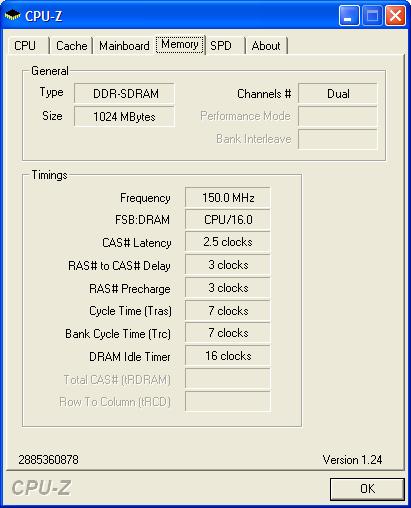
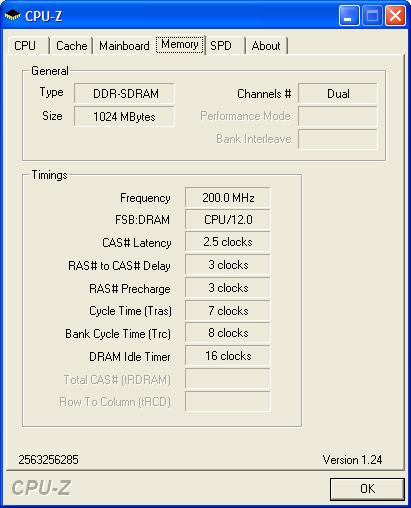
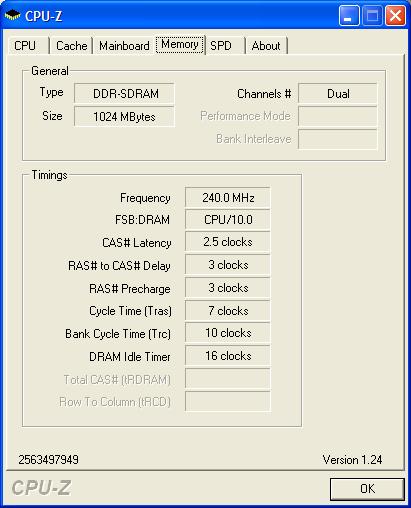
The above screens show a 2.4GHZ CPU running at 8x300HTT. To help calculate the memory frequency when running a divider, you must first know the CPU speed, then divide it by the corresponding divider value. As you can see, the divider values do not scale linearly. When a 166 divider is used, the divider value is 10. With the 133 divider, the divider value is 12; but the 100 divider value is 16, which goes to show that the divider value does not just increase by an increment of 2.
The divider value adjusts itself according to the multiplier used. When running 300HTT with a 100 divider and multiplier at 8x, the divider value is set to be 18, but when running 200HTT and 100 divider and multiplier at 9x, the divider value is set to be 10. The dividing values are set in stone and depend on the divider and multiplier used. Here is a chart of all the divider values found on XtremeSystems.org. Those guys worked hard to find the values and deserve all the credit for it.
Chart of divider values on XtremeSystems.org
Good job guys. You guys really deserve the credit for helping everyone.
I mentioned earlier that the dividing ratios can be easily calculated when using whole multipliers. What’s wrong with using half dividers and following the same ratios? Well according to the chart on XtremSystems.org, running half multipliers causes memory frequencies to run lower than expected, thus lowering overall system bandwidth. It is definitely not ideal to use half multipliers during your overclocking process.
Command Per Clock:
Finally, we get to the effects of CPC. We all know that running CPC on or at 1T provides the best performance possible, even with lower memory frequency. But to run 1T, good memory must be used, and in the case of overclocking, extremely good memory must be used. Since 1T is known to provide better performance, when and why would anyone use 2T? People use 2T to help increase the FSB (or in the case of A64, HTT) and sometimes to help with overall CPU speed, depending on the use of multipliers. With the A64, running 1T is preferable, even if it means running memory at a slower speed. Of course running high HTT with 1T is ideal, but not everyone can afford such high quality RAM. So far, OCZ and G.Skill seem to be the only modules that allow high HTT with 1T. The rest of the competitors usually require 2T in order for memory to scale higher.
| 8 x 300HTT 2.5-3-3-7 1T 166 divider 240MHZ 3xLDT | 9 x 267HTT 2.5-4-4-7 2T 200 divider 267MHZ 3xLDT | 9 x 275HTT 2.5-4-4-7 2T 200 divider 275MHZ 3xLDT | |
| Aida32 (read/write) | 7103/2753 | 7003/2223 | 7280/2280 |
| SiSoft Sandra (int/float) | 6795/6699 | 6467/6437 | 6665/6635 |
| Super PI (seconds, lower is better) | 35 | 35 | 34 |
| PiFast (seconds, lower is better) | 36.78 | 37.42 | 36.38 |
| 3DMark2001SE | 26353 | 25914 | 26484 |
| 3DMark2001SE Lobby Low (fps) | 328.2 | 318.8 | 325.4 |
| 3DMark2001SE Lobby High (fps) | 147.4 | 142.7 | 146.0 |
| PCMark2002 | 12749 | 11860 | 12125 |
| PCMark2004 | 6072 | 5587 | 5734 |
| Doom 3 1024x768 (fps) | 83.2 | 82.6 | 83.3 |
| Doom 3 1280x1024 (fps) | 57.3 | 57.3 | 57.3 |
| Far Cry 1024x768 (fps) | 84.21 | 81.56 | 84.44 |
| Far Cry 1280x1024 (fps) | 72.95 | 72.90 | 73.20 |
| Unreal Tournament 2004 1024x768 (fps) | 197.73 | 192.76 | 198.65 |
| Unreal Tournament 2004 1280x1024 (fps) | 186.26 | 182.12 | 187.07 |
When your CPU is capable of high HTT but your memory can’t run along at 1:1 and at 1T, a divider should be used. The first two columns are results with the CPU running at 2400MHZ. The first column is with a higher HTT and a divider of 166. This makes the memory run slower but allows you to keep the 1T command. The second column is with a lower HTT but has the memory chugging along nicely at a 1:1 ratio. In doing so, the memory latencies needed to be higher so the command rate of 2T was used. Judging by the results, you can see that running 2T definitely hurts performance. The only benchmark that yielded same results was Super PI. All the other benchmarks, both synthetic and real world, showed better performance with 1T and the 166 divider.
So what kind of HTT increase would the 2T need in order for performance to be back on its feet? Raising HTT up to 275 seemed to help close the gap. However, the increase of HTT to 275 changed the CPU speed to 2475MHZ, 75MHZ higher than the compared 2400MHZ. A higher CPU clock and higher HTT frequency was needed in order to cope with the lowered command rate.
So what does this all mean in the end? You don’t need to have the fastest and most expensive memory in order to have excellent results. There is no shame in running a divider and keeping the 1T command, of course it would depend on the HTT set and the CPU clock. Dividers are finally working in an AMD system and they work great. Obviously, if you can afford it, buy the best memory possible and pump up the HTT and keep the 1T. If my memory allowed, I’d have best performance with 9x267HTT and command rate of 1T, but unfortunately, that wasn’t possible.
Conclusion:
AMD’s implementation of the memory controller on the CPU die requires enthusiasts to spend a lot of time figuring out the best combination of memory settings. There are a lot of things to be aware of when trying for the best overclock possible. The first step starts with finding the maximum CPU clock, followed by finding the maximum HTT the board allows. After those two values are known, then you can start adjusting settings to find the best performance possible. The combination of lower multipliers and high HTT (FSB) is no longer ideal, as seen in the results above. It seems that a purchase should be made for higher clocked A64 CPUs, because those will allow higher multipliers to be used. AMD was smart in allowing users access to their unlocked multipliers. They lock the upper half and open up the lower half. The lower multipliers are generally considered to be pointless, as they would lower memory bandwidth, but it all depends on your HTT frequency and the use of dividers. Overclocking an A64 CPUs is not as easy as overclocking other CPUs. There are more settings to test and more things to keep in mind. The easiest CPU to overclock is still the Intel. Simply push the FSB and that’s about it. There really isn’t much fun in spending 10 minutes of trial and error. A64s are more enjoyable, yet frustrating at times. It can keep you busy for weekends on end. Even to this day, I’m still trying to find out the best system performance out of my testbed. I’m reaching the ceiling, but I’m not there yet. Hopefully after reading this article, you’ll be able to hit your ceiling too.
If you have any questions or comments or even advice you would like to share with us, please do so kindly in our forums. We would love to hear your comments or anything you can contribute to further make this article in depth.

Looking back: Overclocking Legends: The Athlon XP 1700+ DLT3C