

Gigabyte Radeon X800 Pro
Introduction
Although Gigabyte has been a long time participant in the graphic card category, not many people are aware of it. Gigabyte is one of the top 5 largest motherboard manufacturer in the world and focuses primarily on motherboards, until now. With graphic cards becoming so important for smooth gameplay, it’s no surprise that Gigabyte started putting more focus on their graphic cards to gain attention.
Gigabyte currently supports both Nvidia and ATI chipsets and provides solutions from low to high end systems. Today’s review will be on Gigabyte’s implementation of ATI’s latest high end GPU–the X800 Pro.
Gigabyte Radeon X800 Pro
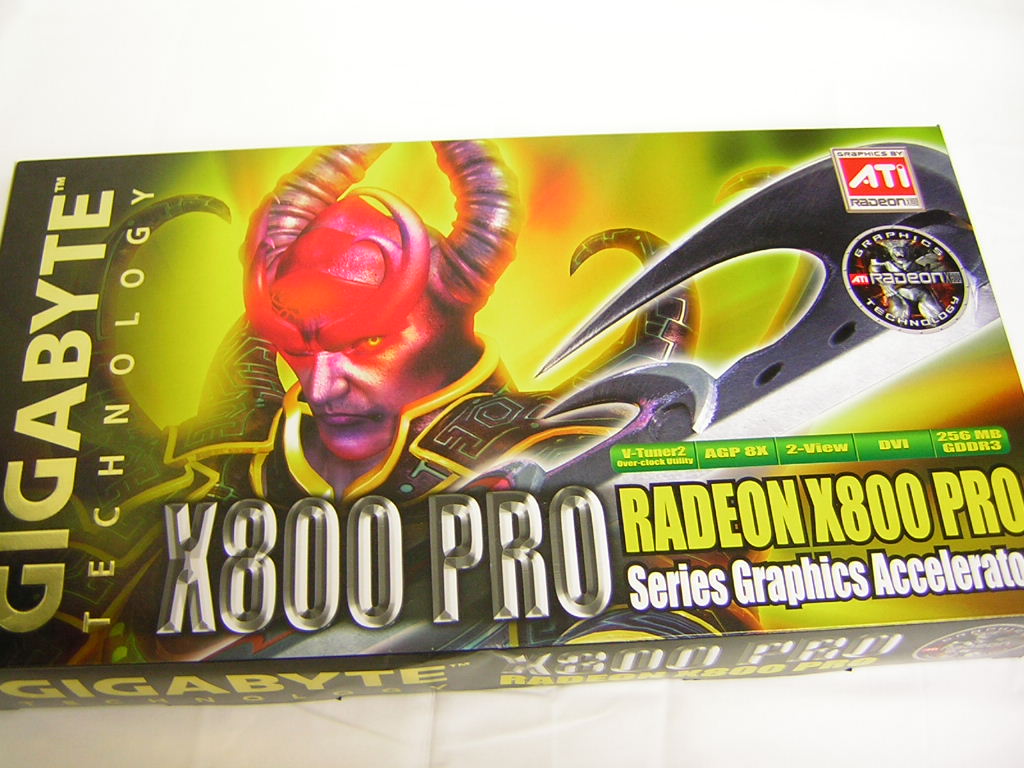
The Gigabyte X800 Pro comes in an extremely large box. Personally, I find no point in using these big boxes. There are better ways to attract attention than taking up space, but I guess the use of this big box does come with its reasons. My sample here today was a gift from my buddy Doc Overclock, so I don’t have all the accessories and CDs that came with the package. A quick look at Newegg shows that it comes with a plethora of goodies. There are two full version games bundled–Spell Force and Rainbow Six 3: Raven Shield. Although these are far from being the latest releases, it will keep a few gamers busy for a while before the need to move on to something else. The rest of the CDs consist of the usual driver CD, DVD software, and a 3D-Album program for your picture editing. The Gigabyte X800 Pro does not have the VIVO function, but does come with all the video cables needed to provide a decent TV experience. It includes the common analog to DVI adapter, S-Video cable, component cables, 4pin power connector, and a standard video cable.


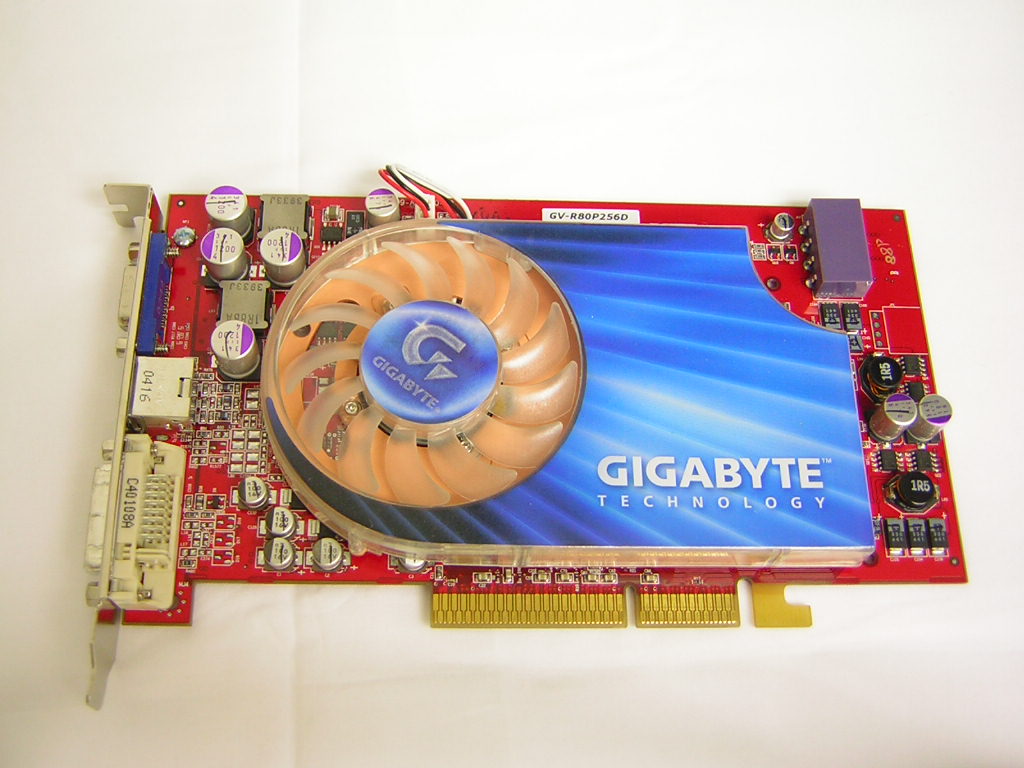
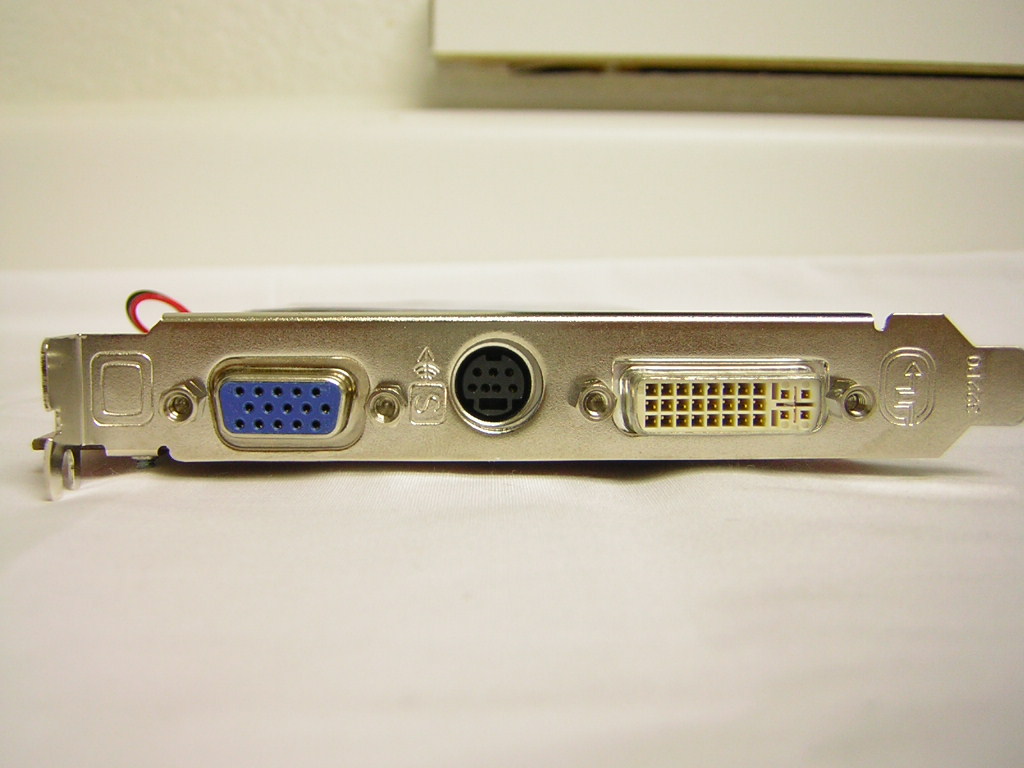
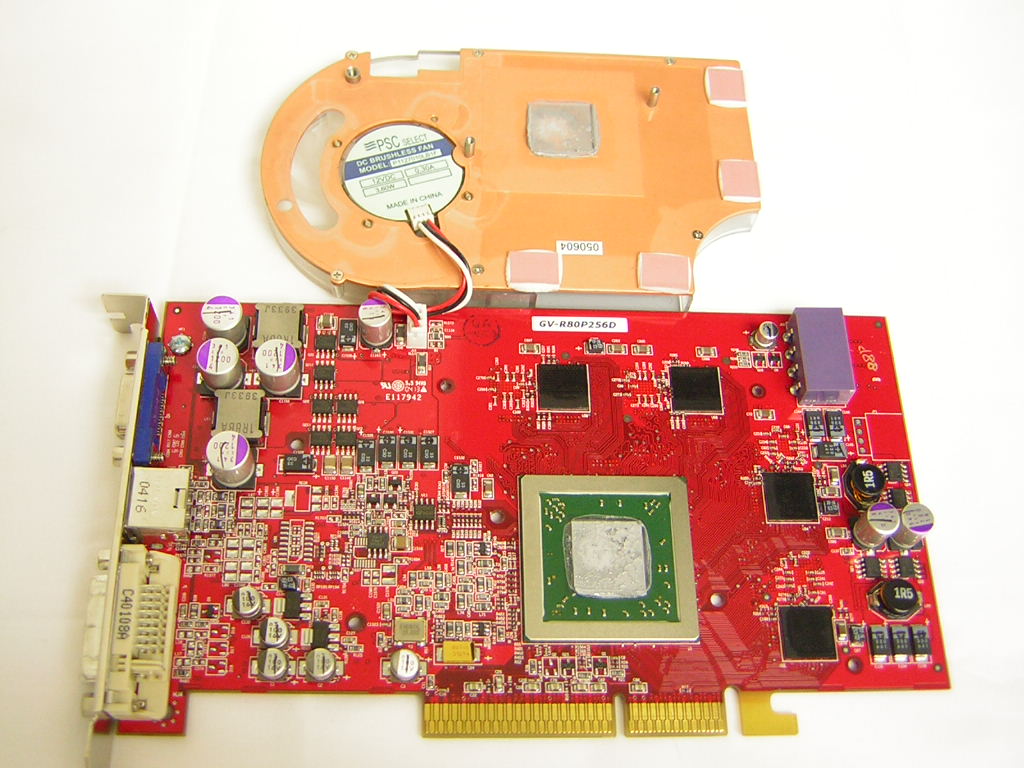
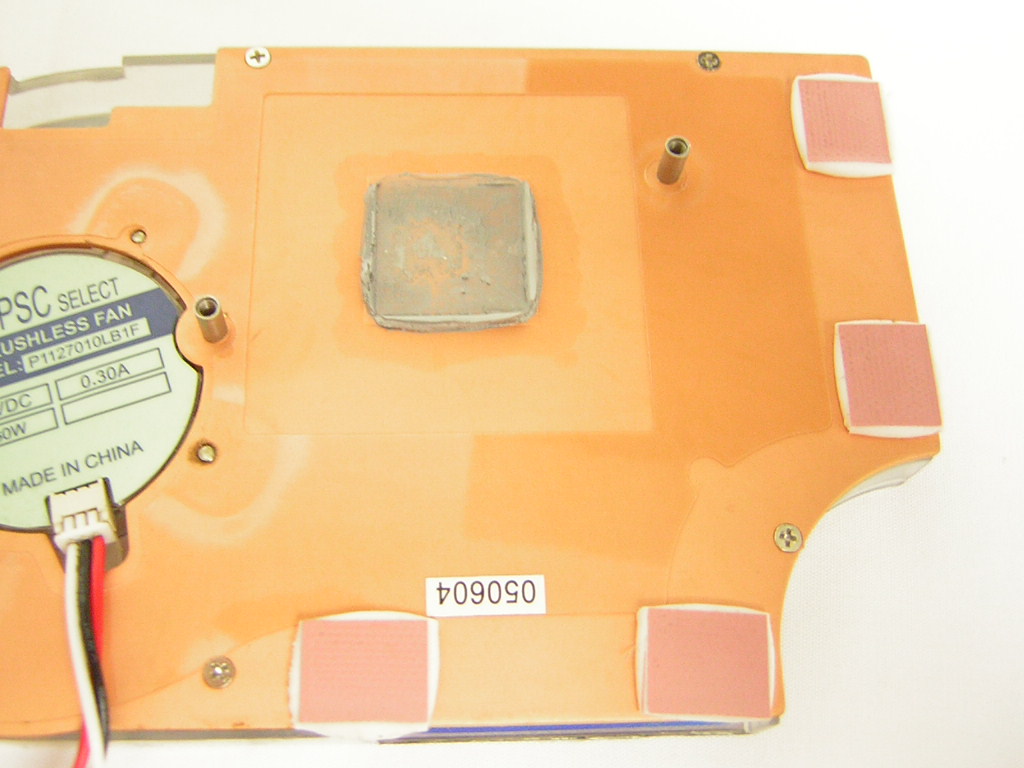
Unlike the rest of the X800s available, Gigabyte provides their own solution for GPU cooling. It looks very much like the ATI reference but is just a little bigger. The extended length and width provides cooling to the graphic memory, but only on one side. The memory on the backside of the graphic card is left empty. The Gigabyte cooler does a good job at keeping things running cool and does so quietly. The only time the fan made audible noise was during bootup. The fan would spin at its maximum RPM and then slow down once Windows begins to load. At first I thought the fan adjusted its speed according to the thermal output, but it didn’t turn out that way. The fan on the cooler was like fans found on Nvidia coolers–they speed up during POST and then quiet down when entering Windows. Like the majority of graphic cards available, the Gigabyte X800 Pro comes with the standard analog, S-Video, and DVI outputs.
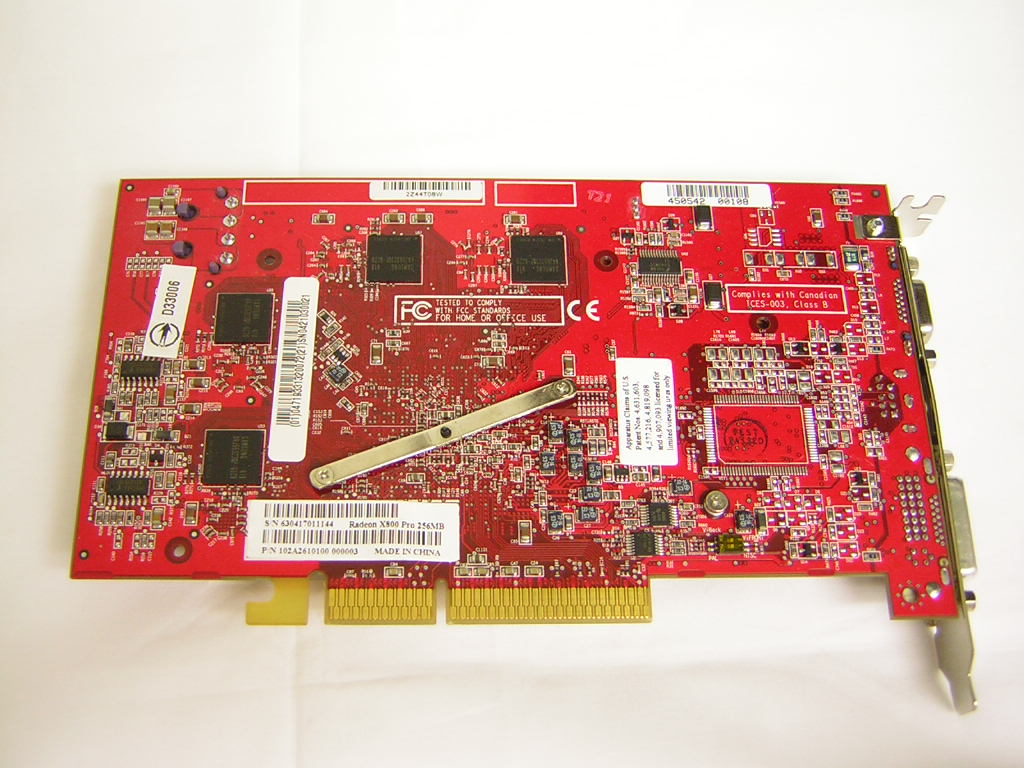
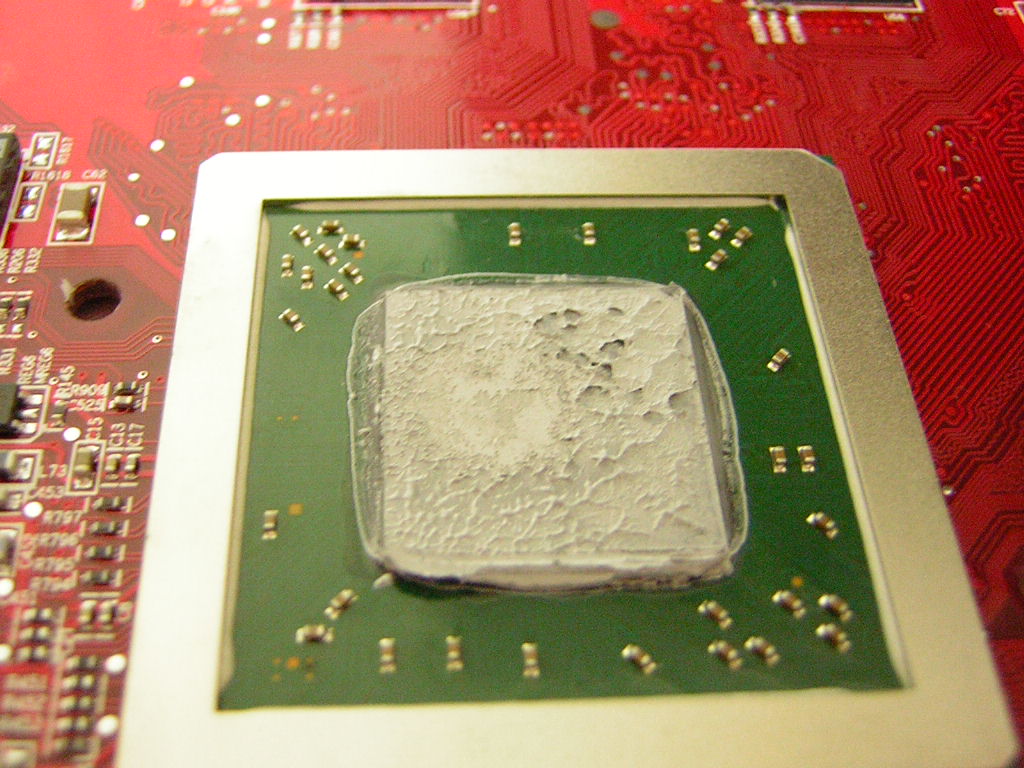
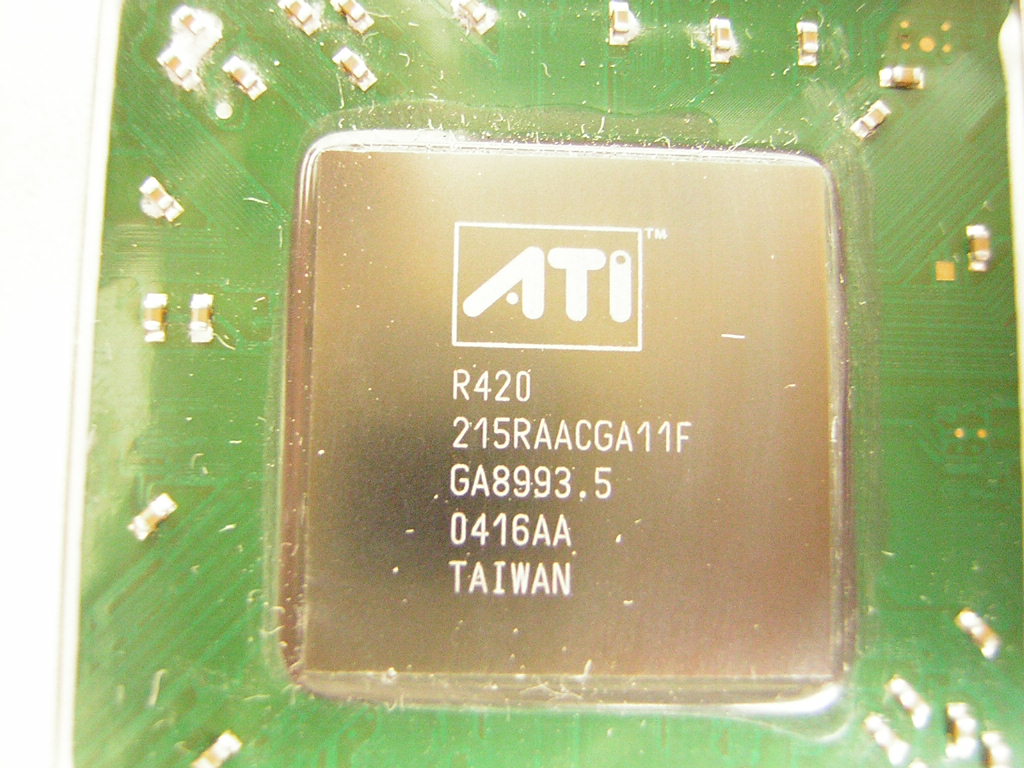
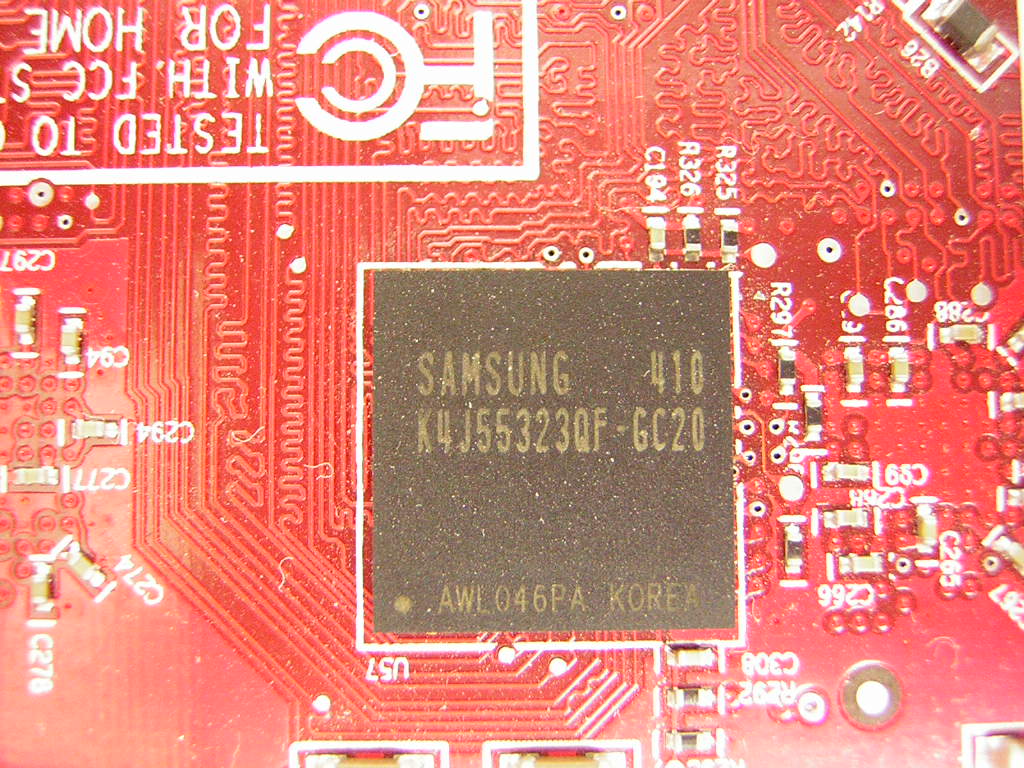
To make sure that the memory actually transfers heat to the heatsink, thermal pads are used as the thermal interface material. Although not extremely effective, it still gets the job done. For the core, a nice layer of thermal grease was applied. The grease appears to be Shin Etsu and does a great job, but it doesn’t wipe off easily. Unlike the PowerColor X800 Pro VIVO, the core is an actual X800 Pro. The numbers “215RAACGA11F” denote the use of a 12 pipeline GPU. The laser cut bridge on the upper right corner also denotes that the card is just what it is, an X800 Pro. Samsung 2.0ns memory was used to supply 256MB of GDDR3. 2.0ns theoretically yields a 500MHZ frequency, so the card should definitely have some headroom for overclocking from the stock speed of 450MHZ.
Specifications
The main competitor of the ATI X800 Pro line is Nvidia’s 6800GT. Both graphic cards retail at $399 and offer the latest cutting edge graphics. Although there are no price differences, the hardware architecture is completely different. The 6800GT definitely leads in this department, offering 16 pixel pipelines and SM3.0 support. The X800 Pro is nothing but a 9800 Pro on steroids. ATI pumped up the pixel pipelines from 8 to 12, and increased the clocks significantly. There is no support for new technology and does not take advantage of SM3.0 found in DirectX 9.0.
Radeon X800 series vs. Geforce 6800 series:
| Radeon X800 Pro | Radeon X800XT | Radeon X800XT PE | Geforce 6800 | Geforce 6800GT | Geforce 6800 Ultra | |
| Core Speed | 475 | 500 | 520 | 325 | 350 | 400 |
| Memory Speed (DDR x2) | 450 | 500 | 575 | 350 | 500 | 550 |
| Pixel Pipelines | 12 | 16 | 16 | 12 | 16 | 16 |
| Shader Model 3.0 Support | No | No | No | Yes | Yes | Yes |
PowerColor Radeon X800 Pro VIVO Features:
| Brand | PowerColor |
| Model | X800 Pro VIVO |
| GPU | R420 |
| Memory | 256MB GDDR3 |
| Memory Speed | 1.6ns |
| RAMDAC Frequency | Dual 400MHZ |
| Memory Bandwidth | 28.8GB/s |
Radeon X800 Technology Specifications:
- 160 million transistors on 0.13 micron low-k fabrication process
- Up to sixteen extreme parallel pixel pipelines
- Six programmable vertex shader pipelines
- 256-bit quad-channel GDDR3 memory interface
- AGP 8x support or PCI Express support
Smartshader HD:
-
Support for Microsoft DirectX 9.0 programmable vertex and pixel shaders in hardware
-
DirectX 9.0 Vertex Shaders
- Vertex programs up to 65,280 instructions with flow control
- Single cycle trigonometric operations (SIN & COS)
-
DirectX 9.0 Extended Pixel Shaders
- Up to 1,536 instructions and 16 textures per rendering pass
- 2nd generation F-buffer technology accelerates multi-pass pixel shader programs with unlimited instructions
- 32 temporary and constant registers
- Facing register for two-sided lighting
- 128-bit, 64-bit, & 32-bit per pixel floating point color formats
- Multiple Render Target (MRT) support
-
Complete feature set also supported in OpenGL via extensions
Smoothvision HD:
-
2x/4x/6x Anti-Aliasing modes
- Sparse multi-sample algorithm with gamma correction, programmable sample patterns, and centroid sampling
- Lossless Color Compression (up to 6:1) at all resolutions, including widescreen HDTV resolutions
- Temporal Anti-Aliasing
-
2x/4x/8x/16x Anisotropic Filtering process
- Up to 128-tap texture filtering
- Adaptive algorithm with bilinear (performance) and trilinear (quality) options
3Dc:
- High quality 4:1 Normal Map Compression
- Works with any two-channel data format
Hyper Z HD:
- 3-level Hierarchical Z-Buffer with Early Z Test
- Lossless Z-Buffer Compression (up to 48:1)
- Fast Z-Buffer Clear
- Z Cache optimized for real-time shadow rendering
- Optimized for performance at high display resolutions, including widescreen HDTV resolutions
Videoshader HD:
- Seamless integration of pixel shaders with video in real time
- FULLSTREAM video de-blocking technology for Real, DivX, and WMV9 formats
- All-format DTV/HDTV decoding
- Adaptive Per-Pixel De-Interlacing and Frame Rate Conversion (temporal filtering)
Display Features:
- Dual integrated display controllers
- Dual integrated 10 bit per channel 400MHZ DACs
- Integrated 165MHZ TMDS transmitter (DVI 1.0/HDMI compliant and HDCP ready)
- Integrated TV Output support up to 1024x768 resolution
- YPrPb component output for direct drive of HDTV displays
- Single and dual link external TMDS transmitter support for high resolution and/or multi-monitor DVI configurations
- Compatible with ATI’s THEATER video decode and capture devices for VIVO (Video Input/Video Output) configurations on certain X800 graphic cards
Image Quality
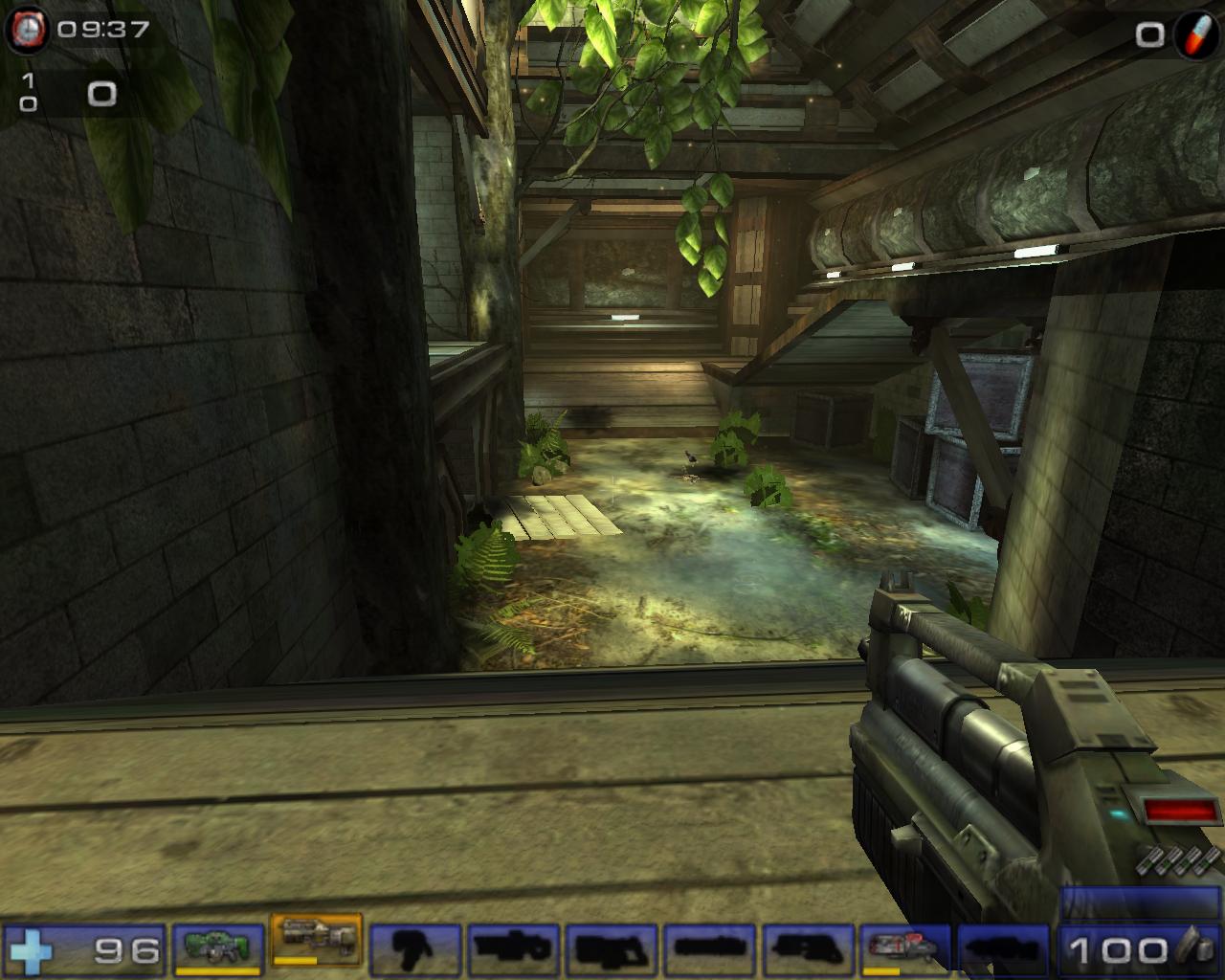
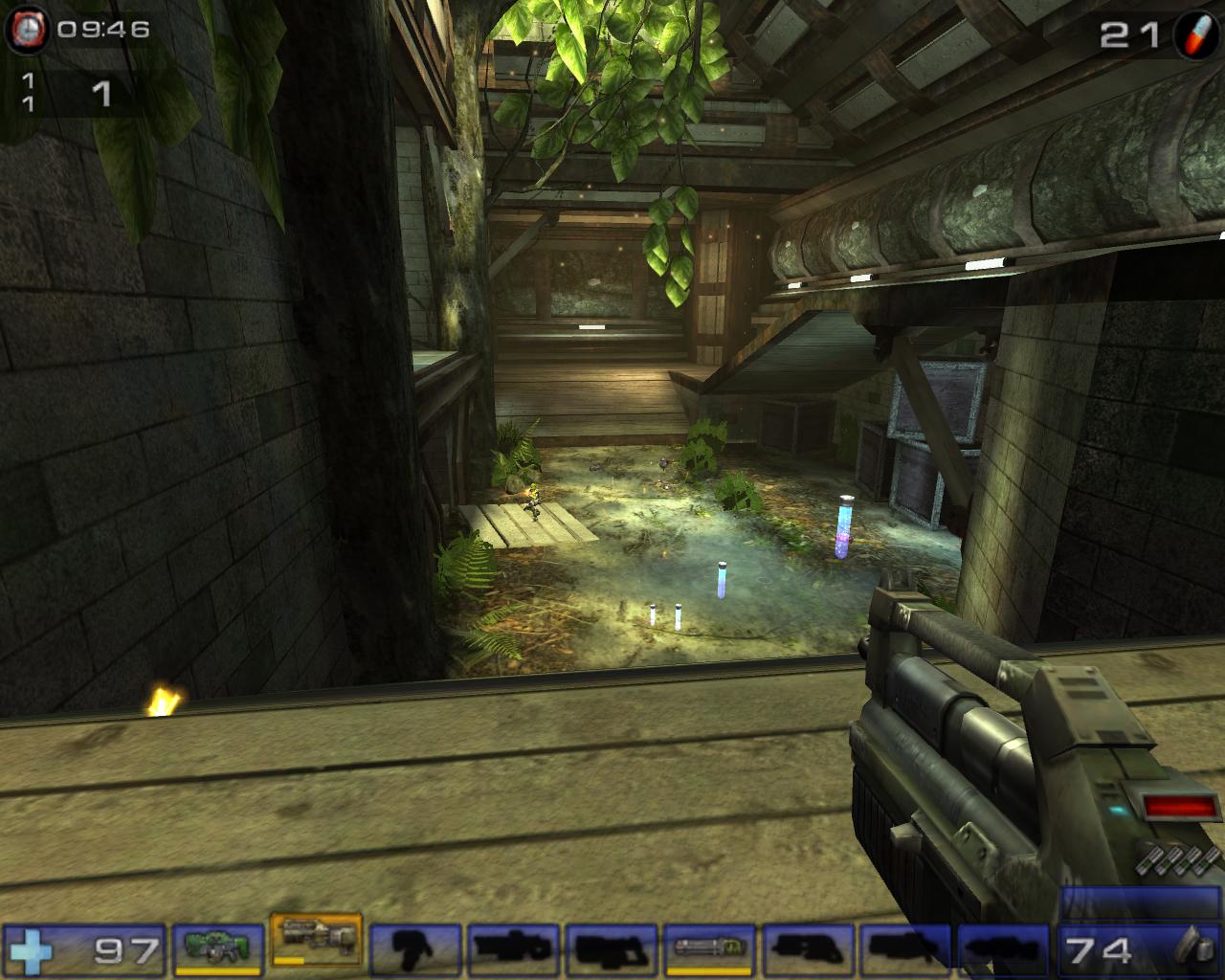
Unlike the well-documented blurriness of the Geforce line of cards, the X800 has excellent 2D image quality. There was no need to adjust the LCD or fiddle with the functions in the driver tabs, although ATI Catalyst provides no such functions. The 2D was nice and crisp and made words easy to read. The 3D image quality was no different. Gameplay was beautiful with both anti-aliasing and anisotropic turned on. It definitely rivaled the Nvidia 3D quality. Both were superb. Here are a couple of in-game screenshots of Unreal Tournament 2004. The resolution was set at 1280x1024.
No AA/AF
2xAA/4xAF
4xAA/8xAF
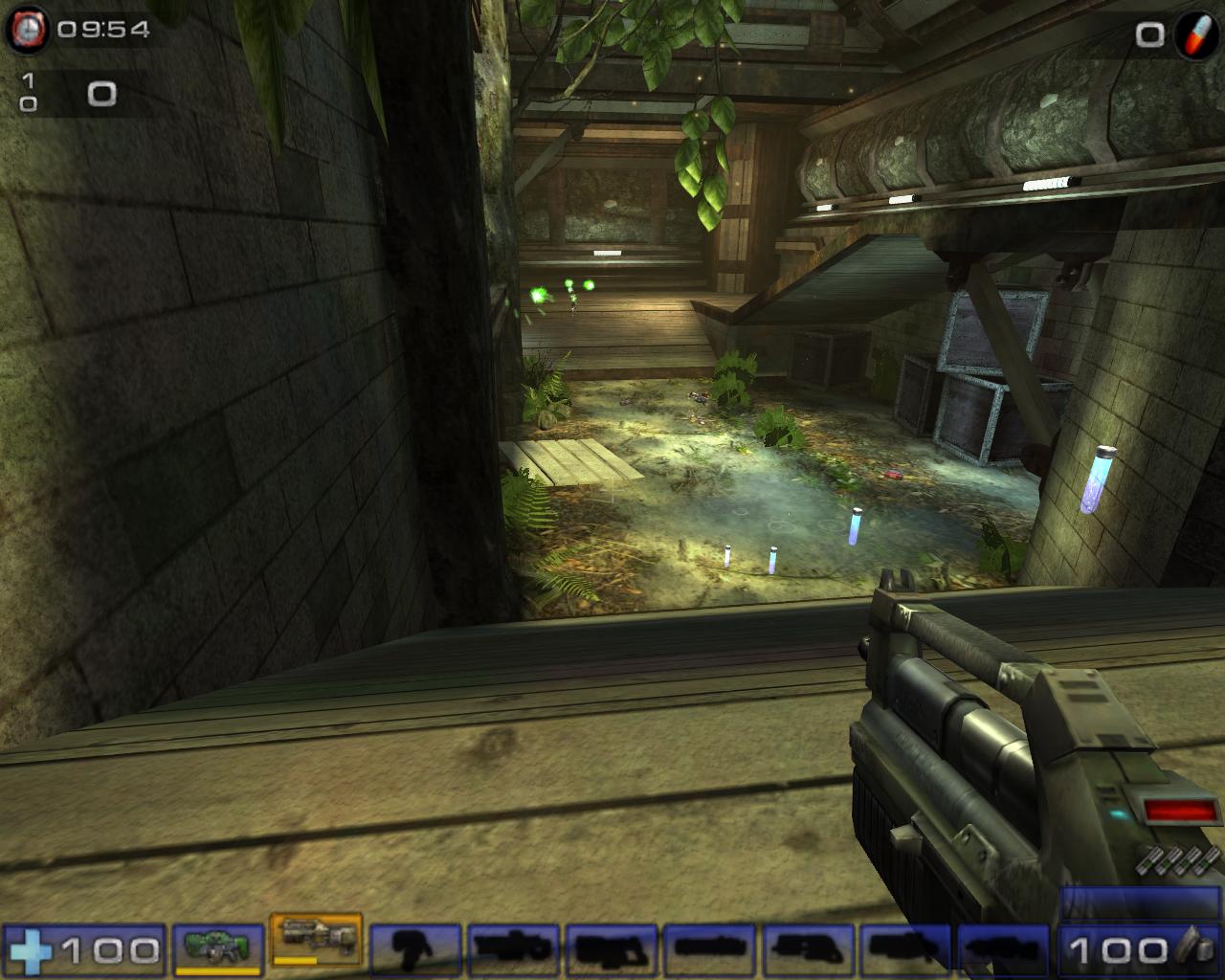
As you can see, the image quality really strengthened when anti-aliasing and anisotropic filtering was turned on. At such high resolution, running anti-aliasing at 2x and anisotropic filtering at 4x was definitely sufficient for good eye candy.
Test Setup and Overclocking
Overclocking:
With a larger cooler attached to the Gigabyte X800, I felt confident that the card would overclock better than the PowerColor I had. I was indeed correct. I started out with ATITool and proceeded to let the program find my maximum speeds. With the core, the Gigabyte achieved an alarmingly high 570MHZ. The memory did quite well as well, reaching 576MHZ without any problems. Unfortunately, the cooling was inadequate for keeping the speeds stable when running the speeds in junction. After some manual overclocking, I reached a stable 540/540. The overclock was considered to be pretty decent. I had no troubles running all the games and benchmarks for hours on end. The core managed better than the PowerColor I had and the memory overclock was good, considering it went beyond the rated 500MHZ speed.
Test Setup and Methods:
- AMD Athlon64 3000+ Winchester (8 x 300HTT @ 1.7v)
- MSI K8N Neo2 Platinum 1.36 Beta Bios
- 2 x 512MB OCZ Gold PC3700 Rev3 (166 Divider - 240MHZ 2.5-3-3-6)
- OCZ DDR Booster
- OCZ PowerStream 420W
- Windows XP Professional Edition with SP1 and DirectX 9.0c
Benchmarks:
- 3DMark2001SE
- 3DMark2003
- 3DMark2005
- Aquamark3
- Code Creatures
- Doom 3
- Far Cry
- Unreal Tournament 2004
Video Cards Tested:
- PowerColor Radeon X800 Pro VIVO: 475/900
- PowerColor Radeon X800 Pro VIVO Overclocked: 525/1080
- PowerColor Radeon X800 Pro VIVO flashed to X800XT PE: 525/1150
- ATI Radeon 9800 Pro: 380/680
- BFG Geforce 6800 OC: 350/700
- BFG Geforce 6800GT OC: 370/1000
- Gigabyte Radeon X800 Pro: 475/900
Results
3DMark2001SE

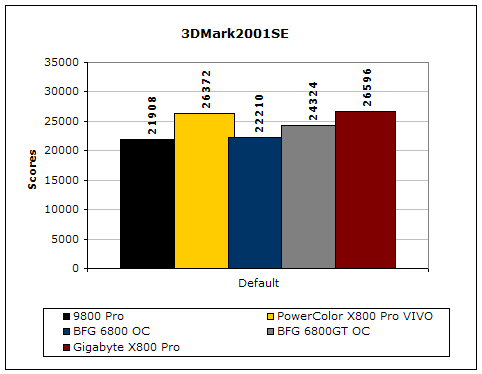
Here, we have the Gigabyte in the lead. It barely edges out the PowerColor by a hundred points or so.
3DMark2003

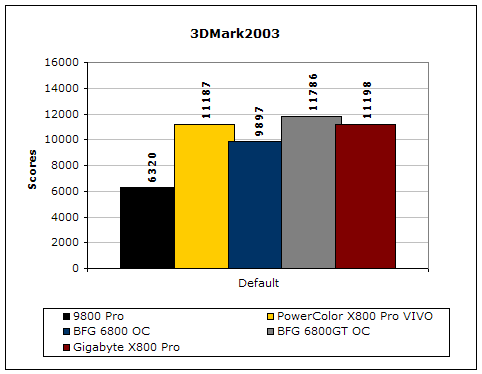
Unlike 3DMark2001SE, 3DMark2003 is extremely GPU dependent. Increases in CPU, FSB, and memory latencies do not affect the benchmark all that much. Although there are a bunch of cheating drivers going around, this is still a good benchmark to test the capabilities of the video card. Once again, the Gigabyte edges out the PowerColor by just a few points. But the results are as they should be, with the 6800GT leading the way.
3DMark2005

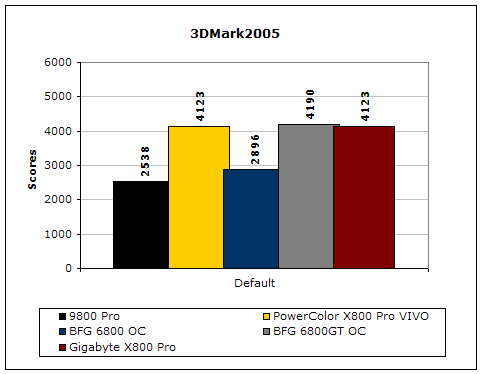
Much like 3DMark2003, 3DMark2005 is extremely taxing on the graphic card. There are currently some controversies about the new benchmark being ATI biased. It’s interesting to see that Gigabyte scored the exact same score as the PowerColor. If the scores were different, it would have been minimal.
Code Creatures
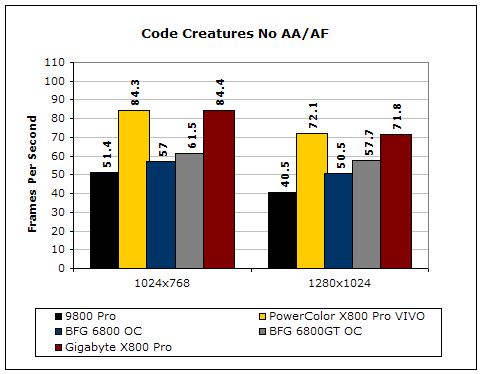
Although Code Creatures is an old benchmark, it is still capable of pushing the video card to the limits. The video test is very intensive and responds to any tiny increase in clocks. The Gigabyte and PowerColor are running neck and neck, leading the way. Both cards destroy the Nvidia counterparts.
Results Continued
Aquamark 3
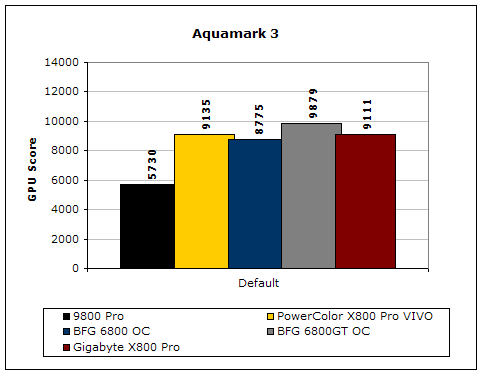
Aquamark3 is another synthetic benchmark that drives the video card to the max. The Gigabyte and PowerColor continue to run neck and neck, with the Gigabyte trailing by a mere 20 points.
Synthetic benchmarks only give a general idea of how each video card performs. From the results above, there is no clear winner. Let’s continue on with some real world benchmarks to test the true performance that you would gain. Afterall, the main reason of making a purchase on a high end graphic card is to enhance your gaming experience. The three gaming benchmarks I used are the most current games that benefit from a good video card. Doom 3 is a graphic intense game that is based on the ever popular OpenGL. Far Cry is based on Direct3D, and Unreal Tournament 2004 is pretty much one of the top multiplayer games that enthusiasts play.
Doom 3
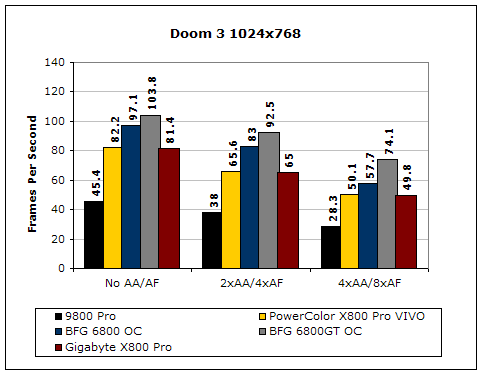
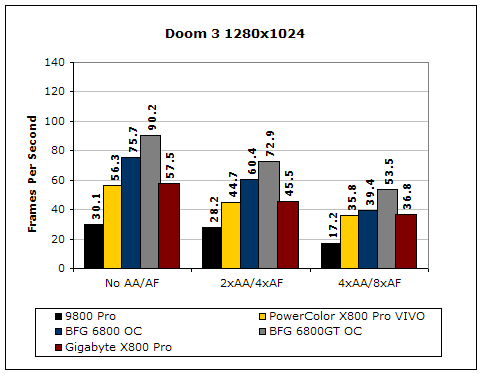
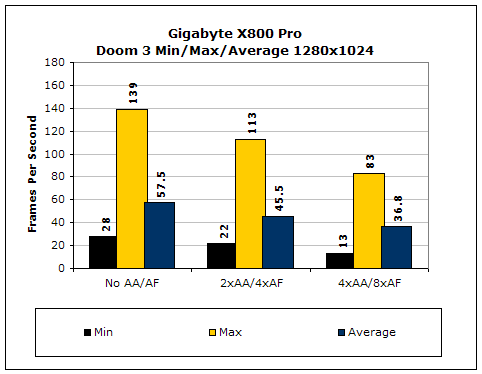
From the results, the Geforce 6800 clearly performed better than the X800 Pro. Nvidia always has strong OpenGL support and Doom 3 is the perfect example. Even the vanilla 6800 produced faster frames per second than the X800 Pro.
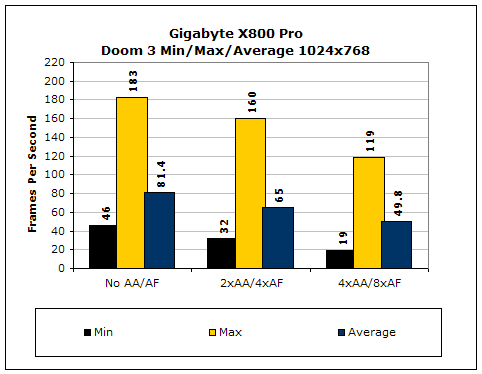
Much like the PowerColor, the Gigabyte provided smooth frames throughout the benchmark. The minimum FPS occurred during an intense fight scene and lights were coming from all angles due to the heavy fire. Overall, it will definitely be able to keep gamers gaming in a smooth environment.
Far Cry
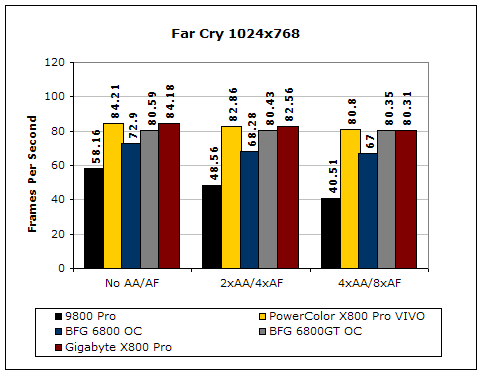
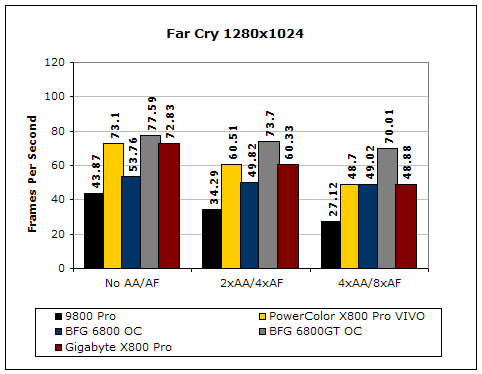
Like Doom 3, Far Cry is an extremely video intensive game. While Nvidia is known for their OpenGL performance, ATI is better known for their Direct3D support. It runs faster than the Geforce counterpart and maintains the steady frames even at 4xAA/8xAF. However, this only happened under a resolution of 1024x768. It started to lose it’s hold when the resolution was turned up. At first I didn’t believe the results I was obtaining, so I conducted the tests multiple times. Each time yielded the same results.
Unreal Tournament 2004
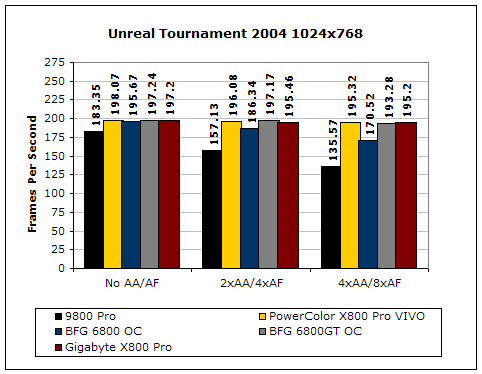
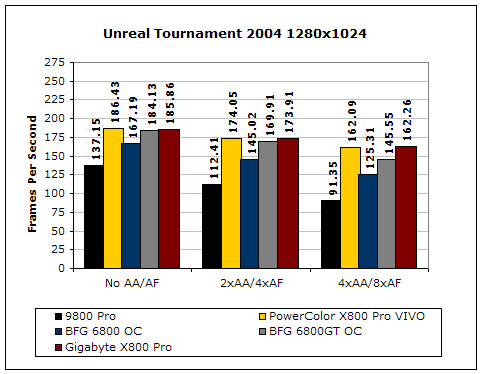
Unreal Tournament is very popular game due to its online multiplayer capabilities. Here, the PowerColor leads the Gigabyte by a couple of frames throughout all resolutions and details. Both cards beat out the 6800GT.
Overclocked Results:
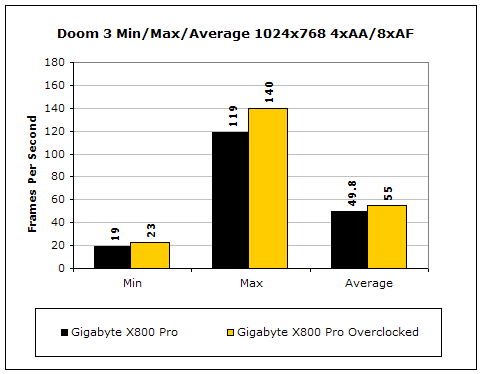
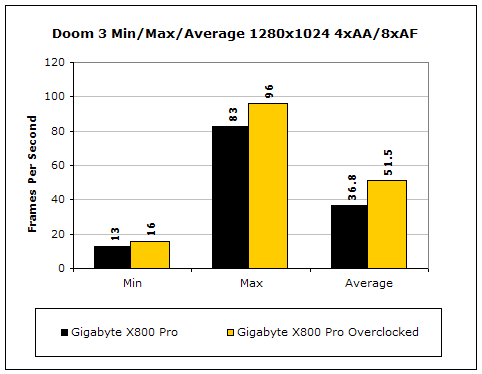
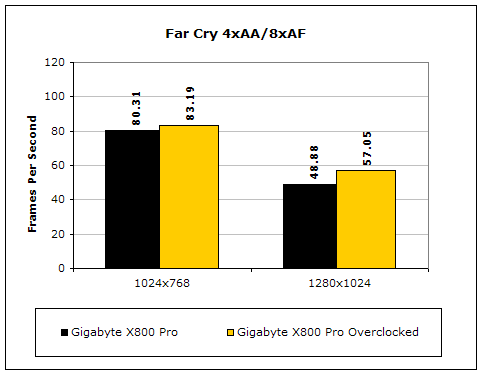
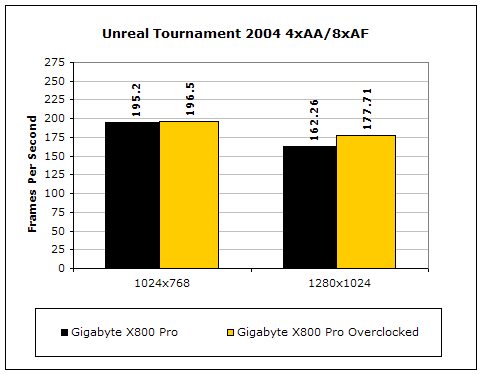
The Gigabyte X800 Pro managed a good increase after overclocking. Doom 3 benefited a good 15 FPS under the resolution of 1280x1024 with all details on. Unlike the BFG 6800 OC I reviewed a while back, the overclock was definitely worth it.
Conclusion and Thoughts
Much like memory when running at the same speeds, all Radeon X800 Pros should give the same performance with the same speeds. That is the case with the Gigabyte and PowerColor X800 Pros. Both cards were neck and neck in benchmarks and games. The deciding factor really comes down to the price, bundle, and overclockability (if this is a word). Coming in at $383.00, the card is definitely not cheap. The bundle is pretty decent, with two full version games to keep gamers busy. The overclocking potential is definitely good because it overclocked better than the PowerColor version. Unfortunately, as a consumer, I’d spend the extra $50 and go with the PowerColor X800 Pro VIVO. The PowerColor comes with faster GDDR3, two better games, and hardware components that match the X800XT PE. The VIVO is definitely worth the $50, as it easily turns into an XT PE. But then again, not everyone out there is willing to void the warranties and put the hardware to risk. Added into the tough decision is Nvidia’s 6800 line. Currently, a 6800GT goes for about $370-$399. It is definitely the better card for gaming, but has issues with 2D image quality. As far as the offering from Gigabyte goes, it is worth the look, but it needs a better bundle to win my credit card.
Pros:
- Great 2D image quality
- Great 3D performance
- Single slot cooler
- Quiet
- Less power hungry than Nvidia counterpart
- Comes with 2 full version games
- Cooler is larger than reference, and covers front side memory
Cons:
- ATI’s weak OpenGL support
- Slightly pricey for an X800 Pro
If you have any questions or comments, feel free to hit us up in the forums. You can also check out more of our latest reviews on the front page.