

Command Per Clock Guide
Overclocking is the most addicting hobby I’ve ever encountered. Video games are another, but not as much. The reason why an ever-increasing amount of people are becoming addicted and going insane with overclocking is that there is no end. You can’t reach the end. Someone will always find new tweaks or ways to increase system performance. Someone will always find a way to cool the CPU better. Someone will always find a way to modify that motherboard or video card. Like the universe, overclocking is infinite.
Overclocking starts off with making the right purchase. If you buy cheap or generic products, you’ll usually end up tossing it to get something better. To save you all that trouble, I encourage you to just splurge and purchase the best item available. You’ll end up doing it anyway. After the purchase is done, and you’ve spent your afternoon building and cleaning up your system internals, it’s time to boot up. You go through your normal procedures of installing windows and your daily programs. Once all this is completed, the fun starts. It’s time to reboot again and go into the BIOS.
If you have a good overclocking motherboard, you’ll find a plethora of tweaking options. One of the most important options would be the advanced chipset section. This is where you do all your memory tweaks and timings. This is where you’ll also find the CPC option for nForce2 chipsets.
Command Per Clock:
Back in the days of the KT266A chipset, I remember being able to go through the usual memory timing adjustments, along with one extra option–command timing. The choices were either 1T or 2T. As chipsets developed, I noticed that this option gradually disappeared. To my surprise, this latency still exists. It’s in that nForce2 motherboard you have right now.
This command timing has a new name, labeled as Command Per Clock (CPC). Basically, with it ON, it’ll default to 1T. With CPC OFF, the latency is set to 2T. Many AMD users have debated over the issue of whether to keep it ON or OFF. Naturally, enthusiasts would want it set to ON. Systems benefit more from having lower timings. However, the downside to keeping CPC on at is that it hinders overclocking, especially with 512MB double sided memory modules. Why, you ask? The Northbridge controller has issues with reading the memory ranks correctly.
When you have 2x256MB modules, the system will read each as 2 ranks. With 2 sticks in the DIMM slots, it will be read as 4 ranks. When you have 2x512MB modules, the system will read each as 4 ranks (due to the double sided memory). With 2 sticks installed, it will be read as 8 ranks. This is where the Northbridge errors. In order to still function correctly with 2x512MB modules, CPC has to be turned off so the command latency is 2T.
Testing:
My test motherboard is the infamous Abit NF7 v2.0. The NF7 v2.0 is known to be quite the overclocker with the right tweaks in the BIOS. The downside is that there is no option to enable or disable CPC. Many people will want this option because it allows for overclocking potential, but unfortunately, the BIOS engineers have set the default to ON. Setting it on does help increase memory performance but it really hurts overclocking, and this is not just on 2x512MB modules. I have a kit of 2x256MB KHX3200A that didn’t like CPC ON. I would hit a wall when barely reaching for 210FSB.
Fortunately for enthusiasts, there are BIOS editors out there who have taken and edited the official Abit BIOS. Many recognize the names TicTac and Trat, as they are two of the most well known BIOS editors. I will not go into details on the modifications done. There are many different types of modified BIOSes available, with each targeting a specific change. The main thing I want to talk about today is CPC. I’ve stayed up many nights going through the countless modified BIOSes and finally found one that my motherboard seems to like. The BIOS I’m using is the d24 ed c18 cpc offversion. The BIOS with CPC ON is d24 ed c18. The “ed” and “c18” are referred to the changes made to the BIOS. Again, I will not go into detail on those.
Testing will be done with these two BIOSes, with the only difference being the CPC setting.
- d24_ed_c18_cpc_off (CPC OFF)
- d24_ed_c18 (CPC ON)
I didn’t include the official version of the Abit BIOS D24, due to the fact that the two BIOSes have other modifications to enhance performance. It would not be a fair and proper comparison.
Testing Method and Setup:
Testing will comprise of the usual memory benchmarks to see the effects of CPC. CPU speed is constant at 2.3GHZ to isolate the influence of CPC. Video card settings were set to 290MHZ/590MHZ with AA and AF switched off. Voltage to DIMM slots were maxed out at 2.9v on the NF7 throughout the entire testing process.
Test system specifications:
- AMD XP1800+ (2.3GHZ @ 1.75v)
- Abit NF7 v2.0
- 512MB OCZ PC3200 Platinum (Winbond CH5)
- 512MB OCZ PC3500 Platinum (Winbond CH5)
- XFX TI4200 128MB w/ Zalman ZM80C
CPC OFF:
- 10 x 230FSB 2-2-2-11 (highest stable overclock with CPC OFF)
CPC ON:
- 11.5 x 200FSB 2-3-2-11
- 10.5 x 215FSB 2-3-2-11 (highest stable overclock with CPC ON)
Immediately, there is a noticeable difference. Typically, Winbond CH5 chips are rated to run at 2-3-2. These ratings are based on the testing process with CPC ON. This means that these CH5 chips are rated to run 2-3-2 1T. When I disabled CPC, I was able to tighten TRCD down to 2. This makes the memory timings run at 2-2-2 2T. What is more important–lower TRCD or lower command rate? The results will show.
Results:
Sandra:
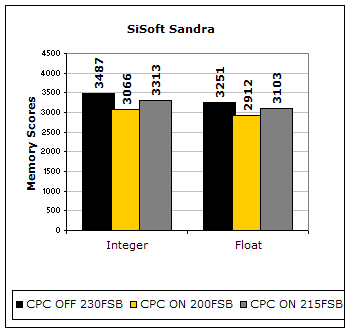
I usually do not rely on Sandra for memory performance results, but here is a good look at the performance difference. With CPC OFF at 230FSB 2-2-2-11, it barely edges over the performance with CPC ON at a mere 215FSB. One hundred fifty points in Sandra is not very difficult to achieve. With CPC ON, you can earn that increase with about 5 extra FSB. (a rough calculation from the increase of memory scores from 200FSB to 215FSB) This means that the performance is about equal when CPC is OFF at 230FSB and when CPC is ON at 220FSB. Let’s move on with the popular gaming benchmarks.
3DMark2001SE:

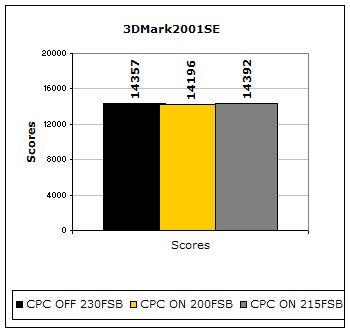
3DMark2001SE is a commonly used benchmark that provides good system results for comparison. Here you see that setting the command rate to 1T yields a better score than 2T with higher FSB. This just proves that 3DMark2001SE loves tight memory timings.
PCMark:

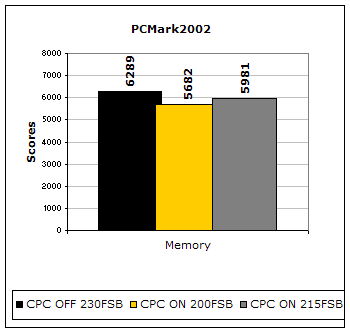
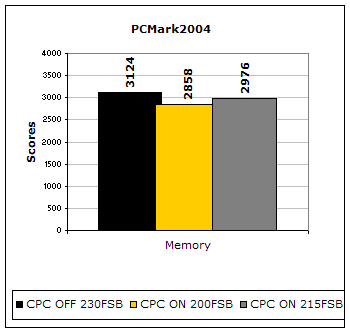
From the results, it seems as if PCMark likes the higher FSB. Timings didn’t seem to play much of a role here.
Unreal Tournament 2003:
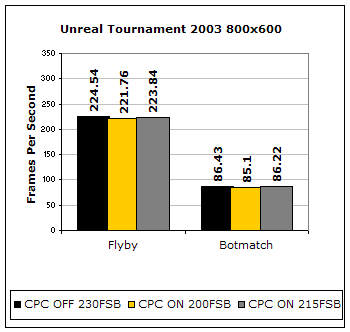
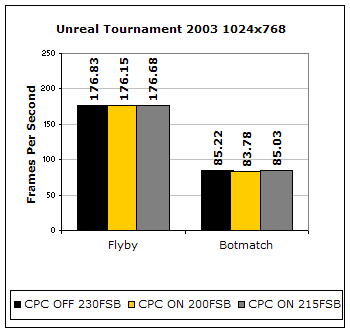
Unreal Tournament 2003 is a popular game that also doubles as a good benchmark. Here you can see that CPC ON does indeed compensate for the lack of FSB. There is only a maximum of one less frame per second for the lack of 15FSB.
Far Cry:
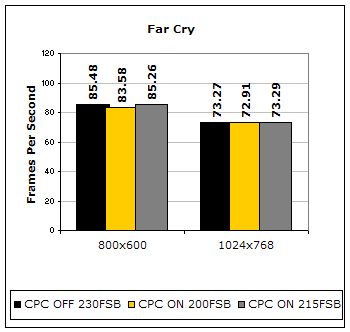
Far Cry has become one of the best games available and also one of the most popular gaming benchmarks. Similar to the results of UT2003, Far Cry also benefits from having the faster command rate of 1T. It sure does make up for the lack of FSB.
Conclusion and Thoughts:
You just read through a bunch of CPC rubbish and have seen the results when it is set ON and OFF. What does this mean in the end? What are you better off with? There is no correct answer. The right answer lies within your system. Although motherboards use the same chipset, PCB design, circuitry, and much more, they do not always perform the same. One NF7 can like the d10 based BIOS while another can like the d24 based BIOS. It all depends on making the right choice. In order to make the right choice, you’ll have to play around with a massive amount of modified BIOSes and let your board settle on one.
The main thing to keep in mind is that not all Northbridges act the same. Most of the nForce2 motherboards allow users to run 2x256MB modules with CPC ON. I tried it with my motherboard and it threw up at me. Another thing to note is your choice of memory. With CPC ON, your memory is running at a tight command rate of 1T. Be sure that your memory can handle 1T before you start overclocking it. With CPC ON, you can loosen the memory timings a bit and still have good performance. As shown above, the results of 230FSB 2-2-2-11 2T only edges out the results of 215FSB 2-3-2-11 1T marginally. Lowering command rate to 1T really improves system performance. It makes up for the lack of 15FSB and the higher TRCD.
So, to conclude all this gibberish, I would suggest keeping CPC ON for better performance. It doesn’t rely too much on FSB to regain the loss of performance and doesn’t require your memory to be super overclockable. Furthermore, with most VDIMM options limited to a max of 2.9v, it would be a better choice to keep CPC ON because most memory will need more than 2.9v to overclock well. If you decide to do voltage mods, then the extra VDIMM can help the memory operate past its limits without losing performance.
We thank you for taking your time in reading this article. If you have questions, comments, or opinions, feel free to drop in the forums and let us hear it.
Looking back: Overclocking Legends: The Athlon XP 1700+ DLT3C