

OCZ Gold PC4000 1GB Dual Channel Kit
Introduction
OCZ has come a long way since they were first introduced. I remember the days when they focused on PC150 memory and the Geforce 3 Titan. Those were the good ole days. They went through a slump when their memory was poorly made, but quickly recovered with the Enhanced Latency memory. The Platinum and Gold series soon followed, and now they’re doing better than ever. Today we have on hand the OCZ Gold PC4000 memory. Although it has been reviewed frequently by various hardware sites, it doesn’t mean that the memory should be forgotten. Additionally, most of the test systems that I’ve read through don’t have the capabilities to put the memory through extensive testing. OCZ is still proud to name the PC4000 Gold as one of their top performance memory. Today, we shall see why.
OCZ PC4000 Gold
I picked up the package from OCZ when I went to San Francisco with my girlfriend for the past month. I must say that it’s pretty quiet in there. All the people I met were extremely friendly. The package was handed over to me by my buddy Sean and I immediately noticed a difference; they redesigned their packaging. Instead of the original black background, OCZ has gone with the orange background. The goal was to make the package stand out. If it was placed in a retail store, you would easily spot the OCZ package because the color is so bright. Mighty good idea, I would say.
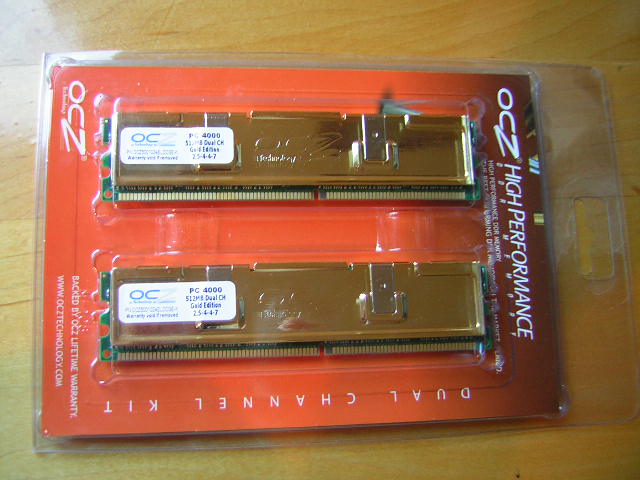
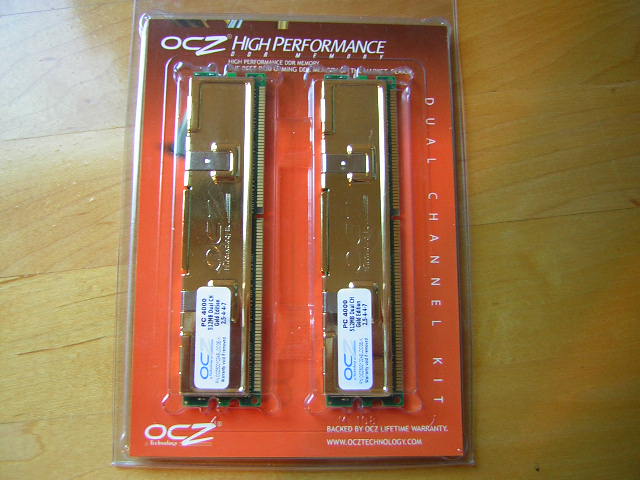
The PC4000 Gold is rated to run 250MHZ with 2.5-4-4-7 timings at 2.8v. Although it’s not 2-2-2-6 or even 2.5-3-3-6 that everyone would love to see, it’s still better than the rest of the PC4000+ memory out there. OCZ also encourages overclocking with their memory. The OCZ EVP (Extended Voltage Protection) allows users to pump up to 3v without voiding the OCZ warranty. That’s certainly better than the 2.8v other companies are capping at. The PC4000 also uses their new technology called ULN2 (Ultra Low Noise 2). It helps with less chip interference and allows for a better potential overclock. Lastly, another feature of the PC4000 Gold is the HyperSpeed. HyperSpeed is not a new technology. It’s a term to let consumers know OCZ hand picks all the fastest chips for their memory to run at the fastest frequency possible–essentially, the best overclocking chips.
The memory comes double sided and uses the Hynix BT-D5 chips. The Hynix D5 chips are known to scale at very high speeds. The only drawback is that they need loose timings. I would guess the the lack of low timings balance out with the high megahertz. We’ll see later on whether this is beneficial.
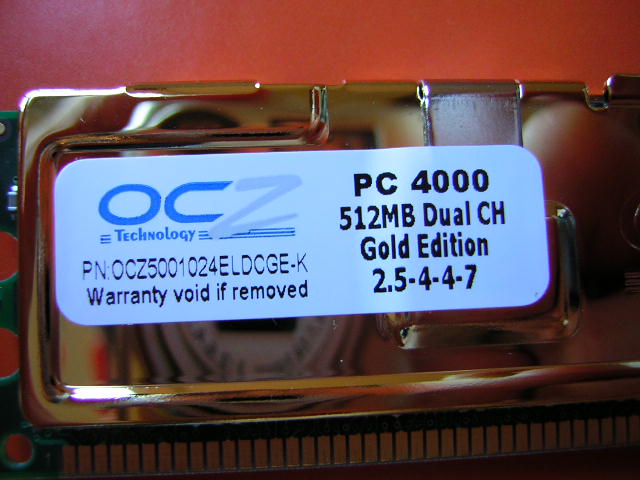
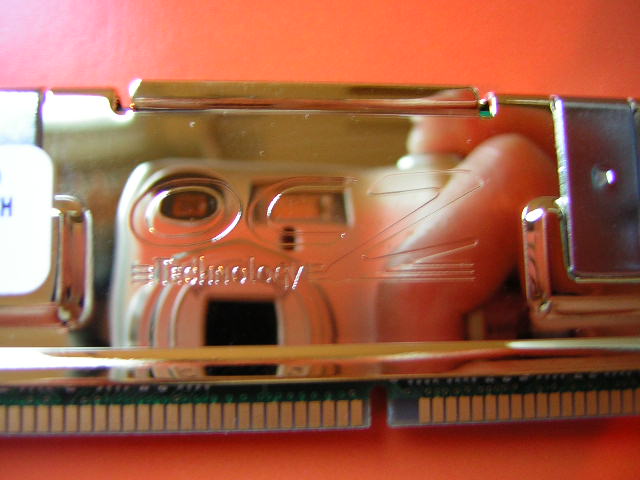
The heat spreaders are extremely shiny and polished. There are no fingerprints or stains. The gold color coating helps prevent the copper from tarnishing. The reflection of the heat spreaders were awesome. I could see myself taking pictures.
Test System and Overclocking
Test System:
- Intel P4 2.4C
- Abit AI7 (GAT: A-A-A-D-D)
- Radeon 9800 Pro (Omega drivers based on Catalyst 4.6)
- 2 x 512MB OCZ PC4000 Gold
- 2 x 512MB OCZ PC3200 Platinum Limited Edition
Overclocking:
Overclocking the memory was extremely fun. I started at 200FSB to see how low the timings would go. I didn’t expect these Hynix chips to do CAS2, but they did. At 200FSB, I was able to run the timings at 2-3-3-6 with 2.8v. Increasing the voltage didn’t help my results. Next stop was the rated 250FSB. It ran flawlessly at the rated 250FSB 2.5-4-4-7 with 2.8v without a hiccup. Since most motherboards only supply a maximum of 2.8v, I went ahead to find the maximum overclock with the default timings and 2.8v. My first try was 260FSB. It ran without a problem. Pretty nice indeed. I upped the FSB bit by bit and hit a ceiling of 270FSB. I must say that 270FSB 2.5-4-4-7 with 2.8v is not too shabby at all. I’ve used a lot of memory in my life, and I don’t recall any memory being able to run 270FSB without running CAS3. I certainly didn’t stop my testing there. I loosened up the timings to 3-4-4-8 and continued to test the highest FSB attainable. After all, my CPU was more than capable of 300FSB. I increased the voltage and found a sweet spot of 3.0v. Anything higher will just make the memory too hot and create instabilities. I was amazed to find that the maximum FSB attained to be 290FSB. This is some amazing memory. I have a feeling that it could go higher, but my motherboard seems to be the one stopping my quest. Another 5FSB higher and I get BIOS boot up errors. All in all, 290FSB is nothing to scoff at. Not many sticks of memory can reach 290FSB at 1:1 ratio.
Overclocking Results:
- 200FSB 2.0-3-3-6 2.8v
- 250FSB 2.5-4-4-7 2.8v
- 270FSB 2.5-4-4-7 2.8v
- 290FSB 3.0-4-4-8 3.0v
Results
The PC4000 Gold will be tested against its cousin, the PC3200 Platinum Limited Edition. One memory aims for the highest frequency possible while the other aims for the lowest timings possible. The PC3200 Platinum Limited Edition will be run off a 5:4 divider in order to keep the lowest timings possible. The following tests will be based on common benchmark programs such as 3DMark and PCMark. Real life performance difference will be tested through current new games such as Far Cry, UT2003, UT2004, and Halo. Memory bandwidth benchmarks will be based off of SiSoft Sandra and Aida32.
Testing Setup:
OCZ PC4000 Gold:
- 200FSB 2.0-3-3-6 1:1
- 250FSB 2.5-4-4-7 1:1
- 270FSB 2.5-4-4-7 1:1
- 290FSB 3.0-4-4-8 1:1
OCZ PC3200 Platinum Limited Edition:
- 200FSB 2-2-2-6 1:1
- 230FSB 2-2-2-6 1:1
- 250FSB 2-2-2-6 5:4
- 285FSB 2-2-2-6 5:4
Results:
SiSoft Sandra

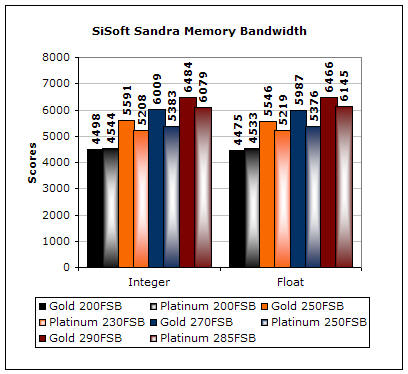
SiSoft Sandra is the most widely used memory bandwidth test. It can tell you the increase in performance from just lowering the latency timings. Looking from the graph above, you can see that the scores for both memory sticks are similar at 200FSB. The Platinum Limited Edition edges out by having the lower latencies. Also note that running the Gold at 250FSB 1:1 2.5-4-4-7 still gives higher bandwidth than running the Platinum at 230FSB 1:1 2-2-2-6. The Gold at 250FSB 1:1 2.5-4-4-7 even edges out the Platinum at 250FSB 5:4 2-2-2-6. This reveals that 1:1 does indeed provide higher bandwidth. When the limits are compared, it is clear that the Gold at 1:1 ratio is stellar.
Aida32:
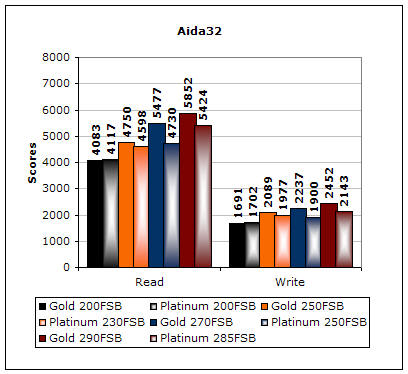
Much like Sandra, Aida32 tests the memory’s ability to read and write data in large chunks. The results are similar to the results in Sandra. The only time the Platinum wins is at 200FSB, due to the lower latencies. Even though the latencies are a bit looser, the higher frequencies of the Gold continue to provide better performance.
3DMark2001SE:

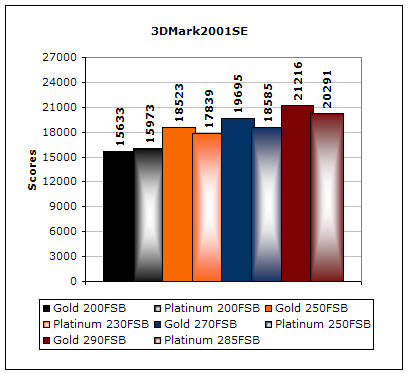
3DMark is probably the overclocker’s favorite benchmark. Unlike 3DMark2003, which stresses mainly the video card, 3DMark2001SE tests all of the system’s main components. Increasing the CPU speed, memory speed, and video card speeds will result in higher results in the final score. The scores show that the tight timings do catch up, but only to a certain limit. When running the Gold at 250FSB 1:1, it scored slightly lower than the Platinum at 250FSB 5:4. The lower timings do help. When comparing the limits, we see that the high frequency of the Gold still manages to score higher. Although it does have an extra 60MHZ of CPU power, the difference shouldn’t be more than 1,000 points. This means that the memory does indeed make the system run much faster.
Results Continued
PCMark2004:

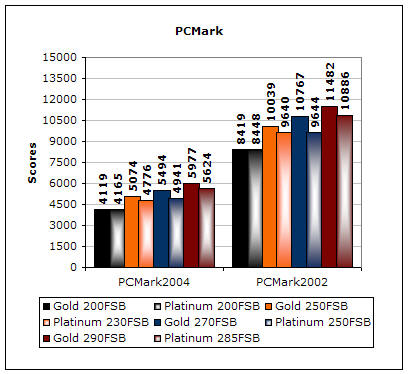
PCMark is another benchmark created by Futuremark. It tests the memory compression and decompression speeds in small to large chunks of data. As I predicted, the results follow the same pattern. This time, the Platinum barely edges out the Gold. I would say that the performance is marginal. It’s certainly nothing to brag about.
Finally we have our real world performance game tests. Games usually favor tighter timings to pump out the frames. We’ll see how well each memory performs.
Far Cry:
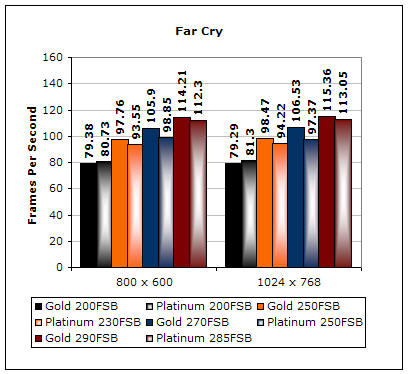
Far Cry is currently one of the most popular games and does a great job of taxing your system. Like the results found in 3DMark2001SE, the performance of running the Gold at 250FSB 1:1 is about the same as running the Platinum at 250FSB 5:4. When comparing the performance of the limits, we see that the Gold has a gain of about 2 frames, which comes out to 2%.
Unreal Tournament 2004:
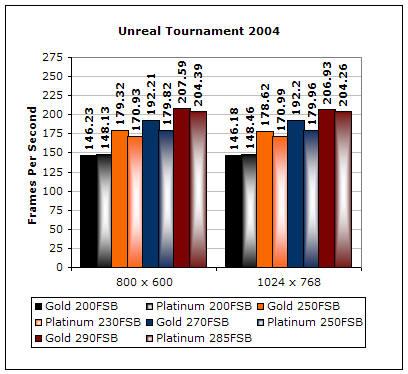
Unreal Tournament 2004 is another popular game that also makes a good benchmark. This game is known to like tight timings. Once again, the performance of the Gold and Platinum at 250FSB is pretty much equal. The only difference is at the limits. I do believe that if the Platinum were able to hit 290FSB 5:4, the performance would be better by at most 2 frames.
Unreal Tournament 2003:
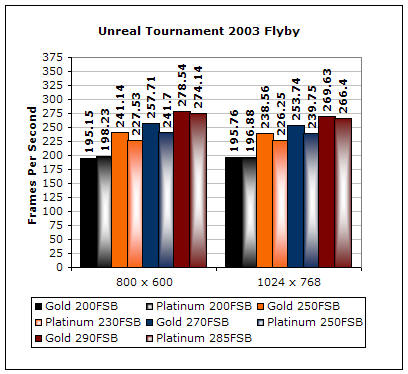
Although UT2K4 is out, UT2K3 is still a gamer’s choice and an overclocker’s benchmark. This game is more memory hungry than the younger brother. Much like the newer game, the performance difference is minimal.
Halo:
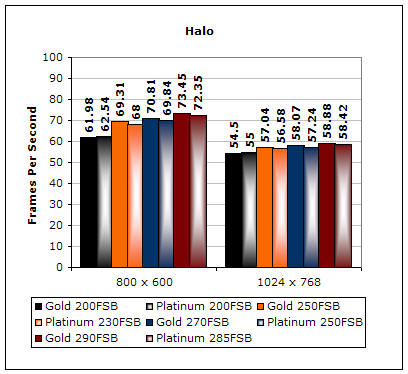
Halo is the biggest hit for Xbox console gamers and the port over to the PC is still quite a success. Apparently, this game doesn’t seem to eat too much of the memory. The frequencies and timings do play a role, but not drastic enough to change one whole frame.
Conclusion and Thoughts
OCZ does not cease to amaze me. The PC4000 Gold is not new to the market and has been around for quite some time. The performance is amazing and it overclocks like a champion. I didn’t have a single problem keeping the memory stable at 290FSB. My eyes brightened when I realized how good this memory is. I believe that the potential of the PC4000 Gold doesn’t just stop at 290FSB. My motherboard seems to be the one causing the trouble. It craps out on me at any higher speeds.
When would I suggest using this memory? If your CPU can scale high at 1:1 ratio, then this is a definite buy. Keep in mind, that in order to bring out the potential of the PC4000 Gold, you must have a CPU capable of running high frequencies. I would say at 275FSB+, the Gold would be beneficial. It would be pointless to run it at 230FSB at 2.5-4-4-7. That’s just using it for the wrong reasons. This means that users with nForce2 motherboards should look for low latency memory for better performance.
Everyone knows that the performance with low latency will always be better. It’s tough finding the discontinued Winbond BH5 and BH6 chips. Even if you do, you’ll have to pay premium prices and run them off a 5:4 divider. At just below $300, the PC4000 Gold is a clear winner.
Pros:
- Rated timings of 2.5-4-4-7 is lower than competitors
- Gold colored copper heat spreaders
- Mirror finish
- Rather cheap for PC4000–just below $300
- Excellent performance
- EXTREMELY OVERCLOCKABLE!
Cons:
- Only beneficial for high scaling P4 CPUs (not sure if it’s a con since it was designed to be for that purpose)
- Nothing I can think of

We would like to thank OCZ for providing us the sample. If you have any questions or comments, feel free to hit us up in the forums. You can also check out more of our latest reviews on the front page.
Looking back: Where Are They Now: OCZ