

VisionTek Radeon X800 Pro
Introduction
With the release of Nvidia’s GeForce FX 6800 Ultra, many people, including myself, were skeptical of ATI’s claim that the X800 series cards were faster. Many people thought that Nvidia would regain the crown for a while. Now ATI has proven that their line of cards is indeed better. The X800 Pro has even beaten the 6800 Ultra in some tests, which is definitely a slap in the face for Nvidia. The X800 Pro, being $100 cheaper than the 6800 Ultra and X800XT, is a much more reasonable alternative. But is it worth the upgrade if you have a 9800 Pro or equivalent card? Is it worth the $400 to upgrade that old dusty card that has sat in your case for the past year? That’s what we are going to find out today folks.
In The Box
First, let’s take a look at what we’re getting along with the uber performance.
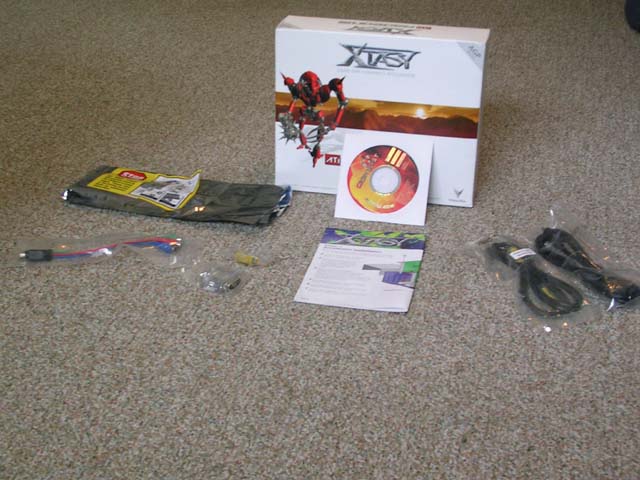
The whole package included an s-video cable, Catalyst drivers, DVI adapter, and several video cables and converters to ensure a connection to any TV. This is nice since I have a 27” TV sitting about 4 feet away from my computer; it’s always fun to have a crowd watching you as you frag away. Though VisionTek makes sure that you are capable of setting up your own entertainment room, it’s always a little disappointing to find out that the $400 graphics card you just bought didn’t come with any extra games or goodies. I guess this is the price you have to pay to get a top of the line graphics card. As you can see, there are plenty of warnings that come with the manual and on the outside of the anti-static cover. New users need not worry about putting in everything correctly as the directions will constantly remind you not to make mistakes. ATI’s box art always proves to be pretty cool looking. The guy on the front looks like one of those Bionicle Lego figures on steroids. ;o) Let’s go on and take a look under the hood.
Taking a Closer Look
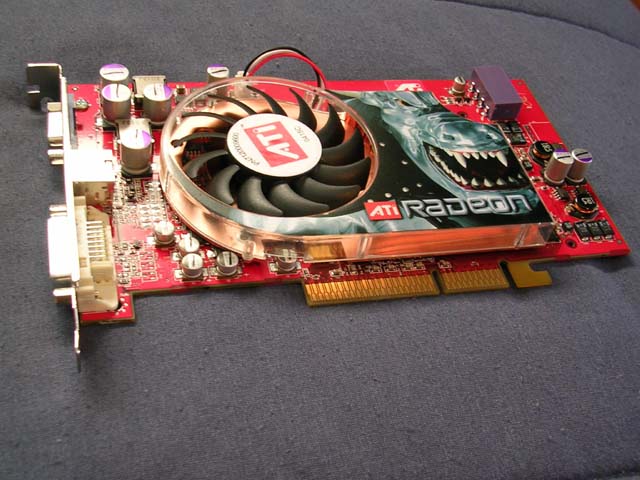
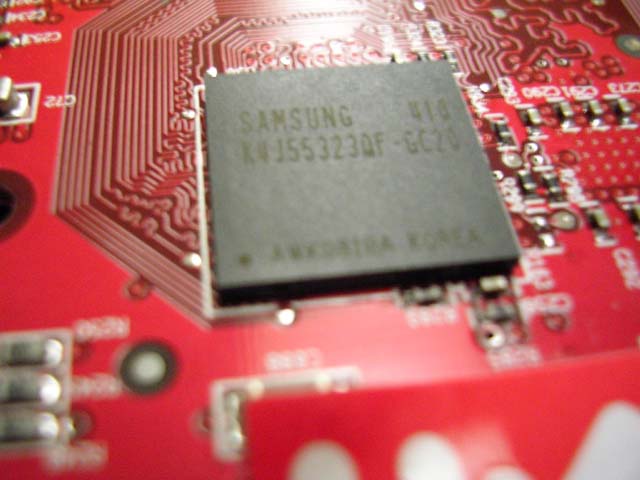
The card came with “Samsung 410; K4J55323QF-GC20; AWK0818A Korea” memory chips. These are DDR3 2.0ns chips, which translates to 1ghz capability. We will have to see if it can pull off more than this.
The fan design is different from previous ATI cards. With the new DDR3 memory chips, RAMsinks are not necessary; but the fan is designed to be directed through the heatsink fins so that air blows heat away from the core and passes through the memory chips. Previous ATI fan designs were made so that the fan is positioned directly above the core. As you can probably imagine, this is not very efficient. The fan would blow air around the core but not directly over the center like the new heatsink design. Any card you get at the moment is of the ATI reference design. Third party manufacturers should start selling custom fan designs and colored PCBs soon.
Test Setup
Test Setup**:**
- Abit IC7
- Intel P4 2.6c @ 3.3GHZ
- 4 x 256MB Geil PC4000
- VisionTek X800 Pro 256MB (Omega drivers based on Catalyst 4.6)
- Sapphire Radeon 9800 Pro 128MB (Omega drivers based on Catalyst 4.6)
- Geforce 4 TI4200 128MB (ForceWare 56.72)
- Creative Audigy2 ZS
- Seagate 120GB 7200 RPM
- Enermax 431W PSU
As you can see, I threw in a GeForce 4 TI4200 so those of you with older cards can the performance advantage from upgrading to an x800. This is to prove to the skeptics out there that it may be worth every penny to upgrade that old card, you’d be surprised at what you’re missing. This is a fairly high end system, yet it is still a bottleneck that may not display the full potential of the card.
Here’s a lay-down on what we are looking at price/feature-wise:
| X800XT | X800 Pro | 6800 Ultra | 9800 Pro | TI4200 | |
| Core Speed | 520 | 475 | 400 | 380 | 250 |
| Memory Speed | 1000 | 900 | 1100 | 680 | 520 |
| Vertex Pipelines | 6 | 6 | 6 | 4 | 2 |
| Pixel Pipelines | 16 | 12 | 16 | 8 | 4 |
| Shader Version | 2.0+ | 2.0+ | 3.0 | 2.0 | 1.1 |
| Price | $500 | $400 | $500 | $210 | $120 |
It’s easy to see why the X800 Pro is so tempting as it sits right in between the X800XT and 6800 Ultra. Of course, it has to be a bit stripped down as it has slower clocks and has 4 less pipelines. Not many of us are willing to spend $500 for a video card though, and many of us are not willing to spend $400 on a new one unless it is leaps and bounds ahead of our current card. Now, without any further blabber, let’s get to the benchmarks. ;o)
Game Tests and Notes
Game Tests and Testing Notes
- Far Cry
- Unreal Tournament 2004
- Call of Duty
- Return to Castle Wolfenstein
- AquaMark 3
- 3DMark2001SE (build 330)
- 3DMark2003 (build 340)
Settings Used:
**Direct3D:
OpenGL:**
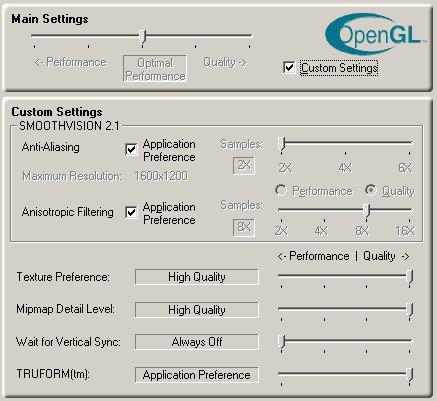
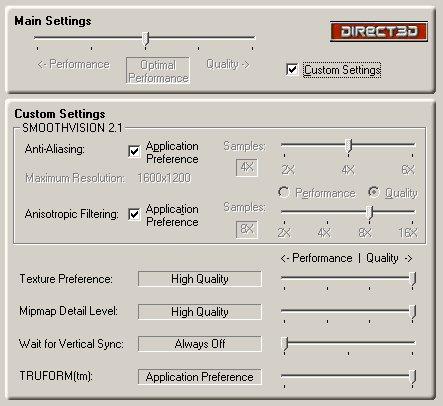
First, I will be testing each game on the highest quality settings, with vsync off, and all anti-aliasing and anisopotric filtering disabled. Everything else on the cards will be set at max. Next, I will run all tests again with 2x AA and 4x AF (on quality) to see how they perform with the goods turned on. Then, I’ll run each test once again to see how the cards handle 4x AA and 8x AF. I will run each game with resolutions of 800x600, 1024x768, 1024x1280, and 1600x1200 in each set of tests.
Far Cry
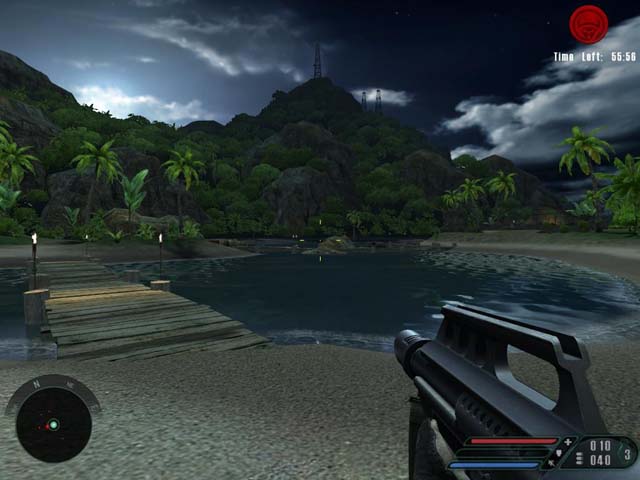
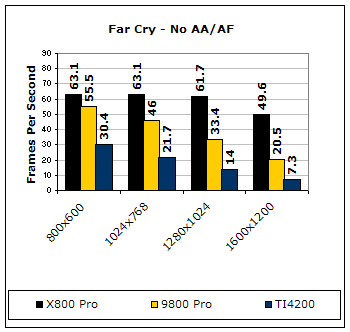
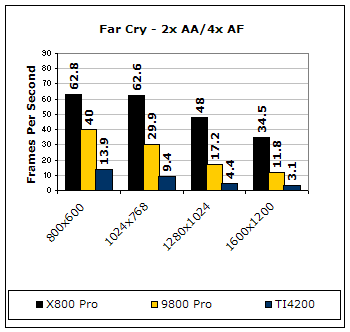
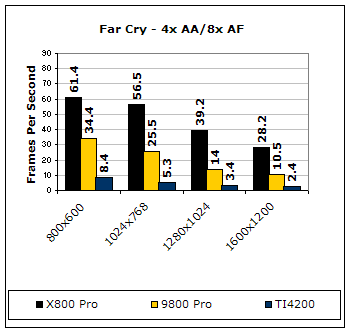
I found it amazing that the X800 Pro only dropped 12 fps from 800x600 to 1600x1200 with no AA and AF. That is an impressive feat, considering how demanding Far Cry has been known to be on systems. The 9800 Pro could not keep half the frame rate that the X800 Pro could muster with anti-aliasing and anisotropic filtering enabled. The X800 Pro shined most at resolutions above 1024x768, delivering over twice the frames in any situation. The Geforce 4 TI4200, being an older generation DirectX 8 card, could not run the game at playable frames unless it was at 800x600 with no AA or AF. And that’s if you can even consider 30 FPS playable. Far Cry, as of right now, is the best representation of the next generation of games and the best looking to date. Right now I play this game at 1600x1200 with 2x AA and 4x AF (I don’t notice the difference above 2x AA/4x AF when playing, especially at this high of a resolution) and it is very playable at an average FPS of 34.5. I know most of you like a higher frame rate than 30, but I find a solid 30 fps is fine. Of course this is all personal preference and differs from person to person.
Unreal Tournament 2004
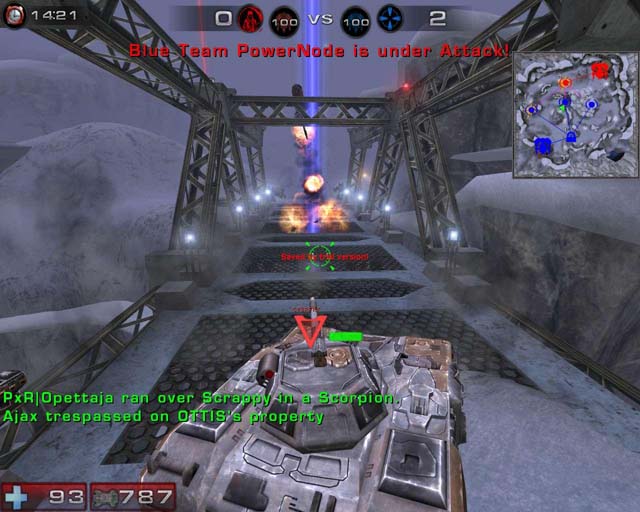
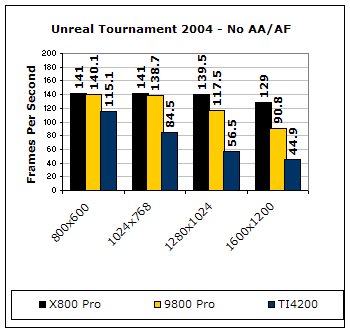
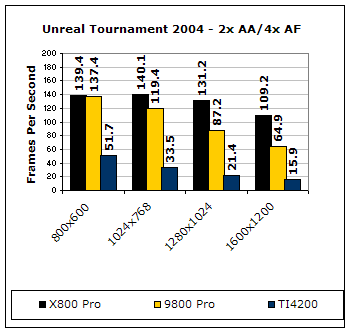
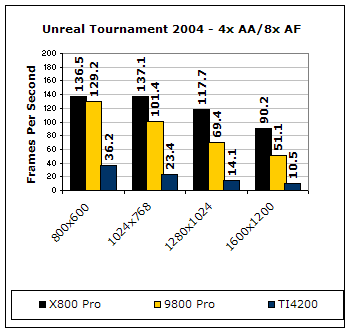
Here’s another very popular game that is one of the best looking games at the moment. Not quite as spiffy looking as Far Cry, but it’s definitely the runner up and is a very useful tool for separating the good cards from the best. The Geforce 4 does not deliver playable frames with any more than 2x AA/4x AF, and the 9800 Pro and X800 Pro are over four times as fast with any anti-aliasing or anisotropic filtering enabled. At 800x600 and 1024x768, the 9800 Pro and X800 Pro are about even. But when 4x AA and 8x AF are enabled and the resolutions cranked up, the X800 delivers almost twice the performance.
Call of Duty
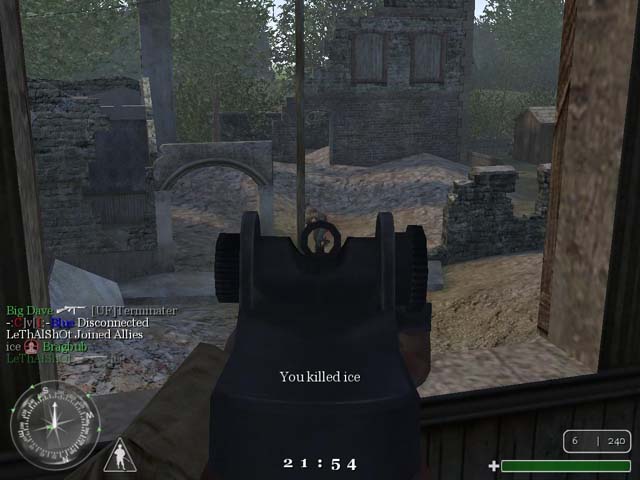
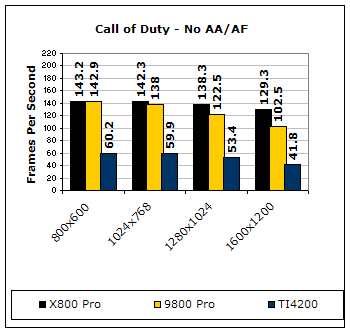
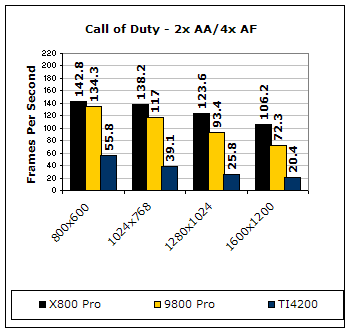
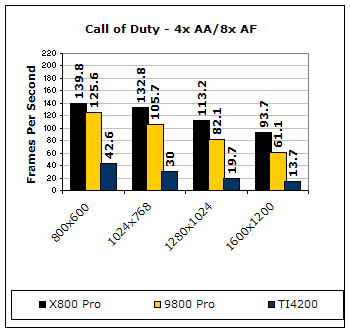
This is an older game than the rest but it is still very popular, with mods like Revolt and Heat of Battle out. The results are the same as they were for Unreal Tournament, with the Geforce 4 not handling anti-aliasing or anisotropic filtering well enough to deliver a playable frame rate. Once again, the X800 Pro really shines with the goodies turned up, delivering almost twice the performance as its predecessor.
Return to Castle Wolfenstein
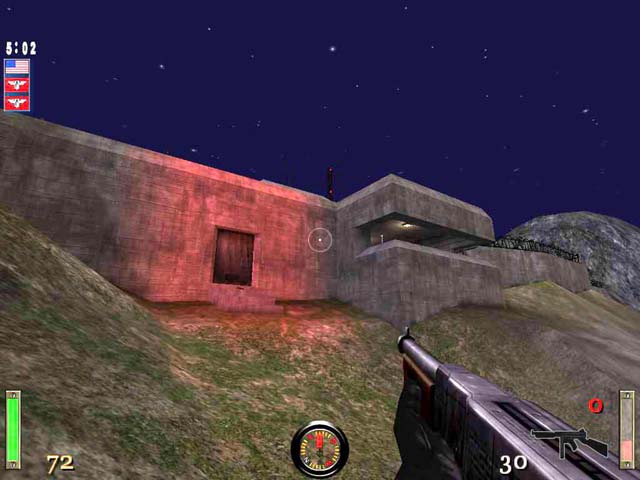
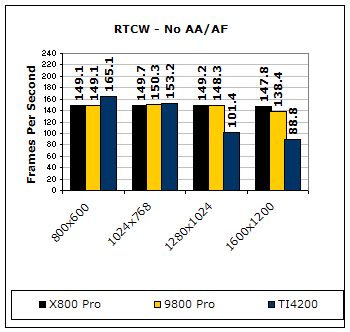
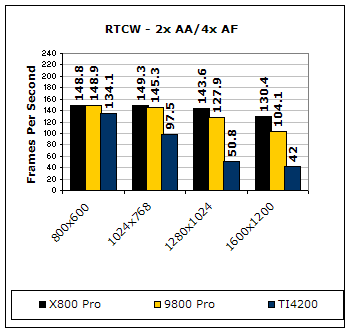
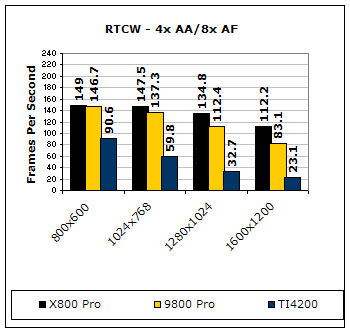
This is the oldest game I used for testing. This game was very popular for its time, and is still quite popular today. It ran fine on the Geforce 4 until 4x AA/8x AF was enabled. This is when its weaknesses became apparent. I found it funny that the Geforce 4 even beat the X800 Pro with no anti-aliasing or anisotropic filtering enabled at 1024x768. Nvidia proves once again that they make better OpenGL cards. But if the goods are turned up any more it can’t take the heat and is taken about by the other more modern cards. The game is playable at any settings used with the 9800 Pro or X800 Pro, with the cards being a steady 30 frames apart at most, and that is only with a resolution of 1600x1200 and 4x AA/8x AF enabled.
Aquamark3

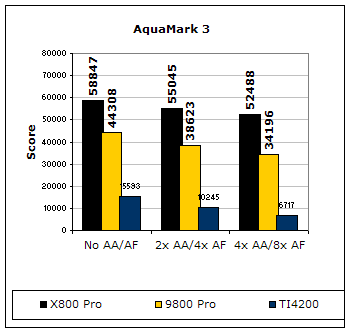
This benchmark has become very popular, and you can bet it represents the next generation of games’ performance pretty accurately. This benchmark really proves that the Geforce 4 TI4200 just cannot handle DirectX 9, and is definitely another reason to upgrade your old card. The 9800 Pro flew through it three times as fast. The 9800 Pro falls 10112 marks from no AA/AF enabled to 4x AA/8x AF enabled, while the X800 Pro only falls 7459 marks. This proves that the actual architecture of the card, rather than just pure muscle, is coming into play and is probably a result of the hefty 256MB of DDR3 and other various optimizations put into the R420 core.
3DMark2001SE

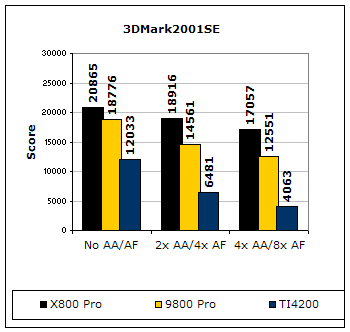
Ah, everybody’s favorite benchmark, and every computer’s nightmare. Although old, this thing has been putting the most hardcore overclockers to the test, with very fierce competitions that push people to the point of literally melting their rigs. I was surprised at the difference between the 9800 Pro and X800 Pro in this benchmark. It turned out to be a 2189 3Dmark difference, while I thought it would be slightly lower since it is based on DirectX 8 and follow the same pattern as RTCW and COD. Apparently I was wrong, and the difference rises over 4000 with 4x AA/8x AF enabled. The Geforce 4 is no competition for the other two cards, with an astonishing 8000 point difference between it and the X800 at the lowest quality settings.
3DMark03
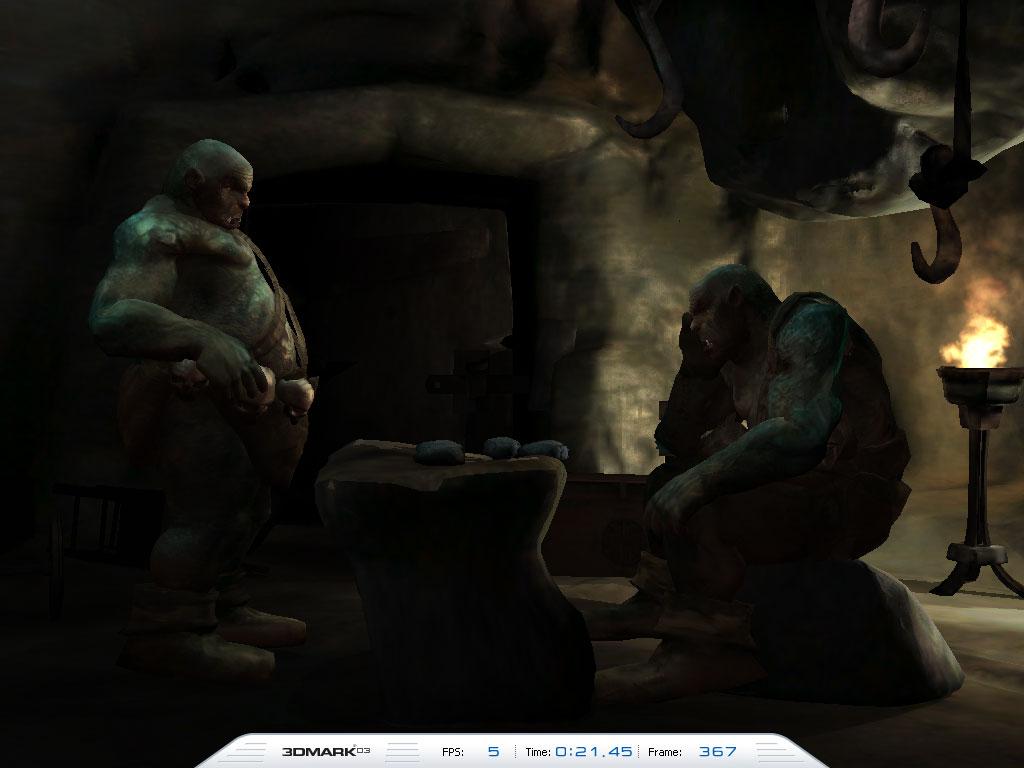
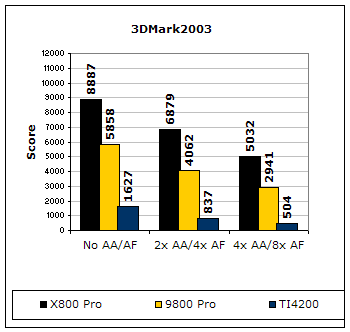
Ah, everybody’s soon to be favorite benchmark. Though there is a lot of controversy around this benchmark, especially when people were comparing their DirectX 8 cards to DirectX 9 cards, I think people will eventually adapt to using it over 3DMark2001SE and it will become the primary benchmark for the new generation of cards. The Geforce 4 doesn’t stand any chance here, being a DirectX8 card. The X800 Pro once again has a lower drop in performance with anti-aliasing and anisotropic filtering enabled then its predecessor and once again proves its technology superior.
Image Quality
X800 Pro no AA/AF 9800 Pro no AA/AF
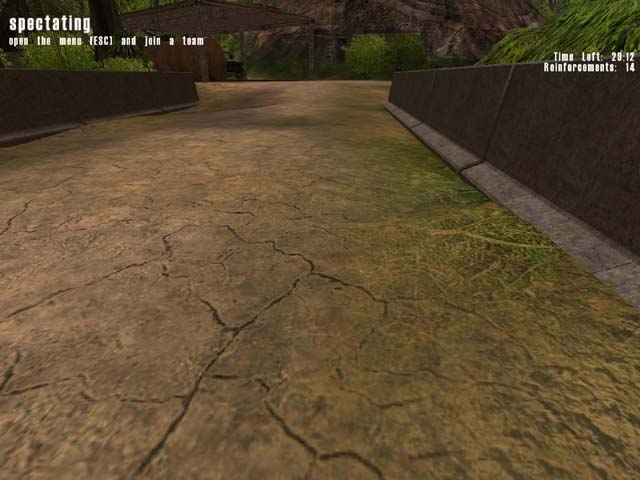
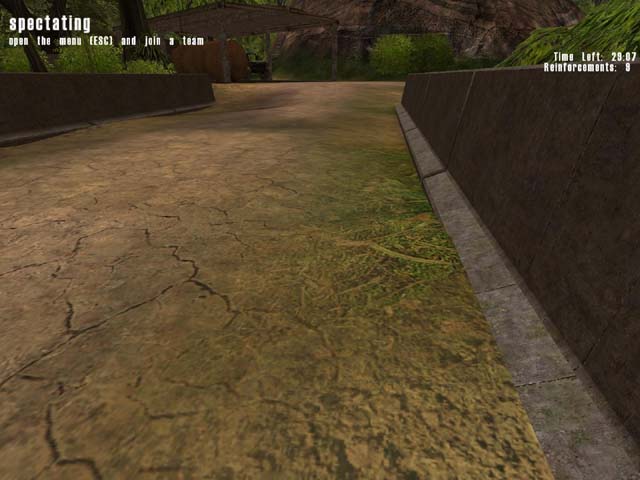
Things look about even here because of the slightly different angles the screenshots were taken at.
X800 Pro 2x AA/4x AF 9800 Pro 2x AA/4x AF
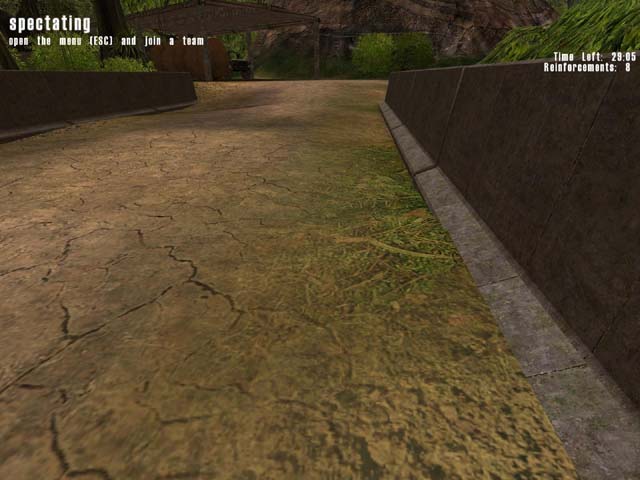
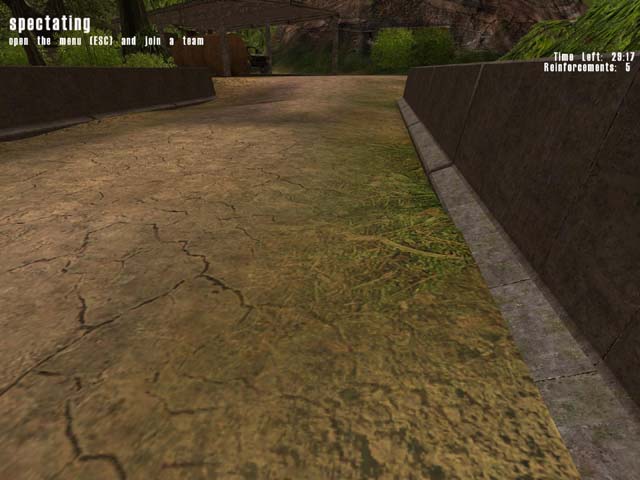
The X800 takes the lead here, with noticeably cleaner anisotropic filtering. Anti-aliasing quality looks top notch on both cards.
X800 Pro 4x AA/8x AF 9800 Pro 4x AA/8x AF
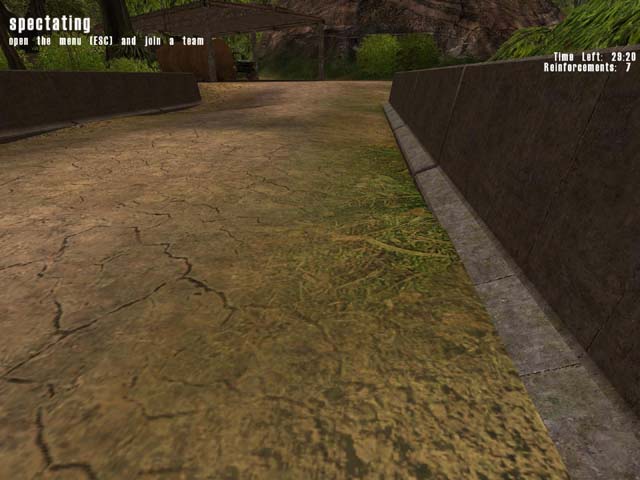
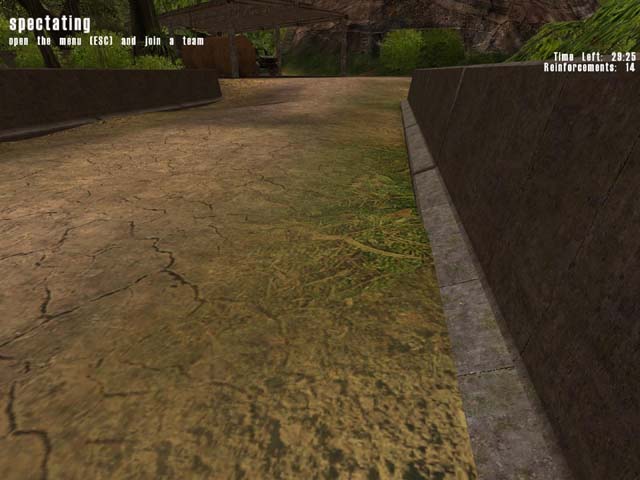
The X800 takes the lead once again as it shows off its slightly more vibrant, and clearer anisotropic filtering, while the anti-aliasing quality looks the same. I have also taken some pictures of the Geforce 4 TI4200 in action compared to the X800 Pro. This is meant to show the improvement for those of you who have old cards and looking to upgrade. I took them at 2x AA and 4x AF.
X800 Pro 2x AA/4x AF
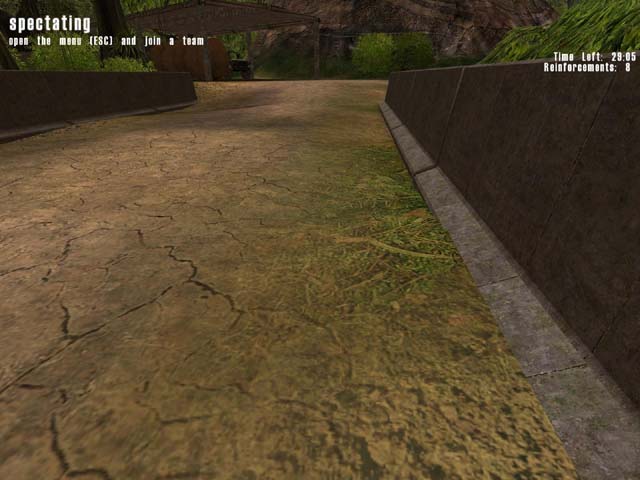
Geforce 4 TI4200 2x AA/4x AF
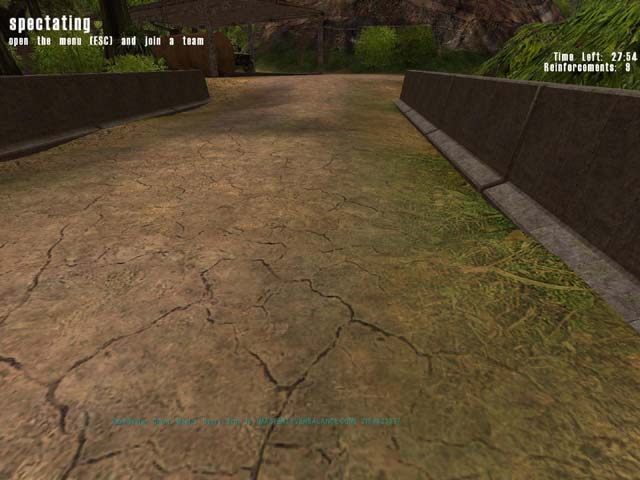
At this point it comes down to personal preference. In my opinion, Nvidia’s anisotropic filtering is better than ATI’s, and ATI’s anti-aliasing is better than Nvidia’s.
Overclocking
The stock clocks of this X800 Pro are 475/900. Using Rage3D, I was able to achieve a core clock speed of 522 and a memory clock speed of 1.14GHz stable without artifacts and at a decent temperature. This is an amazing overclock with the stock heatsink and fan, and the temperature never went above 46°C during testing. ATI proves that they know how to make quality cards, and make them right. The 0.13 micron process is incredible and gives the X800 series the ability to run cooler and suck less power than the 9800 series. To give you an idea of the performance difference you would see when clocked this high verses the stock clock speeds, I did a quick benchmark in Far Cry at 1600x1200 with 4x AA/8x AF.
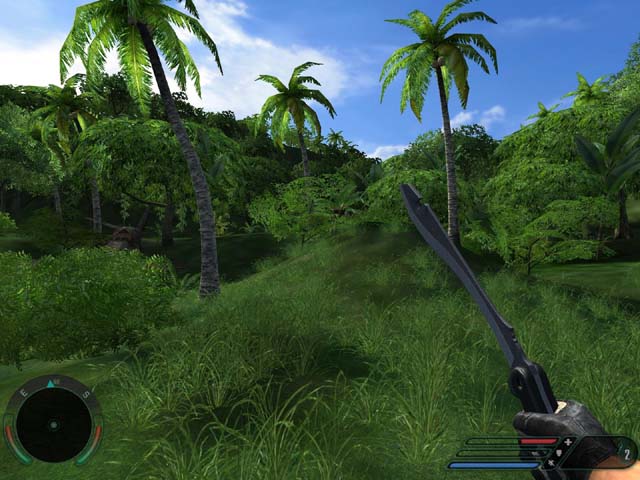
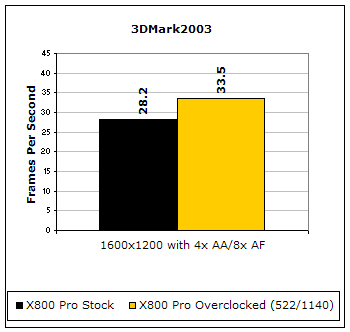
The difference in performance is amazing for graphics this high quality, eh? Far Cry looked like a dream at these settings, and played like one too.
Conclusion and Thoughts
As the gaming industry grows, the demand for visual performance skyrockets. Some people, including John Carmack, estimate that the industry will be as big as the movie industry within 10 years and games will look as good as the Lord of the Rings movie you just saw. While this is hard to believe, imagine 10 years ago if someone showed another gamer a screenshot of Doom 3 or Half-Life 2 and said in 10 years games would look this good. They would probably think you were on crack. All gamers had 10 years ago were a bunch of fat pixels across the screen. It is not hard to see why almost every gamer considers his graphics card to be the most important (not to mention most expensive) part of the system. It’s also a part of your system that requires a lot of research if you want to really get a good bang for your buck.
My advice for those of you who have a Geforce 4 equivalent or older is to think about upgrading. If you have the extra cash and you game a lot, I see no reason why you shouldn’t upgrade. The X800 Pro packs literally nine times the power of any card in the Geforce 4/Radeon 9500 series when AA/AF are turned on. If you are on a steep budget, I would suggest you wait a while until the X800 series is in huge stock and 9800 Pro prices start dropping, and then grab one of those. For those of you with 9800 Pros, it is a more difficult decision. I would recommend that you wait for one of the newer PCI express cards to come out before making your decision. Chances are your 9800 Pro suits you fine right now. Wait until the X800XT Platinum Edition is out in full bloom and prices have dropped a bit. Doom 3 and Half-Life 2 are right around the corner and will probably require a very powerful card if you want to run those on max quality and at a decent resolution. The best thing to do would be to keep your 9800 Pro and wait until Doom 3 comes out (which has been announced to be coming this summer and will most likely arrive in stores before Half-Life 2). Then you will know what cards are good for the next generation of games and your choice will be a lot easier. Overall, I am very satisfied with how well this card overclocks. Tune in for my next article where I will be showing you how to put an AMD heatsink and fan on to your video card to achieve even higher overclocks! Even if you are not planning on overclocking your card at all, it’s never a bad idea to have some good cooling on your card to prolong its life.
Pros:
- A huge performance boost over older generation cards
- Much cooler than last generation cards
- Slight anisotropic filtering image quality improvements over past ATI cards
Cons:
- Not quite worth the upgrade for current 9800 Pro owners
- Slightly behind Nvidia’s card architecture
- No extra goodies like software or games along with the package
If you have any questions or comments, feel free to hit us up in the forums. You can also check out more of our latest reviews on the front page.