

PowerColor Radeon X800 Pro VIVO
Introduction
PowerColor is a major provider of ATI-based multimedia devices. The company is fairly young, having started in 1999 in Southern California. Within five years, PowerColor has become the world’s third largest provider of graphics cards and the number one supplier of ATI-based graphics cards. This kind of growth can only mean the company has high goals and is determined to meet the latest demands on high end hardware. PowerColor is currently owned by Tul, a company based in Taiwan that was founded in 1997. You can say that PowerColor is a subdivision of Tul, just like how Crucial is considered to be a subdivision of Micron Technology.
PowerColor provides a numerous line of ATI Radeon cards. From low end budget solutions to high end enthusiast favorites, PowerColor has a graphics card to suit everyone’s needs. Many enthusiasts can probably remember the success of PowerColor’s highly popular and moddable Radeon 9800SE. Although the card’s performance was only considered to be mediocre, there was a hidden secret that unleashed the full potential of the “cheap” card. With a simple BIOS flash, the 9800SE turned into a full fledged 9800 Pro. Of course there were certain things to be aware of, such as choosing the 256-bit versions and providing good cooling. What we have in today is the enthusiast’s favorite: the X800 Pro VIVO. The VIVO line, although not an “official” release by ATI, offers the same exact hardware components as the full fledged X800XT PE, something that definitely shows promise.
PowerColor X800 Pro VIVO
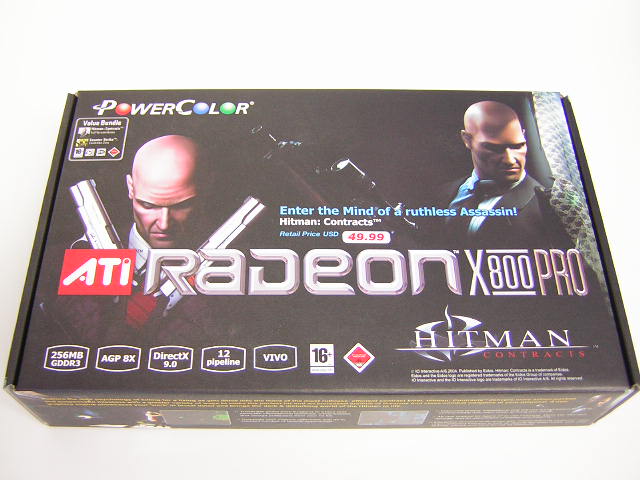
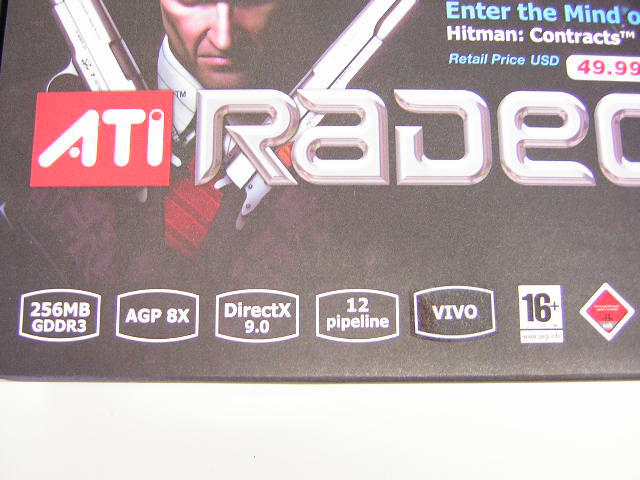
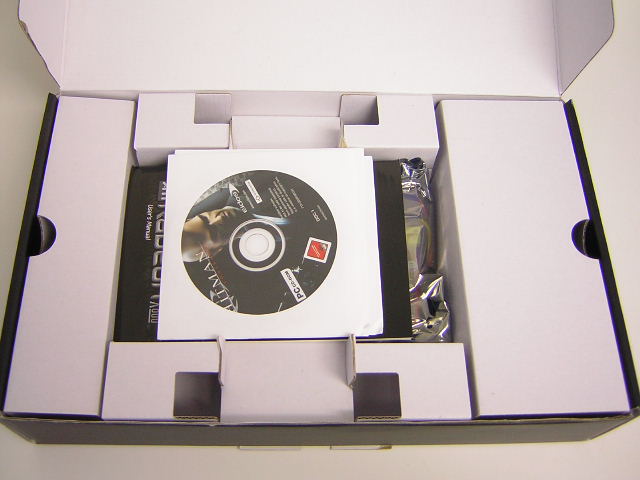
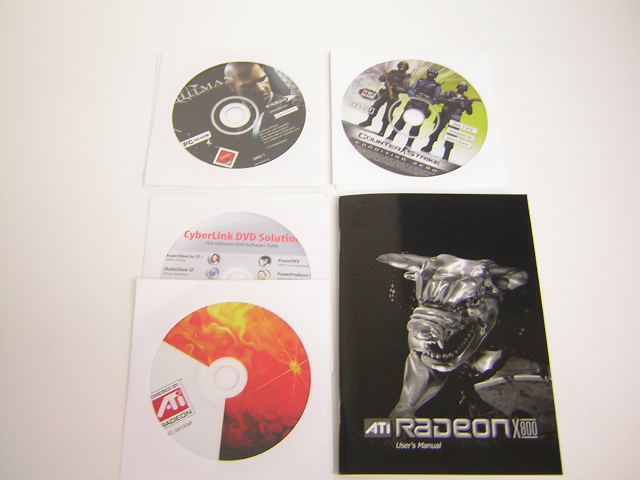
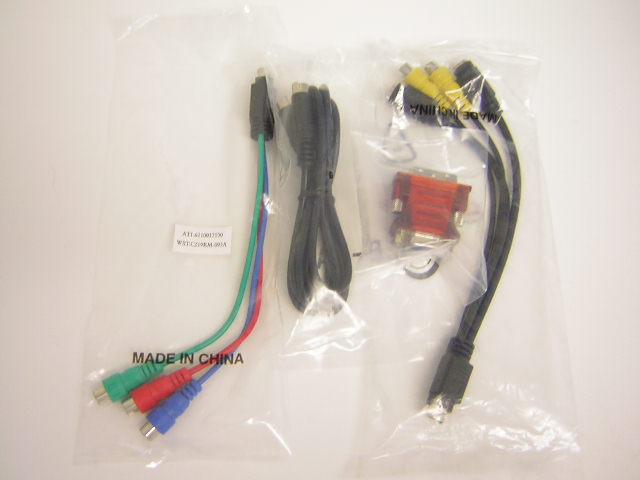
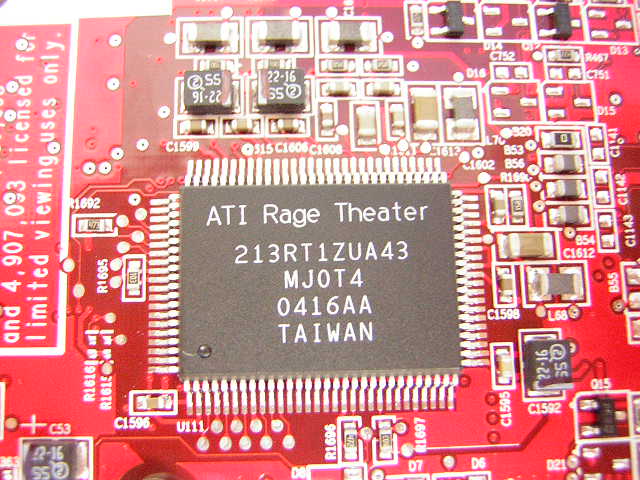
The PowerColor X800 Pro VIVO comes with a full retail game called Hitman Contracts. Although there are certainly better games available, such as Doom 3 or Far Cry, Hitman Contracts is fun and addicting and should keep gamers busy for a couple weekends or so. The box is artistically designed, with the Hitman all over the box. The box states that the card has 256MB GDDR3 onboard memory, 12 pixel pipelines, AGP 8x support, DirectX 9.0, and the VIVO (Video In Video Out) function. VIVO can come in handy for multimedia users who like to take pictures, film with camcorders, or record a show from the TV. Typical cards today only come with a standard S-Video out. With the implementation of VIVO, PowerColor makes use of the ATI Rage Theatre chip. To fully take advantage of the VIVO function, an S-Video cable with labeled In/Out cables and a S-Video out to component cable adapter are included. The use of component cables enhances the TV image quality over S-Video, so you can enjoy in clarity whatever it is that you’re watching . Also included is a analog to DVI adapter for users who wish to have a dual display setup. Another game that comes bundled is the ever popular Counterstrike: Condition Zero. The included game is old, but gamers still play it due to the extremely fun online multiplayer. The other discs are just the typical CyberLink DVD software and the driver CD.
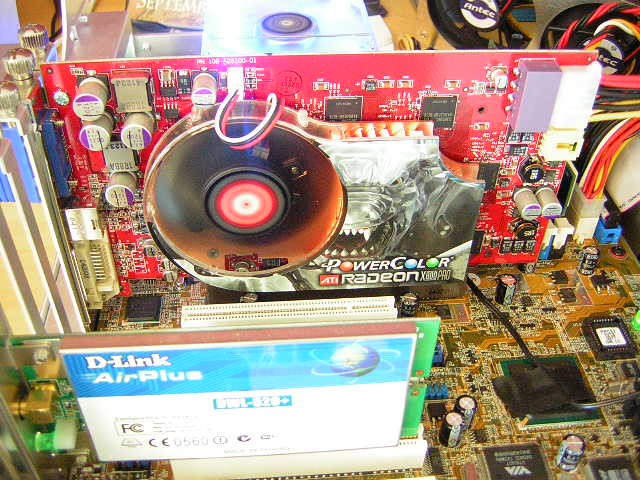
The X800 Pro VIVO comes with the ATI reference cooler. It’s a pretty good cooler, even though it is large and cools only the GPU. Many must wonder why ATI chose not to cover the memory. The onboard GDDR3 memory does not release the amount heat of the older GDDR2. The memory does get warm when it’s on full load but is much cooler than GDDR2 and still manages to scale high in terms of frequency. A 4pin power adapter is included for those who run short of power cables. As mentioned earlier, the X800 Pro VIVO has all the same hardware components of the X800XT PE; the use of the Rage Theatre chips and the Samsung 1.6ns GDDR3 memory. The core specifies the use of a 16 pixel pipeline GPU. The part that reads “215RADCGA11F” means that it is a 16 pipeline GPU. Regular X800 Pros come with “AA” written to denote the use of a 12 pipeline GPU. Although not quite clear in the picture below, the upper right corner does not have any bridges cut. These signs indicate the card should be a X800XT PE in disguise. Like most graphic cards, the X800 Pro VIVO comes with the standard analog out, S-Video out, and DVI for all possible monitor displays.
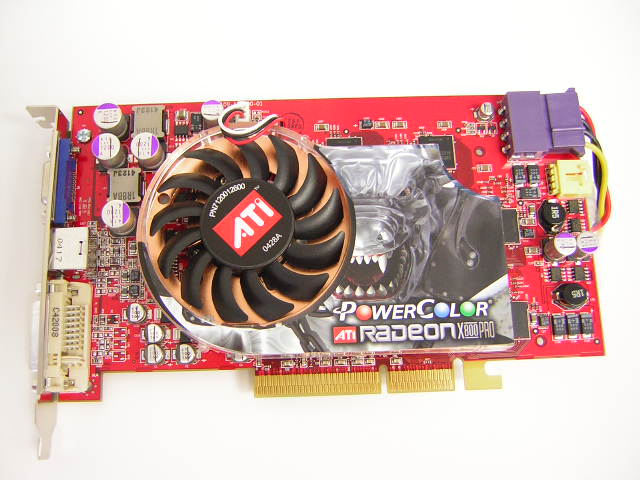
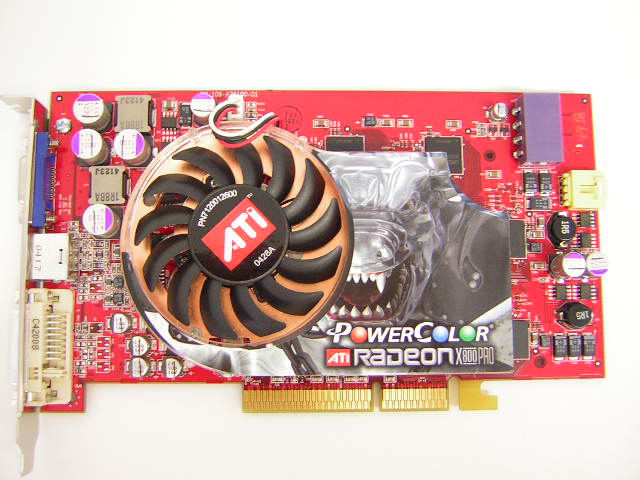
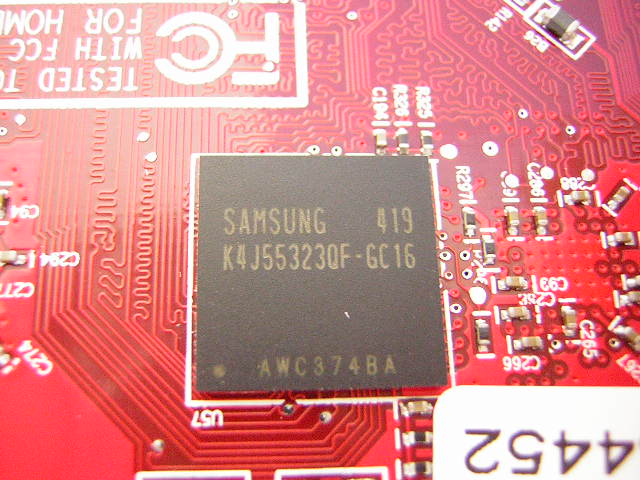
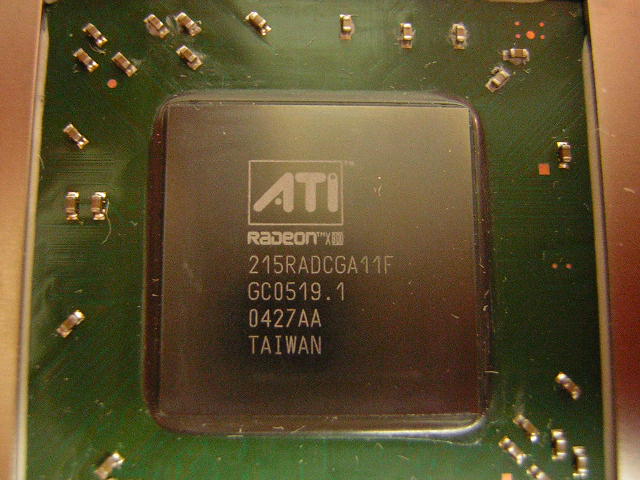
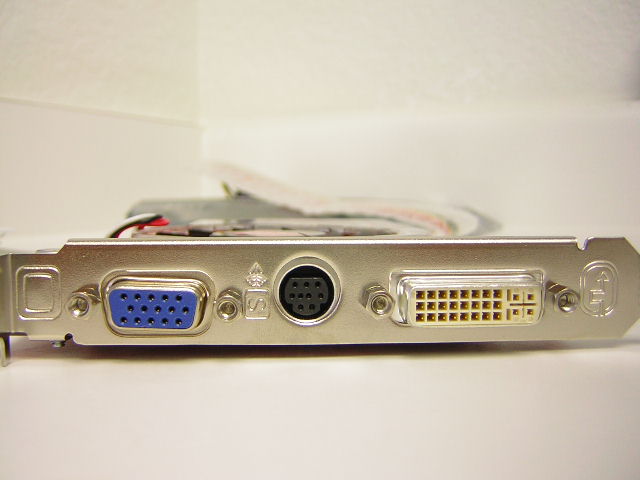
The X800 Pro VIVO comes with a single slot cooling solution. The reference cooler does a pretty decent job of keeping the graphics card cool. It was so quiet that it produced no audible noise, at least nothing that I could hear. Underneath the cooler is a nice layer of thermal grease. It’s a good thing that companies are migrating away from the use of traditional thick pink thermal pads. Pads are the worst type of thermal interface material available. The grayish thermal paste appears to be Shin Etsu and is definitely better than the typical white silicone grease. Although Shin Etsu is good thermal paste, I personally don’t like it. Cleaning off the paste was a hassle.
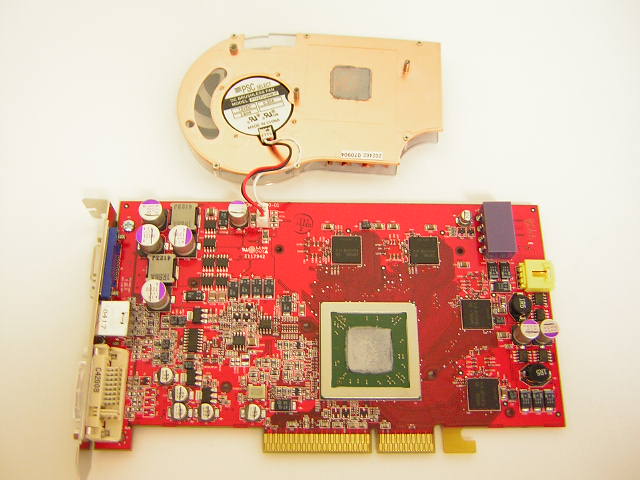
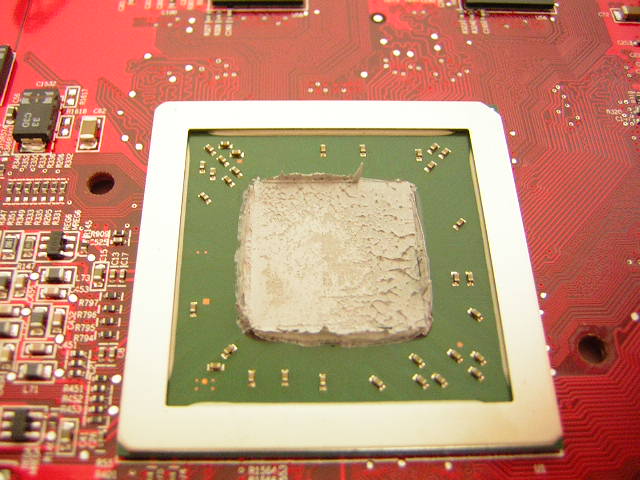
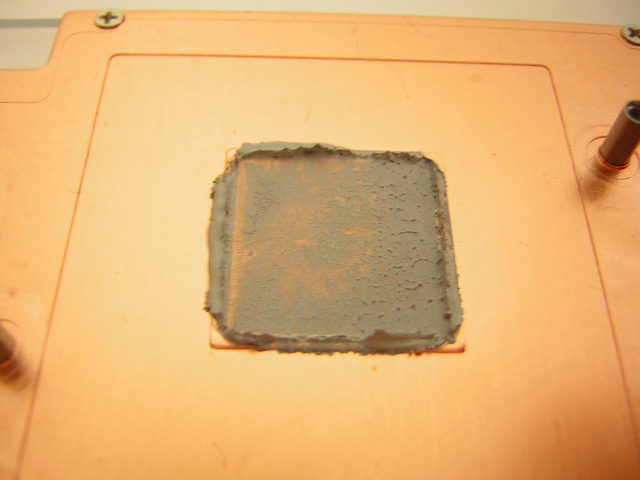
Unlike the power hungry Nvidia 6800 series of graphic cards, the X800 series are known to be less power demanding. The X800 Pro only requires a minimum 300W power supply. This means that users must ensure their power supplies are capable of producing 300W of clean steady power.
Specifications
The main competitor of the ATI X800 Pro line is Nvidia’s 6800GT. Both graphic cards retail at $399 and offer the latest cutting edge graphics. Although there are no price differences, the hardware architecture is completely different. The 6800GT definitely leads in this department, offering 16 pixel pipelines and SM3.0 support. The X800 Pro is nothing but a 9800 Pro on steroids. ATI pumped up the pixel pipelines from 8 to 12, and increased the clocks significantly. There is no support for new technology and does not take advantage of SM3.0 found in DirectX 9.0.
Radeon X800 series vs. Geforce 6800 series:
| Radeon X800 Pro | Radeon X800XT | Radeon X800XT PE | Geforce 6800 | Geforce 6800GT | Geforce 6800 Ultra | |
| Core Speed | 475 | 500 | 520 | 325 | 350 | 400 |
| Memory Speed (DDR x2) | 450 | 500 | 575 | 350 | 500 | 550 |
| Pixel Pipelines | 12 | 16 | 16 | 12 | 16 | 16 |
| Shader Model 3.0 Support | No | No | No | Yes | Yes | Yes |
PowerColor Radeon X800 Pro VIVO Features:
| Brand | PowerColor |
| Model | X800 Pro VIVO |
| GPU | R420 |
| Memory | 256MB GDDR3 |
| Memory Speed | 1.6ns |
| RAMDAC Frequency | Dual 400MHZ |
| Memory Bandwidth | 28.8GB/s |
Radeon X800 Technology Specifications:
- 160 million transistors on 0.13 micron low-k fabrication process
- Up to sixteen extreme parallel pixel pipelines
- Six programmable vertex shader pipelines
- 256-bit quad-channel GDDR3 memory interface
- AGP 8x support or PCI Express support
Smartshader HD:
-
Support for Microsoft DirectX 9.0 programmable vertex and pixel shaders in hardware
-
DirectX 9.0 Vertex Shaders
- Vertex programs up to 65,280 instructions with flow control
- Single cycle trigonometric operations (SIN & COS)
-
DirectX 9.0 Extended Pixel Shaders
- Up to 1,536 instructions and 16 textures per rendering pass
- 2nd generation F-buffer technology accelerates multi-pass pixel shader programs with unlimited instructions
- 32 temporary and constant registers
- Facing register for two-sided lighting
- 128-bit, 64-bit, & 32-bit per pixel floating point color formats
- Multiple Render Target (MRT) support
-
Complete feature set also supported in OpenGL via extensions
Smoothvision HD:
-
2x/4x/6x Anti-Aliasing modes
- Sparse multi-sample algorithm with gamma correction, programmable sample patterns, and centroid sampling
- Lossless Color Compression (up to 6:1) at all resolutions, including widescreen HDTV resolutions
- Temporal Anti-Aliasing
-
2x/4x/8x/16x Anisotropic Filtering process
- Up to 128-tap texture filtering
- Adaptive algorithm with bilinear (performance) and trilinear (quality) options
3Dc:
- High quality 4:1 Normal Map Compression
- Works with any two-channel data format
Hyper Z HD:
- 3-level Hierarchical Z-Buffer with Early Z Test
- Lossless Z-Buffer Compression (up to 48:1)
- Fast Z-Buffer Clear
- Z Cache optimized for real-time shadow rendering
- Optimized for performance at high display resolutions, including widescreen HDTV resolutions
Videoshader HD:
- Seamless integration of pixel shaders with video in real time
- FULLSTREAM video de-blocking technology for Real, DivX, and WMV9 formats
- All-format DTV/HDTV decoding
- Adaptive Per-Pixel De-Interlacing and Frame Rate Conversion (temporal filtering)
Display Features:
- Dual integrated display controllers
- Dual integrated 10 bit per channel 400MHZ DACs
- Integrated 165MHZ TMDS transmitter (DVI 1.0/HDMI compliant and HDCP ready)
- Integrated TV Output support up to 1024x768 resolution
- YPrPb component output for direct drive of HDTV displays
- Single and dual link external TMDS transmitter support for high resolution and/or multi-monitor DVI configurations
- Compatible with ATI’s THEATER video decode and capture devices for VIVO (Videon Input/Video Output) configurations on certain X800 graphic cards
Image Quality
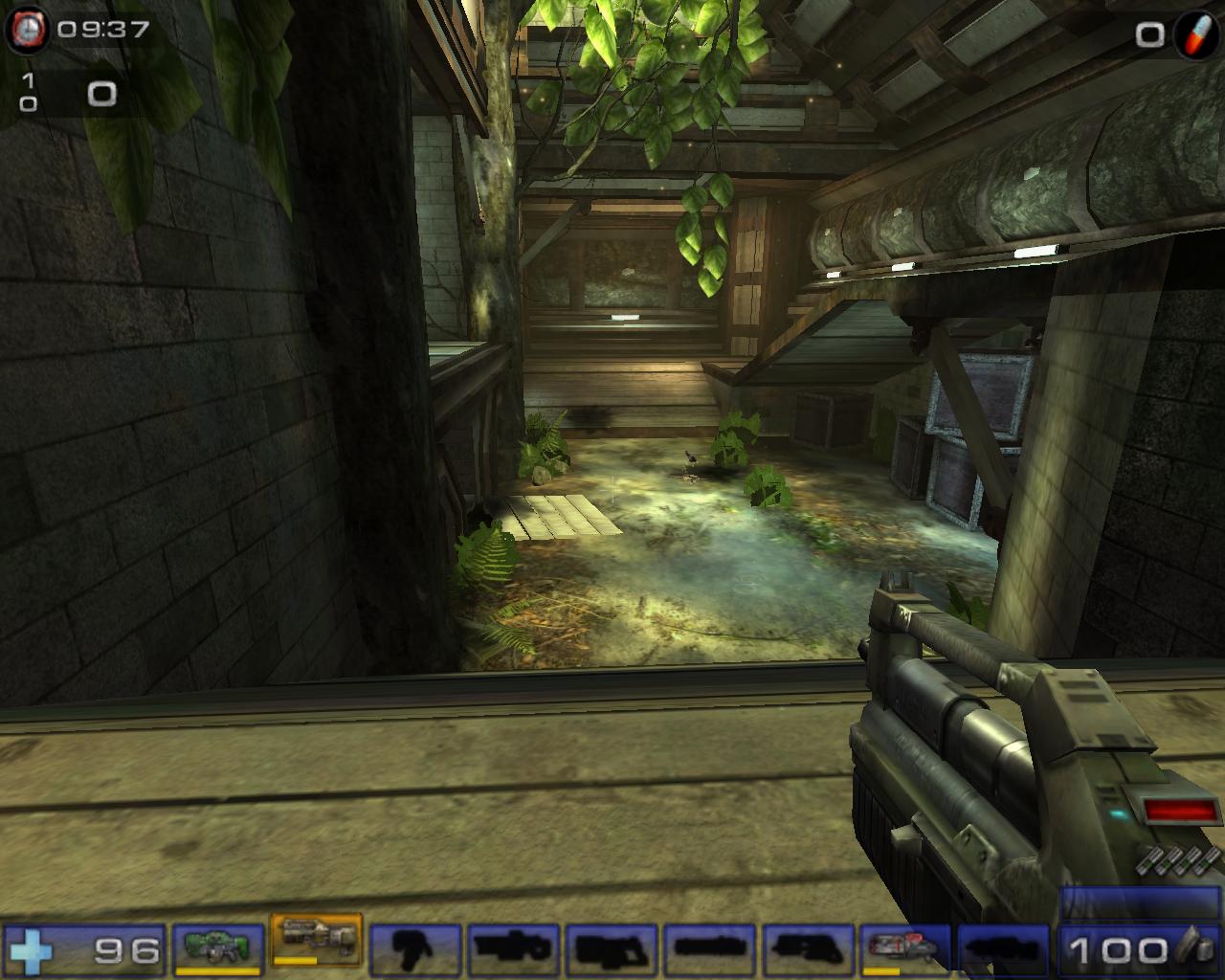
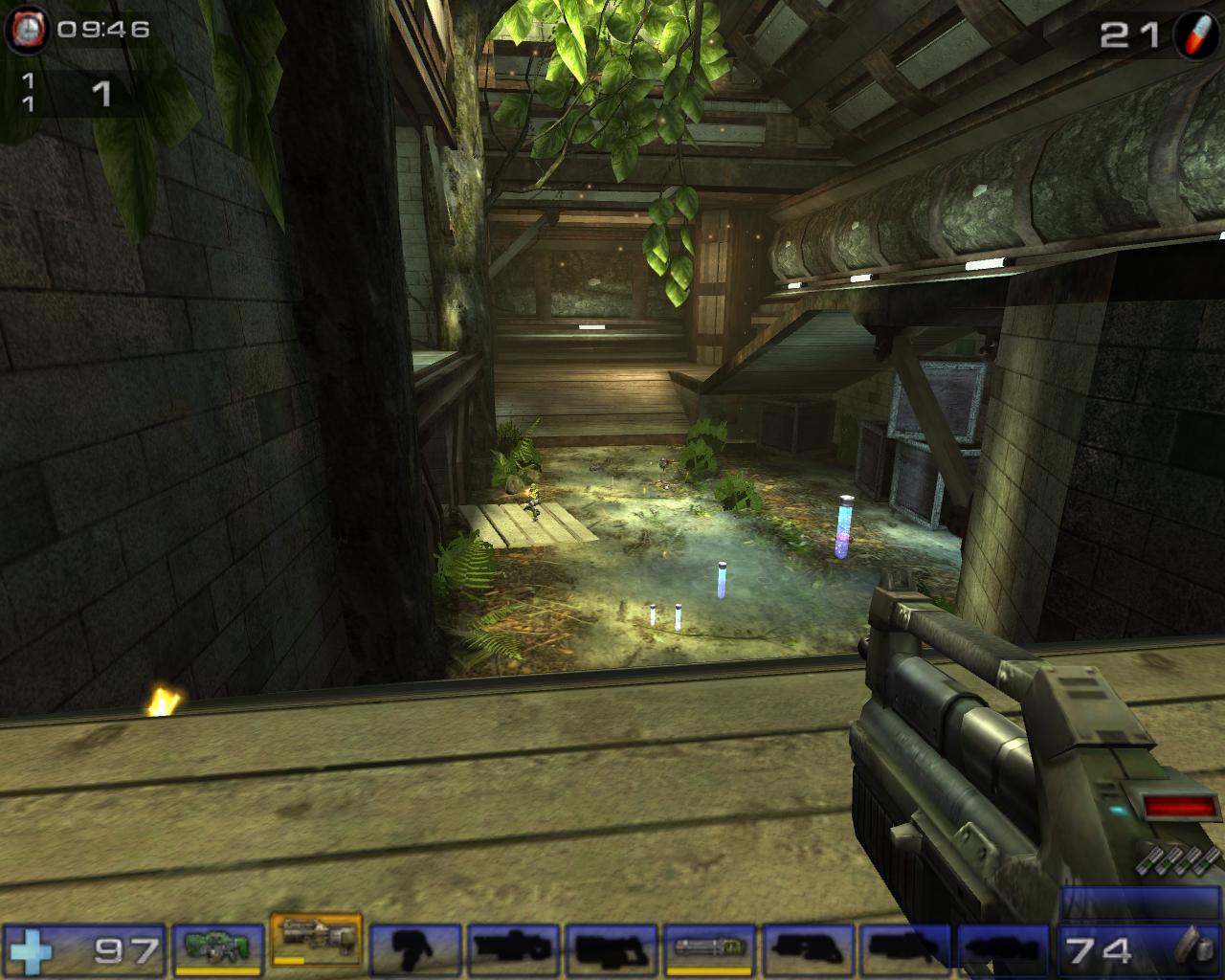
Unlike the well-documented blurriness of the Geforce line of cards, the X800 had excellent 2D image quality. There was no need to adjust the LCD or fiddle with the functions in the driver tabs, although ATI Catalyst provides no such functions. The 2D was nice and crisp and made words easy to read. The 3D image quality was no different. Gameplay was beautiful with both anti-aliasing and anisotropic turned on. It definitely rivaled the Nvidia 3D quality. Both were superb. Here are a couple of in-game screenshots of Unreal Tournament 2004. The resolution was set at 1280x1024.
No AA/AF
2xAA/4xAF
4xAA/8xAF
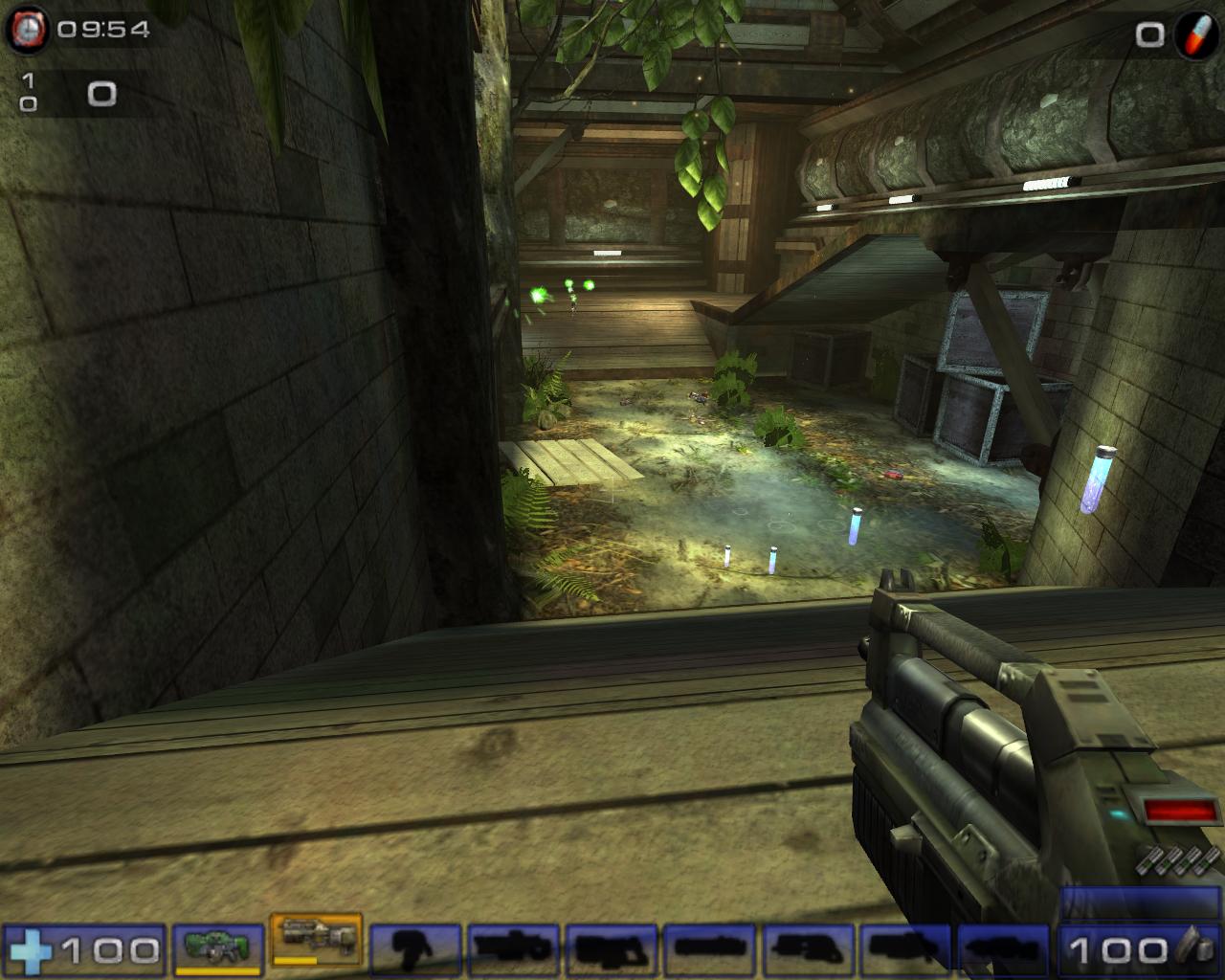
As you can see, the image quality really strengthened when anti-aliasing and anisotropic filtering was turned on. At such high resolution, running anti-aliasing at 2x and anisotropic filtering at 4x was definitely sufficient for good eye candy.
Test Setup and Overclocking
Overclocking:
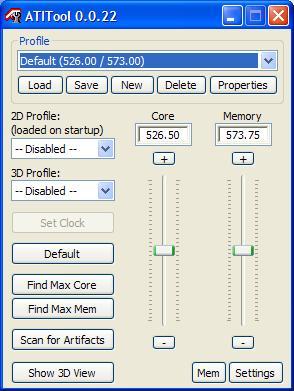
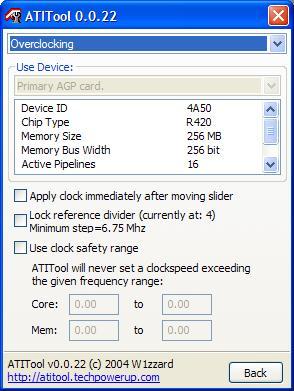
I checked around the web to find the overclocking potential of the X800 Pro and found that most were able to hit 520MHZ for core and 560MHZ for memory. My results, however, were different. As usual, I started with ATITool, as it automatically conducts rigorous tests to test for 3D stability and artifacts. The results I obtained were 545MHZ on the core and 570MHZ for the memory. Unfortunately, the card was not stable. After some manual overclocking and testing, the fastest stable clocks were 525/540. It was a bit disappointing, especially for the memory, because 1.6ns theoretically yields 625MHZ. Anything past 525MHZ on the core would result in lockups, and anything beyond 540MHZ on the memory would result in extreme artifacts. With such poor overclocks, I was bit hesitant to take it one step further. Nonetheless, I decided to do the BIOS flash. There are many guides on the web that gives you step by step instructions on the X800 Pro to X800XT PE upgrade. The first warning is to make sure the X800 Pro is at least capable of running 520/560. I was already at a loss with the memory, but at this point, I didn’t care. Keep in mind that InsaneTek and PowerColor are not responsible for any mishaps during your BIOS flash.
I popped in my floppies and proceeded to void my warranty. After a couple minutes of swapping around BIOS files, I finished my procedure and rebooted the system. Voila, the system started without any artifacts. I installed the ATI Catalyst and rebooted once more. Still no artifacts. Everything was going quite well. I installed ATITool once again and doubled checked with the graphic card settings. And there it was, a screen indicating a R420 with 16 active pipelines. The core and memory speeds were running just as fast as it would on an X800XT PE–520/575. I was happy. I continued to do a bit of video testing to make sure the card was stable. After many hours of gaming and benchmarks, it definitely was stable. There were NO artifacts or lockups whatsoever. The X800 Pro VIVO turned into a full fledged X800XT PE. Of course I provided better cooling than the stock cooler. I didn’t want to take anymore chances with it overheating. An Arctic Cooling ATI Silencer 4 was installed to keep things cool.
Test Setup and Methods:
- AMD Athlon64 3000+ Winchester (8 x 300HTT @ 1.7v)
- MSI K8N Neo2 Platinum 1.36 Beta Bios
- 2 x 512MB OCZ Gold PC3700 Rev3 (166 Divider - 240MHZ 2.5-3-3-6)
- OCZ DDR Booster
- OCZ PowerStream 420W
- Windows XP Professional Edition with SP1 and DirectX 9.0c
Benchmarks:
- 3DMark2001SE
- 3DMark2003
- 3DMark2005
- Aquamark3
- Code Creatures
- Doom 3
- Far Cry
- Unreal Tournament 2004
Video Cards Tested:
- PowerColor Radeon X800 Pro VIVO: 475/900
- PowerColor Radeon X800 Pro VIVO Overclocked: 525/1080
- PowerColor Radeon X800 Pro VIVO flashed to X800XT PE: 525/1150
- ATI Radeon 9800 Pro: 380/680
- BFG Geforce 6800 OC: 350/700
- BFG Geforce 6800GT OC: 370/1000
Results
3DMark2001SE
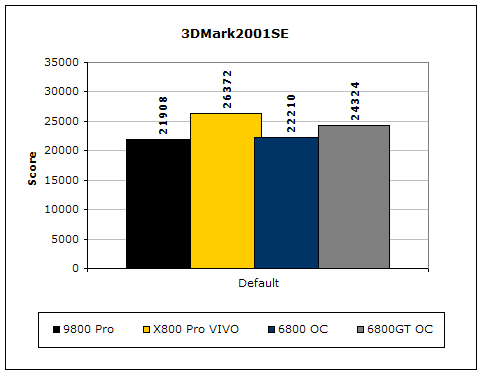
Here, we have the X800 Pro VIVO in the lead. Although the 6800GT OC has more pixel pipelines, it still loses in 3DMark2001SE. I guess this is why the top benchmarks are still done with ATI cards. Something fishy going on perhaps?
3DMark2003
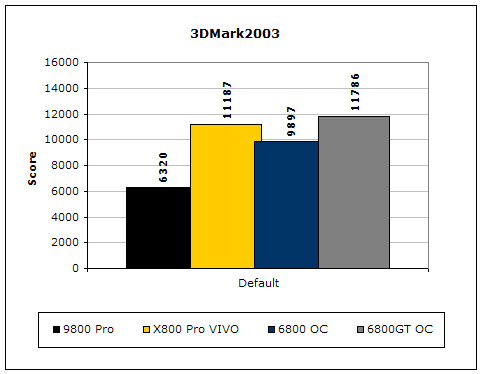
Unlike 3DMark2001SE, 3DMark2003 is extremely GPU dependent. Increases in CPU, FSB, and memory latencies do not affect the benchmark all that much. Although there are a bunch of cheating drivers going around, this is still a good benchmark to test the capabilities of the video card. The results are as they should be, with the 6800GT leading the way.
3DMark2005
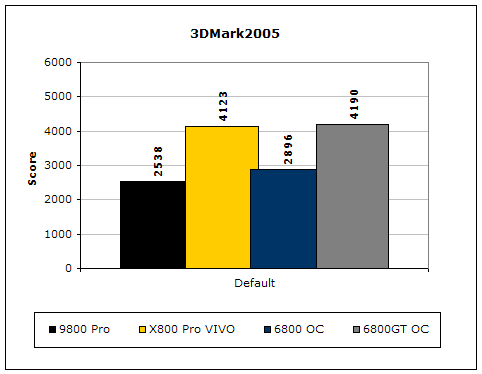
Much like 3DMark2003, 3DMark2005 is extremely taxing on the graphic card. There are currently some controversies about the new benchmark being ATI biased. However, the results still show the 6800GT in the lead by only 70 points.
Code Creatures
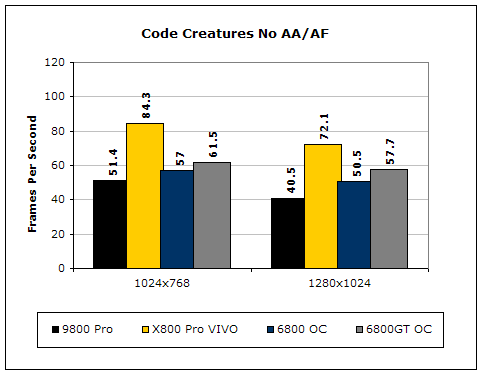
Although Code Creatures is an old benchmark, it is still capable of pushing the video card to the limits. The video test is very intensive and responds to any tiny increase in clocks. The X800 Pro VIVO managed to score extremely high in this benchmark. It leads the competition with a good 30 FPS gap.
Results Continued
Aquamark 3
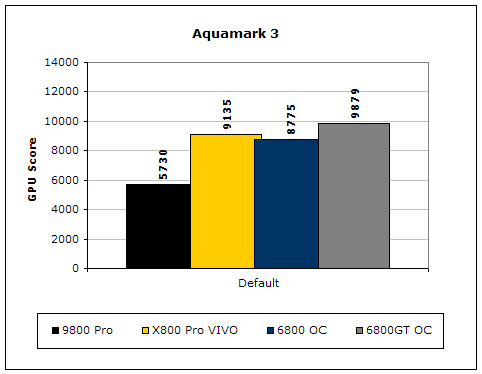
Aquamark3 is another synthetic benchmark that drives the video card to the max. Again, the 6800GT wins with a good 700 point lead.
Synthetic benchmarks only give a general idea of how each video card performs. From the results above, there is no clear winner. Let’s continue on with some real world benchmarks to test the true performance that you would gain. Afterall, the main reason of making a purchase on a high end graphic card is to enhance your gaming experience. The three gaming benchmarks I used are the most current games that benefit greatly from a good video card. Doom 3 is a graphic intense game that is based on the ever popular OpenGL. Far Cry is based on Direct3D, and Unreal Tournament 2004 is pretty much one of the top multiplayer games that enthusiasts play.
Doom 3
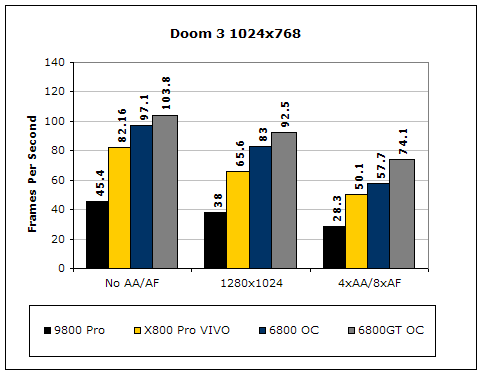
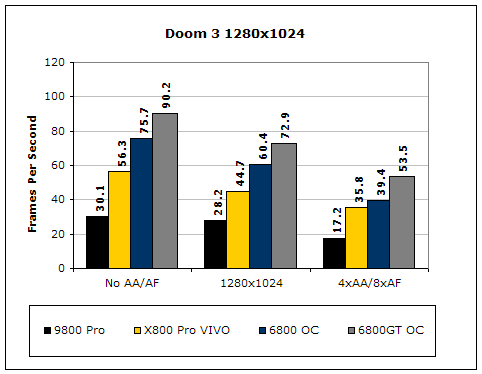
From the results, the Geforce 6800 clearly performed better than the X800 Pro. Nvidia always has strong OpenGL support and Doom 3 is the perfect example. Even the vanilla 6800 produced faster frames per second than the X800 Pro.
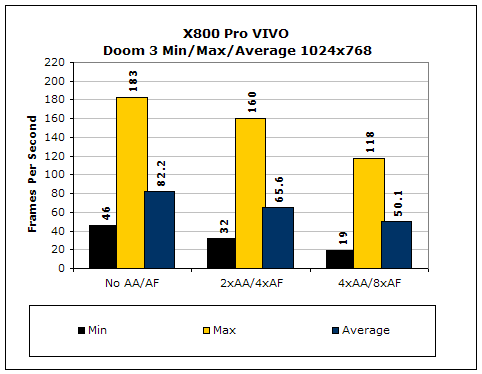
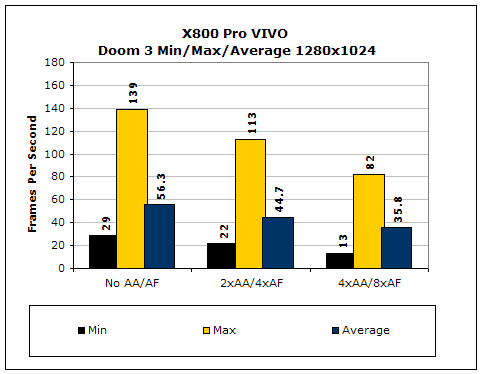
The X800 Pro VIVO provided smooth frames throughout the benchmark. The minimum FPS occurred during an intense fight scene and lights were coming from all angles due to the heavy fire. Overall, it will definitely be able to keep gamers gaming in a smooth environment.
While playing Doom 3, I noticed that the X800 Pro VIVO produce blurry images and text during the in-game menu. After some help from our fellow member, this problem only occurs with certain “versions” of Doom 3. The way to fix this is to change the configuration file. After fixing the problem, everything was crisp and clear. Although most will blame ATI for this, it is definitely not their fault. The fault lies within the game itself. It seems to be more “biased” towards Nvidia cards.
Far Cry
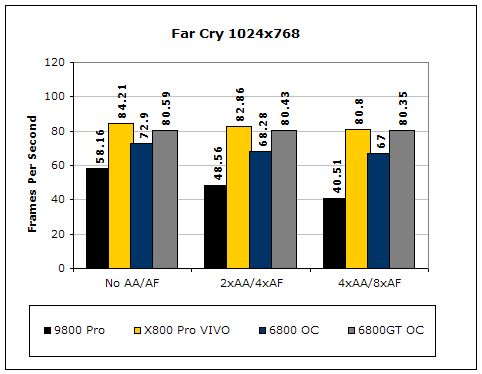
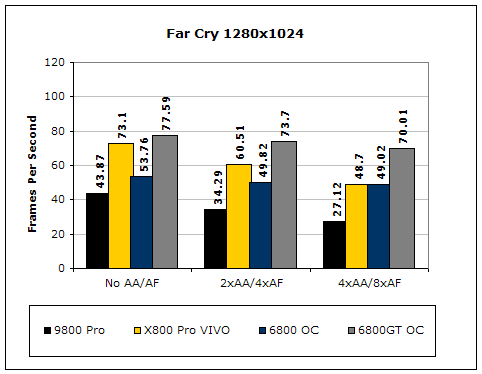
Like Doom 3, Far Cry is an extremely video intensive game. While Nvidia is known for their OpenGL performance, ATI is better known for their Direct3D support. It runs faster than the Geforce counterpart and maintains the steady frames even at 4xAA/8xAF. However, this only happened under the resolution of 1024x768. It started to lose it’s hold when the resolution was turned up. At first I didn’t believe the results I was obtaining, so I conducted the tests multiple times. Each time yielded the same results.
Unreal Tournament 2004
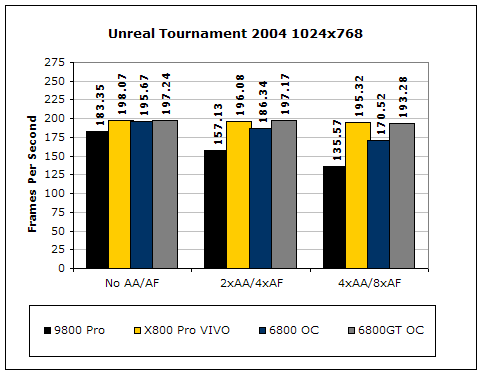
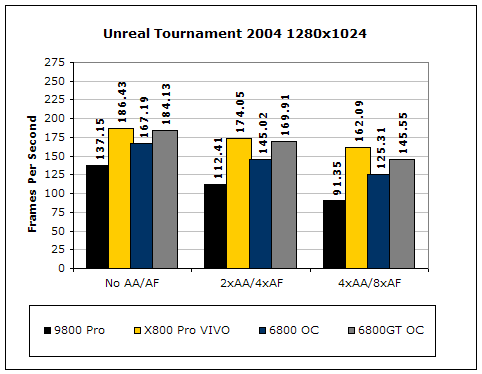
Unreal Tournament is very popular game due to its online multiplayer capabilities. Here, the clear winner is the X800 Pro VIVO.
Overclocked Results:
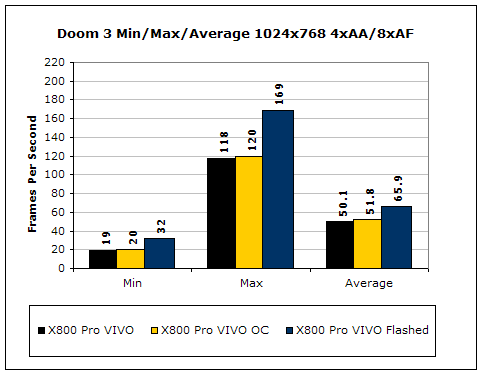
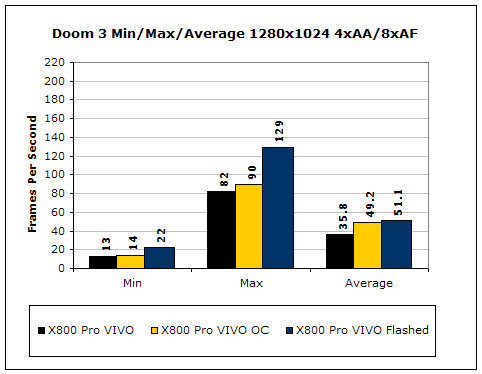
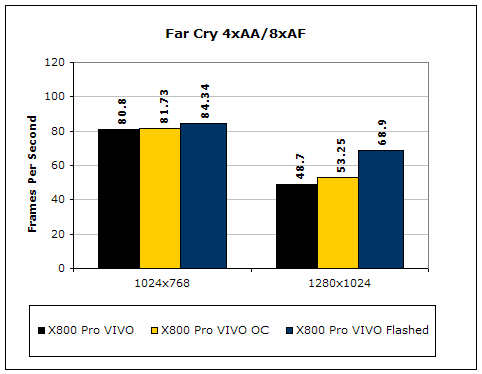
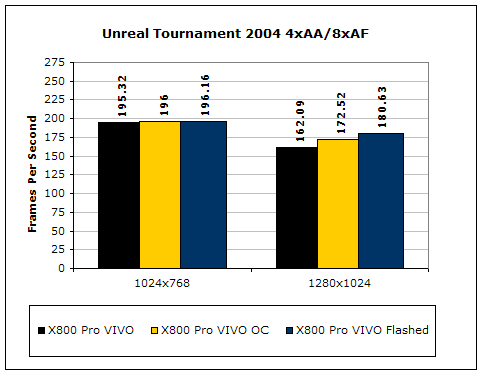
Overclocking the X800 Pro VIVO did help with the performance. What really helped was the flash to the X800XT PE. Far Cry gained the most increase after the flash, while Doom 3 only gained a bit. ATI really needs to improve their OpenGL performance, as there are rumors of many future games being based on it.
Conclusion and Thoughts
All ATI Radeon X800 Pro graphic cards are pretty much the same. Enthusiasts will usually make the purchase on the one with the lowest price. However, PowerColor’s X800 Pro VIVO seems to be just about the best available. The card comes in at a relatively cheap price, just a few more bucks than a standard X800 Pro. Bundled in the package is Hitman Contracts, which retails at about $49.99. Another game included is Counterstrike: Condition Zero. The single player mode is nothing exciting, but the multiplayer will keep you on your toes. Counterstrike is still one of the best multiplayer FPS available and I personally think that it’s a great addition to the package. Granted, the game can be had for less than $19.99, but with the way Steam works now, you’ll definitely want to have a registered key all to your own. Along with the extra software is the VIVO capabilities. Multimedia enthusiasts can now edit, record, and watch videos with ease and transition between a regular TV and the PC. The VIVO option really expands the wide range of uses for a graphics card. With multimedia and gaming enthusiasts satisfied, overclocking enthusiasts can be happy as well. The VIVO comes with the exact same hardware components as the X800XT PE. With a simple BIOS flash, the Pro turns into a full fledged XT PE. Although Nvidia’s Geforce 6800GT provides tough competition and better gaming performance, it really comes down to the buyer’s choice. Should they go with bad 2D image quality but excellent 3D performance? Or should they go with great 2D image quality and good 3D performance? If it was up to me, this PowerColor X800 Pro VIVO would be the definite choice. There is no doubt about it that it wins the InsaneTek Must-Have Award. $439 for an X800XT PE? Why would you want to think twice?
Pros:
- Great 2D image quality
- Great 3D performance
- Single slot cooler
- Quiet
- Less power hungry than Nvidia counterpart
- Has VIVO function
- Two good bundled games
- Flashes to X800XT PE!!!
- Practically only $439 for an X800XT PE
Cons:
- ATI’s weak OpenGL support
- Weak in overclocking

We would like to thank PowerColor for providing us the sample. If you have any questions or comments, feel free to hit us up in the forums. You can also check out more of our latest reviews on the front page.