

OCZ Platinum PC4000 EB 2GB Dual Channel Kit
Introduction
It was not too long ago that OCZ released their Gold PC4000 2GB part for the overclocking enthusiasts. We were more than happy with the results as the UCCC based memory took us to 280MHz quite easily with low voltage. The trade for that high speed were the loose latencies required. Enthusiasts did not quite complain but they did mention how it would be nicer to have memory that ran at high speeds but with tighter timings. Of course, OCZ knows everything we say and want and now they are back with yet another 2GB dual channel solution. This time the memory comes with tighter timings at a speed of 250MHz. Tighter timings at 250MHz sounds pretty appealing to me. Who wouldn’t want fast speed with tighter timings?
The only question now is whether the new platinum 2GB solution can overclock with the tight timings. It would seem pretty hard to do without increased voltages. It is common sense that in order to scale higher with tight timings, more voltage is generally needed. OCZ surprised us all with their Gold PC4000 2GB, so I am already dipping into this Platinum PC4000 EB 2GB with great expectations.
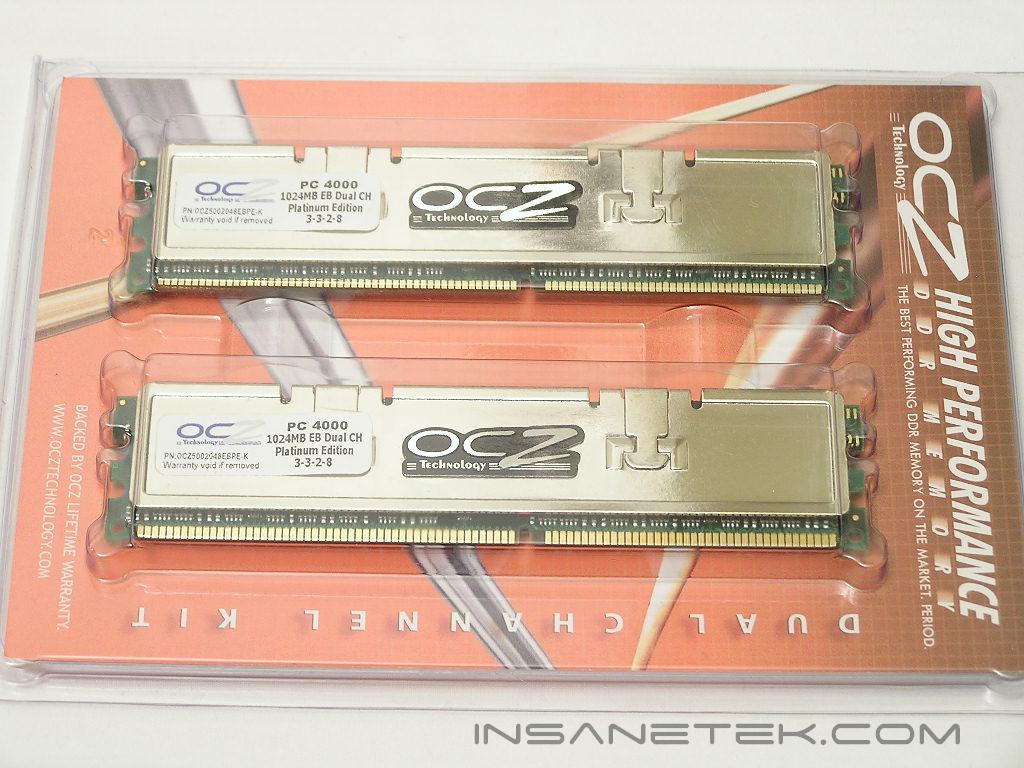
OCZ Platinum PC4000 EB 2GB
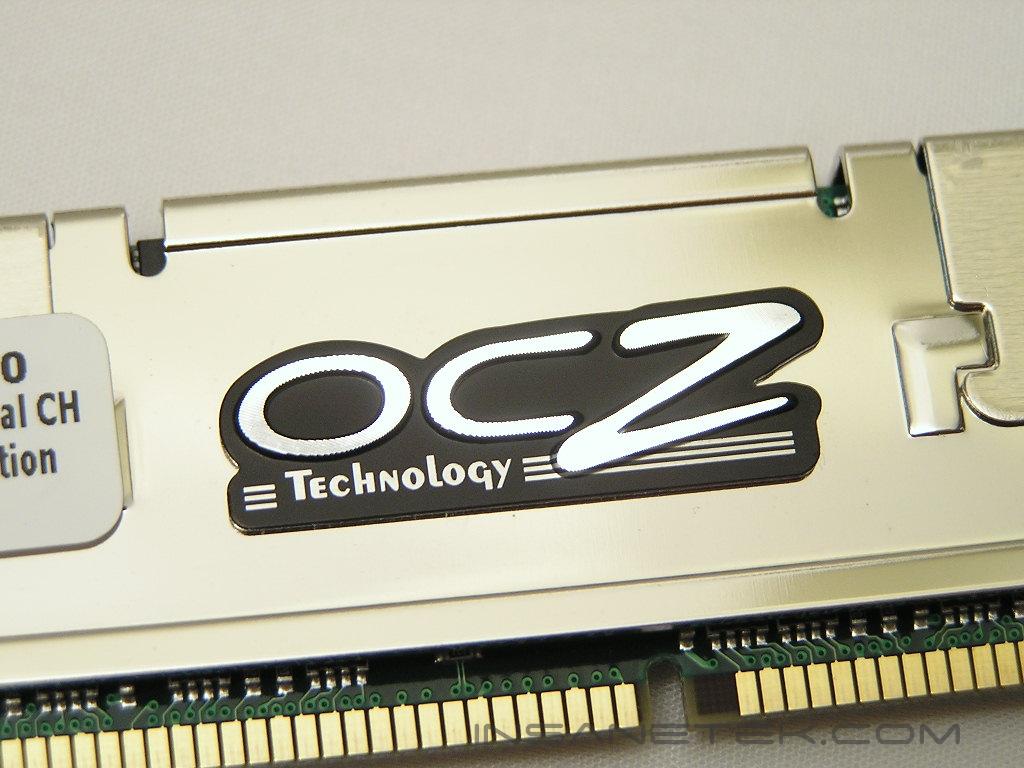
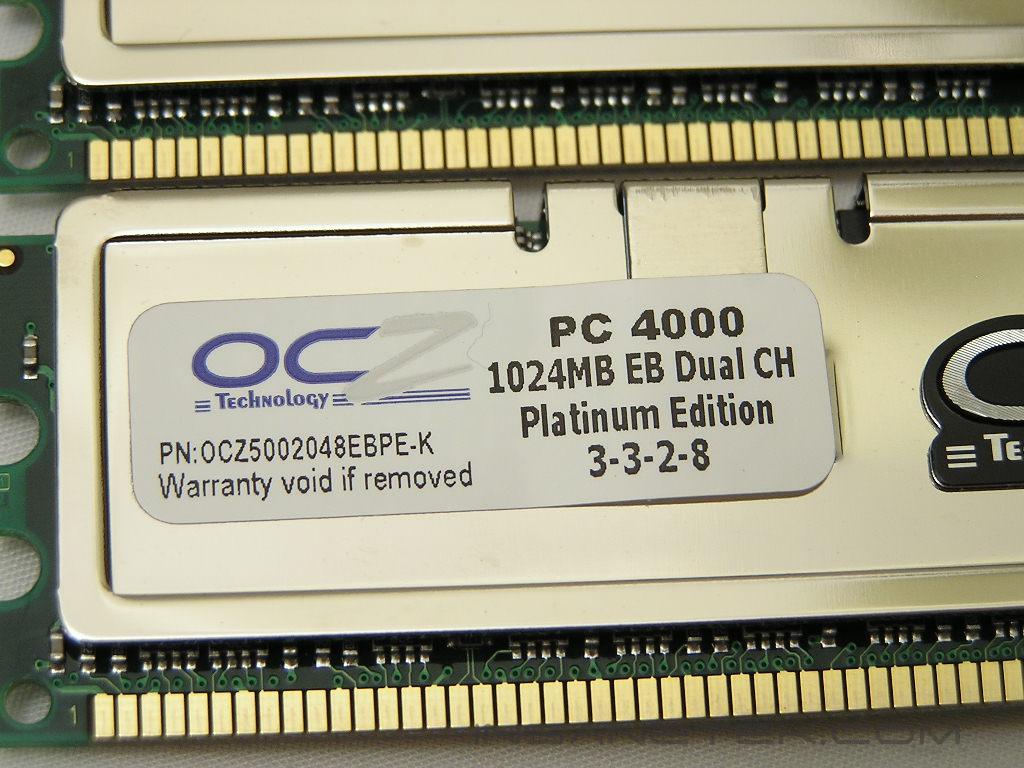
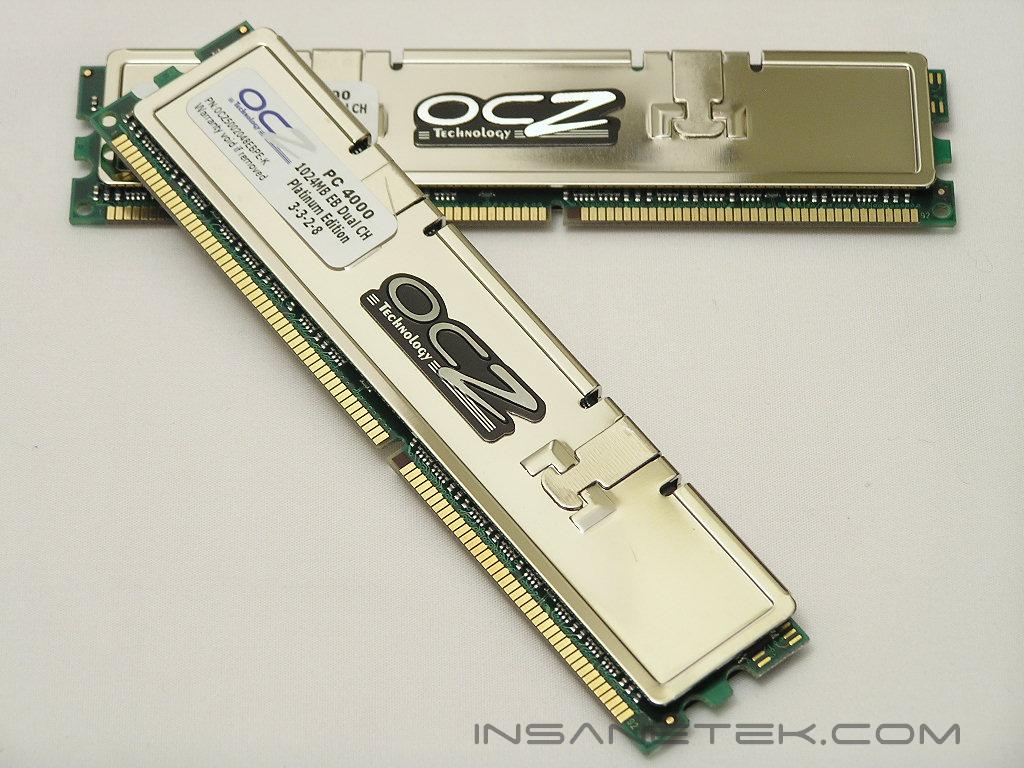
The reason why this particular memory is categorized under OCZ’s Platinum series is because it aims for low latencies. As with all their other Platinum memory, the PC4000 EB comes with copper heatspreaders in a platinum mirror finish. It just looks absolutely stunning. Centon’s Advanced line with the white heatspreaders and OCZ’s Platinum line are my two favorite.
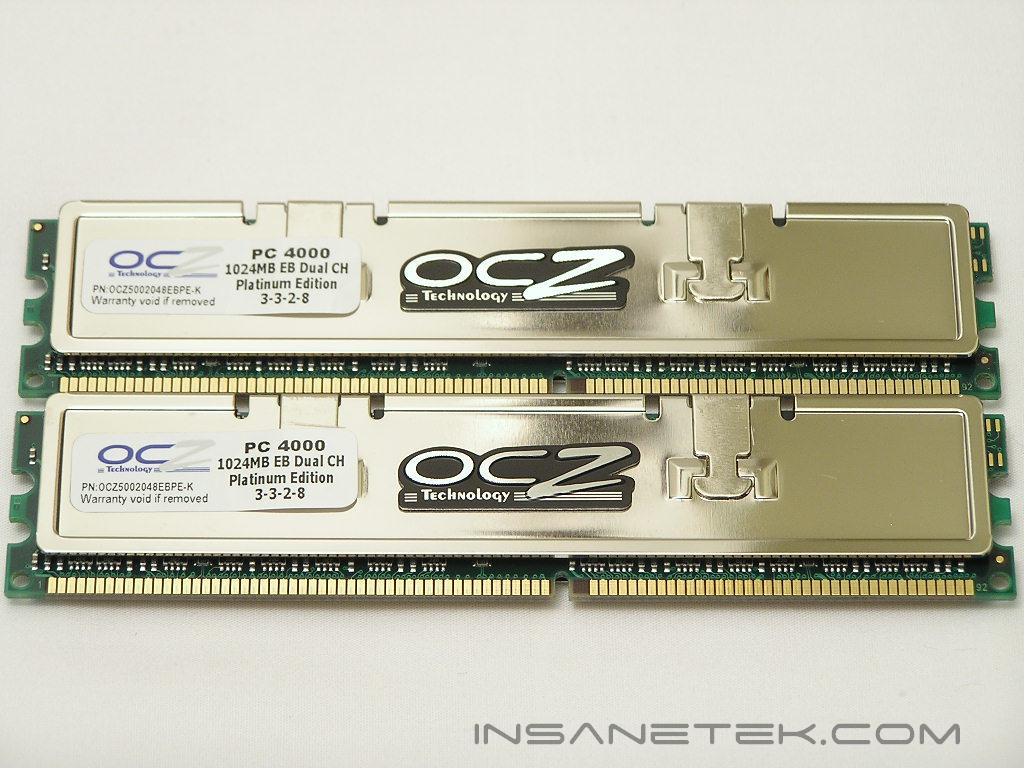
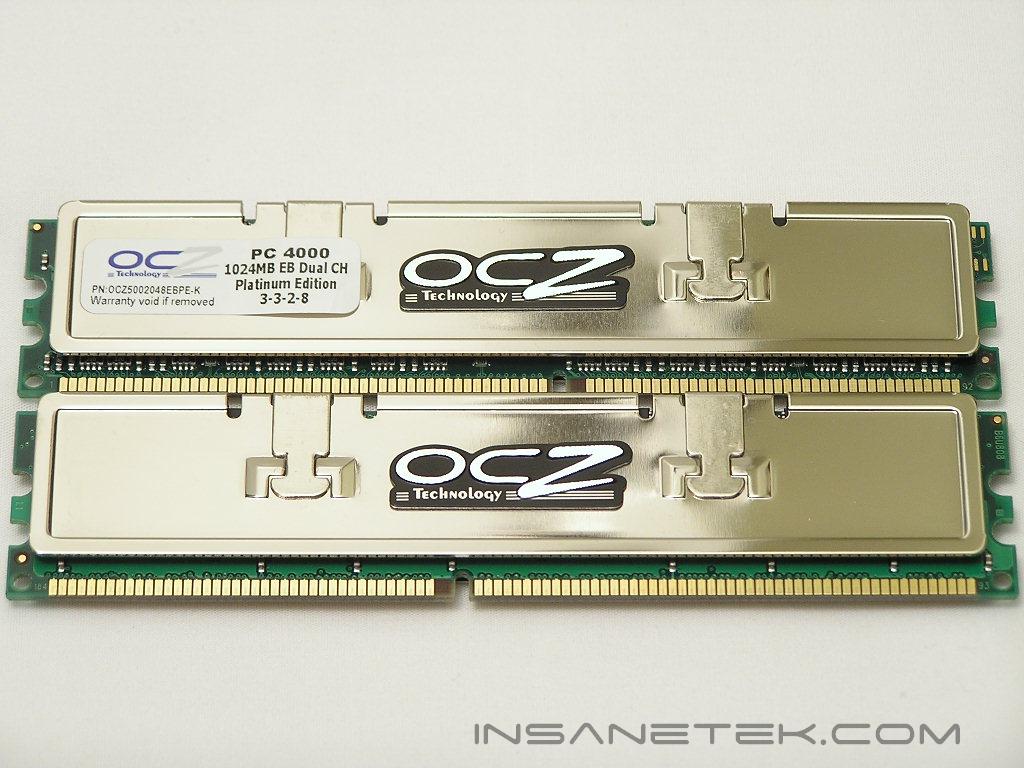
The Platinum PC4000 EB comes with a speed rating of 250MHz and timings of 3-3-2-8 1T with a voltage rating of 2.8v. The memory ICs used to allow such low latencies at high speeds would be the Infineon CE-6. It was quite a shock to me since I did have experience with them in the past and they have never allowed such speeds and timings. Perhaps the newer batches are better and are allowing better overclocks. The even more surprising part is that these CE-6 chips are rated at 6ns, which means it is meant to run at 166MHz or DDR333. If these modules are rated to run at 250MHz, it means that these ICs are definitely capable of yielding some nice overclocking headroom. OCZ was one of the first, if not the first, to use Brainpower PCB on their enthusiast memory. They continue the trend with the same Brainpower 808 on these Platinum PC4000 EB sticks.
Test System and Overclocking
Test System:
- AMD Athlon 64 3000+ Venice
- DFI LANParty UT nF4 Ultra-D
- 2 x 1GB OCZ Platinum PC4000 EB 2GB
- ATI Radeon X800XT
- Arctic Cooling Freezer 64
- SilverStone ST65ZF
- BIOS 623-3 and orange slots
Overclocking:
Keep in mind that during overclocking, the latencies are as follows: CAS-TRCD-TRP-TRAS
The first thing that I did was to see the lowest voltage required to run the rated speeds and timings. The memory only needed a whopping 2.6v! That is better than awesome. This means that ALL motherboards will have no trouble running these suckers. I then proceeded to see just how low the timings would go at the rated speed of 250MHz. After some fiddling and Memtest testing, the memory was able to go as low as 2.5-3-2-5. It was not much lower than the rated timings of 3-3-2-8, but it is still a bit lower. Now that we know the memory is capable of running 250MHz with timings of 2.5-3-2-5, it is time to go drop the speed and see how much lower the timings can go. From all the my past encounters with Infineon chips, I have yet to see it run 2-2-2-5, so I was expecting nothing more than 2-3-2-5. Sure enough, I was right. The memory ran just find at 200MHz 2-3-2-5 with 2.6v. The next step was to find just how high the memory will overclock with these low timings. The memory reached 225MHz, which seems to be the max Infineon chips are reaching. The Corsair PC3500LLPRO and PC4400PRO, both of which used Infineon ICs, topped out at that speed with the same timings. There is no need to even bother to try 2-3-3 timings since we know that these PC4000 EB can do TRP of 2. Going back to the timings of 2.5-3-2-6, I shot for the highest overclock possible with 2.6v. It brought me nowhere. I had to increase the voltage to 2.7v before the memory would budge to 255MHz. 5MHz is not all that much so I was a little disappointed, but I was not really expecting much from these Infineon chips. Next up was to loosen the timings to the rated 3-3-2-8 and go as high as possible. The sample I received topped out at 275MHz. Nothing I did allowed higher speeds. 280MHz was Memtest stable, but it did not allow Windows to load. I then proceeded to see how much more the memory would allow with looser timings, even though it defeats the main purpose of these Platinum sticks. Timings of 3-3-3-8, 3-4-3-8, and 3-4-4-8 all did nothing. It seems like I was already stuck. What is interesting is that when the voltage was upped to 2.8v, the memory would not overclock as well. I guess some sticks are more enduring than others when it comes to increased voltage.
Overclocking Results:
- 200MHz 2.0-3-2-5 1T 2.6v
- 225MHz 2.0-3-2-5 1T 2.6v
- 250MHz 2.5-3-2-6 1T 2.6v
- 255MHz 2.5-3-2-6 1T 2.7v
- 275MHz 3.0-3-2-8 1T 2.7v
Encountered Issues:
There are some issues that have been circling around the Platinum PC4000 EB 2GB for a while now regarding game stability. With the memory running at a maximum overclock of 275MHz-280MHz, games would artifact or become unstable even when Memtest is 100% error free and Super PI 32M passes without a hiccup. There is also another problem regarding the integrated memory controller of AMD Athlon 64 processors. Many enthusiasts are encountering different overclocking results with different processors. The worst seems to be the non-FX San Diego core. All the others overclock just fine, but it is just with these non-FX San Diego cores that overclocking becomes poor. With those problems in mind, I began another stage of stability testing. I found it quite weird that the game benchmarks, Far Cry and UT2K4, passed without a problem. I fired up CS:S and started to do some fragging, and within 10 minutes into the game, artifacts began to appear. It was not a video issue since my video card was not even overclocked. The CPU was more than capable of handling the HTT bus speed. It appeared to be a memory issue. If you can recall back in the days when I reviewed the Kingston HyperX PC4300 memory, similar incidents occurred and concluded to be a memory issue. I slowly dropped the memory frequency until I was able to game in CS:S without any big triangles. The final frequency turned out to be 265MHz with timings of 3-3-2-8. Now with that issue out of the way, I switched out my week 17 Venice for a San Diego I had lying around and proceeded with the testing. Just like what everyone else was encountering, the memory would only overclock to 260MHz. Unfortunately I did not have a San Diego core FX processor so I couldn’t test to see if it would be ok in an FX San Diego.
Results
A series of memory intensive benchmarks will be run to test the performance of our sample. The other tests will be based on common benchmark programs, such as 3DMark and PCMark. Real life performance differences will be tested through current games, such as Far Cry and UT2004. Memory bandwidth benchmarks will be based off of SiSoft Sandra and Everest Home Edition. Super PI and PiFast will also be used to test memory performance, as the benchmark benefits largely from FSB increases.
SiSoft Sandra Memory Bandwidth
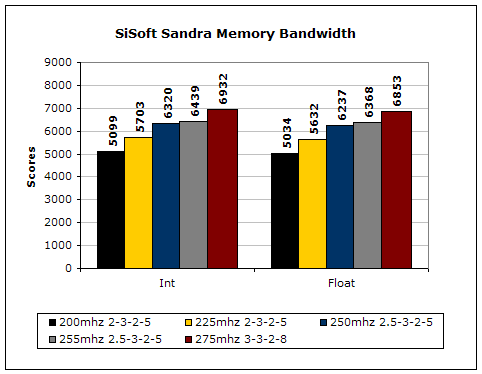
SiSoft Sandra is the most widely used memory bandwidth test. It can tell you the increase in performance from just lowering the latency timings.
Everest Home Edition
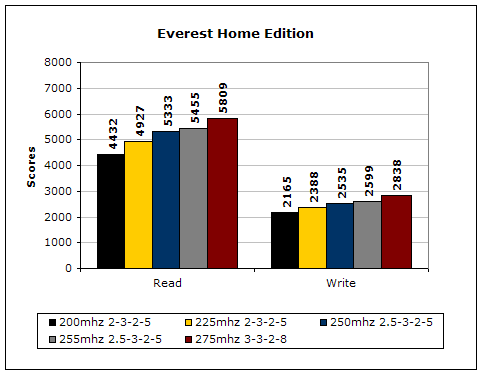
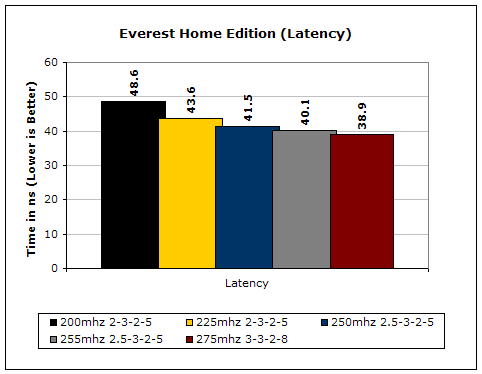
Much like Sandra, Everest Home Edition tests the memory’s ability to read and write data in large chunks. The results show that the lower latencies seem to help just a little with performance.
3DMark2001SE
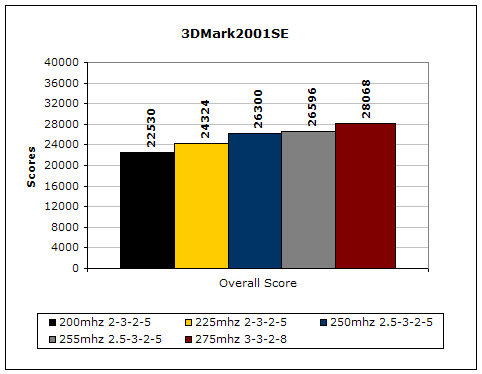
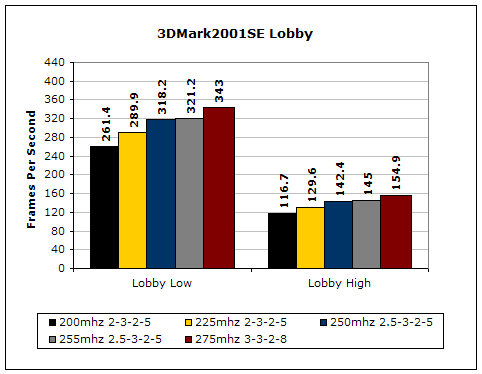
3DMark is likely the overclocker’s favorite benchmark. Unlike 3DMark2003, which stresses mainly the video card, 3DMark2001SE tests all of the system’s main components. Increasing the CPU speed, memory speed, and video card speeds will result in higher results in the final score.
Results Continued
Far Cry
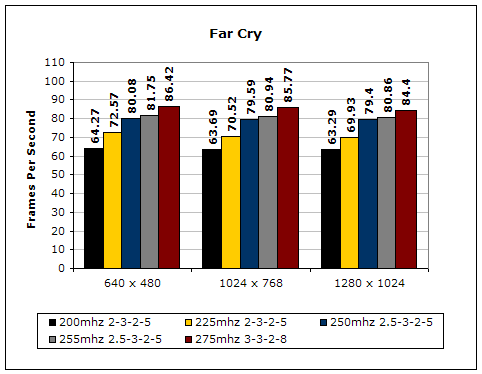
Since Far Cry is a game, the performance results will be very similar to 3dMark2001. I ran the benchmark at 640x480, so the benchmark would not be too GPU dependent. The tests under 1024x768 and 1280x1024 are an approximation of what kind of frames you’ll be getting. While the results are similar to 3dMark2001 in performance, this benchmark will give more significant results, because Far Cry is a lot more demanding.
Unreal Tournament 2004
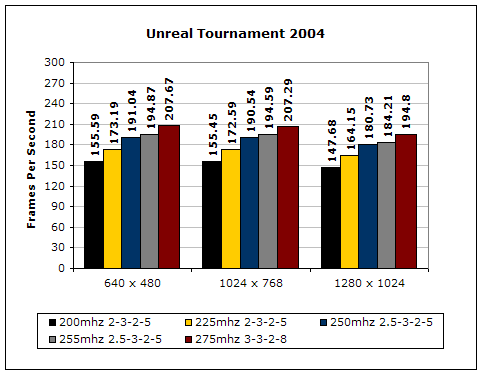
Unreal Tournament is another popular game engine to test overall system performance. Here, we can see the same results as Far Cry and 3dMark2001. Like Far Cry, UT2004 was also run at 640x480 to limit GPU dependency. The other resolutions provide an approximation of actual game play performance.
PCMark2002
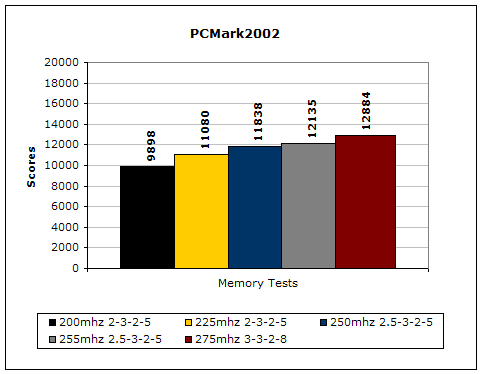
PCMark is another benchmark created by Futuremark. It tests the memory compression and decompression speeds in small to large chunks of data.
Super PI
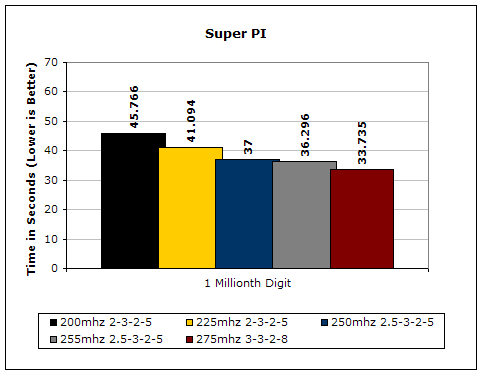
Since the value of PI is an infinite value, Super PI is a speed test to find the digit you’re looking for. In this case, we chose the millionth digit. Super PI benefits greatly from higher FSB, as well as low latencies.
PiFast
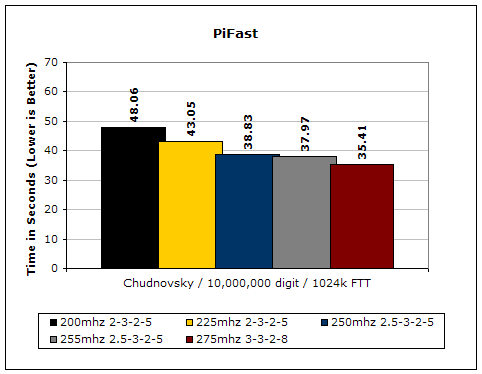
PiFast is similar to Super PI. The results can be greatly affected by a slight adjustment to the memory megahertz and latency.
Conclusion and Thoughts
I must admit that I was ready to award the Platinum PC4000 EB with a great award right from the start. The results that enthusiasts have been reporting were exceptional. I was expecting them to be nothing short of greatness. After spending some time with the memory, I have come to a different conclusion. Don’t get me wrong here; the memory is not bad. It is great, but there are some issues that need to be taken into account. The overclocking potential of the memory is excellent and those results are further sweetened by the low latencies. If you care to compare the results of these modules to OCZ’s Gold PC4000 2GB, you will see that the majority of the tests were dominated by the Platinum. Unfortunately the highest overclock of 275MHz was not 100% stable for every day gaming. The memory sailed smoothly when running synthetic benchmarks, but it gave artifacts when running a real world application. That real life application can vary too. Far Cry and Unreal Tournament 2004 were both artifact free, but as soon as I fired up CS:S, the game started to artifact. Is the memory unstable? It’s quite hard to say. The first reaction would definitely be that the memory can’t handle the high speeds and should be considered unstable, but the fact still remains that other games were 100% fine and Memtest was fine and even Super PI 32M was fine. Mind boggling isn’t it? The next problem comes with the non-FX San Diego core. The memory just would not overclock as well with that core when compared to other cores.
The Platinum PC4000 EB is definitely fast for a 2GB solution. The unfortunate thing is that it carries some unnecessary baggage along the trip. Would I pick these over the Gold PC4000 2GB? I sure would any day. I am actually running these in my personal system as you read this. The thing to remember is to pair this memory with a non-FX San Diego core processor. If the problems did not exist, the Platinum PC4000 EB would have easily earned the Highly Praised Award. But because of these issues, I can only recommend it at the very most. It certainly won’t be for everyone out there. The Gold PC4000 2GB will be a more suitable choice for the general enthusiast, albeit the slacker timings.
Pros:
- Beautiful platinum mirror finish heatspreaders
- Low latencies at high frequencies
- Affordable at roughly $300
- Great performance
- Overclocks very well with low voltage
Cons:
- Game stable overclock is lower than highest stable overclock
- Overclocking result varies with CPU core

We would like to thank OCZ for providing us the sample. If you have any questions or comments, feel free to hit us up in the forums. You can also check out more of our latest reviews on the front page.
Looking back: Where Are They Now: OCZ