

Kingston HyperX PC4300 1GB Dual Channel Kit
Introduction
Kingston Technology is a vastly renowned memory manufacturer. They’ve been a key player in the memory market for years and handle billions of dollars of sales a year. It just goes to show how reliable they are when it comes to making system memory. They have mainly focused on OEM memory, as well as value memory for typical computer consumers. But similar to many of the companies today, they’ve branched out with a line of memory dedicated to gamers and overclockers.
Many will probably find this surprising, but the HyperX line is only a little under 2 years old. The HyperX line of memory is backed up by low latencies as well as a special PCB design. PCB design does play a major factor when it comes to memory making. Designs can influence the memory performance as well as overclock abilities, i.e., traces and routing can be shortened to produce faster memory transfers. I remember when I went to the local Fry’s Electronics and saw the first stick of HyperX. I thought to myself, “Kingston makes overclocking memory?” The blue aluminum heatspreaders attracted me, as well as the price and the low latencies. I’m a big fan of low latency memory. I purchased my first two sticks of HyperX PC3000 256MB and was pleased with the great overclocks I obtained. With a mere 2.85v in my A7N8X, I hit a whopping 223FSB from a rated 188FSB. Sure it may not seem like much now, but that was more than a year and a half ago.
When the Winbond BH5 hype began, top overclockers realized that Kingston’s PCB was much better than what the competition provided. Many of the world’s top 3DMark scores are obtained with the use of Kingston’s KHX3200. I had a couple of these sticks as well, and hit a whopping 250FSB with just 3.2v. It’s a shame that I sold it. If you’ve checked out our review of the OCZ DDR Booster, you’ll see that I’ve had great success with the KHX3500. With all the talk about low latency memory, how does their high megahertz memory perform? That’s what we’re here to find out. But before that, I must start with a brief introduction about the tour I received at Kingston Technology.
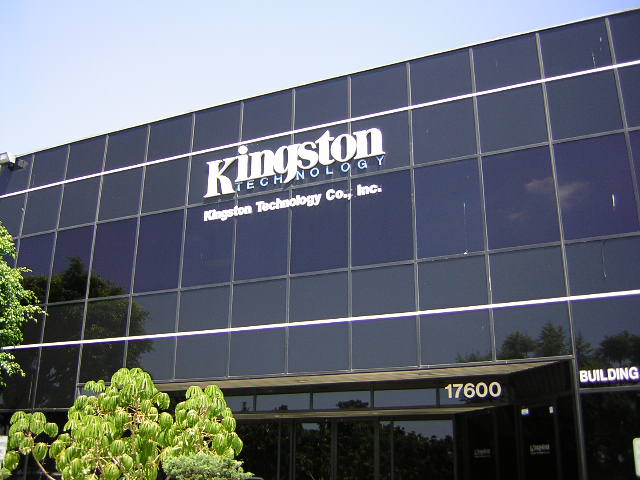
The Kingston Tour
I was fortunate enough to live close by the Kingston headquarters. It was pretty much next to Fry’s Electronics and only required 10 minutes of driving time. Heather, Kingston’s head Public Relations Manager, was kind enough to arrange for a tour with Kingston’s Field Engineer, Louis. Right before I went in the Kingston office, I was greeted with security and was directed to wear anti-static coats. It’s always a good safety precaution to wear the coats around such a sensitive facility.
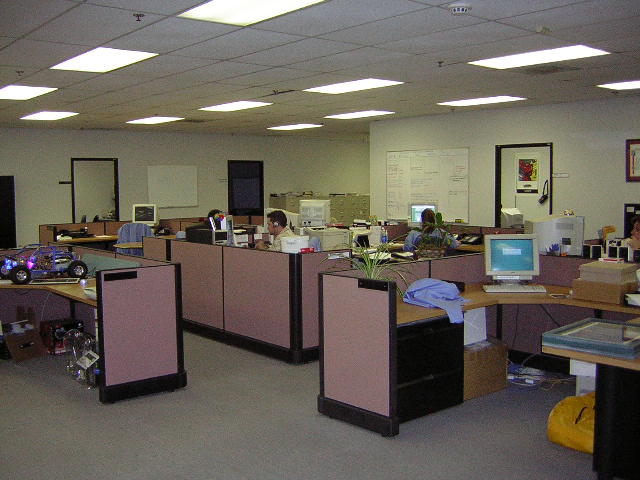
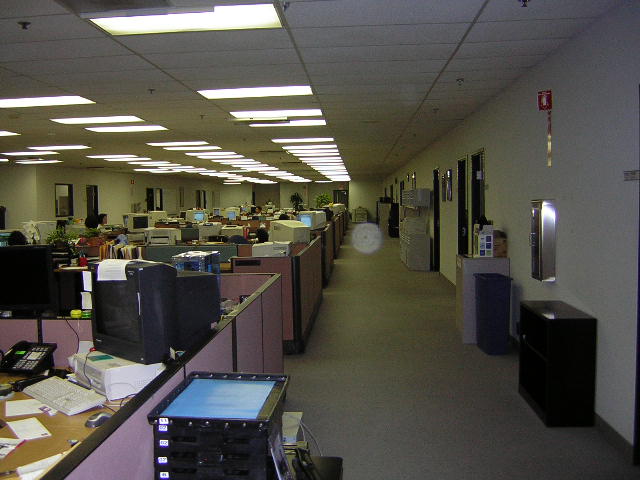
I stepped into the office cubicles and found it to be pretty silent. Everyone was busy doing serious work and no one was horsing around. In these pictures you can see the spacious room along with some of the employees. The two owners of Kingston Technology sit right in the middle with them. Unfortunately, they were not present at the time of my tour.
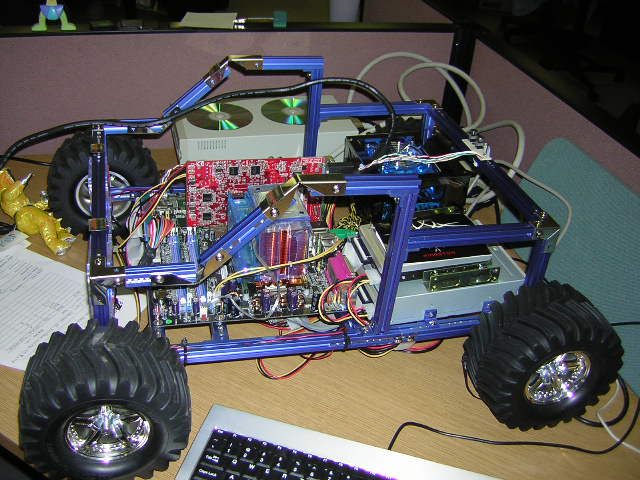
Here you can see Louis’s toy system as well as his testbed system. At the time of my tour, they were conducting tests in search for candidates for Kingston’s HyperX DDR2. Unfortunately Louis was smacked in the face with a cheap PCI video card and was unable to do any gaming with the system.
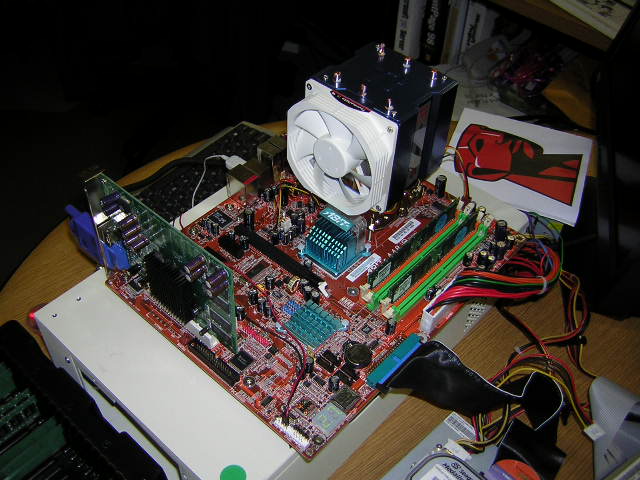
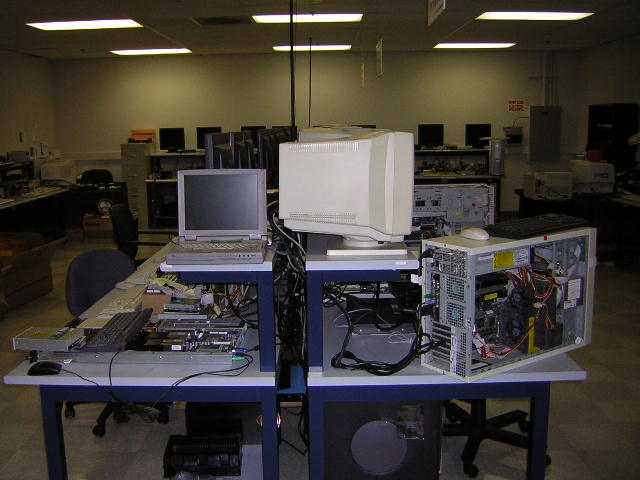
Our next stop of the tour was the testing labs. Kingston does a lot of serious compatibility testing to ensure that the memory runs nice and smooth in your system. They have many motherboards in the test labs to do their work.
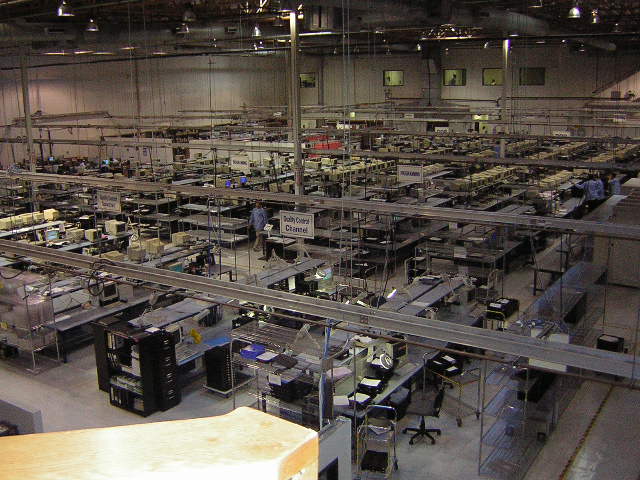
One reason for Kingston’s success in the memory industry is that they manufacture their products right in their facilities. All the high end million dollar equipment is stationed downstairs in their underground facilities. Products are made in a fast paced environment to meet the demands of the consumers. Right after the products are made, it goes through the first series of torture tests, consisting of burning in and running 1s and 0s before it is packed to be shipped off.
Kingston HyperX PC4300
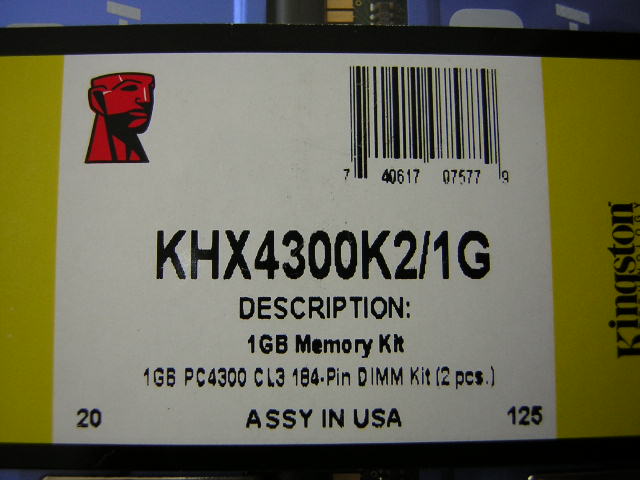
The package remains consistent with all their dual channel kits. It’s a small plastic container to house the two sticks of memory; and inside is a small sheet of installation instructions and warranty information.
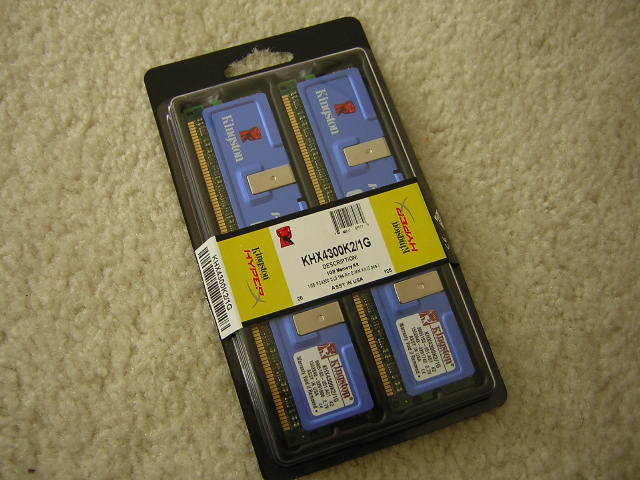
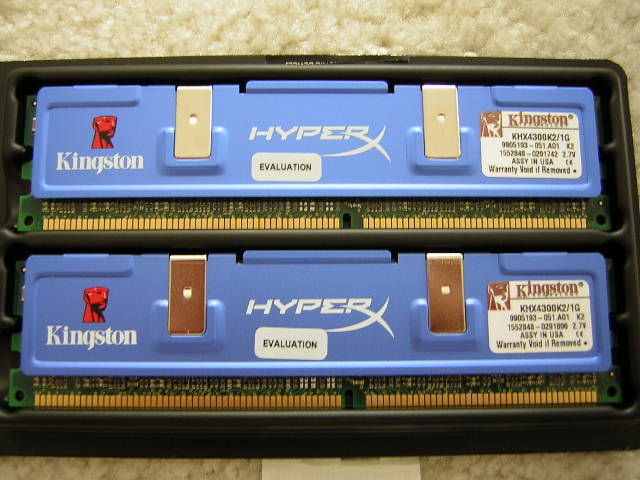
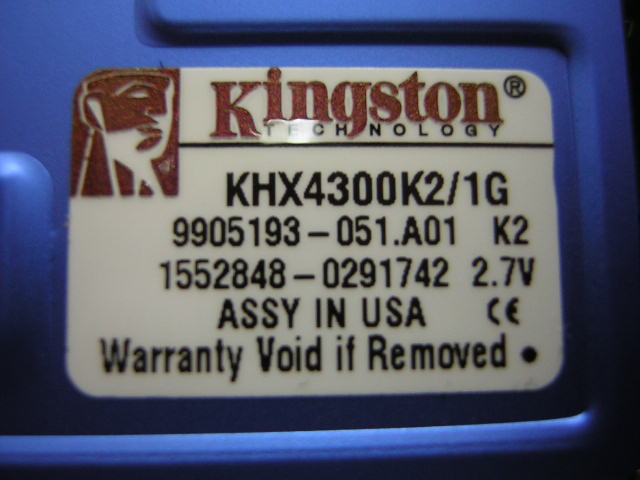
The modules are clothed with Kingston’s blue aluminum heatspreaders and a small sticker label, which provides the part information. The dual channel kit I received was a 1GB kit. Kingston has rated the memory to run at 266FSB with latencies of 3-4-4-8 at 2.7v.
Test System and Overclocking
Test System:
- Intel P4 2.4C
- Asus P4C800-E (with droop mod)
- BFG 6800GT (with NV Silencer 5)
- 2 x 512MB Kingston HyperX PC4300
- 2 x 512MB OCZ PC4000 Gold
Compatibility Issues:
Previously, the Abit AI7 was the mainboard in my testbed. It was the perfect motherboard for me. It allowed high overclocks, had high VDIMM options without Abit’s known VTT problem, and it provided excellent performance. My first test with the KHX4300 in the board gave me bad vibes. There were artifacts in just about anything 3D related, whether it be games or benchmarks. I thought I had received a faulty sample and met up with Kingston for an exchange. They reproduced my exact same setup and we tested it in their facilities. The exact same thing happened with another kit of KHX4300. The problem was very frustrating. We couldn’t figure out whether it was the memory or the motherboard. I searched around online for reviews on the Abit AI7 and found that there seems to be an AGP tearing problem. I logged into Abit’s forums and asked around whether if people had the same problems I had. Many have reported that the board is really picky about the memory used. I already came to the conclusion that it could be a motherboard issue until I received the OCZ Gold memory. The OCZ Gold worked flawlessly and even overclocked to an amazing 290FSB on the AI7. This is where I got lost. At first I thought the AI7 didn’t like the Hynix chips, but then the OCZ Gold worked also. What was the difference between the OCZ Gold and the KHX? The answer lies within the model of the chips. The OCZ Gold uses Hynix BT-D5 chips while the KHX4300 used Hynix CT-D43 chips. Throughout my experiences, I’ve had much better success with the Hynix D5. The IC overclocks tremendously well and does not cause any compatibility issues. So to narrow it down, I’ve concluded that the Hynix D43 chips are considered to be inferior to the Hynix D5. It just seems I have the worst luck possible. I had a motherboard that was extremely picky with memory, and I paired it with a chip that wasn’t all that great. Well all is taken care of now since I replaced the board with the P4C800-E. Thus, my testing continued.
Overclocking:
Kingston’s HyperX line of memory has been known to overclock quite well. Unfortunately, the potential of the sample I received was pretty much at its limits. The memory runs beautifully well at its rated speed, timings, and voltage. I started the process with running at 200FSB and found it to yield the same latencies as the OCZ Gold, which was 2-3-3-6. I tried running it a little “underclocked” at 250FSB and was able to run it at 2.5-4-4-7, just like the rated speeds of the OCZ Gold. I raised it back up to 266FSB and tried to lower the rated latencies but found that impossible. I increased the voltage to a max of 3v (I found that to be a sweet spot for overclocking Hynix chips) and found that to be of no help. Going back to finding the highest frequency possible, I started it off at 270FSB 3-4-4-8. Everything ran great and fast until I ran the Far Cry benchmark. The game started showing artifacts and I was forced to stop my process. The game might be a bit more memory intensive than I had imagined. Every benchmark I ran was perfectly fine. 3DMark, UT2K3, UT2K4, and even Aquamark3 were all nice and smooth. Far Cry was the only game that displayed artifacts. I stopped the overclocking process after finding that 270FSB was considered to be unstable. The KHX4300 did not allow a mere 4MHZ increase in speed. The speed of the memory pretty much came to me tapped out. This clearly shows that Kingston does not send out good overclocking samples as many other leading competitors. I got my sample from a random batch, just like how any consumer would receive their memory.
Overclocking Results:
- 200FSB 2.0-3-3-6 2.7v
- 250FSB 2.5-4-4-7 2.7v
- 266FSB 3.0-4-4-8 2.8v
Results
A series of memory intensive benchmarks will be run to test the performance of our sample. The following tests will be based on common benchmark programs such as 3DMark and PCMark. Real life performance difference will be tested through current new games such as Far Cry, UT2003, UT2004, and Halo. Memory bandwidth benchmarks will be based off of SiSoft Sandra and Aida32. Super PI will also be used to test memory performance as the benchmark benefits largely from FSB increases.
Testing Setup:
Kingston HyperX PC4300:
- 200FSB 2.0-3-3-6 1:1
- 250FSB 2.5-4-4-7 1:1
- 266FSB 3.0-4-4-8 1:1 (the maximum stable speed achieved with 2.8v)
OCZ PC4000 Gold:
- 200FSB 2.0-3-3-6 1:1
- 250FSB 2.5-4-4-7 1:1
- 275FSB 2.5-4-4-7 1:1 (the maximum stable speed achieved with 2.8v)
Results:
SiSoft Sandra

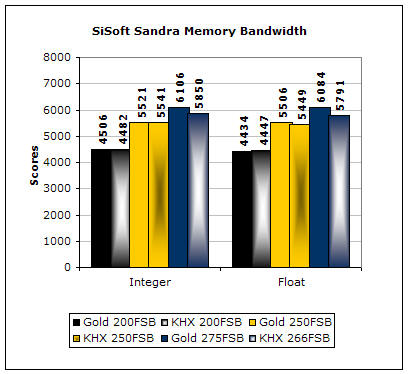
SiSoft Sandra is the most widely used memory bandwidth test. It can tell you the increase in performance from just lowering the latency timings. Looking from the graph above, you can see that the scores for both memory sticks are similar at 200FSB. It continues to be similar when the memory runs at the same speeds and timings. The only difference is that the OCZ Gold creates a good lead with the higher overclock and slightly lower latencies.
Aida32
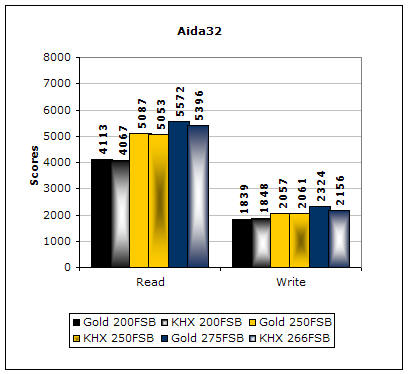
Much like Sandra, Aida32 tests the memory’s ability to read and write data in large chunks. The results are similar to the results in Sandra.
3DMark2001SE

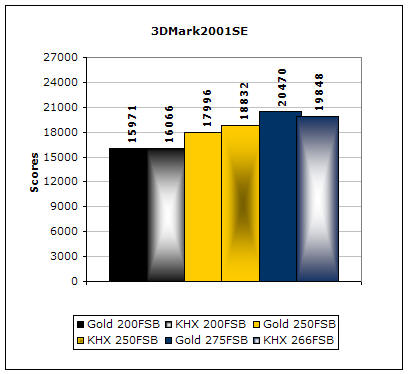
3DMark is probably the overclocker’s favorite benchmark. Unlike 3DMark2003, which stresses mainly the video card, 3DMark2001SE tests all of the system’s main components. Increasing the CPU speed, memory speed, and video card speeds will result in higher results in the final score. Here is the surprising part. As much as I’ve tested, the KHX4300 scores higher than the OCZ Gold. I guess this is where a good routing of traces plays a good role.
PCMark

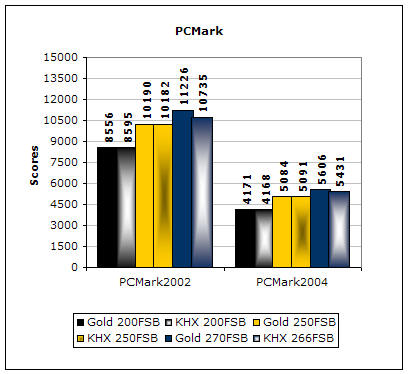
PCMark is another benchmark created by Futuremark. It tests the memory compression and decompression speeds in small to large chunks of data. As I predicted, the results follow the same pattern. There is nothing surprising here.
Results Continued
Finally we have our real world performance game tests. Games usually favor tighter timings to pump out the frames. We’ll see how well each memory performs.
Far Cry
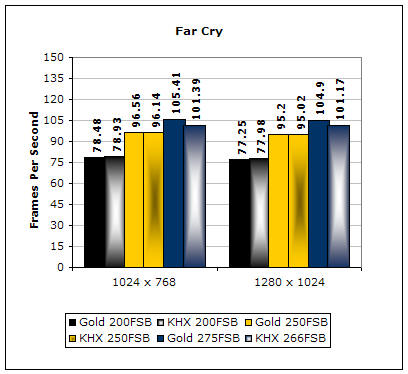
Far Cry is currently one of the most popular games and does a great job of taxing your system. Like the memory tests shown, the two sticks of memory perform just about the same. The only time the OCZ Gold performs better is when then memory has a higher FSB and slightly lower latencies.
Unreal Tournament 2004
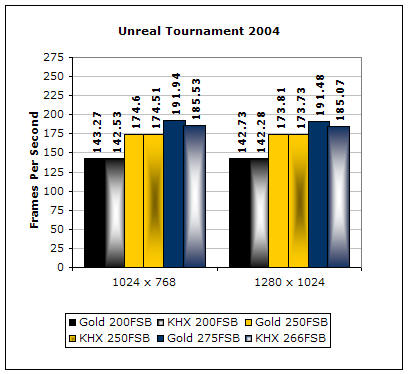
Unreal Tournament 2004 is another popular game that also doubles as a good benchmark. This game really likes memory bandwidth and it shows. The results were pretty much as expected.
Unreal Tournament 2003
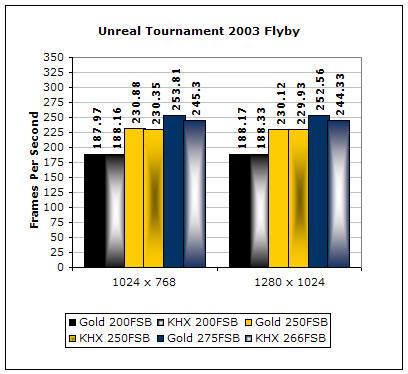
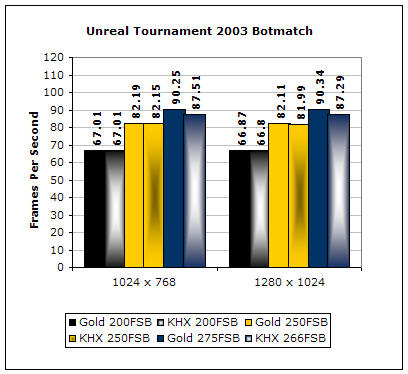
Although UT2K4 is out, UT2K3 is still a gamer’s choice and an overclocker’s benchmark. This game is more memory hungry than the younger brother. Much like the newer game, the performance difference is minimal.
Super PI
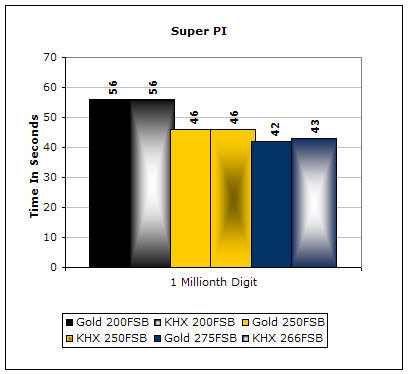
Since the value of PI is an infinite number, Super PI is a speed test to find the digit you’re looking for. In this case, we chose the millionth digit. Super PI benefits greatly from higher FSB as well as low latencies. Here you can see that the OCZ Gold took one whole second less with the increased 9MHZ and slightly lower latencies.
Conclusion and Thoughts
As much as I love Kingston HyperX memory, this was one of the disappointing encounters I’ve had. Kingston does do a great job at making a good PCB, as shown above with the scores of 3DMark2001SE. However, there was a poor choice in using the memory IC. Kingston should have spent some more time picking out good ICs. The memory does run stable at a fast 266FSB as it was rated, but there wasn’t much headroom left for overclockers. A mere 4MHZ increase in frequency resulted with artifacts in a popular game. I guess you can say that the performance of the KHX4300 is just about average, with nothing great and nothing all that bad. But is this memory worth your money? That is one excellent question to ask. Coming in at a hefty $395 for a 1GB dual channel kit, it’s not considered to be one of the cheaper choices. The OCZ Gold PC4000 costs around $300 and produces great results. I guess if you’re a diehard Kingston fan, then by all means, go for it. It does get the job done.
I spoke with the Kingston engineer and received word that upcoming future KHX4300 memory will be based on the new Hynix DT-D5 ICs. That is definitely good news to hear. I’m glad that they reacted fast and changed the white paper specs to satisfy the overclockers’ demands. I hope that they give the new KHX4300 a different model name so that consumers can distinguish which sticks use which memory. If so, be sure to know that InsaneTek will try to get a sample and see just how well the memory will perform with good ICs paired with an excellent PCB design.

Pros:
- Very fast memory with good PCB design
- Runs 250FSB 2.5-4-4-7
- Blue aluminum heatspreaders
- Backed by Kingston’s good lifetime warranty
Cons:
- Bad choice of ICs
- Memory overclocking potential nonexistent
- Expensive
We would like to thank Kingston for providing us the sample. If you have any questions or comments, feel free to hit us up in the forums. You can also check out more of our latest reviews on the front page.