

Corsair Xpert TWINXP1024-3200XL
Introduction
Who was the first to make low latency memory? Corsair. Who was the first to use heatspreaders for memory? Corsair. Who was the first to have pretty LED’s for memory? Corsair. If I was wrong about any of the information, please correct me. But if I’m right, then Corsair is the first to provide enthusiasts with flashy looks. Corsair is always on the lookout for the newest thing. They discovered the great potential in the Samsung TCCD chips and allowed enthusiasts the joy of running extremely low latencies.
What good is running low latencies and buying high end hardware if you can’t show them off to your computer illiterate friends? Benchers get the joy of out crunching numbers, but gamers on the go usually have nothing “special” to display, other than the modded box. Corsair’s Pro series of memory was the memory that changed all that. Gamers were able to provide some additional “fireworks” to catch wandering eyes. This time, Corsair has outdone themselves with a whole new next generation of flashy looks. Corsair introduces their Xpert line of memory, the first to feature an LED display. The LED’s come with a default setting and can be programmed however you wish.
Corsair Memory Dashboard Software
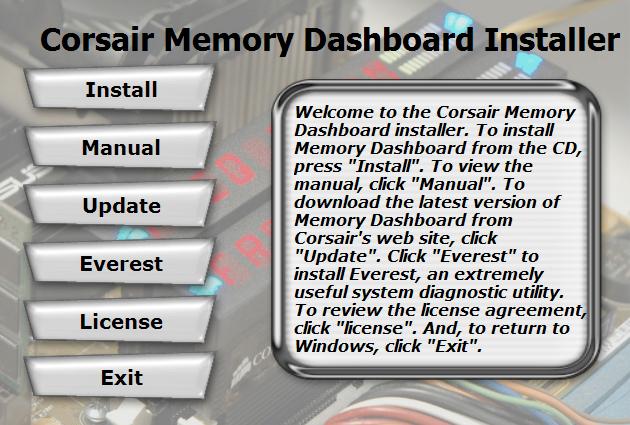
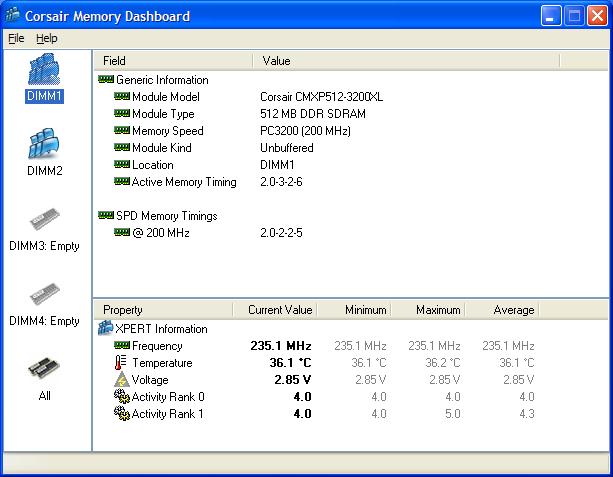
In order to customize the LED’s, you’ll need to install Corsair’s Memory Dashboard software. The software comes on a drivers CD and can also be downloaded off Corsair’s website. The drivers CD also comes with an install of Everest, which is a program similar to SiSoft Sandra. It can also be used to benchmark memory bandwidth and latency. The Dashboard utility is a very neat tool and it shows a plethora of memory information, including memory frequency, voltage, and temperature. The Dashboard also detects which memory slots are used up and which are empty.
Under the options tab, you can find more information on the LED display options. The default is set to scroll the Corsair Message, Part Name, Frequency, Voltage, and Temperature. You can also reverse the LED display and change the number of digits, as well as the scroll speed of each message display.
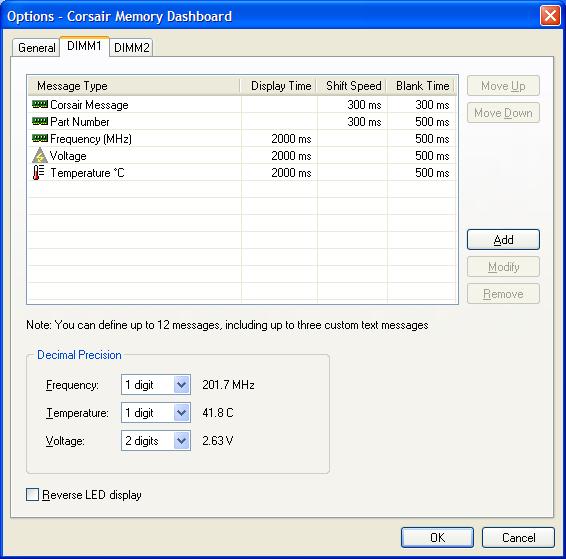
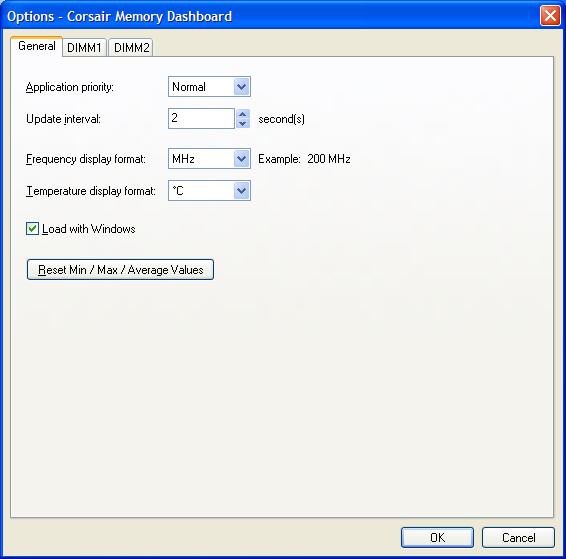
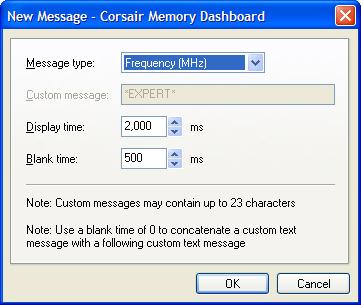
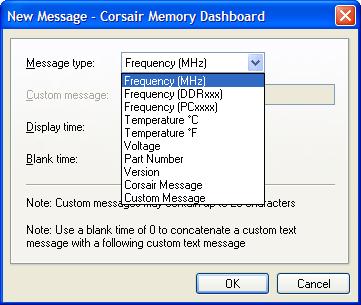
Being an enthusiast, of course you’d want to display your own custom message. It’s very easy to add a new message. Simply click on Add, and a new window will allow you to change the message type, display time, and blank time. The drop down box also contains pre-set messages, and to display your own, just choose Custom Message. Type in the message that you would like to have shown and you’re set.
Corsair LED Movie Clip
I recorded a small clip of the Xpert memory in action. Please note that you must have Quicktime installed to view this clip (6.6mbs).
Test System and Overclocking
Test System:
- AMD Athlon64 3000+ Winchester
- Abit Fatal1ty AN8
- 2 x 512MB Corsair Xpert PC3200 XL
- ATI Radeon X800 (400/490)
- Enermax Noisetaker 470W
Overclocking:
Keep in mind that during overclocking, the latencies are as follows: CAS-TRCD-TRP-TRAS
Like the other memory reviews I write, I proceeded to find the highest overclock with lowest latencies of 2-2-2-5 1T. With a maximum of 2.8v (which is what these Xpert sticks seem to overclock best with) I was able to hit a decent 215HTT. I loosened the TRCD to 3 and TRAS to 6 and achieved a rather good overclock of 235HTT. Unfortunately the memory didn’t gain any benefits with the TRP loosened to 3. An increase of 5MHZ showed immediate instability. With the use of Samsung TCCD chips, the memory is guaranteed to run at least 250MHZ, as the chips are rated at 4.0ns. With that in mind and loosened timings of 2.5-3-3-7 1T, I was able to hit 250HTT on the MSI K8N Neo4 Platinum. I wasn’t satisfied and believed that the memory could fair better, so I delayed the review and waited for a true overclocking motherboard–the Fatal1ty AN8. With the Fatal1ty AN8, the memory increased from the previous 250HTT to 260HTT. Although the final result is not something to drool over, it’s certainly respectable, considering a Brainpower PCB was not used. Most of the gaming systems that I see around forums show enthusiasts running at 10 x 250HTT/260HTT. Of course this memory wouldn’t be considered ideal for hardcore benchers, but then again its targeted for gamers. The Xpert memory will be suitable for overclocking gamers who like to bring a little show when they frag. I tried loosening to 3-4-4-8 and even run with a command rate of 2T but the Xpert refused to budge. It seems like 260HTT 2.5-3-3-7 1T is the limit.
Overclocking Results:
- 200HTT 2.0-2-2-5 1T
- 215HTT 2.0-2-2-5 1T
- 235HTT 2.0-3-2-6 1T
- 260HTT 2.5-3-3-7 1T
Results
A series of memory intensive benchmarks will be run to test the performance of our sample. The following tests will be based on common benchmark programs such as 3DMark and PCMark. Real life performance differences will be tested through current games such as Far Cry, UT2003, UT2004, and Halo. Memory bandwidth benchmarks will be based off of SiSoft Sandra and Aida32. Super PI and PiFast will also be used to test memory performance, as the benchmark benefits largely from FSB increases.
SiSoft Sandra
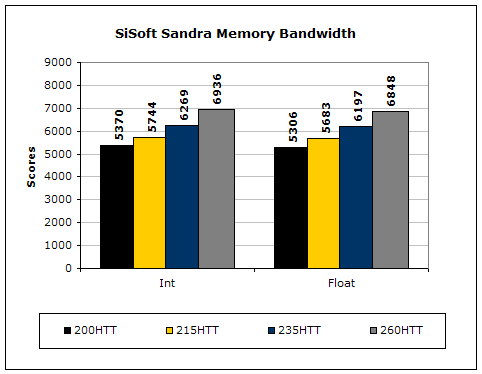
SiSoft Sandra is the most widely used memory bandwidth test. It can tell you the increase in performance from just lowering the latency timings. The results seem to scale linearly, despite the fact that the HyperTransport Bus is different when the overclock increases.
Everest Home Edition
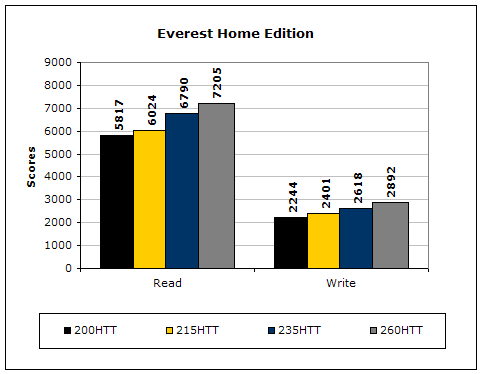
Everest Home Edition’s Memory Benchmarks show the same results as Sandra Memory Bandwidth.
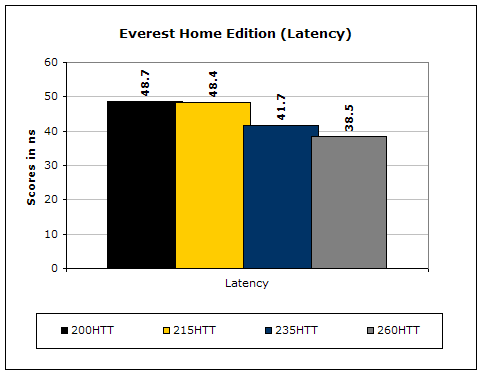
Everest Home Edition also includes a latency benchmark. The Athlon64’s performance with various latencies is also dependent upon its increase in CPU speed.
3DMark2001SE
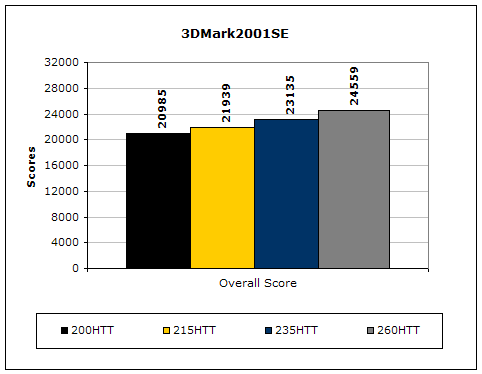
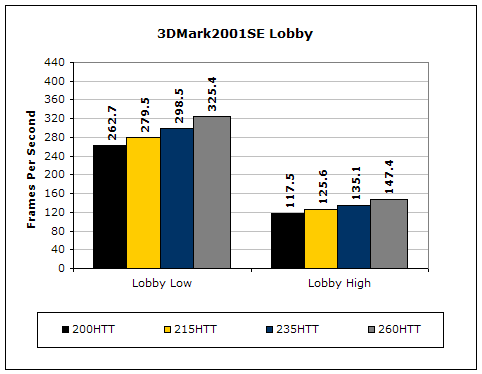
3DMark is probably the overclocker’s favorite benchmark. Unlike 3DMark2003, which stresses mainly the video card, 3DMark2001SE tests all of the system’s main components. Increasing the CPU speed, memory speed, and video card speeds will result in higher results in the final score.
Far Cry
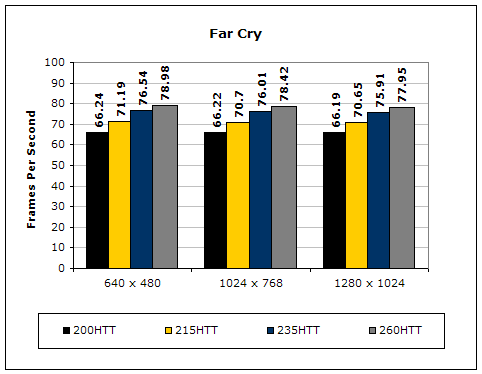
Since Far Cry is a game, the performance results will be very similar to 3dMark2001. I ran the benchmark at 640x480 so the benchmark would not be too GPU dependent. The tests under 1024x768 and 1280x1024 are there to show an approximate of what kind of frames you’ll be getting. While the results are similar to 3dMark2001 in performance, this benchmark will give more significant results because Far Cry is extremely demanding.
Unreal Tournament 2004
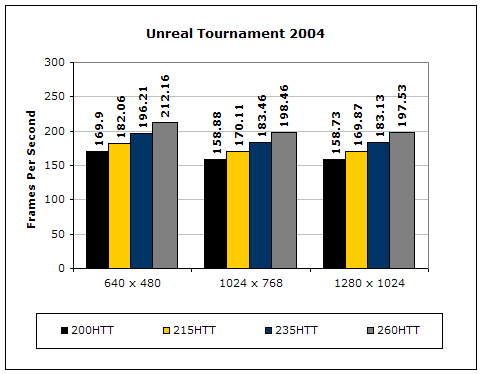
Unreal Tournament is another popular game engine to test overall system performance. Here, we can see the same results as Far Cry and 3dMark2001. Like Far Cry, UT2004 was also run at 640x480 to limit GPU dependency. The other resolutions are to give an approximate of actual gameplay performance.
PCMark
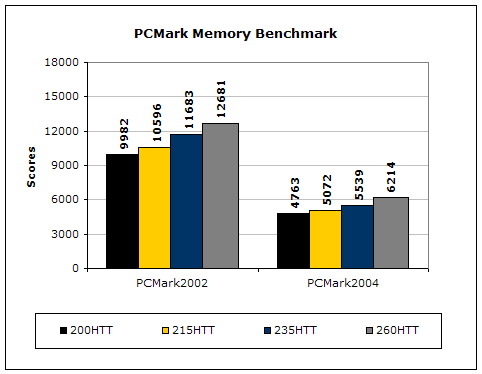
PCMark is another benchmark created by Futuremark. It tests the memory compression and decompression speeds in small to large chunks of data.
Super PI
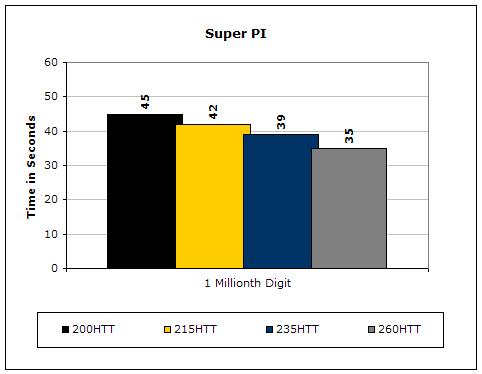
Since the value of PI is an infinite value, Super PI is a speed test to find the digit you’re looking for. In this case, we chose the millionth digit. Super PI benefits greatly from higher FSB as well as low latencies.
PiFast
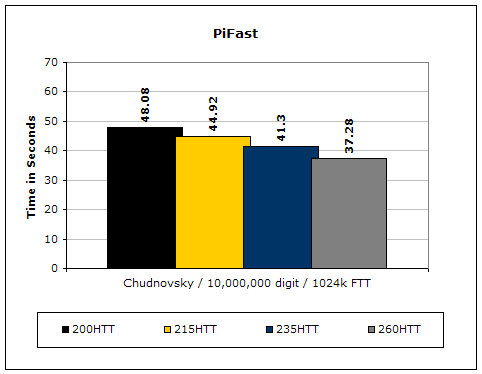
PiFast is similar to Super PI and the results can be greatly affected by a slight adjustment to the memory megahertz and latency.
Conclusion and Thoughts
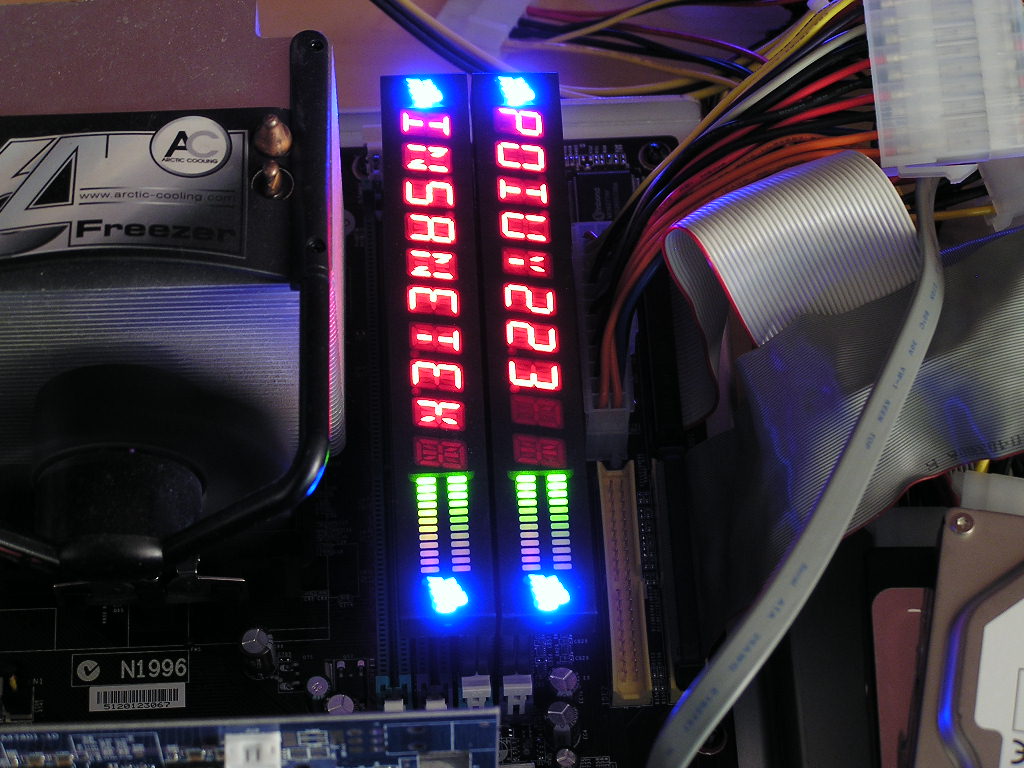
Once again, Corsair’s new innovation is a job well done. The flashiness of the LED display is not extreme and can provide some cool uses and the memory overclocks pretty decently. Sure it’s not the high end top of the line overclock that reaches outrageous speeds of 300HTT but it’s definitely good enough for the gamers out there. The flexibility of the displays is well thought and clears way of compatibility issues. Unlike the standard memory heatspreaders out there, these Corsair custom large heatsinks can actually help dissipate heat. The one thing that is a big turnoff with the Xpert memory is the price. Coming in at roughly $350 is certainly not cheap and affordable. I’ve spoken with Corsair and they are aware that price is the major issue. Not all gamers are willing to fork out $350 for a set of memory when there are other solutions out there that’ll suffice. The catch with the Xpert is the LED displays. It’s not hard to build a need for it. It’s just simply amazing. The LED’s look so awesome that pictures won’t justify its abilities. The option of customizing your own message is even better. Of course we’re going to have to pimp ourselves a little with the picture below. If the price wasn’t so costly, the Xpert would’ve been a Must Have, even with the average overclock. But it still wins our high Recommended Award.
One thing to note though is that Corsair has released a more affordable CAS 2 Xpert. These sticks will run at timings of 2-3-3-6 1T. The chips used will be lower grade Samsung chips that can run CAS 2. What’s interesting is that it might even make use of the new Winbond chips. Just what specific version I’m not sure, so I guess the only thing to do right now is trial and error. That’s certainly wonderful news isn’t it?
Pros:
- Ideal for gamers
- Decent overclocking potential
- Large heatsinks
- Beautiful LED display
- Easy to use software
- Customizable messages
- Installation of LED displays very flexible
- Low latency memory
Cons:
- Very very expensive

We would like to thank Corsair for providing us the sample. If you have any questions or comments, feel free to hit us up in the forums. You can also check out more of our latest reviews on the front page.