

Corsair XMS2 TWIN2X1024-8000UL 1GB Dual Channel Kit
Introduction
The pioneer to DDR2 was hard and continues to be hard. Perhaps the major reason behind that is because of the lacking performance on Intel’s chipsets. DDR2 is far from lacking in performance. However, because there is still only one platform that supports DDR2, the demand or even the hype of DDR2 won’t reach its maximum. Memory companies are finding ways to increase the DDR2 demand since DDR2 is the future, whether everyone likes it or not. With Intel’s newest 955X chipset, overclocking DDR2 memory has reached a whole new level. Intel’s older LGA775 chipsets only allowed a rather weak 3:4 divider and hindered the potential of DDR2 headroom. The inclusion of the 1:2 divider on the 955X chipset allows memory speeds to break old limits and reach new ceilings.
Shortly after the release of the Asus P5WD2, overclockers have been reaching amazing memory records. Corsair quickly recognized the highly achievable memory speeds and released the PC2-8000UL.
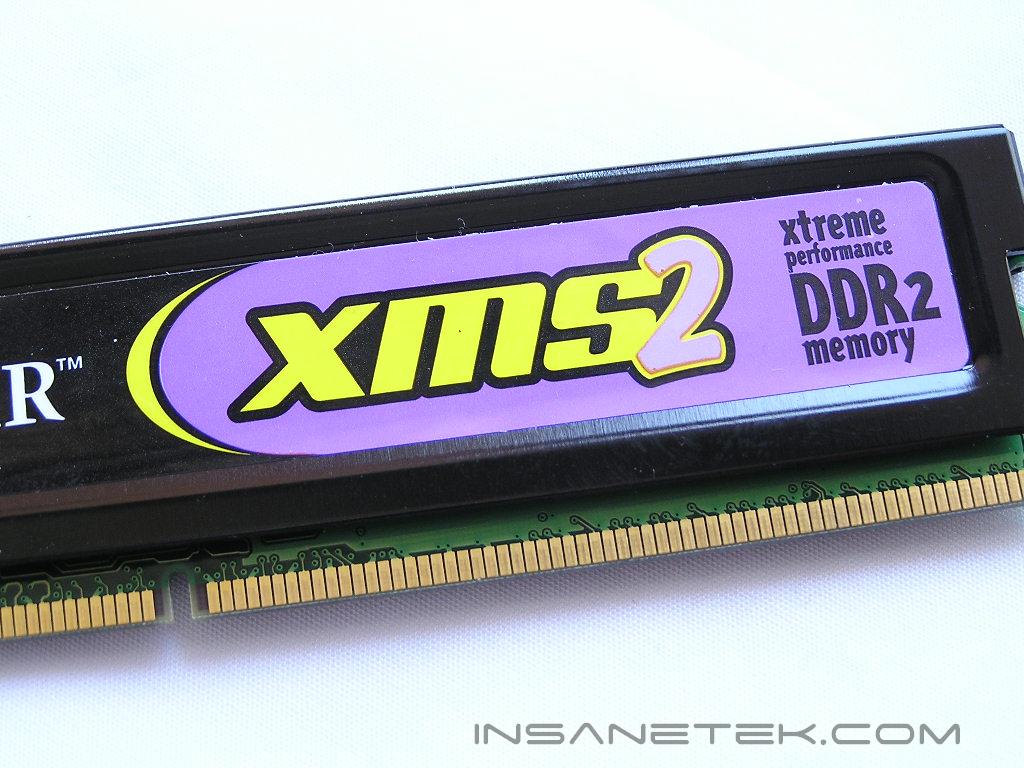
Corsair XMS2 PC2-8000UL
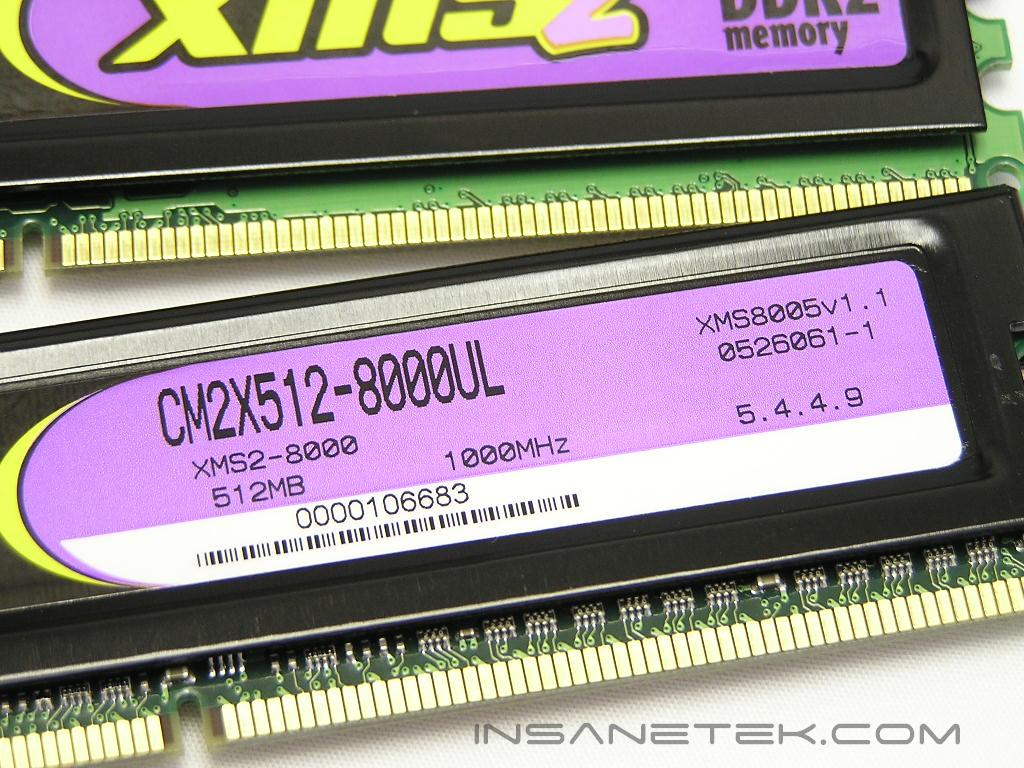
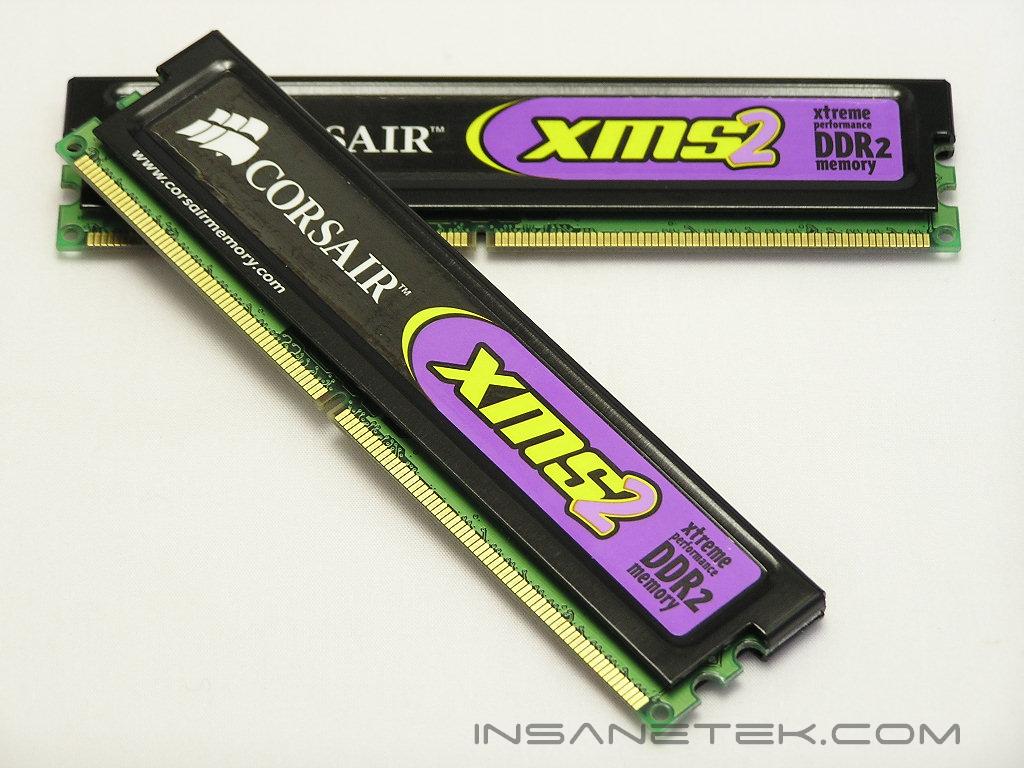
The Corsair PC2-8000UL comes in Corsair’s usual packaging and signature black heatspreaders. There are no clips this time for their XMS2 memory. Instead, there is adhesive paste between the memory IC’s and the heatspreader. This makes heatspreader removal rather impossible. Removing the heatspreader from DDR2 modules is deadly. The BGA IC’s rip off quite easily because of the weaker soldering bonds that are beneath the chips.
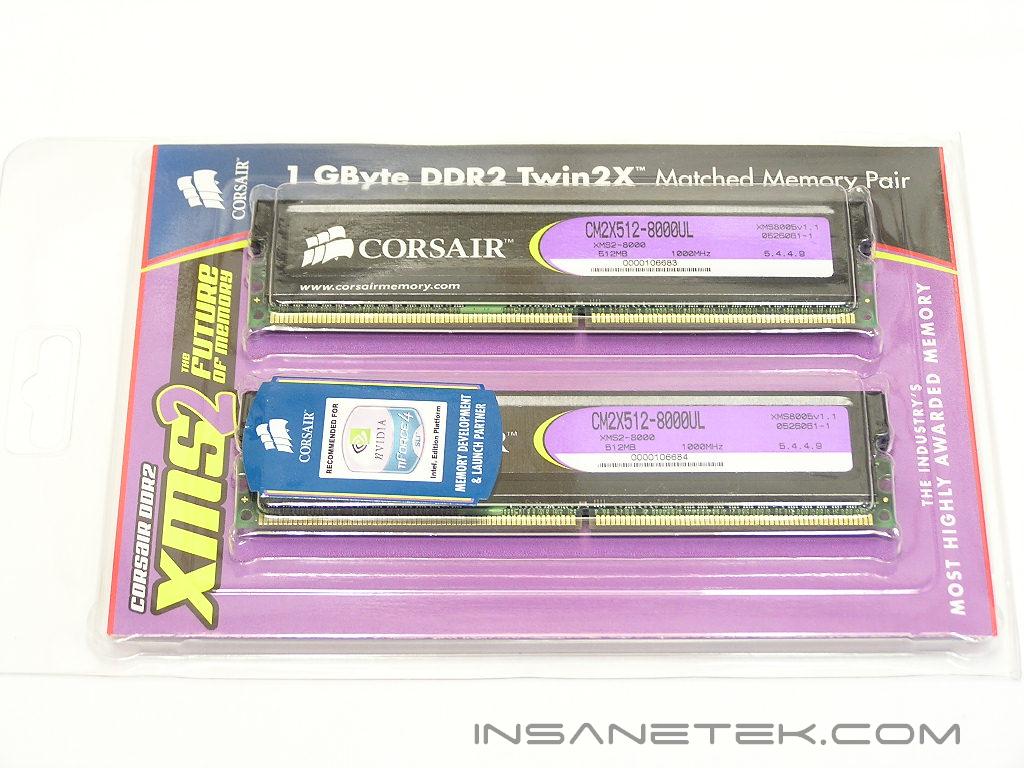
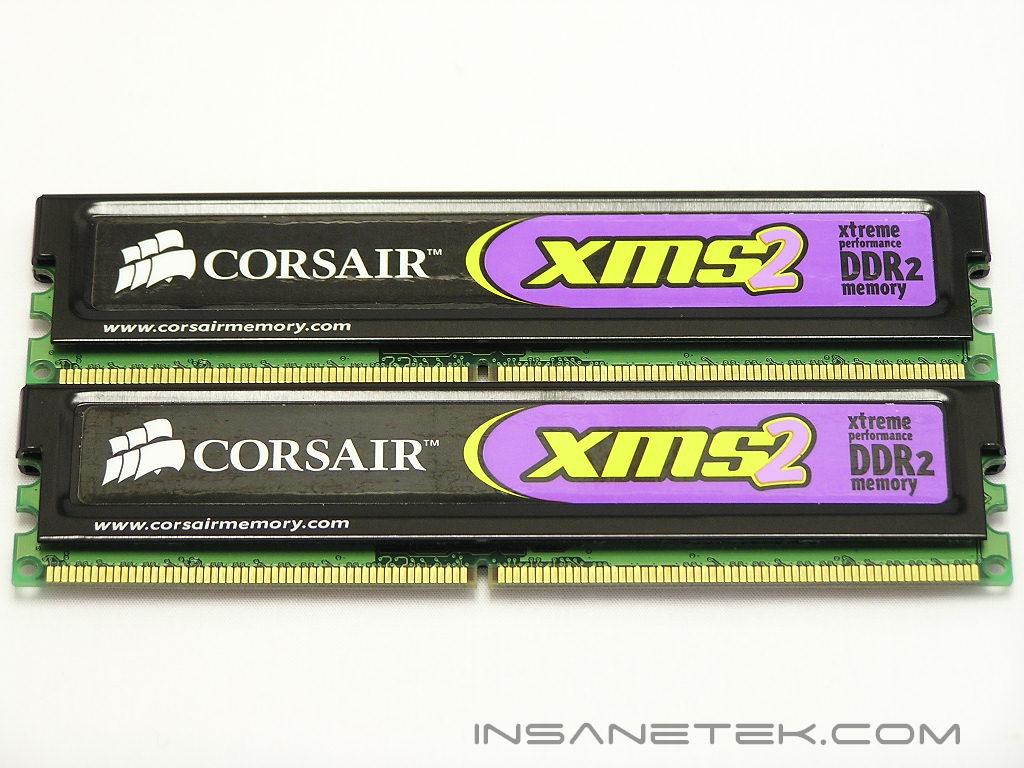
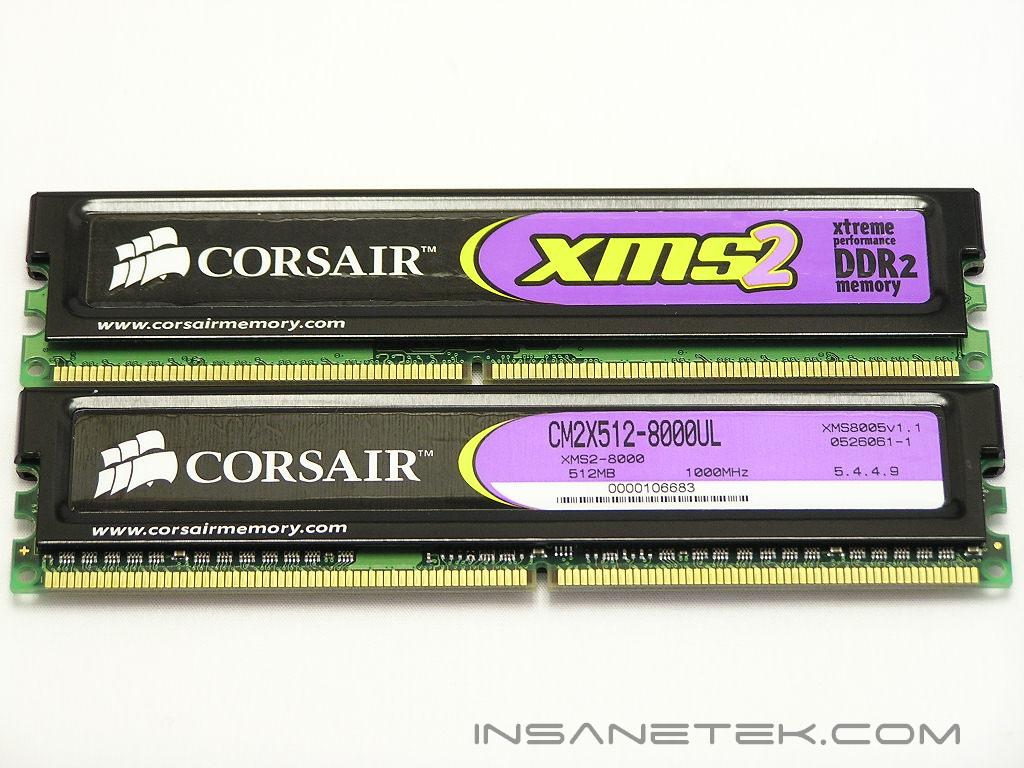
The XMS2 PC2-8000UL comes equipped with fatty Micron chips. To be more specific, these chips are marked D9DQT and are rated for 3ns or DDR2-667. Micron’s fatty D9’s are the only current memory IC’s capable of doing low latencies at high speeds. They also respond rather well to increased voltages. The sad part is that Micron has put this certain die revision through EOL, meaning that whatever is available now is all that’s left. You won’t be able to purchase it in the future. All fatty Micron D9’s are going to disappear. What a shame! Corsair’s memory is rated at timings of 5-4-4-9 with 2.2v at DDR2-1000, or 500MHZ. Those are some impressive ratings for memory that’s running so fast.
Test System and Overclocking
Test System:
- Intel 560 3.6GHZ
- Asus P5WD2 Premium
- 2 x 512MB Corsair XMS2 PC2-8000UL
- Sapphire Radeon X800
- Arctic Freezer 7
- Thermaltake PurePower 680W
Overclocking:
Keep in mind that during overclocking, the latencies are as follows: CAS-TRCD-TRP-TRAS
Throughout all tests, the multiplier has been kept at 14x to reduce any possible CPU bottleneck.
I started overclocking to see how low the latencies will go at a typical speed of 266MHZ. For those who run their systems at stock settings, 266MHZ would be the common memory speed to run. As expected, the latencies were able to drop as low as 3-2-2-5. The next speed tested would be at 333MHZ or DDR2-667. This is another common speed for memory to run at when using a higher divider. Surprisingly, the latencies were still able to maintain 3-2-2-5. It ran perfectly smoothly without a hiccup. As mentioned earlier, Intel’s new 955X chipset supports an even higher divider of 1:2. With a stock speed of 200FSB, the 1:2 divider will run the memory at 400MHZ. Memory at 400MHZ is rated as PC2-6400. With just 2.2v and timings of 4-3-2-8, I was able to run the memory at 400MHZ without a problem. In order for the memory to run at 1000MHZ, I had to push the FSB to 250. It reached the speed without a sweat and even ran at lower latencies of 5-3-3-9. That’s some mighty fine accomplishment there.
The next process of overclocking is to find the highest speed that each set of latencies can reach. I bumped the voltage to the max of 2.3v and began testing with 3-2-2-5 timings. The XMS2 PC2-8000UL was able to run as high as 367MHZ. I loosened the timings to 4-3-2-8 and reached 480MHZ, just 20MHZ shy of the rated speed. 480MHZ with timings of 4-3-2-8 was quite amazing. Finally with timings of 5-3-3-9, the memory topped out at 520MHZ or DDR2-1040. I was able to boot the system even higher at a speed of DDR2-1066 and programs would run fine, but the memory would fail Memtest and Windows Memtest. I tried even looser timings of 5-4-4 and 5-5-5 but nothing helped. The memory definitely needed more voltage.
Overclocking Results:
- 200FSB 3:4 266MHZ 3-2-2-5 2.2v
- 200FSB 3:5 333MHZ 3-2-2-5 2.2v
- 200FSB 1:2 400MHZ 4-3-2-8 2.2v
- 250FSB 1:2 500MHZ 5-3-3-9 2.2v
- 220FSB 3:5 367MHZ 3-2-2-5 2.3v
- 240FSB 1:2 480MHZ 4-3-2-8 2.3v
- 260FSB 1:2 520MHZ 5-3-3-9 2.3v
Results
A series of memory intensive benchmarks will be run to test the performance of our sample. The other tests will be based on common benchmark programs, such as 3DMark and PCMark. Real life performance differences will be tested through current games, such as Far Cry and UT2004. Memory bandwidth benchmarks will be based off of SiSoft Sandra and Everest Home Edition. Super PI and PiFast will also be used to test memory performance, as the benchmark benefits largely from FSB increases.
SiSoft Sandra Memory Bandwidth
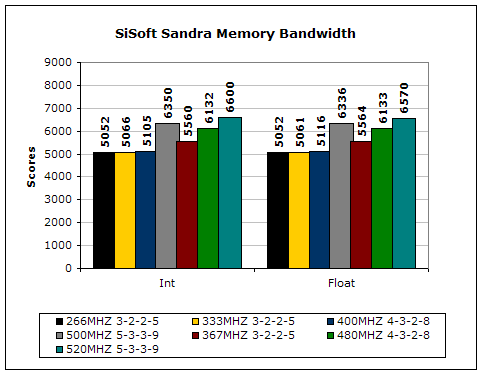
SiSoft Sandra is the most widely used memory bandwidth test. It can tell you the increase in performance from just lowering the latency timings.
Everest Home Edition
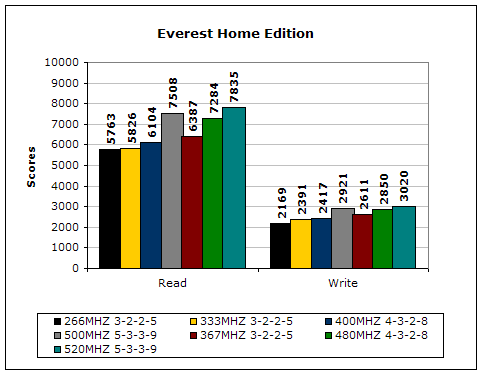
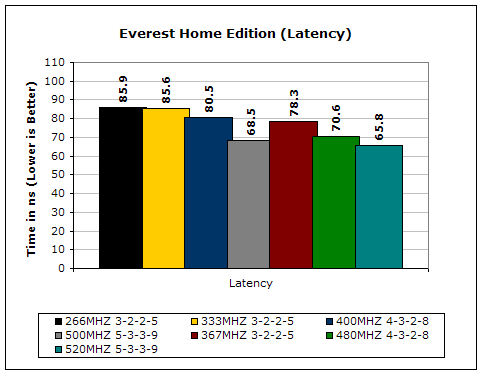
Much like Sandra, Everest Home Edition tests the memory’s ability to read and write data in large chunks. The results show that the lower latencies seem to help just a little with performance.
3DMark2001SE
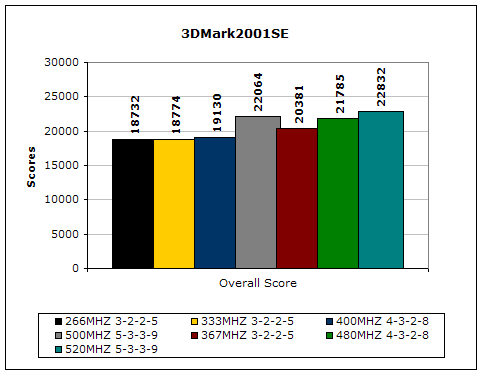
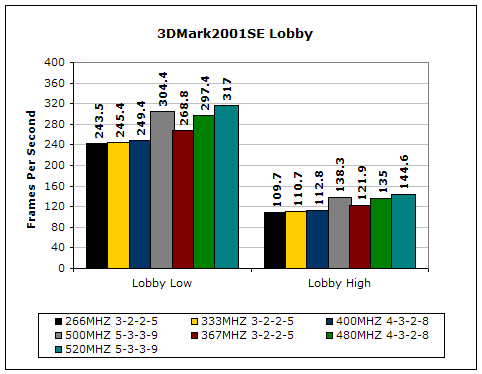
3DMark is likely the overclocker’s favorite benchmark. Unlike 3DMark2003, which stresses mainly the video card, 3DMark2001SE tests all of the system’s main components. Increasing the CPU speed, memory speed, and video card speeds will result in higher results in the final score.
Results
Far Cry
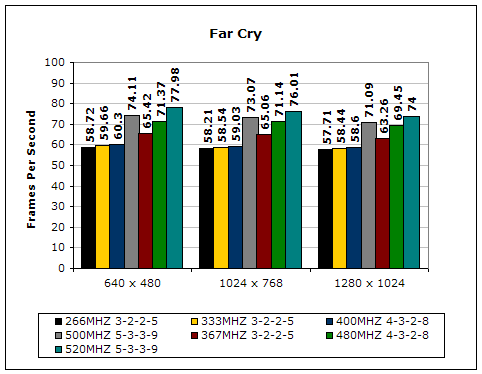
Since Far Cry is a game, the performance results will be very similar to 3dMark2001. I ran the benchmark at 640x480, so the benchmark would not be too GPU dependent. The tests under 1024x768 and 1280x1024 are an approximation of what kind of frames you’ll be getting. While the results are similar to 3dMark2001 in performance, this benchmark will give more significant results, because Far Cry is extremely demanding.
Unreal Tournament 2004
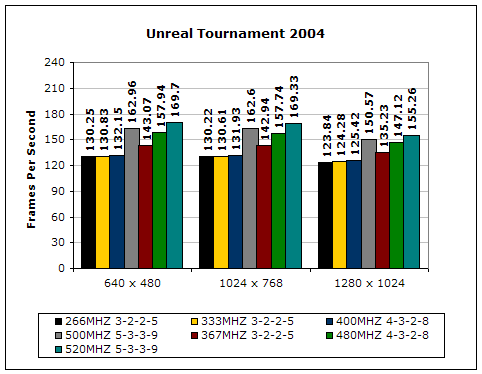
Unreal Tournament is another popular game engine to test overall system performance. Here, we can see the same results as Far Cry and 3dMark2001. Like Far Cry, UT2004 was also run at 640x480 to limit GPU dependency. The other resolutions provide an approximation of actual gameplay performance.
PCMark2002
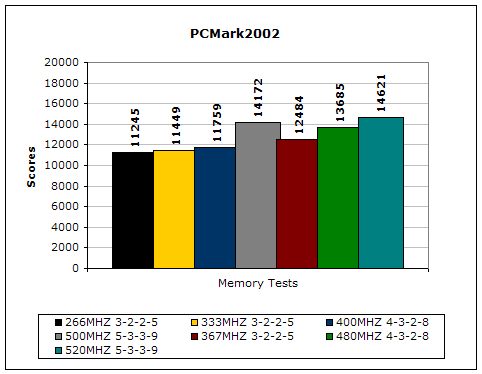
PCMark is another benchmark created by Futuremark. It tests the memory compression and decompression speeds in small to large chunks of data.
Super PI
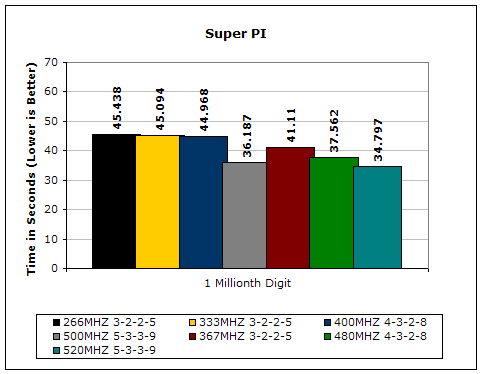
Since the value of PI is an infinite value, Super PI is a speed test to find the digit you’re looking for. In this case, we chose the millionth digit. Super PI benefits greatly from higher FSB, as well as low latencies.
PiFast
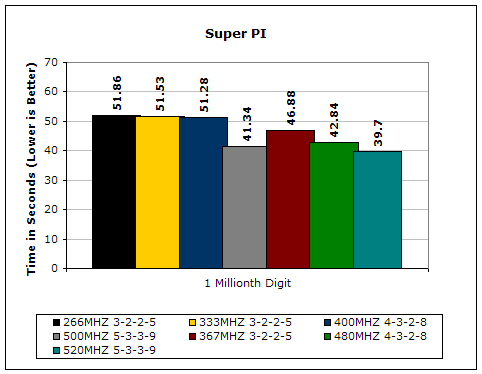
PiFast is similar to Super PI. The results can be greatly affected by a slight adjustment to the memory megahertz and latency.
Conclusion and Thoughts
Wow. Corsair’s PC2-8000UL is simply amazing. It’s currently the fastest DDR2 memory available and the fastest DDR2 memory tested here thus far. The price tag of the 8000UL is leaning a little bit towards the expensive side but that’s understandable and still under the $300 price point. There is a reason why expensive memory is expensive. It provides the great performance and high overclocking ability. The memory didn’t have a high gap of overclocking headroom but it did still manage to squeeze out another 40MHZ. Personally, I find the great part in the low latency operations at high speeds. Even though 5-3-3-9 isn’t quite low like the timings of DDR memory, it’s considerably lower than the usual 5-5-5-15 that’s commonly rated for high speed DDR2. The only downside to this memory is that quantities are limited. Micron has ended the fatty Micron D9 die revision and their new D9 revision doesn’t look so well in terms of providing low latency operations. If there is another DDR2 memory IC that can do low latencies then all the better, but if there isn’t, these Corsair PC2-8000UL sticks will be gems in the long run. AMD is forced to use DDR2 in the near future and it will be very interesting to see the kind of memory bandwidth released with low latency DDR2 on AMD’s onboard memory controller.
Pros:
- Runs low latency at high speeds
- Uses best DDR2 IC – Micron D9’s
- Overclocking friendly
- Amazing performance yields
- Great reasonable price
Cons:
- It’s going to see EOL

We would like to thank Corsair for providing us the sample. If you have any questions or comments, feel free to hit us up in the forums. You can also check out more of our latest reviews on the front page.