

Corsair XMS TWINX2048-3500LLPRO 2GB Dual Channel Kit
Introduction
Didn’t Corsair just recently release a PC4400PRO 2GB part? The folks at Corsair sure work fast to provide us with goodies. This time around, they introduce a low latency 2GB kit that runs faster than other low latency 2GB kits. Unlike the competing PC3200 2GB parts, Corsair’s new 2GB memory comes at a slightly faster speed of PC3500.
Corsair’s high speed PC4400PRO 2GB is capable of reaching some good overclocks, but it did come with loose timings of 3-4-4-8 2T. The 2T part just kills me. I never bother to run ANY memory at 2T. The loose command rate just loses too much system performance to be really beneficial. The PC3500LLPRO we have today is rated with much better timings. Their recent press release announces the memory as the “Fastest Asus-Ready 1GB DDR1 Module”. For more information on their press release, visit HERE. Corsair and Asus are known to have some great partnerships so it is not surprising that Corsair used Asus A8N32-SLI motherboards for their testing platforms. While we were not fortunate enough to receive the A8N32-SLI motherboard, we do have the DFI LANParty UT nF4 Ultra-D in house. Although it is not Corsair’s “recommended” motherboard to pair with the memory, we all know that DFI’s nF4 boards are able to reach some outrageous bus speeds. The board certainly won’t be the bottleneck. Just how fast is the fastest DDR1 module?
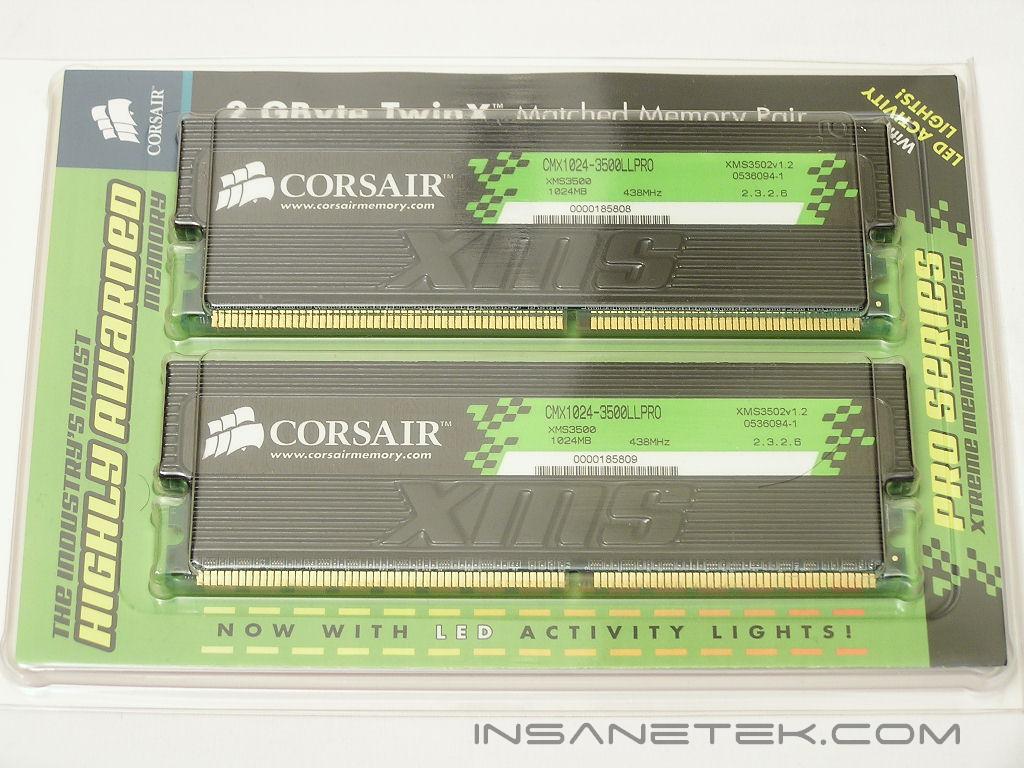
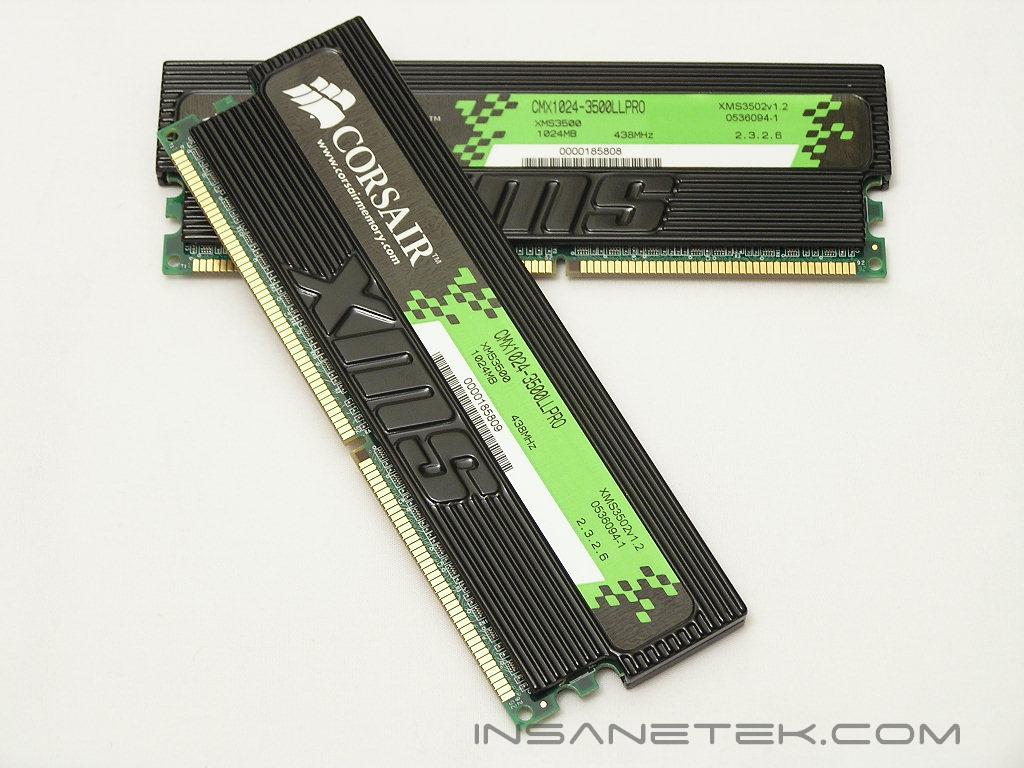
Corsair XMS TWINX2048-3500LLPRO
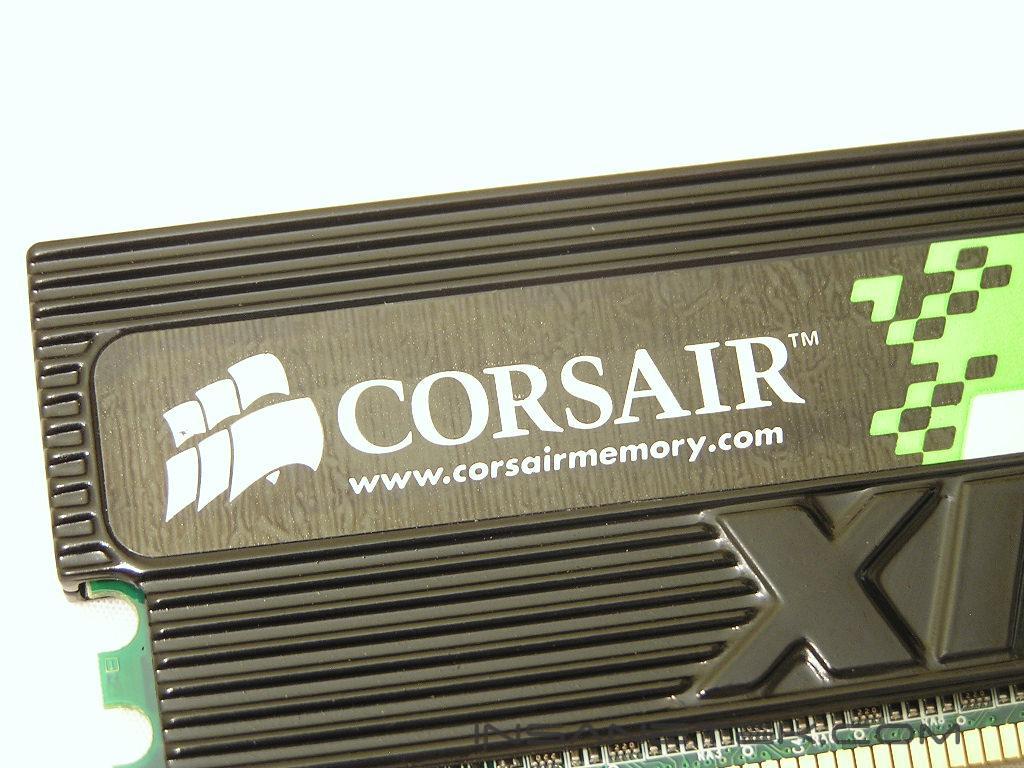
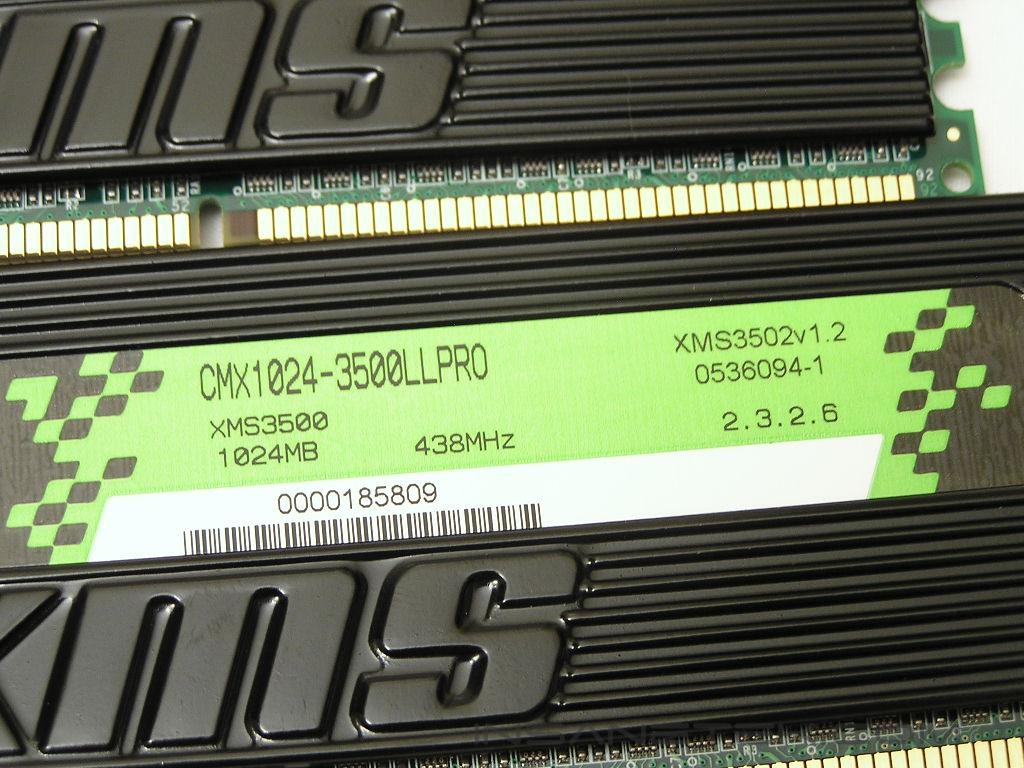
The PC3500LLPRO looks exactly like the PC4400PRO. The large black heatspreaders are signature to Corsair’s PRO series and helps dissipate heat from memory ICs more efficiently. We all know that heatspreaders for memory do close to nothing in terms of cooling, but it does look really cool though. I’m sure we all would like to see more naked people running around, but having naked memory is different. It is too bare and un-sexy.
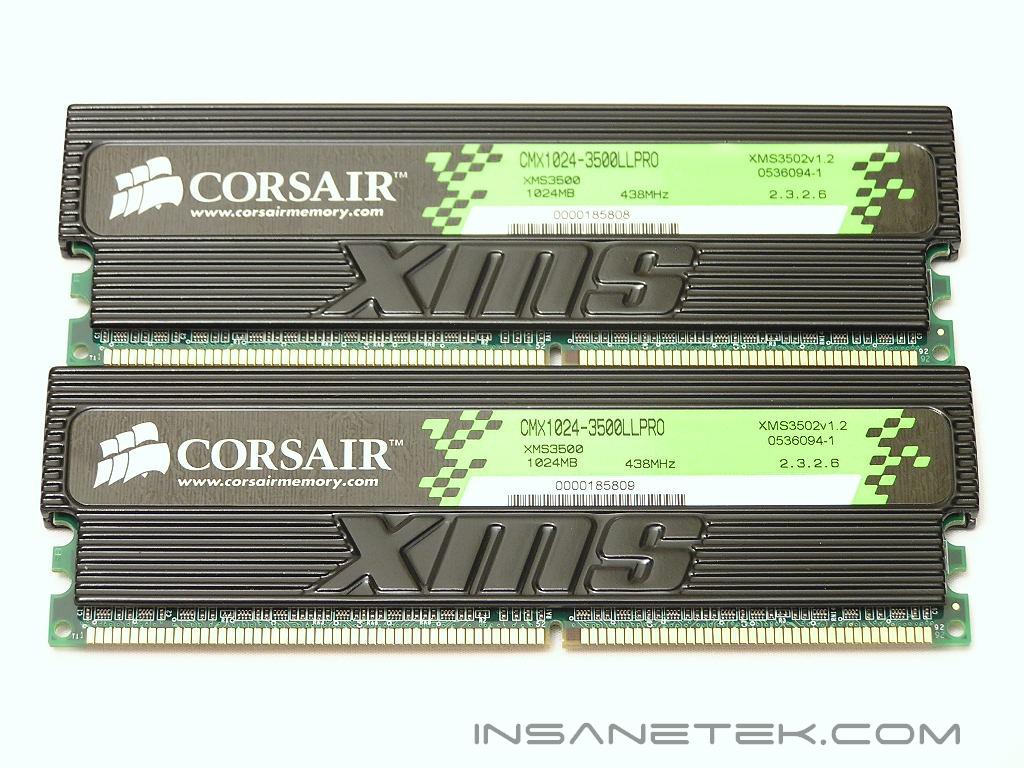
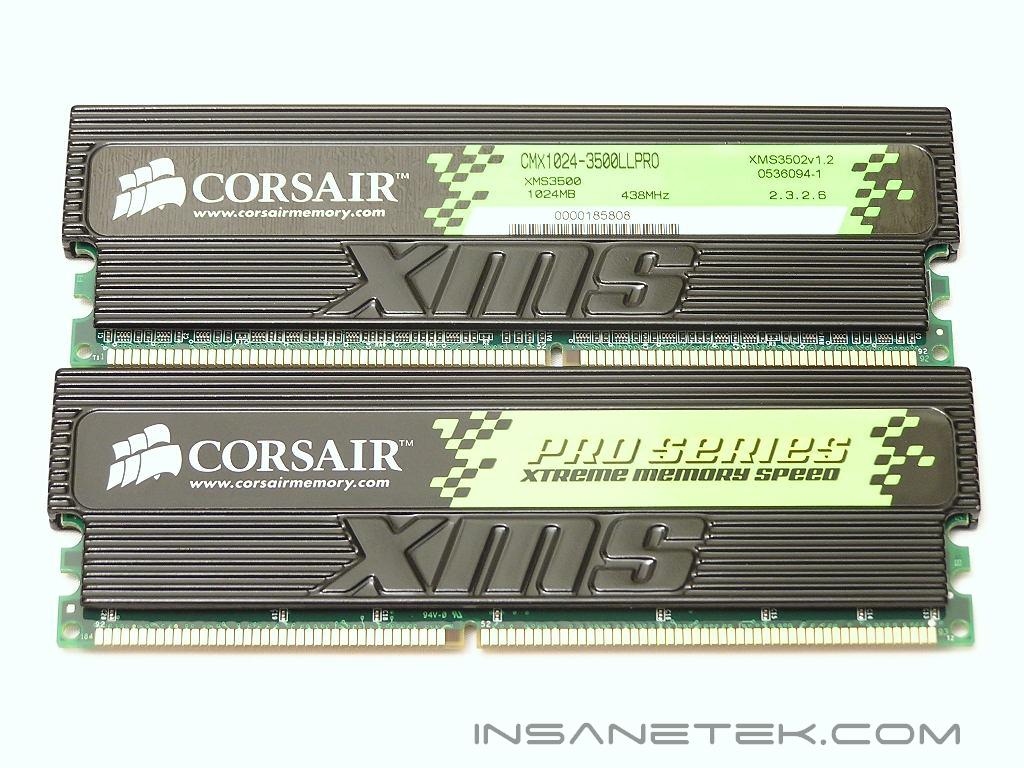
The PC3500LLPRO comes rated at a speed of 219MHz with timings of 2-3-2-6 1T and no voltage requirement. The memory uses the same Infineon CE-5 ICs (or so I have been told) as the PC4400PRO. From past experiences, Infineon ICs do not like much voltage and usually tend to stick around 2.7v. Increasing the voltage usually yields unnecessary errors. So what’s the difference between the two? Shouldn’t you just buy the cheaper one out of the two? That depends on what kind of performance you are after. The PC3500LLPRO is binned for low latencies while the PC4400PRO is binned for highest frequencies. Will there really be a difference? I guess we’ll find out later on in the overclocking section. Just to note, HERE is the specification sheet on the PC3500LLPRO. Notice that Corsair wrote down 218MHz, or DDR437. 2x218 != 437. Also note that the sticker label on the memory itself shows DDR438, which is 219MHz. A boo boo anywhere?
Test System and Overclocking
Test System:
- AMD Athlon 64 3000+ Venice
- DFI LANParty UT nF4 Ultra-D
- 2 x 1GB Corsair XMS PC3500LLPRO 2GB
- ATI Radeon X800XT
- Arctic Cooling Freezer 64
- Thermaltake PurePower 680W
- BIOS 623-3 and orange slots
Overclocking:
Keep in mind that during overclocking, the latencies are as follows: CAS-TRCD-TRP-TRAS
Since the memory is already rated to operate at a speed of 219MHz with low latencies of 2-3-2-6, I lowered the speed to 200MHz to see if it would run the lowest latencies possible. Unfortunately like the majority of Infineon ICs, the PC3500LLPRO could not run 2-2-2-5. It was no big surprise. I was just crossing my fingers and hoping for the best. Now that we know the memory won’t run with latencies of 2-2-2-5, I reverted back to the rated latencies and started the overclocking process. The PC3500LLPRO didn’t allow too much headroom in the low latency department and stopped at a decent 225MHz. Running timings of 2-3-3-6 did not help achieve any higher overclock. I had to loosen the timings to 2.5-3-3-7 in order for the memory to go to 255MHz. Not too bad. We are definitely seeing similar results as the PC4400PRO. Unfortunately, the memory could not go anywhere with timings of 3-3-3-8. But with looser timings of 3-4-3-8, the PC3500LLPRO took off to 260MHz, a bit shy of the PC4400PRO’s highest overclock. Any looser timings or increased voltages did not help.
Overclocking Results:
- 219MHz 2.0-3-2-6 1T 2.7v
- 225MHz 2.0-3-2-6 1T 2.7v
- 255MHz 2.5-3-3-7 1T 2.7v
- 260MHz 3.0-4-3-8 1T 2.7v
UPDATE:
After spending a little more time with overclocking the Infineon ICs, these PC3500LLPRO were found to be able to run up to 260MHz with timings of 2.5-3-2-5 1T with just 2.7v. Increased voltage did not help and loosening the timings to 3-3-2-8 did not help increase the memory headroom.
Results
A series of memory intensive benchmarks will be run to test the performance of our sample. The other tests will be based on common benchmark programs, such as 3DMark and PCMark. Real life performance differences will be tested through current games, such as Far Cry and UT2004. Memory bandwidth benchmarks will be based off of SiSoft Sandra and Everest Home Edition. Super PI and PiFast will also be used to test memory performance, as the benchmark benefits largely from FSB increases.
SiSoft Sandra Memory Bandwidth
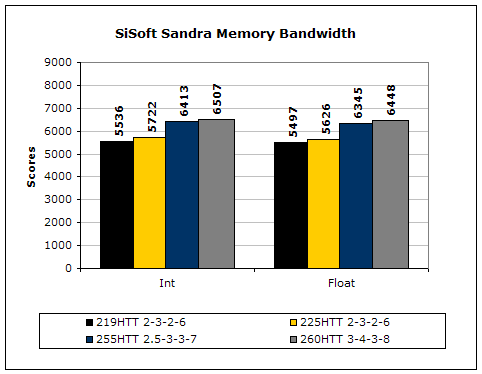
SiSoft Sandra is the most widely used memory bandwidth test. It can tell you the increase in performance from just lowering the latency timings.
Everest Home Edition
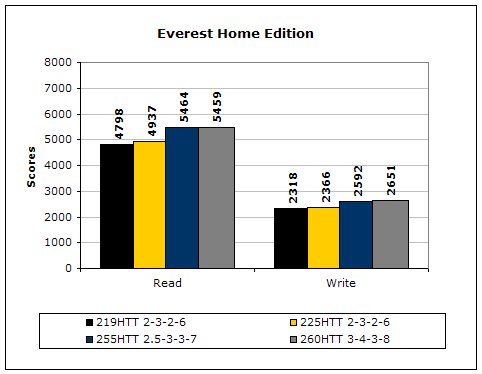
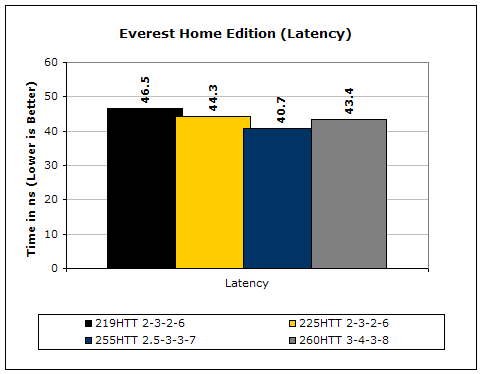
Much like Sandra, Everest Home Edition tests the memory’s ability to read and write data in large chunks. The results show that the lower latencies seem to help just a little with performance.
3DMark2001SE
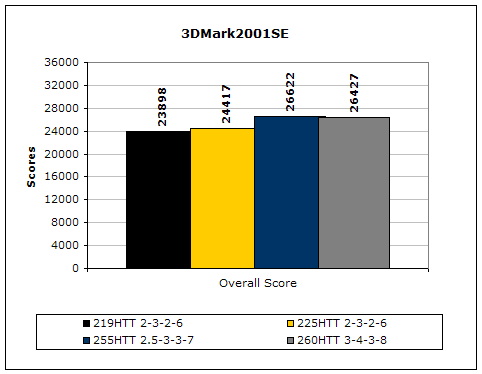
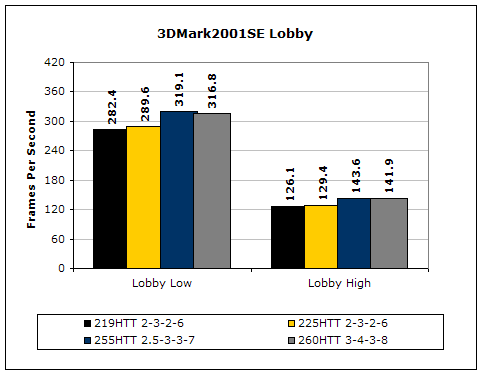
3DMark is likely the overclocker’s favorite benchmark. Unlike 3DMark2003, which stresses mainly the video card, 3DMark2001SE tests all of the system’s main components. Increasing the CPU speed, memory speed, and video card speeds will result in higher results in the final score.
Results Continued
Far Cry
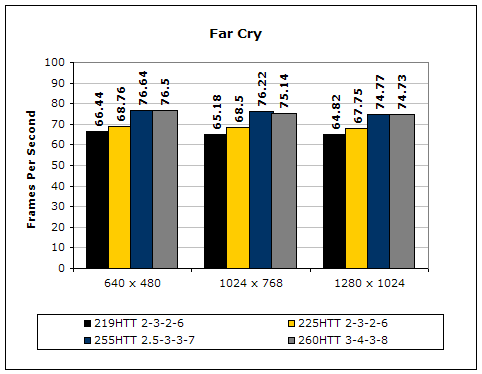
Since Far Cry is a game, the performance results will be very similar to 3dMark2001. I ran the benchmark at 640x480, so the benchmark would not be too GPU-dependent. The tests under 1024x768 and 1280x1024 are an approximation of what kind of frames you’ll be getting. While the results are similar to 3dMark2001 in performance, this benchmark will give more significant results, because Far Cry is a lot more demanding.
Unreal Tournament 2004
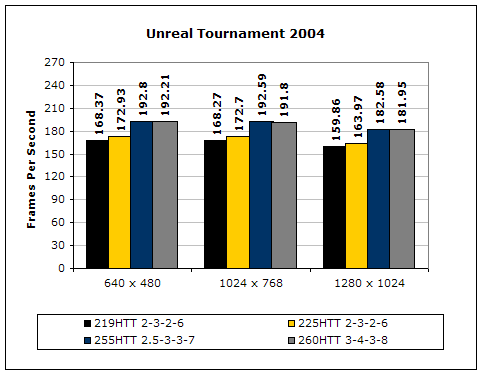
Unreal Tournament is another popular game engine to test overall system performance. Here, we can see the same results as Far Cry and 3dMark2001. Like Far Cry, UT2004 was also run at 640x480 to limit GPU dependency. The other resolutions provide an approximation of actual game play performance.
PCMark2002
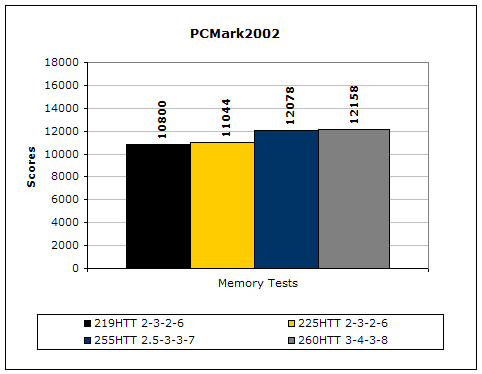
PCMark is another benchmark created by Futuremark. It tests the memory compression and decompression speeds in small to large chunks of data.
Super PI
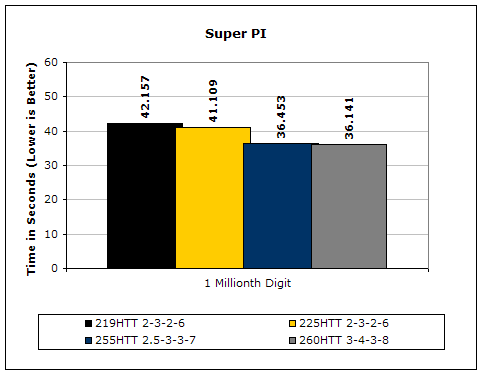
Since the value of PI is an infinite value, Super PI is a speed test to find the digit you’re looking for. In this case, we chose the millionth digit. Super PI benefits greatly from higher FSB, as well as low latencies.
PiFast
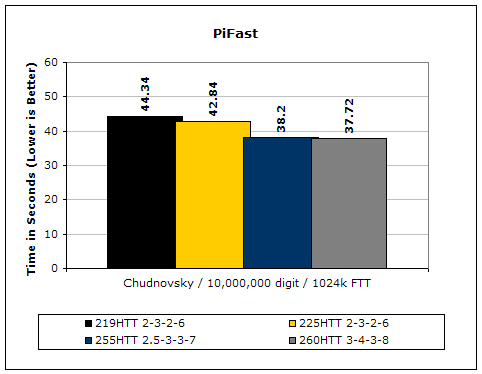
PiFast is similar to Super PI. The results can be greatly affected by a slight adjustment to the memory megahertz and latency.
Conclusion and Thoughts
Corsair’s new PC3500LLPRO is indeed good memory for low latency lovers. The memory is guaranteed to run a speed of 219MHz (or so it says on the sticker label) with timings of 2-3-2-6. While you can find other solutions that will allow this low latency operation, it is not always guaranteed. A part like this is like PC4800 DDR. There will be TCCD that will run 300MHz without the guarantee, but it will be hit or miss.
Now that we know the PC3500LLPRO and the PC4400PRO use the same ICs, what makes this a better choice over the PC4400PRO part? Personally, I would just opt for the PC4400PRO part since it will most likely (note the world likely) run speeds of 219MHz with timings of 2-3-2-6. The PC4400PRO sample I received was able to do just that and more. I guess the deciding factor will be what you plan to do with your system. If you are an enthusiast who only look to overclock just a little, then the PC3500LLPRO will do just fine. It will guarantee (note the guarantee) that your memory will operate at 219MHz with timings of 2-3-2-6. If you are an enthusiast who wish to push your system as high as possible, the PC4400PRO part will be more suitable.
Pros:
- Pretty memory activity LEDs
- Large heatspreaders for increased surface area
- Overclocks decently
- Guarantees 219MHz with 2-3-2-6
Cons:
- A bit expensive when compared to leading competitors

We would like to thank Corsair for providing us the sample. If you have any questions or comments, feel free to hit us up in the forums. You can also check out more of our latest reviews on the front page.