

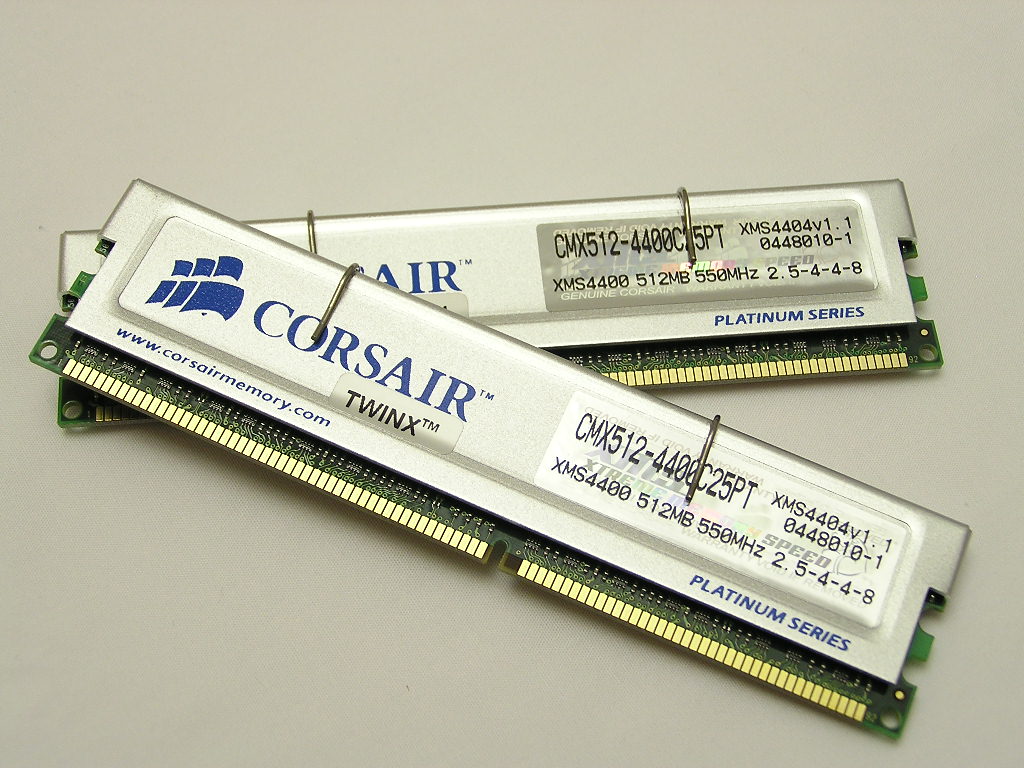
Corsair XMS TWINX1024-4400C25 1GB Dual Channel Kit
Introduction
We have already reviewed memory modules from OCZ and Kingston, but today we have the privilege of reviewing modules from a company that single-handedly took the enthusiast memory market by storm. Through their XMS line, Corsair may very well possess the most powerful brand name among all memory manufacturers. The polls on Corsair’s webpage that ask “Who makes the best gaming memory?” illustrate their dominance (with Corsair beating Kingston and OCZ unanimously). In fact, at a local Fry’s Electronics, I always catch unknowing salesmen recommend Corsair for everything, despite OCZ and Kingston being just as good. Corsair has become synonymous with “quality memory” to the common person, much like “Nintendo” became synonymous with home console gaming systems.
Corsair recently sent us their latest and greatest XMS memory modules, the TwinX11024-4400C25. These modules use the highly-acclaimed TCCD chips that Corsair originally introduced with their XL lineup. Now they have revamped the TCCD chips with newer chips, higher rated speeds, and a new PCB that looks to be made by Brainpower, although I’m not entirely sure. With that said, on to the review.
Test System and Overclocking
Test System:
- Athlon64 3000+ (0440) Winchester
- MSI K8N Neo2 (Korea) nForce 3 Ultra
- PNY 6800
- Western Digital 120GB Hard drive
- OCZ DDR Booster
- OCZ 600 Watt PowerStream
Although I could use a Pentium 4, the Athlon64 allows unlockable lower multipliers that are useful in determining the highest possible memory frequency. The Athlon64 also has an amazing memory controller directly on the CPU that can produce amazing bandwidth scores. The drawbacks is that it is tricky to obtain linear results because of the on-die memory controller. On a Pentium 4, memory clocked at 250 MHZ will produce somewhat similar Sandra bandwidth scores regardless of the multiplier. On an Athlon64, a larger multiplier at the same memory frequency will greatly increase bandwidth scores. Raising both the CPU and memory frequency can thus increase your memory performance, which makes memory analysis more tedious. So when looking at the various gaming benchmarks, always assume that the increase in memory frequency is also an increase in 1:1 with the CPU, although for analysis I have included some tests that do not run 1:1.
Overclocking:
Note that TCCD is the most random chip in determining voltage. I have been through 431, 437, and 440 chips and none show a particular pattern in how much voltage determines the highest overclock. I have also used many different PCBs, and while the Brainpower PCB has been proven to scale the highest, no PCB has proven to utilize the same voltage options. For example, I had some OCZ Platinum Revision 2’s that did 265mhz at 2.5-3-3-7 at only 2.5v. Anything higher than 2.5v caused Prime95 instability. The next week I had some Centon Advanced TCCDs that loved 2.85v for 275mhz at 2.5-3-3-7, but anything lower than 2.85v produced BSODs. For these set of modules, please DO NOT assume that your modules will achieve the same results, as TCCD is not a very consistent chip in respect to voltage options.
Additionally, I conducted a quick check of Super PI to the one-millionth digit for stability. If the modules passed Super PI, I used Prime95 for 2 hours. I have had more luck testing stability tests with Prime95 than Memtest86, which can sometimes loop for days but still have Prime95 errors. This is the best available method for me until I get a working R.S.T. card for testing at InsaneTek.
Before adjusting the timings and clocks, I kept all results in 1T command, because forcing 2T would reduce performance at even high speeds. I first checked that these modules could run at 2-2-2-5, like most TCCD modules on the market do at DDR400. They worked fine up to 215MHz at 2.85v, yet even 3.3v on the OCZ Booster did not bring any improvement in speed at low latencies. This verified that these were not the mythical “voltage-loving” TCCDs that some people have been getting as of late. Relaxing the Ras to Cas to 3 brought the overclock to 225MHz. No matter what timings I chose for CAS2, such as 2-3-3-7 or 2-4-4-8, it would not boot into Windows past 225MHz. Next, I tried matching Corsair’s timings of 2.5-4-4-8 at 275MHz, but I then decided to lower the timings to a tighter 2.5-3-3-7. Considering that Corsair chose a much better PCB than their XL lineup, 2.5-3-3-8 at 275MHz is a much expected improvement over the XL. Afterwards, I tried obtaining the highest speed possible with the rated timings of 2.5-4-4-8 and managed to get a 10MHz overclock above Corsair’s rating of 275. Here are the results…
Overclocking Results all in Dual Channel (1T):
| CPU Speed | Memory Speed | Timings | Divider | HTT |
| 1800Mhz | 200Mhz | 2-2-2-5 | 200Mhz | 200Mhz |
| 1936Mhz | 215Mhz | 2-2-2-5 | 200Mhz | 215Mhz |
| 2025Mhz | 225Mhz | 2-3-2-6 | 200Mhz | 225Mhz |
| 2480Mhz | 275Mhz | 2.5-3-3-7 | 200Mhz | 275Mhz |
| 2565Mhz | 285Mhz | 2.5-4-4-8 | 200Mhz | 285Mhz |
| 2367Mhz | 215Mhz | 2.0-2-2-5 | 166Mhz | 263Mhz |
| 2367Mhz | 263Mhz | 2.5-3-3-7 | 200Mhz | 263Mhz |
*Notice the orange and yellow box. Keep an eye out for this relation in the tests as I will show the performance difference between running a divider with low latencies or keeping a 1:1 ratio at high frequencies.
Results
A series of memory intensive benchmarks will be run to test the performance of our sample. The following tests will be based on common benchmark programs such as 3DMark2001. Real life performance differences will be tested through current games such as Far Cry and Half-Life 2. Memory bandwidth benchmarks will be based off of SiSoft Sandra and Aida32. Super PI will also be used to test memory performance, as the benchmark benefits largely from FSB increases.
I included all of the timings and speeds that I achieved through overclocking, but I will also add 2 new tests to show the differences of running an Athlon64 with or without a divider with low latency timings. I will also add the change in memory bandwidth with a change in CPU speed. Hopefully, these new tests will shed some light on how complicated memory benchmarks can be on an Athlon64.
| 1st New Test: | ORANGE | 2nd New Test | YELLOW | |||||
| Memory Speed | Timings | CPU Speed | Divider | Memory Speed | Timings | CPU Speed | Divider | |
| 215MHz | 2.0-2-2-5 | 2370MHz (263x9) | 166 | 215MHz | 2.0-2-2-5 | 1935MHz (215x9) | 200 | |
| 263MHz | 2.5-3-3-7 | 2370MHz (263x9) | 200 | 215MHz | 2.0-2-2-5 | 2370MHz (263x9) | 166 |
I’ll be including the different settings for each test as one color on the bar graphs side by side. The first test should show the differences in performance while running a divider on an Athlon64. Sometimes your Athlon64 may have a bad memory controller on it and make a high 1:1 overclock difficult. Or perhaps your brand new motherboard cannot run high HTT speeds but can run high CPU clockspeeds by increasing the multiplier (if you are even lucky enough to own an FX processor). This test will illustrate how low latency timings might be able to make up for the lack of high memory speed overclocks. The second test will illustrate how the Athlon64’s memory bandwidth greatly increases with CPU speed, despite memory speed being the same. Although this may seem rudimentary to most experienced Athlon64 overclockers, this should help Pentium 4 and AthlonXP users realize why their memory bandwidith is diminutive in comparison.
*The “D” after the “215HTT(2-2-2-5)D” in the legend denotes “Divider”, which means the 166Mhz memory divider was used in this particular test. Despite HTT being at 263Mhz, memory was only at 215Mhz at the latencies of 2-2-2-5.
3dMark2001SE
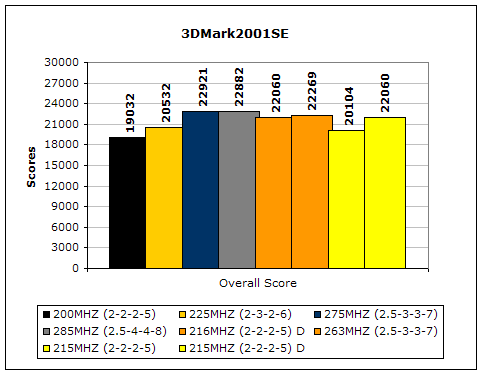
3dMark2001 is an excellent benchmark for determining overall system speed. It uses older DirectX technology, which allows the benchmark not be GPU dependent. A small increase in memory or CPU performance will result in a significant iincrease in scoring. The 4 columns display an expected linear scoring result, but notice that 285Mhz (2.5-4-4-8) is still not enough to beat the lower latencies of 275Mhz (2.5-3-3-7). Also notice the small increase in speed from running high memory frequencies over low latencies, as indicated by the orange columns.
SiSoft Sandra 2005 Memory Bandwidth
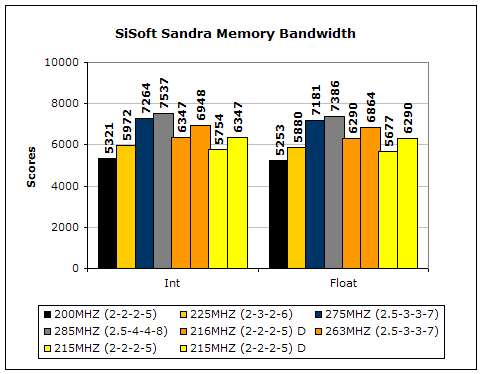
The Sandra Memory Bandwidth results are nearly identical. For every increase in 1:1HTT with memory speed, there is an increase in overall memory bandwidth. The increase comes regardless of latency, although at the same memory speed lower latencies should bring higher bandwidth. The first four columns reveal the increases in memory MHZ scale as well in memory bandwidth. The orange columns show the loss of performance when not running 1:1, despite the lower latencies. However, notice while there is a loss in bandwidth in Sandra Memory, there isn’t much loss in 3dMarks. This illustrates how an Athlon64 is much more CPU speed dependent than memory. Also notice how there is an increase in memory bandwidth with increased CPU speed despite memory speed remaining the same (indicated by the yellow columns). This again illustrates how CPU dependent the Athlon64 is on memory because of its integrated memory controller. A Pentium4 would show the almost the same results with the same speed in memory regardless of a change in CPU speed.
Everest Home Edition (Memory Benchmarks)
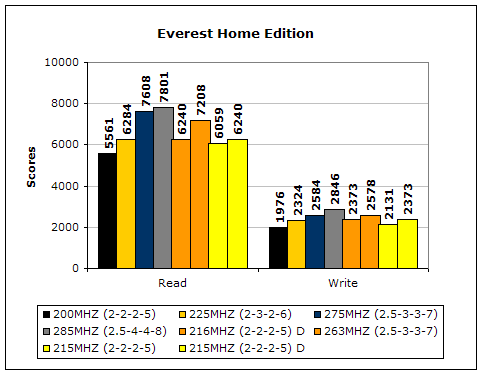
Everest Home Edition’s Memory Benchmarks show the same results as Sandra Memory Bandwidth, although the performance gaps are much smaller.
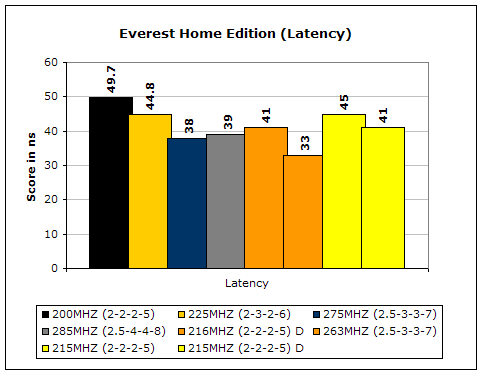
Everest Home Edition also includes a latency benchmark. The Athlon64’s performance with various latencies is also dependent upon its increase in CPU speed, despite the earlier columns having much lower latency. Notice how at 285 MHZ at 2.5-4-4-8 is 1ns higher than 275Mhz at 2.5-3-3-7. This indicates that at similar CPU speeds, latency does help increase system performance. Athlon64 speed can greatly effect latencies as well. The best latency configuration would be a highly clocked A64 with a divider on the memory (so that the latencies can remain at 2-2-2-5).
Results Continued
Far Cry
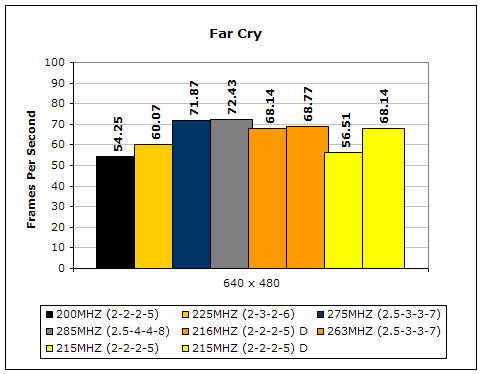
Since Far Cry is a game, the performance results will be very similar to 3dMark2001. I ran the benchmark at 640x480 so the benchmark would not be too GPU dependent. While the results are similar to 3dMark2001 in performance, this benchmark will give more significant results because Far Cry is extremely demanding. The results show that CPU speed plays a much bigger role than memory speed (indicated by the yellow columns), although there is a small boost in increased memory speed (indicated by the orange columns). Nonetheless, if you have a good overclocking CPU with flexible multis (such as a 3500+ and up) and your chipset is limited in terms of overall HTT speed (such as VIA’s chipset is in comparison to Nvidia’s chipset), then using low latency memory will not impact real world performance in comparison to high frequency memory.
Unreal Tournament 2004
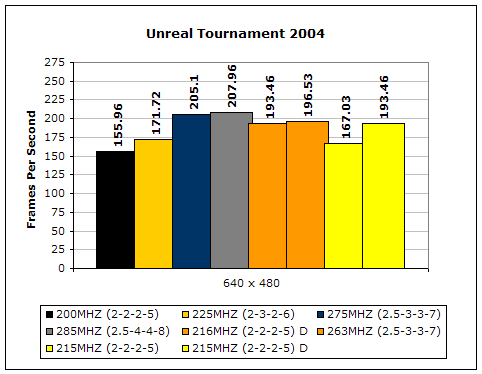
Unreal Tournament is another popular game engine to test overall system performance. Here, we can see the same results as Far Cry and 3dMark2001. Like Far Cry, UT2004 was also run at 640x480 to limit GPU dependency.
Half-Life 2
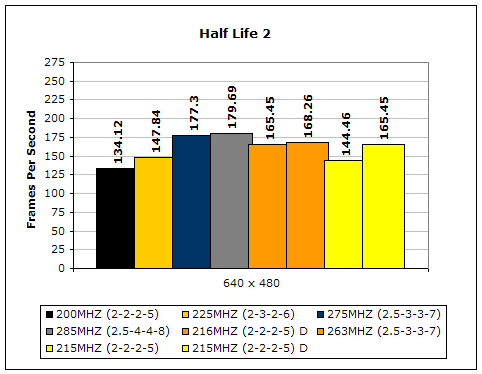
Half-Life 2 is finally here and for those of you who worried about it being too graphically intense for any system, the benchmarks indicate that with a regular 6800 it can scale just as well as UT2004. At 640x480, you can notice the similarities of the results to 3dMark2001, Far Cry, and UT2004.
Super PI
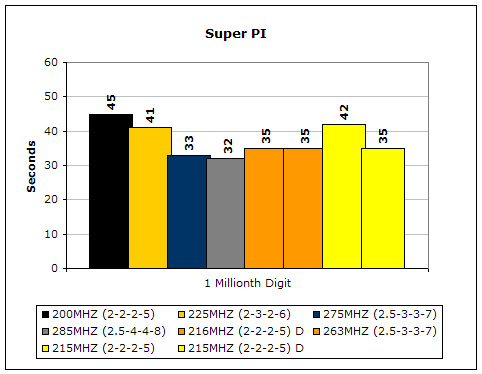
Here we have my favorite benchmark- Super PI. Super PI calculates Pi, an infinite value, so I chose to calculate it to the one millionth digit (which is the most popular digit). An increase in both memory and CPU speed displays an increase in speed in Super PI. Also notice how running the divider is insignificant for Super PI, but how CPU speed affects the speed much more.
Conclusion and Thoughts
Corsair’s latest PC4400 series is a breath of fresh air for Corsair. Lately, Corsair memory has had less than stellar overclocking, even through their XL series. By redesigning their modules, they have quickly released a revamped module of their existing TCCD lineup and greatly improved it. Is this memory better than the existing memory out there? I can’t say, because modules with excellent performing TCCD chips are random. My Centon TCCDs can clock higher at lower frequencies and the OCZ’s that I’ve had did not clock as high as Corsair’s or Centon’s. It is still hit or miss, and the blame should not be put on the manufacturers. Manufacturers are already releasing products that exceed the the rated speeds of the IC’s themselves. The cost is also much higher than OCZ, PQI (review up shortly), Centon (review up shortly), Patriot PDP, or even Geil. However, the increase in price guarantees a clock of 275MHz, which other TCCD products might not be able to achieve. In choosing Corsair, you will get unprecedented support through their House of Help forums and their lifetime guarantee. It is their level of quality and support that has brought them to the forefront of high-performance memory and I suspect this level to continue well into the near future. Considering its speed, the memory may not be too pricey (OCZ’s 4200 is well above $300). If you are smart enough, you can find modules just like Corsair’s for much less. For these reasons, these modules will receive InsaneTek’s “Recommended” award.
Pros:
- Patented holographic sticker and aluminum heatspreaders
- Corsair’s own Brainpower PCB
- Excellent overclocking
- Awesome performance at 1T
- Flexible timings (low latency or high speed)
- Low voltage needed to overclock well
Cons:
- Price a bit high (in comparison to other TCCD modules)

We would like to thank Corsair for providing us the sample. If you have any questions or comments, feel free to hit us up in the forums. You can also check out more of our latest reviews on the front page.