

Gigabyte Geforce 7800 GTX GV-NX78X256V-B
Introduction
I am the type of enthusiast that is willing to fork over big bucks to possess the latest graphics technology in the market. When the 6800 Ultra and X800XT PE were still mysteries to people, I already had them in my possession. While I was mocking the people jealous of me for having both hard-to-find cards, deep inside I was crying because I had to live on crackers and water for two months. The 6800 Ultra and X800XT PE paper releases left many dedicated enthusiasts feeling bitter, and for those that did have access to purchasing these rare cards, we had to endure increased prices over the standard MSRP. The release of Nvidia’s SLI did little to help the situation. The initial launch of PCI-E 6800 cards caused high demand, only to find the supply side to be lacking. However, Nvidia has responded to the complaints of angry enthusiasts and has successfully launched in reality their new 7800 GTX, based on the G70 core, on the same day it was announced. Gigabyte is one of the first companies to respond with an available retail 7800 GTX.
Gigabyte, known to most as a top tier motherboard manufacturer, also manufacturers Nvidia and ATI video cards. Gigabyte is usually one of the first manufacturers to come out with new graphics cards and it is no surprise that they have responded with an incredible looking 7800 GTX package. An attempt to dethrone ATI from all of their single card achievements, the 7800 GTX is a much revamped graphics card based on the 6800 architecture. With the release ATI’s next graphics card, the R520, Nvidia’s release of the 7800 GTX this early is a bold move. Nvidia still plans to release the faster G71 to respond to ATI’s offering. Let’s see if Gigabyte’s 7800 GTX package warrants the upgrade now before the faster cards come out near the end of 2005.
Nvidia’s G70 GPU Core
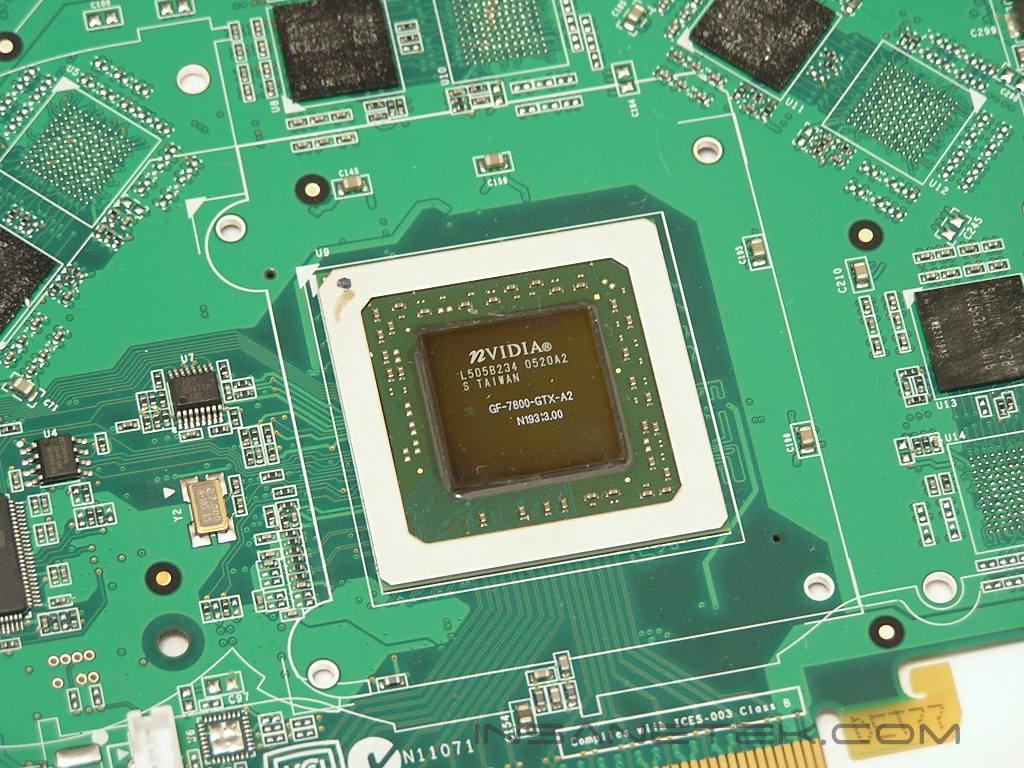
Before we can even examine Gigabyte’s 7800 GTX, we must first examine the G70 core and its key differences and improvements, making it THE card to have in an industry full of speed freaks and gaming gurus. While still based on the same architecture as the 6800 Ultra series, the 7800 GTX has a significant number of improvements that make the G70 core the most robust graphical core to date.
Based on TSMC’s 110nm process, the G70 core boasts a total of 302 million transistors in comparison to the NV40’s 222 million transistors. People were already stunned by the amount of transistor counts on the original 6800 Ultra and X800 XT, in comparison to high-end CPUs, such as the FX-57 that supports about 114 million transistors and now the G70 core supports three times as much transistors as the FX-57. Nvidia also added 8 pixel pipelines for a total of 24 total pipelines on the G70 and also added 2 extra vertex shaders for a total of 8, in comparison to the older 6800 Ultra’s total of 6. The fill rate has also been increased for a maximum of 10.32 Gigatexels in comparison to the 6800 Ultra’s 6.4 Gigatexels.
Gigabyte 7800 GTX GV-NX78X256V-B
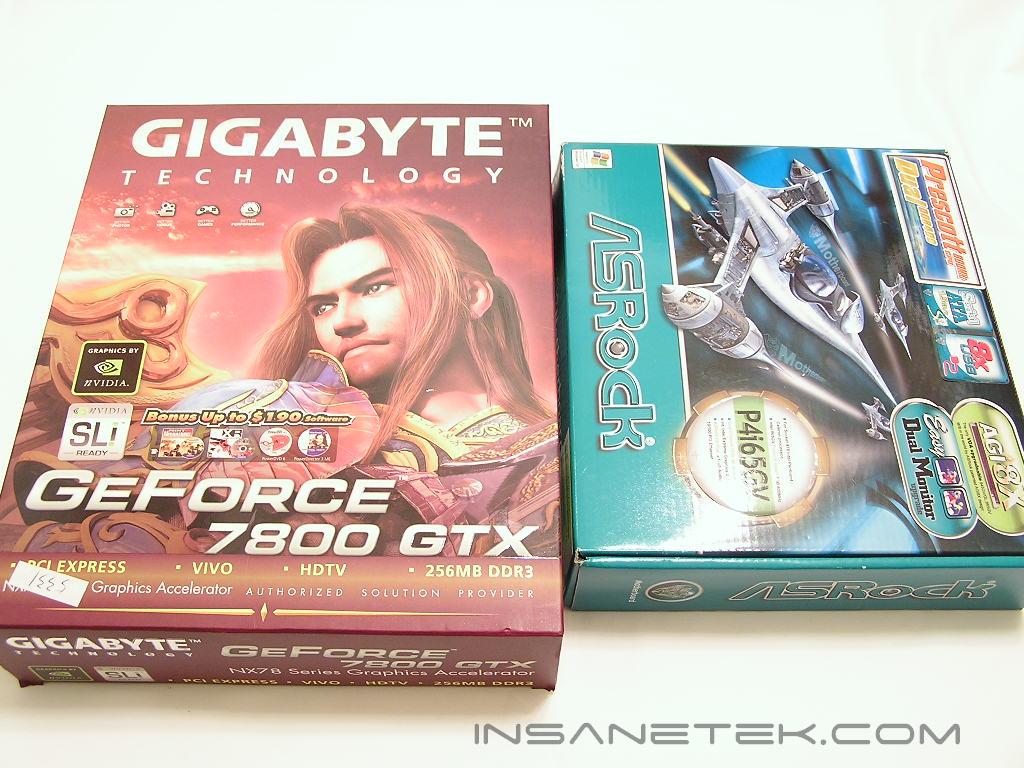
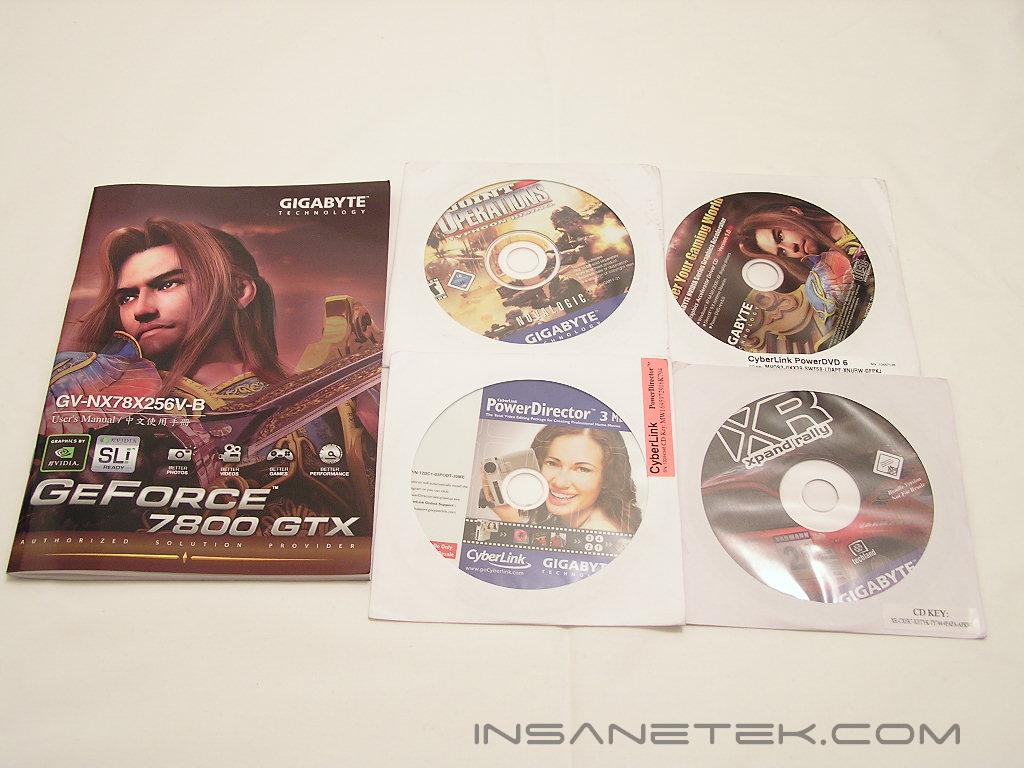
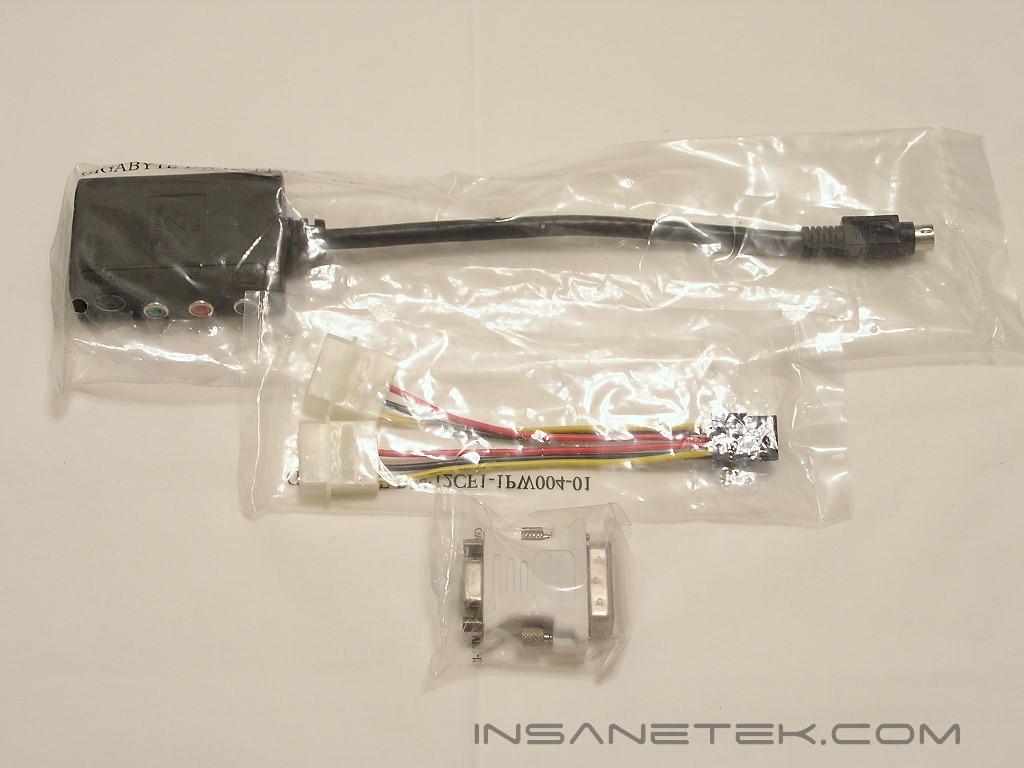
Gigabyte has always been known for their awesome video card bundles and I was not surprised to see their box as magnificent as ever. The box was huge and was equal in size to a typical motherboard bundle. The illustration above shows how much larger the Gigabyte 7800 GTX box is in comparison to an ASRock’s Mini-ATX box. The box, which has a character similar to Soul Caliber’s “Nightmare,” illustrates all of the value-added factors that Gigabyte’s 7800 GTX comes with. Gigabyte claims they have provided the consumer with an extra 190 dollars in value by including software in addition to the card. The following is a list of the package contents:
- Gigabyte GV-NX78X256V-B video card
- User’s Manual
- DVI-VGA adapter
- Multimedia connection for S-video and VIVO capability
- Drivers Installation CD w/ PowerDVD
- XR Xpand Rally
- Joint Operations: Typhoon Rising
- Power Director 3
- PCI-Express power adapter
Gigabyte ensures you are supplied with everything you need to set up an ultimate gaming card with multimedia capabilities. More importantly, Gigabyte includes two games, Joint Operations and XR Rally, for your gaming pleasure.
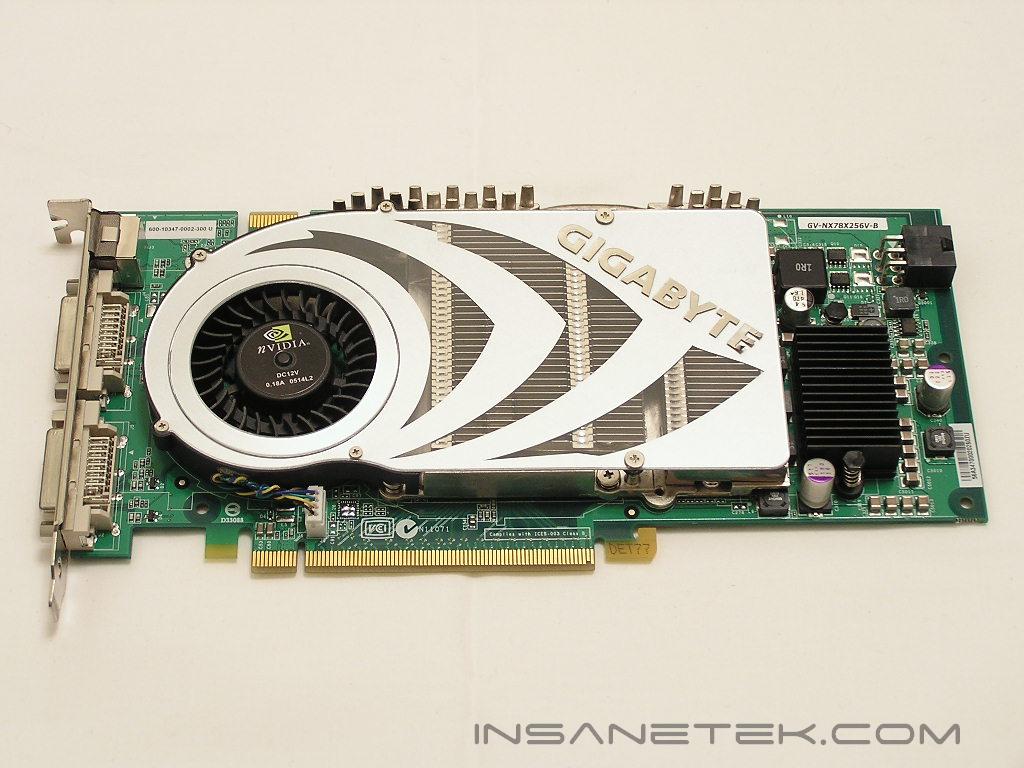
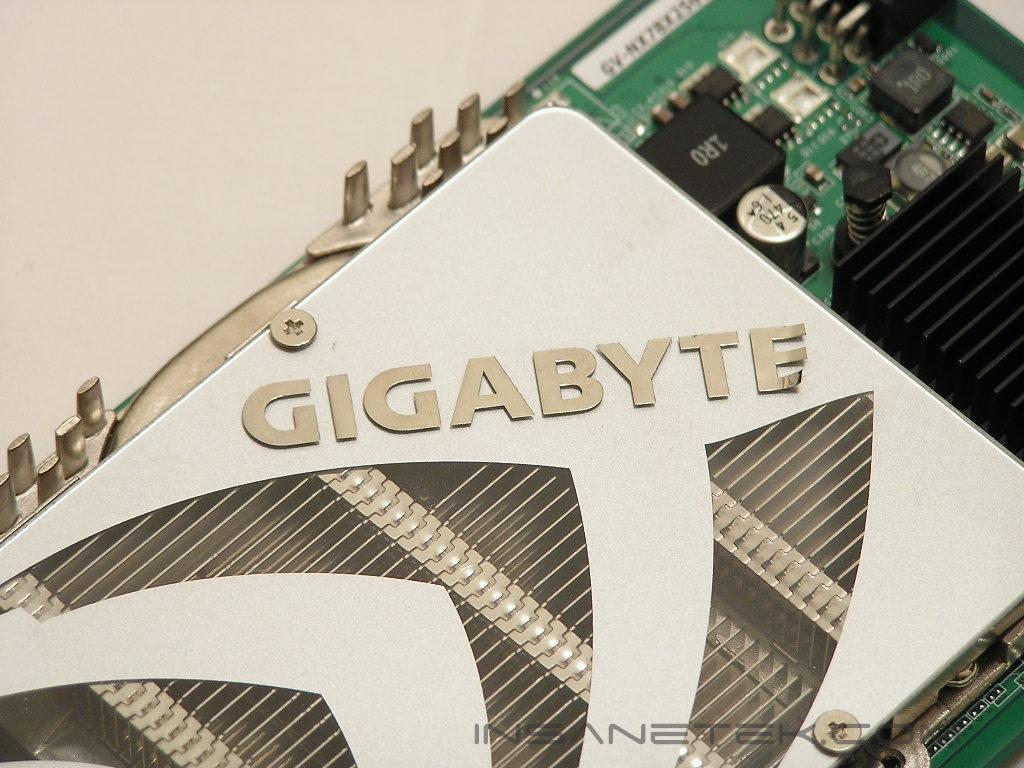
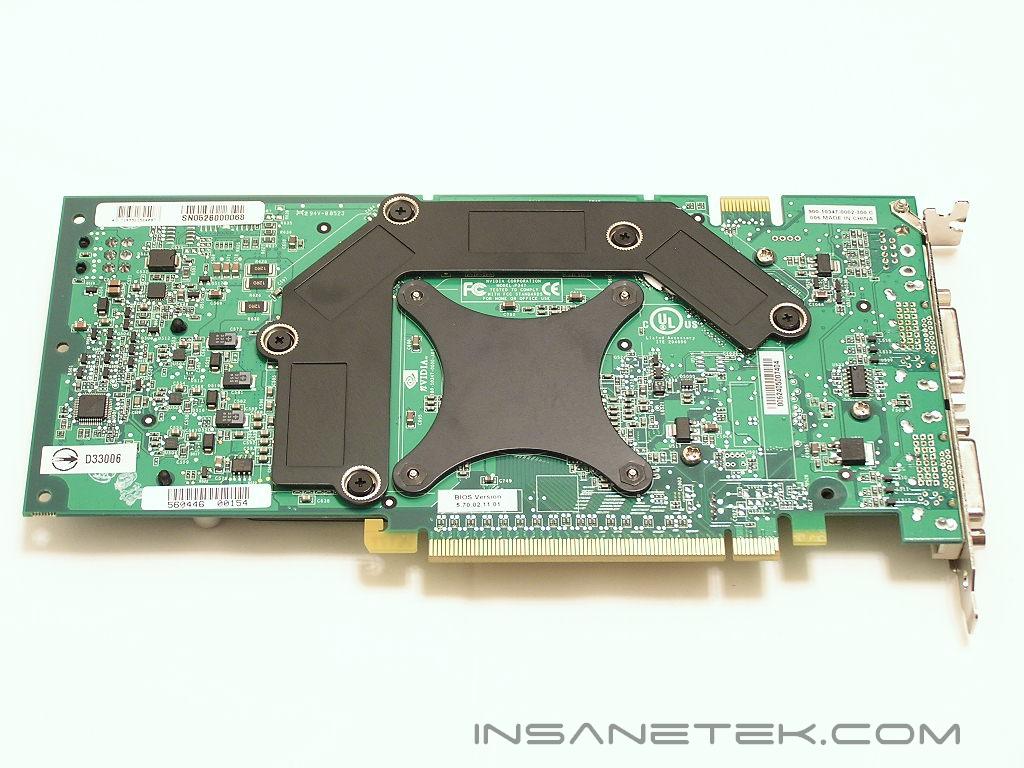
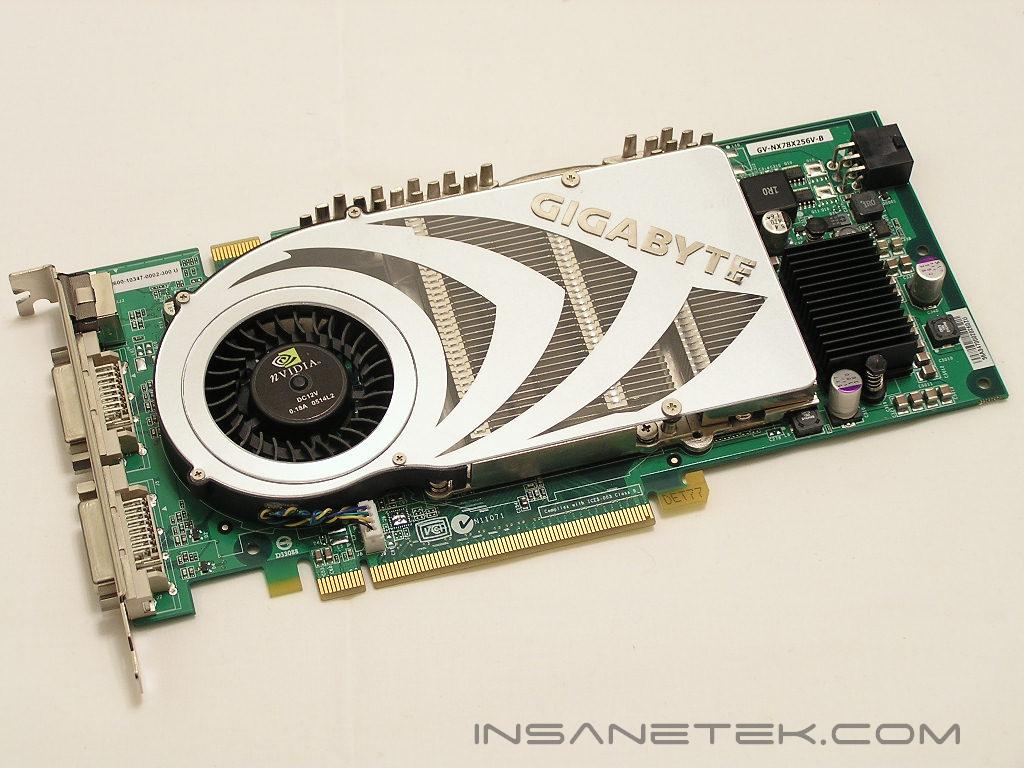
Although I have been reading about the 7800 GTX for quite some time, I did not realize how huge this graphics card was. Despite the large size, the card comes equipped with a single-slot all-aluminum cooler with a smaller blower than the ones equipped with X850 XTs and 6800 Ultras. The smaller die allows the 7800 GTX to come fitted with a much quieter-looking cooling solution than the loud double-slot cooling fans that we are accustomed to. Similar to a 6800 Ultra cooler, the 7800 GTX cooler utilizes a heatpipe to help dissipate the heat better from all of the ram chips surrounding the GPU. The “E” on the Gigabyte sticker also came slightly peeled off, but this is very small cosmetic defect and has no bearing on the quality of the video card. The back ram chips are also cooled by an aluminum back plate.
Gigabyte 7800 GTX GV-NX78X256V-B Continued
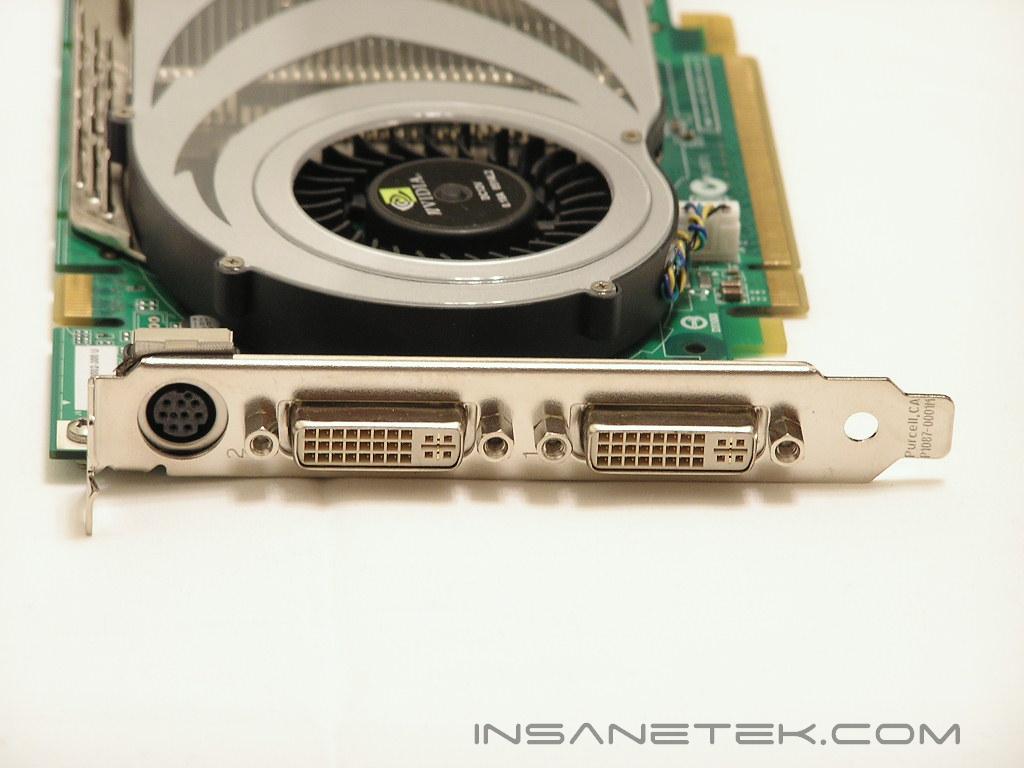
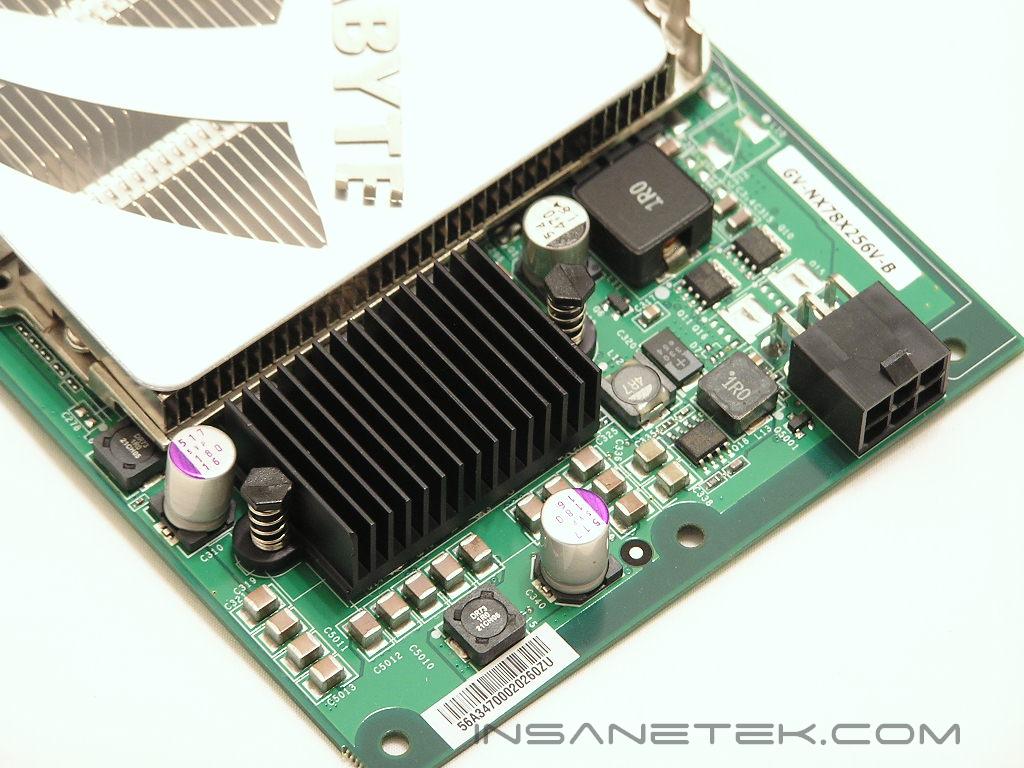
The 7800 GTX features Dual DVI for the graphical gurus out there who need the extra monitor space with dual LCD’s. The 7800 GTX is powered by a single PCI-E connector, which is supplied with most mainstream power supplies, such as OCZ’s PowerStream series and SilverStone’s Zeus series.
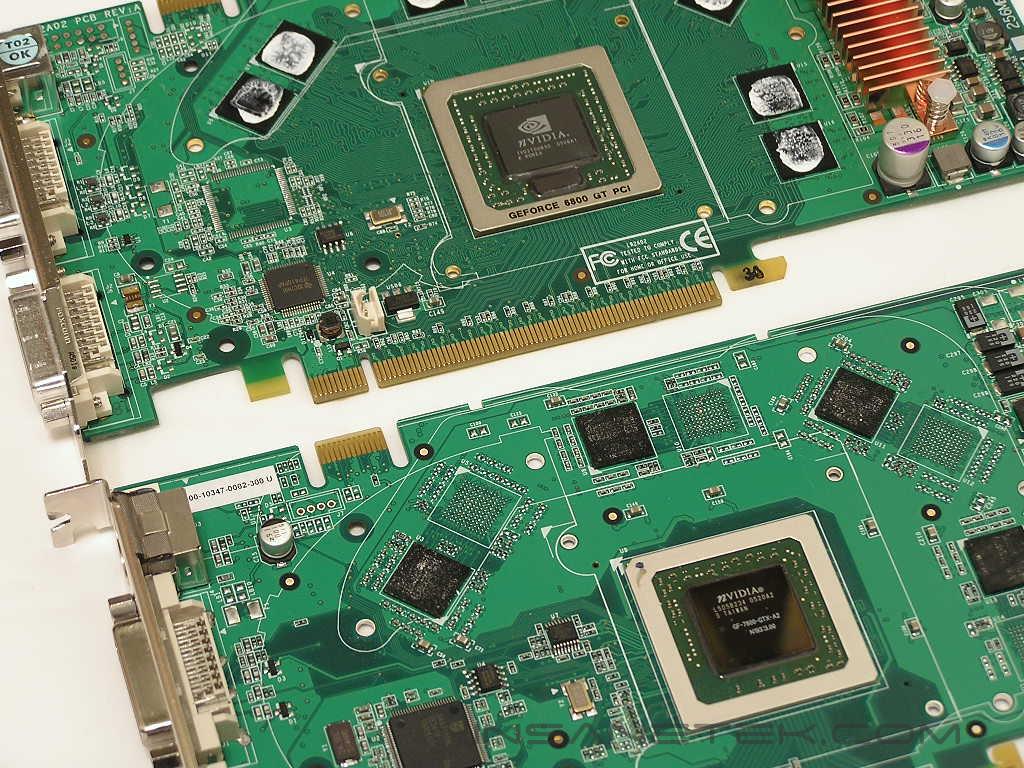
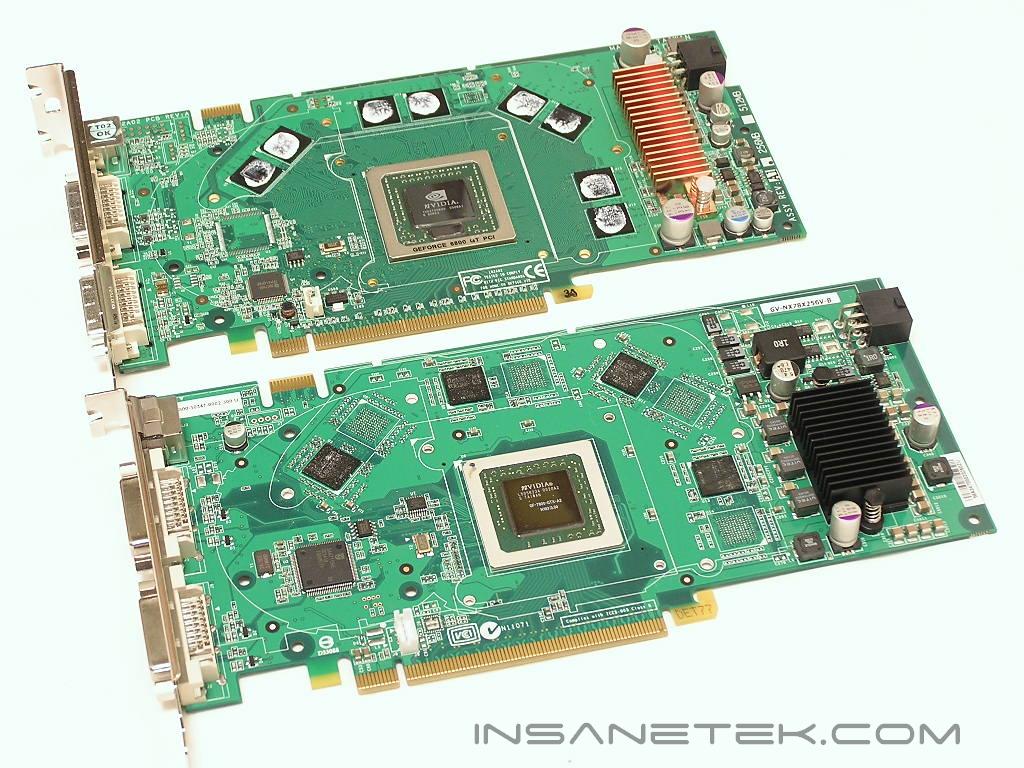
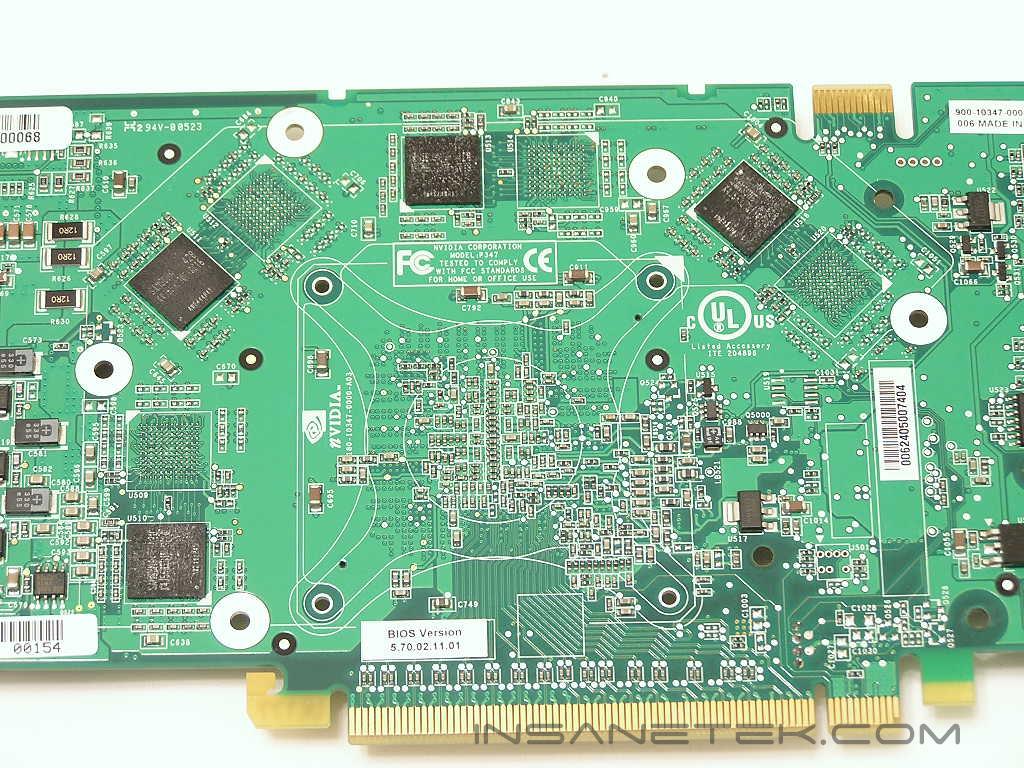
I decided to take apart the 7800 GTX and a Leadtek 6800 GT to compare the change in die size. The top bare video card is the 6800 GT core, while the bottom is the 7800 GTX core. As you can see, the 7800 GTX is a bit larger in comparison to the 6800 GT core, which is the same size as the 6800 Ultra core. As previously stated in the G70 section, the 7800 GTX core boasts more transistors than even an FX-57. Looking at the back and front ram IC placements, you can see there are empty solder ball grids to fit extra ICs for more size. Can you guess the availability of DDR2 512MB 7800 GTX’s in the future? This amount of graphics memory coupled with the power of the 7800 GTX should make for a very powerful combination.
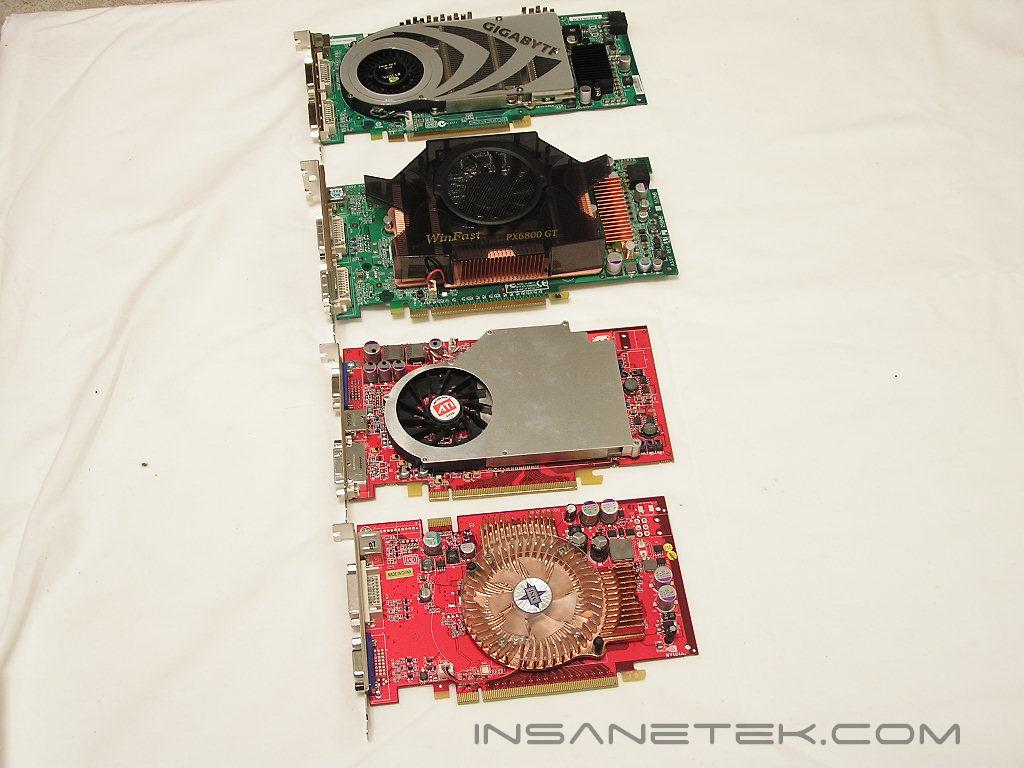
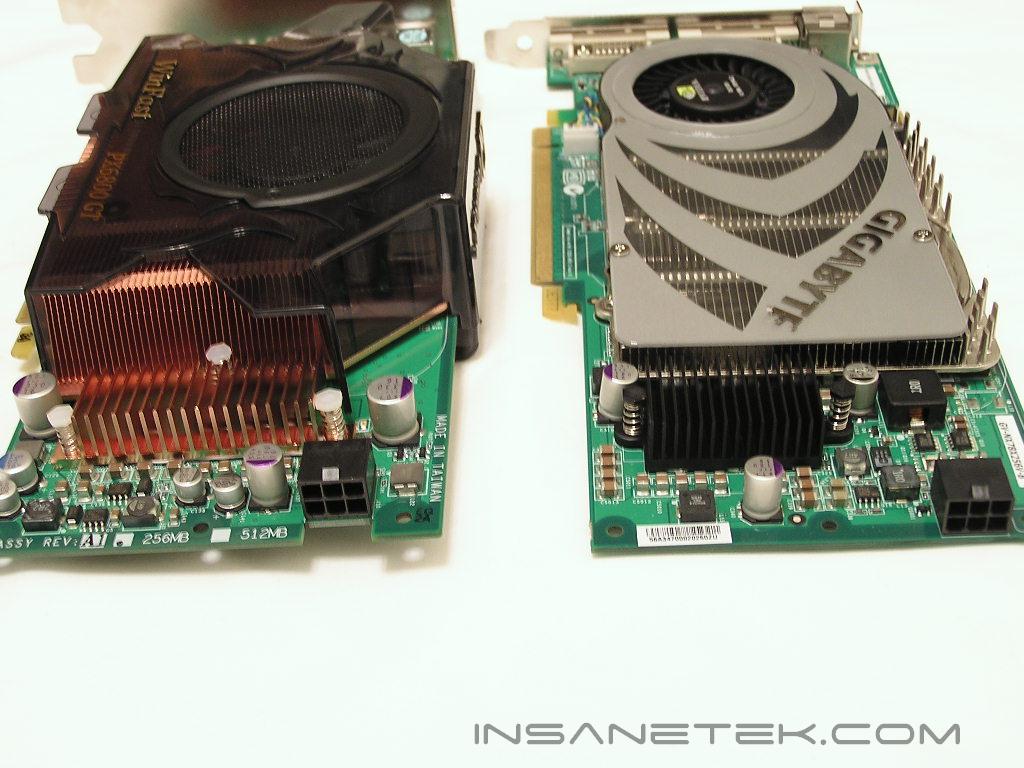
Here, you can see how much larger the Gigabyte 7800 GTX is in comparison (from bottom to top) to the 6600 GT, the X800XL, and the 6800 GT. These cards were pictured for size purposes, but I will also add the X850 XT PE for benchmarking purposes. The X850 XT PE is similar in size to the pictured X800XL.
Testing Setup
Test Setup and Drivers:
- Athlon 64 4000+ (234HT x 12 multi = 2800 Mhz)
- 2 x 512MB PC3200 Centon Advanced
- Abit AN8 Ultra SLI
- 2 x 80GB Hitachi SATA II Hard Drives
- OCZ PowerStream 520W
- Viewsonic V90F
Graphics Cards used for Testing:
- Connect3D Radeon X850XT PE
- 2 x MSI 6600 GT’s in SLI mode
- 2 x Leadtek Winfast 6800 GT’s in SLI mode
- Leadtek Winfast 6800 GT
- ATI Radeon X800XL
Drivers
- Nvidia Forceware 77.77
- ATI Catalyst 5.8
To eliminate as much bottlenecking from my system as possible, I overclocked the 4000+ to 2.8 GHz and verified its stability with Prime95 and SuperPi. I utilized the latest official drivers from both ATI’s and Nvidia’s website and ensured that when I switched drivers, all traces of each driver were eliminated by deleting the appropriate files, folders, and registry settings in Windows. All graphics cards shown for testing were kept at their specified stock speeds and were never overclocked. I avoided the use of budget cards, such as the 6600 GT by itself, the X700, and any graphics card of similar performance or below, considering the 7800 GTX is targeted towards the high-performance and high-end market. The monitor used was a Viewsonic V90F monitor, although I tested only up to 1600x1200, since anything higher was not possible with this monitor. I kept all testing resolutions at above 1280x1024, since today’s high-end video card offerings are meant to run at high resolutions. For 4x anti-aliasing and 16x anisotropic filtering enabled, I tested only at 1024x768 resolution and above. We are moving into an era where resolutions of 1024x768 are no longer an option in the minds of a high-end gamer and are only used for testing purposes. I only tested at settings used in a typical real-world situation, which is why I chose 16x anisotropic filtering always, as the change from 8x to 16x posed a minimal difference in performance.
Testing:
In order to capture as much real-world gaming performance as possible, I tried to make sure all time demos and custom demos were best indicative of real world performance. For the games that already included adequate time demos that reflect real world game play, such as the demos of Doom 3 and Unreal Tournament, I utilized those existing demos for testing. For ones that either did not come with adequate time demos or good enough time demos, such as Half-Life 2 or Battlefield 2, I created custom time demos myself to make sure real-world game play was captured. These demos will be available shortly for download in case any users would like to use them for their own testing purposes. I will discuss more in detail each testing procedure in the benchmark descriptions.
Far Cry
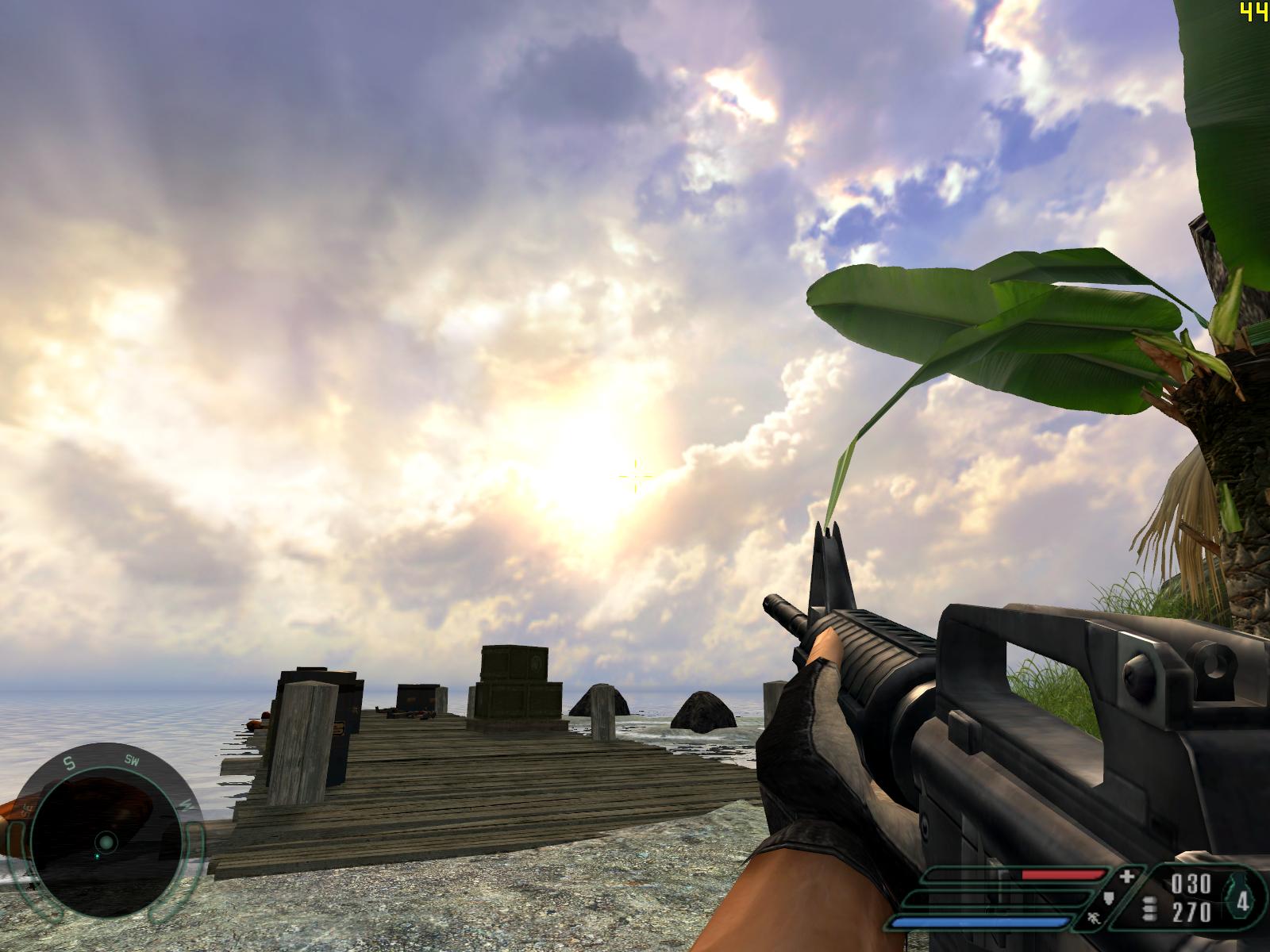
Far Cry may mark the beginning of a new era of graphical prowess as Crytek’s successful engine and game were released several months prior to Doom 3 and Half-Life 2. The game itself set a new standard in the recommendation for new hardware since its graphics, during its time, were rivaled by no other game in existence. And even when other graphically intense games were later revealed, Crytek wowed us again with Far Cry’s immediate support for the latest technological and graphical breakthroughs, such as the use of HDR lighting with Pixel Shader 3.0 and 64-bit capability. Unfortunately, the game does not support standard time demos, so I had to make a custom time demo. I recorded some game play during one of the game’s most graphically demanding levels. Using the outside volcano sequence during the “Dam” level, I managed to record a demo with intense fire fights with bullets and rockets and with “heatwave” effects coming from all around the volcano. Unfortunately, the recorded demo only records a sequence and is not a direct copy of the original sequence taken, which means that each time the demo was run the enemies and environment could react differently every time. In order to keep my results as objective as possible, I played each demo three times and took the average of the three instances. While not too different in results, each FPS may count in delivering the best possible results for analysis. Far Cry patch 1.3 was also applied for testing.
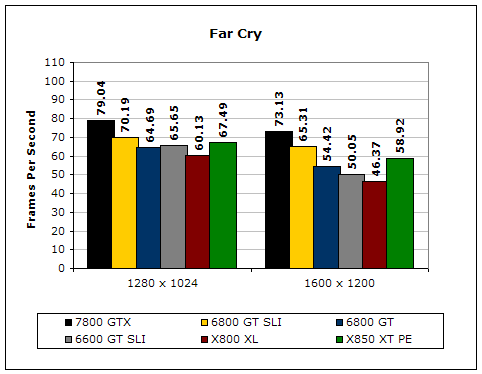
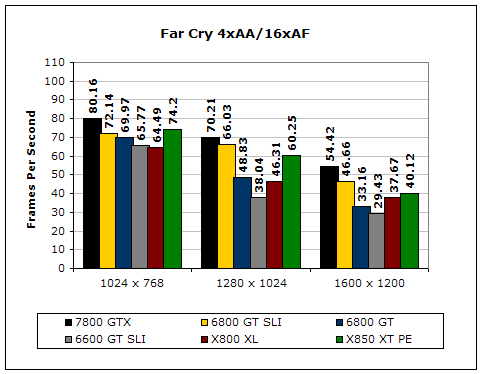
On our first test, you can easily see the power behind the Gigabyte 7800 GTX. In Far Cry, the 7800 GTX was able to edge out a 6800 GT SLI setup, especially at the highest resolution.
Splinter Cell: Chaos Theory
The Splinter Cell series has always gained recognition as being one of the most innovative stealth game experiences ever. And each edition has progressively wowed us in terms of visuals and game design. Chaos Theory is the latest incarnation and features support for Shader Model 3.0 and ATI’s 2.0+. The game features the best shadows and lighting, rivaling even Doom3’s use of darkness as a game play element. To test
Chaos Theory, I used the built-in benchmark time demo to check for results. Splinter Cell was updated with the latest patch that allows for ATI’s shader mode, but to keep tests as similar as possible, shader 1.1 was used for testing.
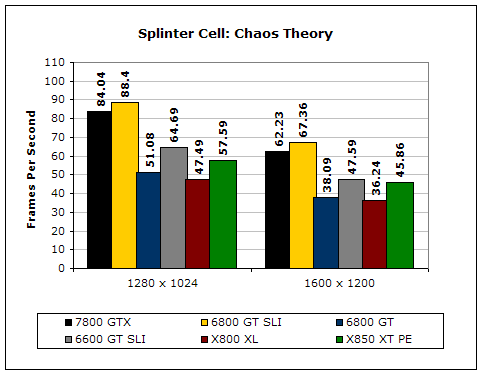
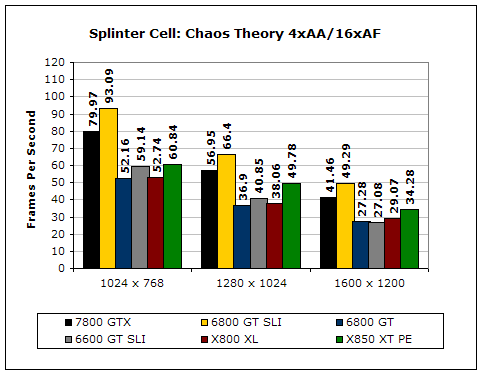
The Gigabyte 7800 GTX was able to handle Splinter Cell: Chaos Theory in all of its glory even at the highest resolution possible. It positioned itself well above the X850 XT PE and was very close to the performance of the SLI setup.
Chronicles of Riddick: Escape from Butcher Bay
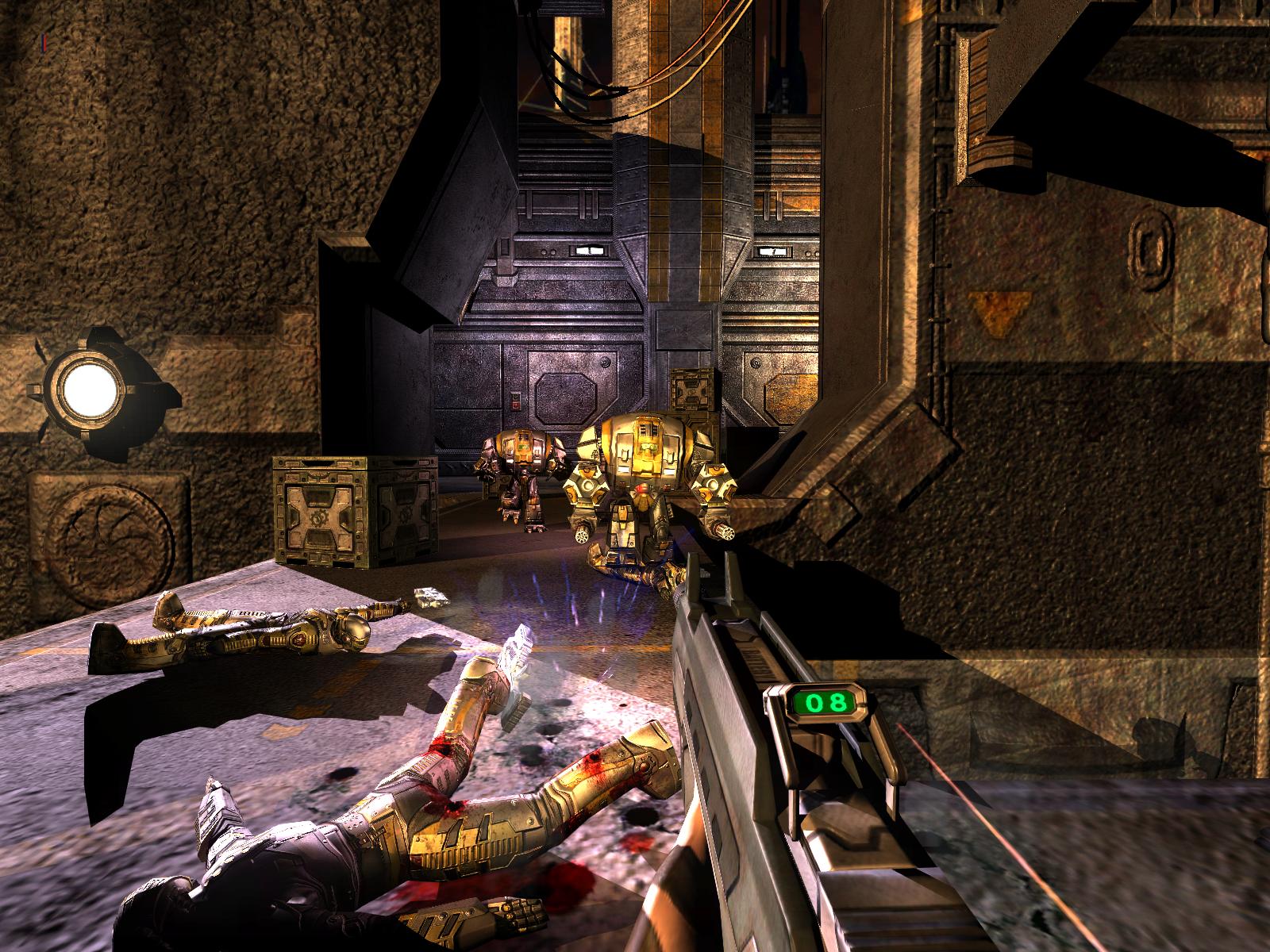
Perhaps the most surprise hit this year, the Chronicles of Riddick was heralded for both its intense game play and incredible graphics. Tarnished by the lackluster reviews of the actual movie, not many people expected the game to be good. However, once the reviews averaged high scores across the board, the game quickly caught on as the game that Doom 3 should have been. Combined with a decent storyline, clever game play, and graphics that look almost CG quality, the Chronicles of Riddick is the best single-player game at its price point. The game is arguably the most graphically intense game as well. With an optional shader mode that will most likely bog down the most high-end machine, the game manages to look stellar in regular 2.0 Shader Mode. It is no wonder why Chronicles of Riddick has easily made its way into the testing platform of the latest and greatest graphics cards. I tested the Chronicles of Riddick using my own custom time demo, which consists of an extreme firefight in one of the ending levels where Riddick tries to escape on the plane.
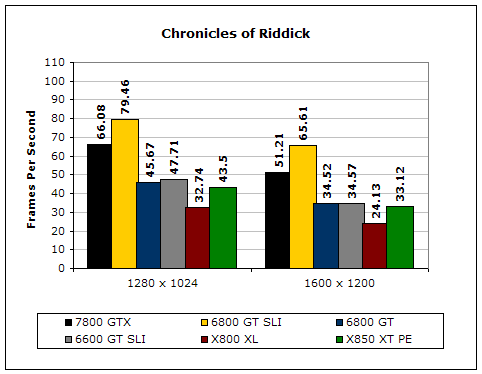
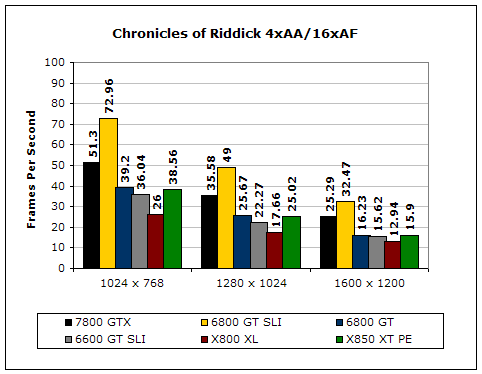
The Chronicles of Riddick is the most demanding game of these tests. Even at super high resolutions, the 7800 GTX showed signs of weakness. Yet, the 7800 GTX still performed well above all the other solutions, except for the SLI setup.
Unreal Tournament 2004
Unreal Tournament may be one of the most popular fragging first-person shooter series of all time, and when UT2003 came out and wowed everyone with its advanced visuals and gameplay, everyone looked forward to an enhanced version in the form of UT2004. With added gameplay modes such as Assault and Onslaught and combined with amazing graphics and benchmarking capability, UT2004 has become a necessity in reviewing the latest graphics card technologies. For testing, I used UT2004’s in-game benchmarking utility, which takes the average of the three levels dm-rankin, as-convoy, and br-colossus.
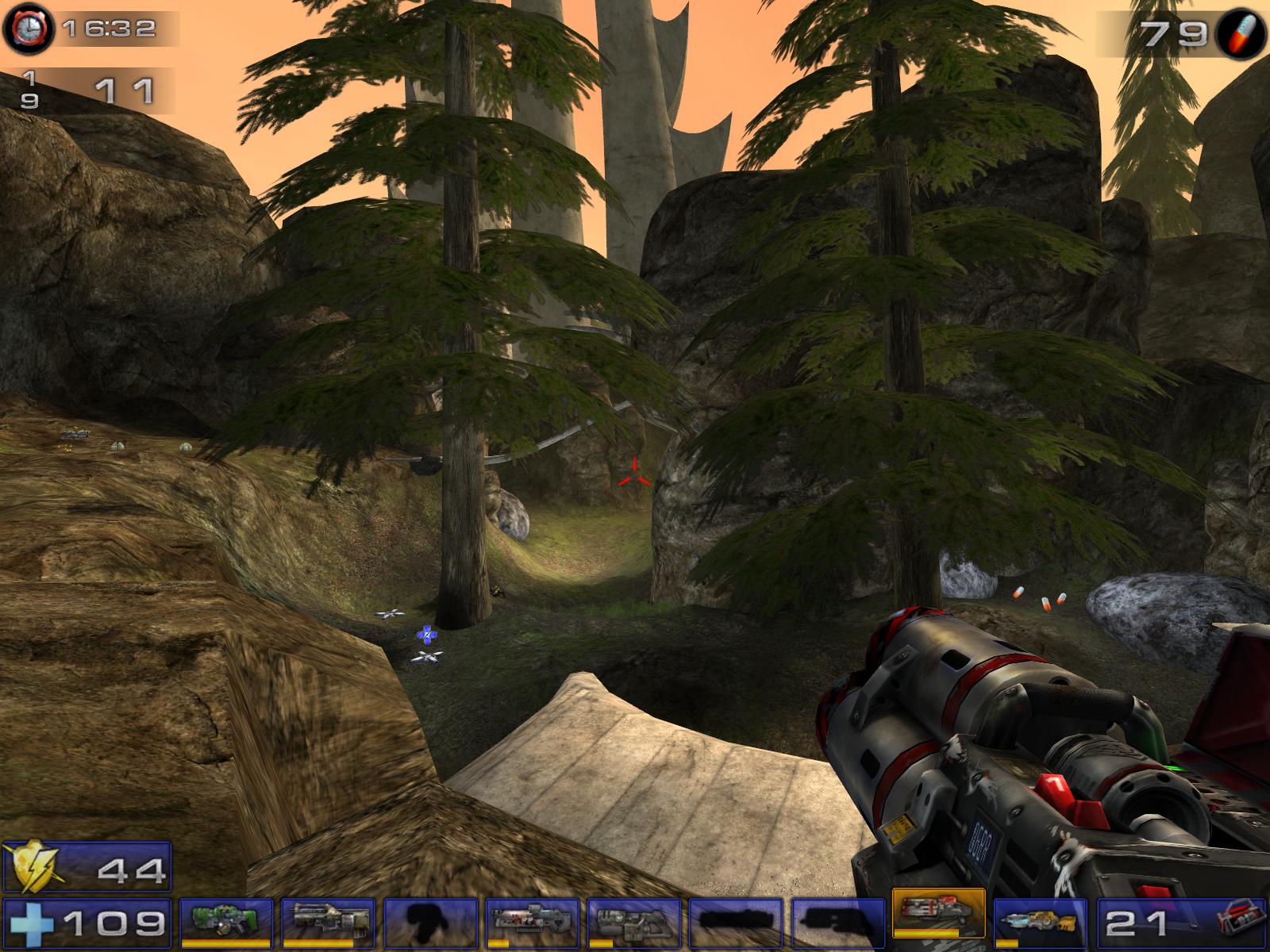
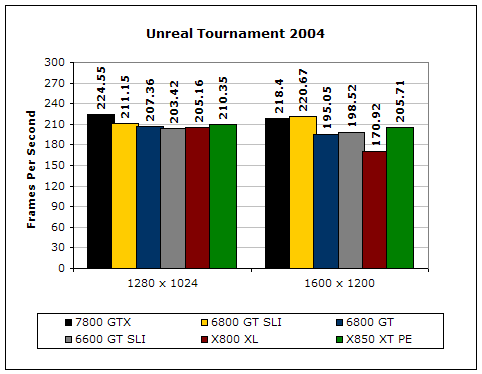
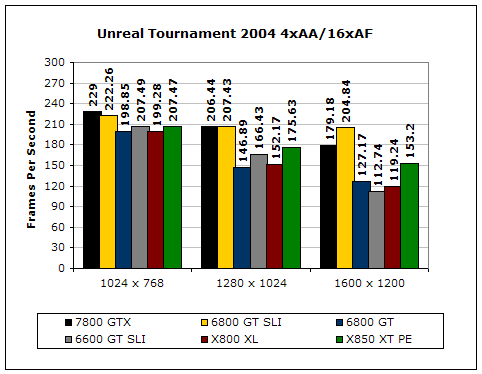
Although UT2004 did not show that much disparity at lower resolutions among the cards, we can see the power the 7800 GTX possesses at the higher resolutions. At 1280x1024 and above with 4xAA and 16xAF enabled, the 7800 GTX performs similarly to the SLI setup.
Doom 3
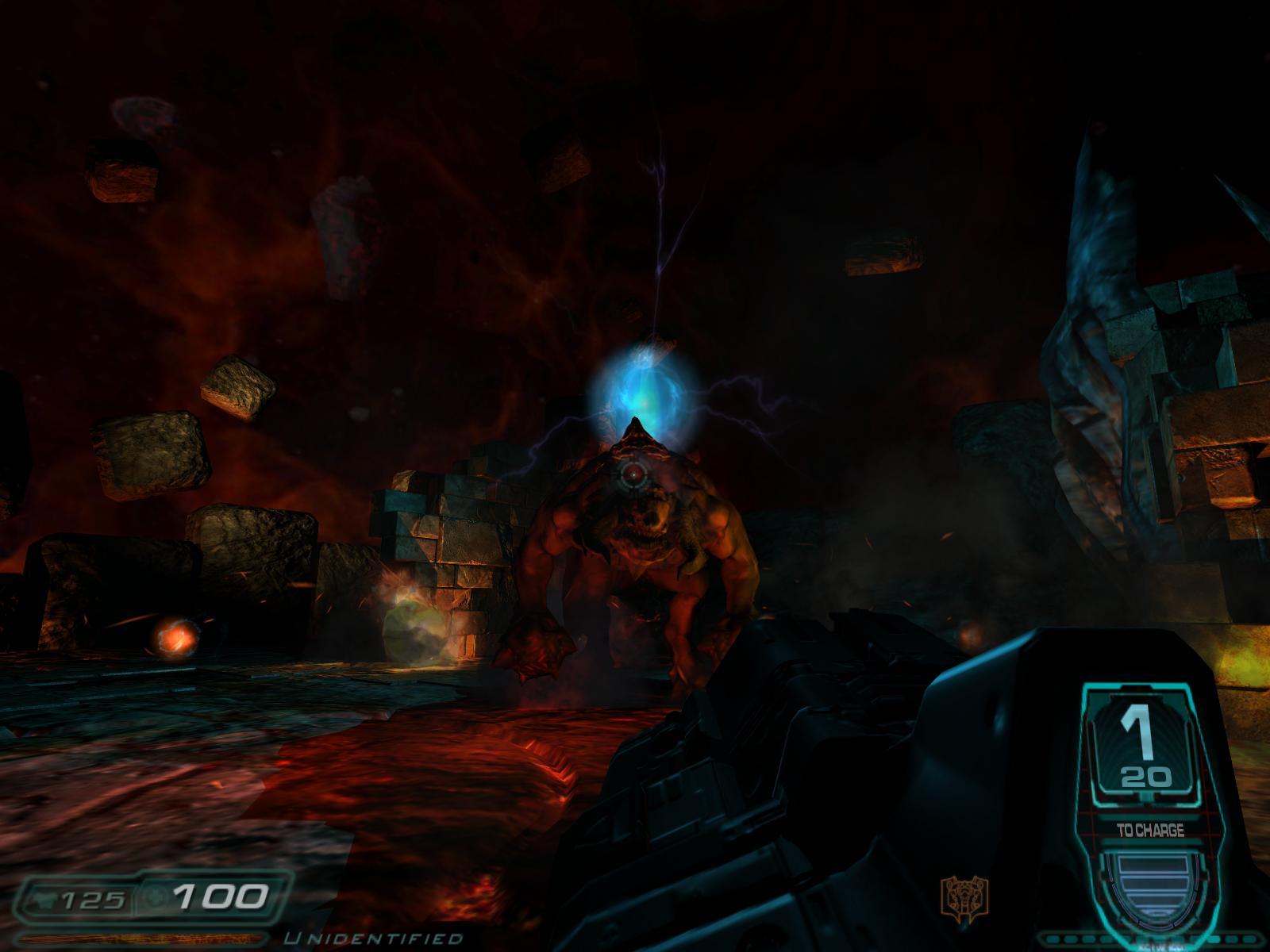
Doom 3 has been a highly-anticipated for quite some time now. In development for many years, gamers were wowed by the intense graphics and physics that they saw from it early on in production. Once the game came out, the PC gaming industry was changed forever, as Doom 3 brought upon a revolution in videogame graphics. Utilizing intense real-time and dynamic shadows and highly-detailed monsters and characters, Doom 3 became the ultimate test in seeing how fast a gaming rig is. It also became one of the first games that would utilize 512MB of video memory. Now serving as the engine for future games such as Quake 4, Doom 3 has become of THE graphical benchmarks to use in testing the latest graphics cards. For testing, I used the demo1 test included with the game. I ran the test three times and recorded the third result since I had to wait for all of the information from the demo1 to load first into the cache.
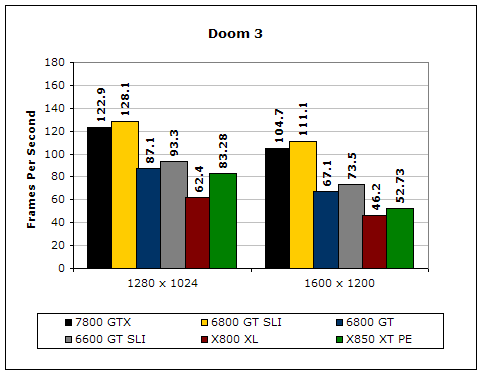
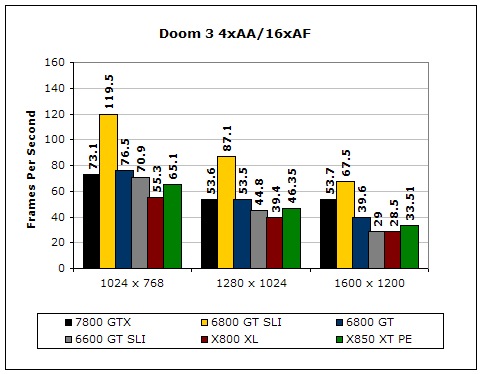
Doom 3 was a made-for-Nvidia game and the 7800 GTX shows how its new architecture improves upon the 6800 series. The 7800 GTX was the only single card capable of running Doom 3 at 1600x1200 with 4xAA and 16xAF enabled.
Half-Life 2
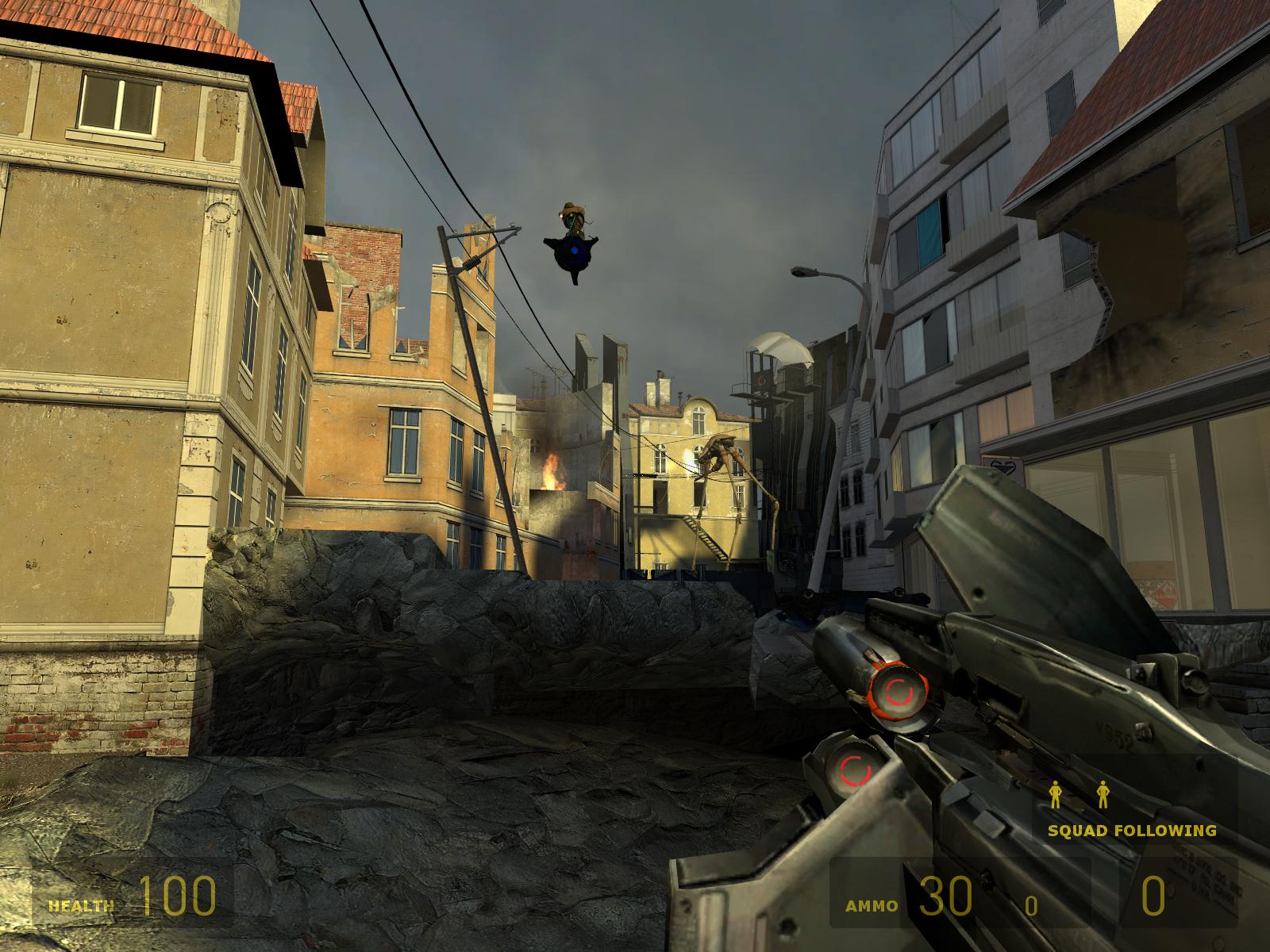
Like Doom 3, Half-life 2 was also long in development and was the most talked about game in history. While Doom 3 brought upon a revolution in graphics, Half-Life 2 brought upon a revolution in physics and game design. Serving as a sequel to probably the best game ever made, Half-life 2 stole the spotlight in 2004 as one of the best games ever made. Offering immediate support for Counter-Strike Source, the game instantly became the game to have for 2004 for both a single-player and multi-player hit. Although the game comes with a built-in graphical test, the test itself is not a good indicator of actual game play. So I made a custom demo using one of the canal levels. The level begins with a brief boat ride, followed by a firefight with both a helicopter and enemies.
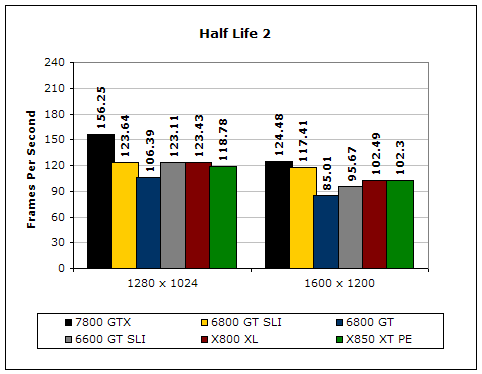
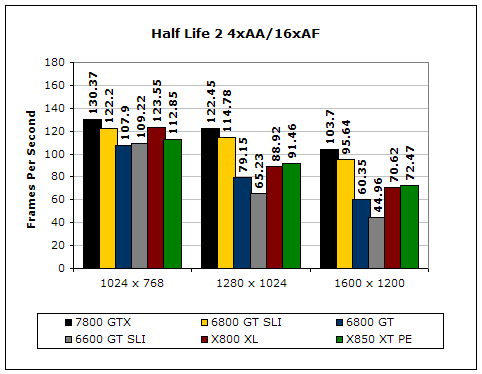
Primarily an ATI favored benchmark, the Gigabyte 7800 GTX completely defaces ATI’s top X850XT PE as the best performing HL2 card to have.
Battlefield 2 Demo
Ever since the original Battlefield series came out, multi-player was never the same. Featuring huge maps and capability of up to 64 players, Battlefield 2 immediately gained recognition considering it had new DirectX 9 graphical improvements. Probably one of the few games to directly effect the demand for 2GB of memory, Battlefield 2 may be one of the most graphically and system-demanding games in the market. While gaming online, I noticed that my memory usage was at over 900 MB, which means I myself am in need of a 2GB upgrade. The game does not come with a built-in benchmarking utility, but I was able to make a custom time demo using the Battlefield 2 demo. I enabled 64 player support in a 16 player map to increase the graphical intensity, and I ensured that the camera angles caught the most graphically demanding firefights of the map.
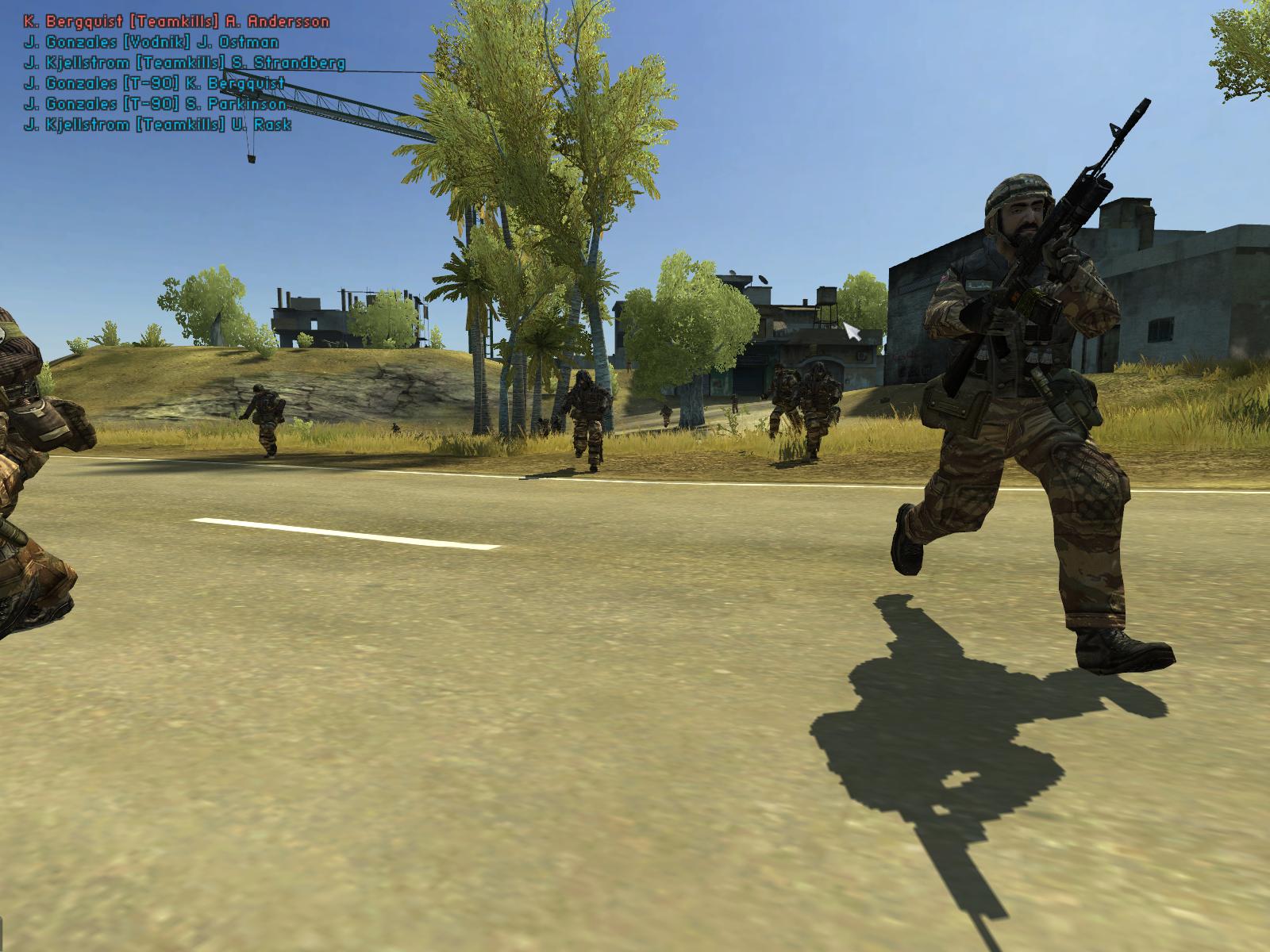
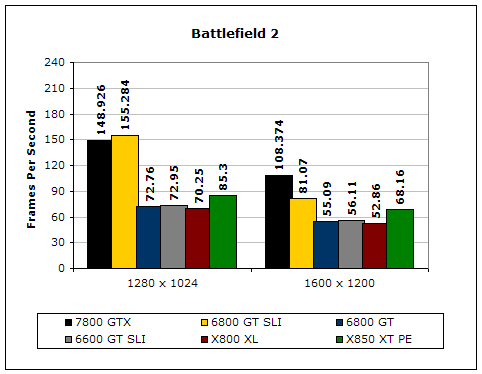
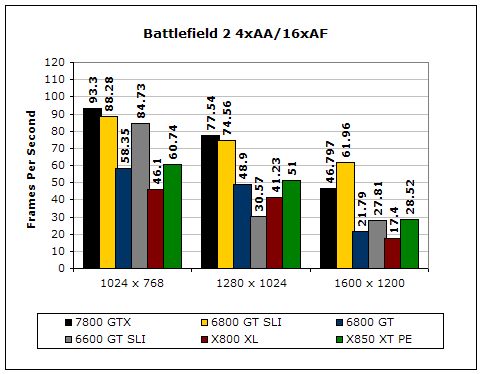
After having played Battlefield 2 on only 1GB of memory, I was convinced that I needed 2GB of memory; however, I realized that even my X850XT PE was not enough for the graphical demands of BF2. Shortly after testing Gigabyte’s 7800 GTX, I am convinced that the 7800 GTX is the PERFECT choice for BF2. Edging out even the SLI setup in some resolutions, the 7800 GTX is the ONLY single player card that can handle BF2 in all of its glory without bogging down your system.
Synthetic Benchmarks
For synthetic benchmarks, I used 3dMark03, 3dMark05, and Aquamark3. I left 3dMark01 out because I wanted to use synthetic benchmarks that utilized the latest graphical technologies, and I did not want to test synthetic benchmarks of older DirectX 8 graphics. 3dMark03, 3dMark05, and Aquamark3 are much closer to top existing and future games in performance and should be adequate tests for testing the latest graphics cards.
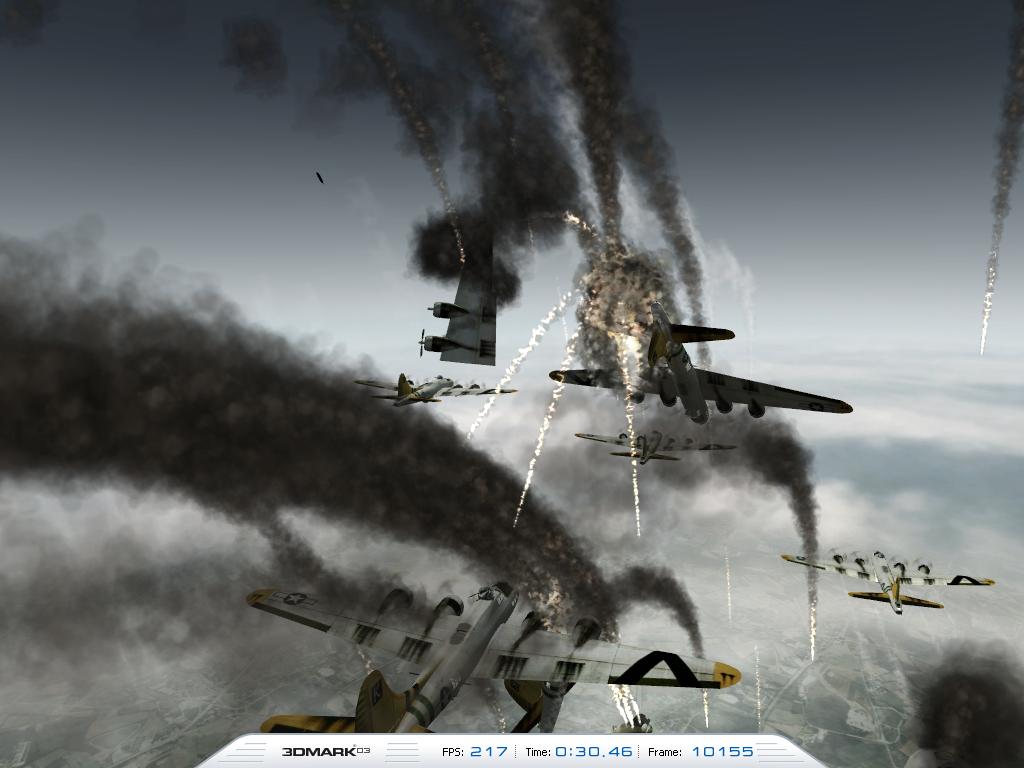
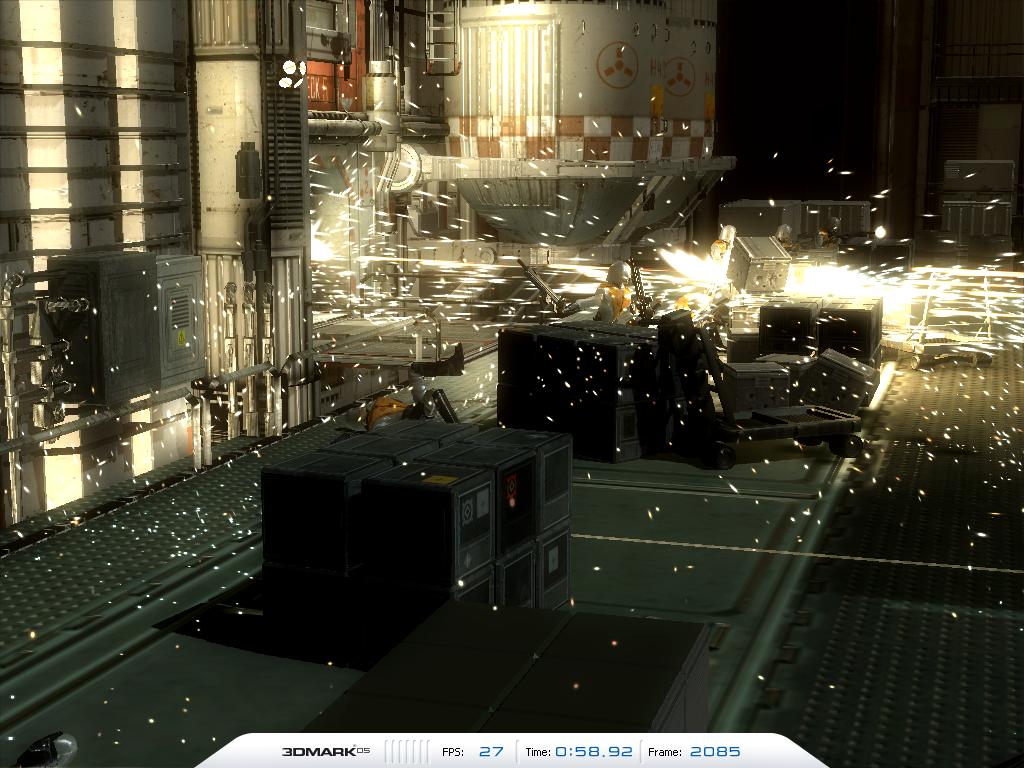
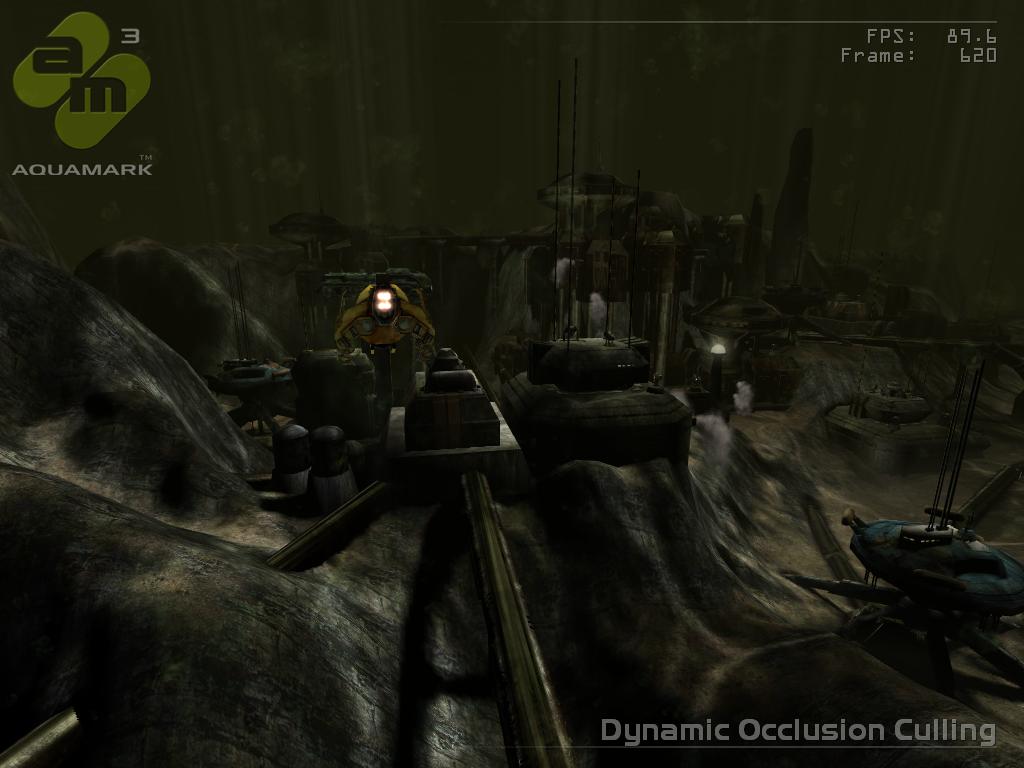
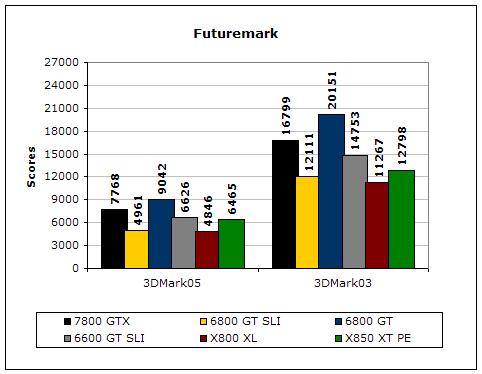
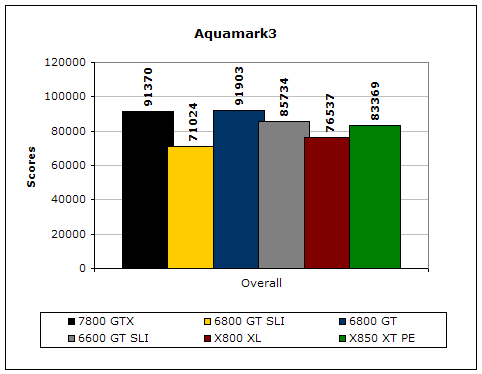
The 7800 GTX came out in top amongst the single player cards and was able to nearly match the 6800 GT SLI setup in Aquamark3. It came very close to matching the SLI setup in 3dMark03 and 3dMark05. The 7800 GTX also flexes its muscle against the X850XT PE, a card that performs incredibly well in 3dMark03 and 3dMark05 and was the leader in synthetic performance before the 7800 GTX was introduced. The 7800 GTX will truly prove to be a bencher’s dream video card and Gigabyte’s version is an excellent edition to have.
Overclocking
While there exists a number of other 7800 GTX-based cards that come pre-overclocked in the market, those cards all utilize the exact same components as factory-clocked cards. Gigabyte’s 7800 GTX comes with the stock frequencies of 430 MHz core and 1200 MHz DDR3 memory. For added performance, I decided to check for the highest possible overclock by utilizing the “Coolbits” function and testing for optimal clock frequencies. To verify its stability, I ran a couple of benchmarks and recorded the results to illustrate the speed benefits of overclocking the 7800 GTX. I was able to achieve a maximum overclock of 465 MHz core and 1260 MHz memory.
While not as high as some of the special pre-overclocked cards in the market, the Gigabyte 7800 GTX showed considerable improvements in the graphically demanding Chronicles of Riddick and Half-Life 2 benchmarks. 3dMark03 and 3dMark05 also benefited from an increase frequencies. Although the performance may seem quite small, any free increase in performance is better than nothing and increased clock speeds also contribute to higher minimum frame rate. In today’s competitive environment among both avid gamers and overclockers, almost every single frame counts, and its good to know Gigabyte’s 7800 GTX provides a little more headroom in the overclocking department.
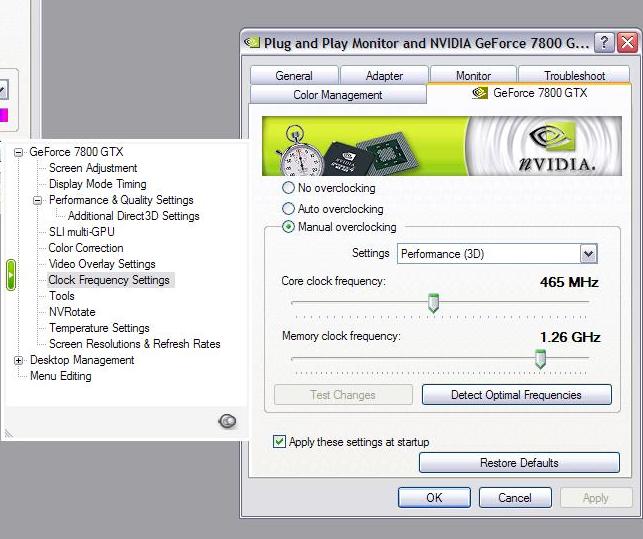
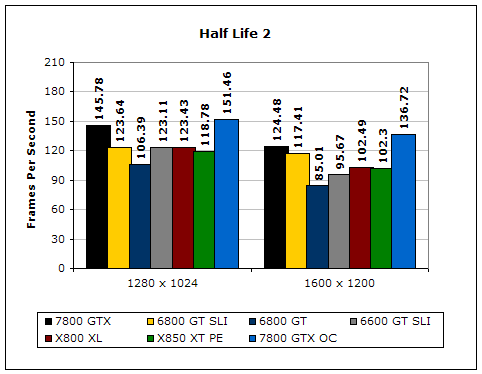
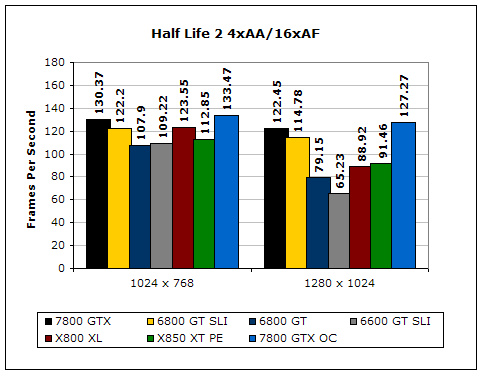
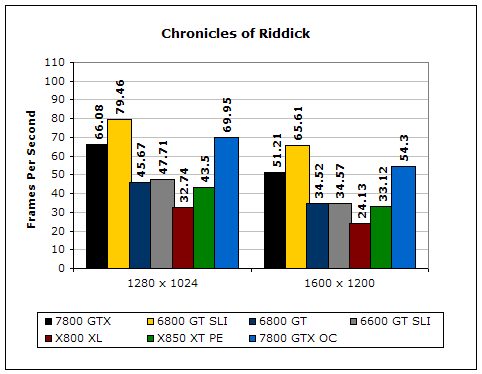
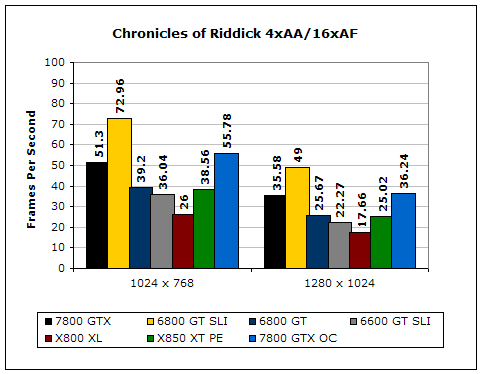
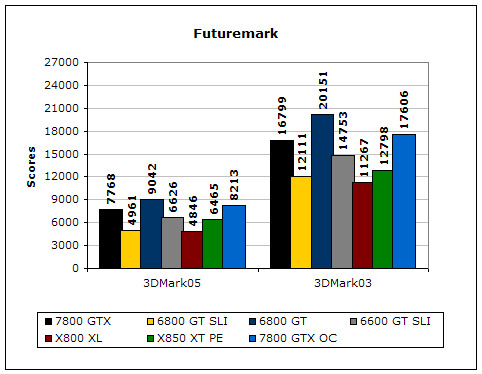
Image Quality
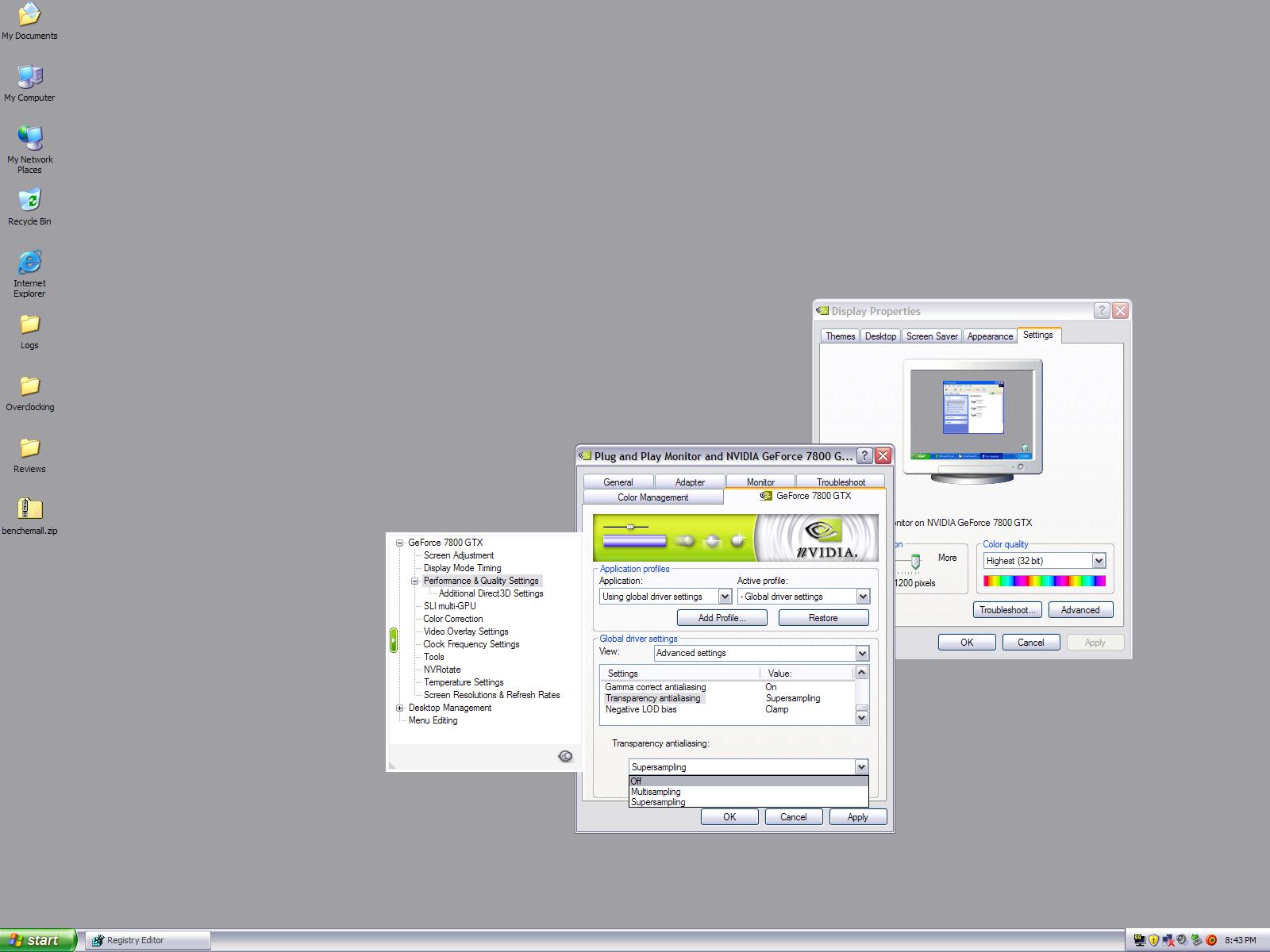
Perhaps one of the most anticipated features of the new 7800 GTX architecture is the addition of new anti-aliasing modes. In addition to the anti-aliasing modes present within the older 6800 architecture, the 7800 GTX features two new modes of transparency anti-aliasing: multisampling and supersampling. The new modes are unique in that they provide much better anti-aliasing methods than what we are used to seeing. Being able to smooth out edges inside of a polygon, the new modes are most obvious in fences, brush, and any other complex flat piece of polygon with complex shapes inside of it. I demonstrated this added mode with Half-Life 2’s fences.
4xAA / 16xAF
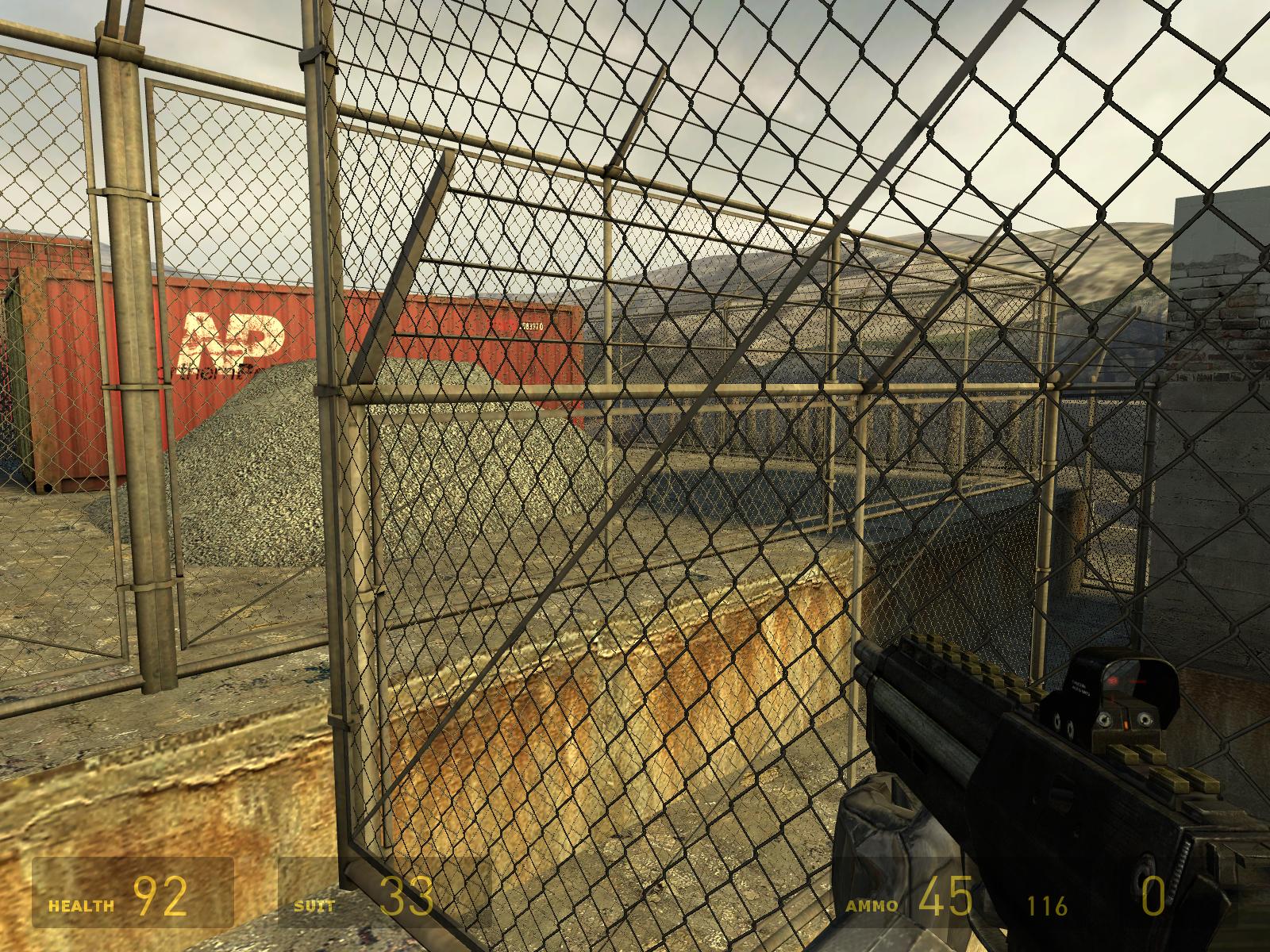
This is a graphical issue we are used to seeing with all games: fences just do not look convincing enough even at 1600x1200 at 4xAA / 16xAF. The fence itself is very jaggy, and you can notice it even more when fences overlay each other (as you can tell in the distance near the right side).
4xMSAA / 16xAF
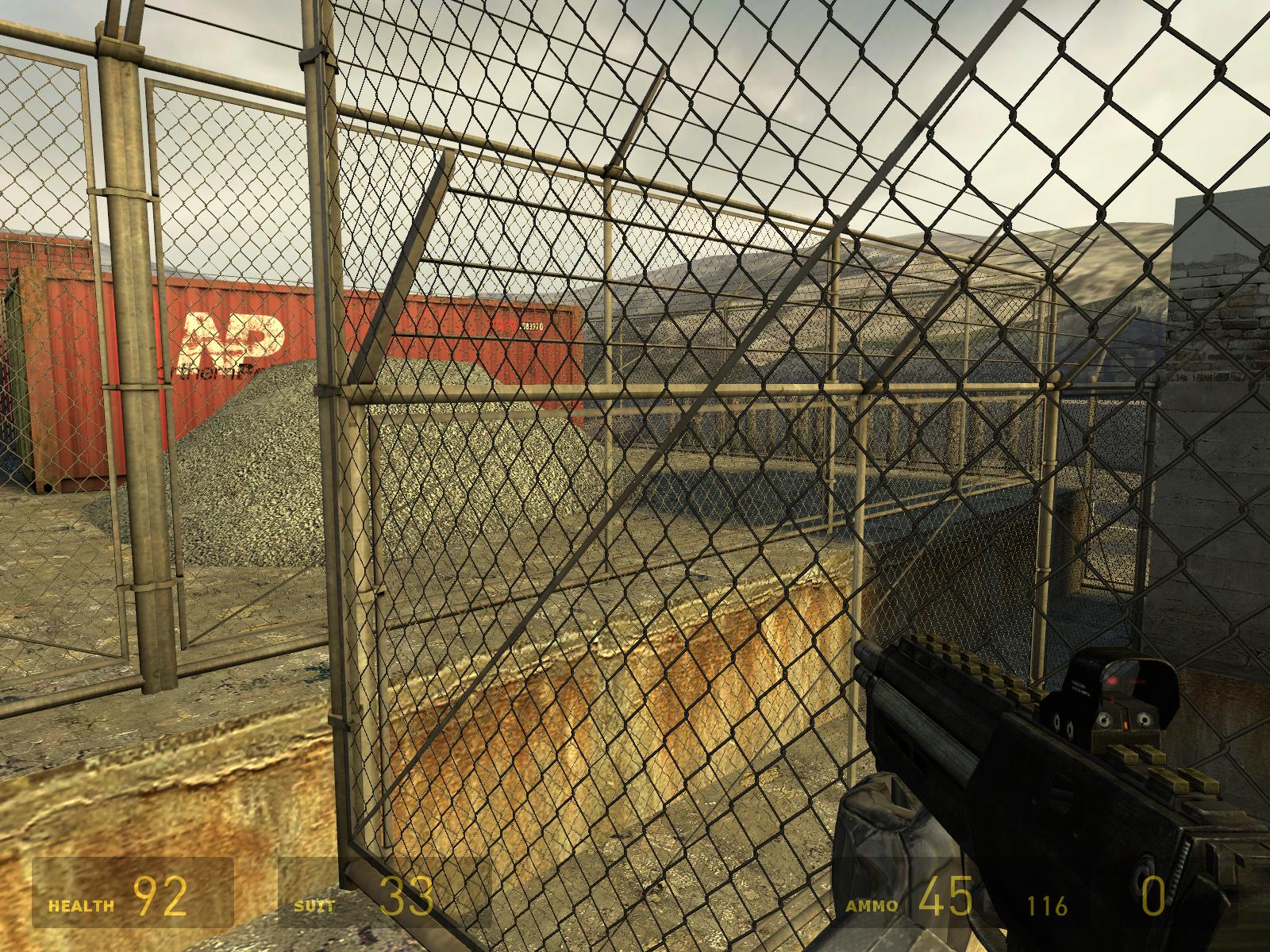
Here, I enabled multisampling anti-aliasing. Although you can not see much of a difference between this and 4xAA / 16xAF, if you look REALLY closely at the fence, you can notice the jaggies getting slightly smoother.
4xSSAA / 16xAF
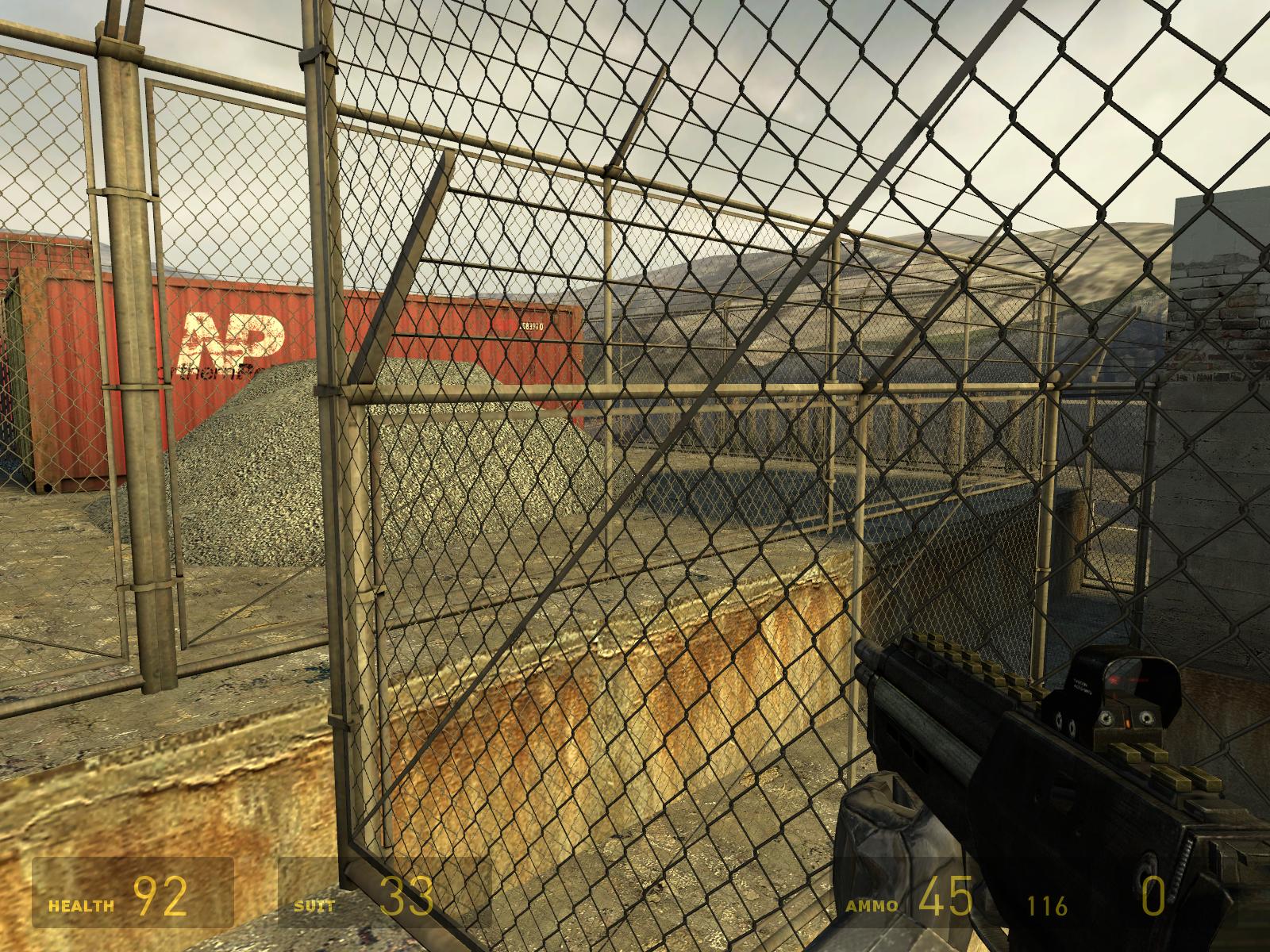
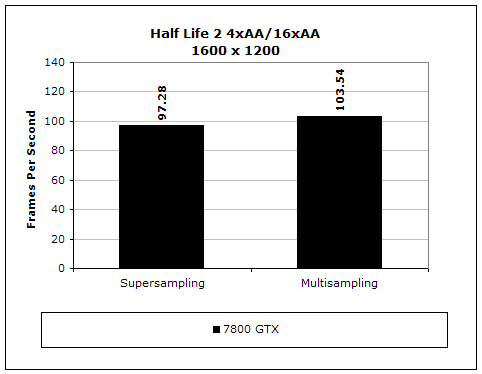
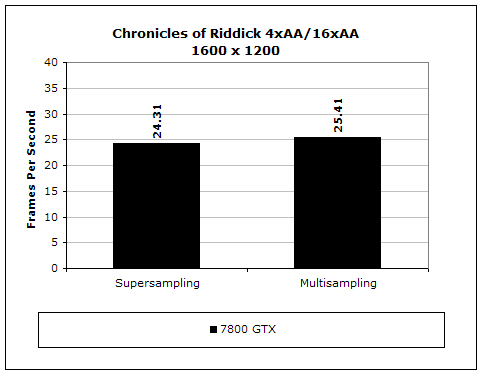
Here, I enabled supersampling anti-aliasing. While you could not notice the difference much with multisampling, the benefit of supersampling is obvious. You can easily notice how the fences are nor longer jaggy, and the back fences are actually crystal clear instead of a mess of pixels. Half-Life 2 never looked so good, and I am not sure if the game is actually meant for ATI cards anymore. For performance results, I tested Chronicles of Riddick and Half-Life 2. Riddick is a perfect example of a system hogging game while Half-Life 2 is a perfect example of a graphically beautiful game that is not as demanding. As you can see from the results, MSAA does not take much of a performance hit, but SSAA takes a much bigger hit. Although not that much, the use of SSAA in these games is simply incredible and well worth the small hit if you enjoy incredible graphics.
Conclusion and Thoughts
Gigabyte’s 7800 GTX is truly a remarkable achievement in video card history. Nvidia claimed that the new 7800 GTX architecture can handle any game at 1600x1200 with 4x anti-aliasing and up to 16x of anisotropic filtering. As you can tell from my results, Nvidia has every right to make that claim, considering Gigabyte’s 7800 GTX managed to even surpass, in some cases, 6800 GT’s in SLI. The 7800 GTX is by no means a simple change in architecture, like the X850 was to the X800 series; the complete architectural overhaul has resulted in a single-card configuration that can handle any game at high resolutions. While also trouncing ATI’s strongest X850XT PE, the 7800 GTX is the fastest single-card video card solution and Gigabyte has provided a 7800 GTX solution with a formidable bundle. While PowerDirect, Joint Operations, and XR Rally may not be the best gaming bundle, Gigabyte’s quality as a top tier manufacturer of video cards is enough reason to warrant this purchase. However, be prepared to couple your new Gigabyte 7800 GTX with equally impressive CPU, memory, and motherboard components. The 7800 GTX, while powerful, proved to bottleneck my system greatly with my Athlon64 4000+ San Diego at 2.4 GHz. I managed to stably clock the 4000+ to FX-57 speeds at 2.8 GHz and even at FX-57 speeds, the 7800 GTX was bottlenecked. I will discuss the bottlenecking of the 7800 GTX in a future article so no buyer with a slow processor even thinks about the 7800 GTX as an immediate upgrade. However, if you are one of those consumers that can afford the purchase of a 600 dollar video card, you probably already have a decent system to begin with. Gigabyte has provided an excellent service to us enthusiasts by delivering the next best video card at the same time the 7800 GTX was officially announced. Combined with insane speeds, revolutionary image quality, and the ability to double the performance with another video card in SLI, Gigabyte’s 7800 GTX earns InsaneTek’s “Highly Praised” award. I applaud both Nvidia’s and Gigabyte’s strategy in releasing a stellar product in a timely manner and I can only hope that ATI has a miracle up their sleeve.
Pros:
- Perhaps the fastest (non-overclocked) single card in the market
- Relatively affordable (in comparison to past flagship video card launches)
- Quiet
- Single-slot solution
- Decent overclockability
- Revolutionary image-quality
- Low power consumption (in comparison to the 6800 Ultra)
- Excellent video quality and HDTV capability
- Immediate availability (no paper launch!)
- Gigabyte’s history-proven quality
Cons:
- The 7800 GTX architecture is quite large
- Weak gaming bundle

We would like to thank Gigabyte for providing the sample. If you have any questions or comments, feel free to hit us up in the forums. You can also check out more of our latest reviews on the front page.