

BFG Geforce 6800 OC
Introduction
BFG is a fairly new company that established themselves in the computer industry rather quickly. They are well known for their friendly and responsive technical support and customer service. BFG is the only video card company that offers lifetime warranty on their video cards. A lifetime warranty! A video card doesn’t even last a lifetime. Of course there are certain rules that you have to follow, such as no overclocking. Overclocking, as we all know, voids all kinds of warranties. Not only that, their technical support is available 24 hours a day, 7 days a week. Why do they do this? That is because most of BFG employees are gamers and enthusiasts, just like us. They recognize the consumer’s needs. Today, we have the BFG Geforce 6800 OC video card up for review. The “OC” does not stand for the ever-so-popular-who-knows-why TV show. It stands for “OverClocking.” As mentioned, overclocking does void manufacturer warranty, but BFG has overclocked the card for us. The good news is, the warranty is still intact. The bad news, well, there aren’t any when the card is already pumped up and ready to go.
We all know that the Geforce 6800 series is Nvidia’s new generation comeback kid. It is the first video card to support Shader Model 3.0. There were glimpses in the Far Cry v1.2 patch of what the new SM3.0 was capable of. Unfortunately, Ubisoft pulled it off due to bugs with ATI video cards. The majority of you know the 6800GT is possibly the best performance/price ratio video card today. It has the full 16 pipelines, just like the 6800 Ultra, but with a price tag $100 less. The only difference between the GT and the Ultra lies within the clock speeds. The slower clocks can easily be remedied by overclocking, provided that you have good cooling. This, of course, is good news to the enthusiasts. We’d all love to save that $100 and still get the performance. What about saving another $100 and going with the vanilla 6800? That, my friends, is what we’re going to find out.
BFG Geforce 6800 OC
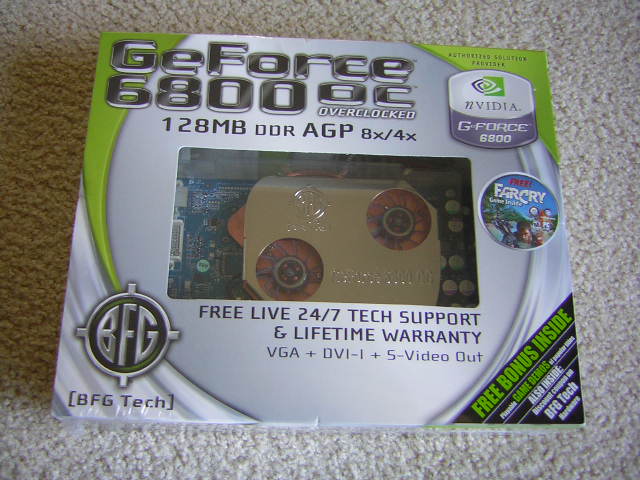
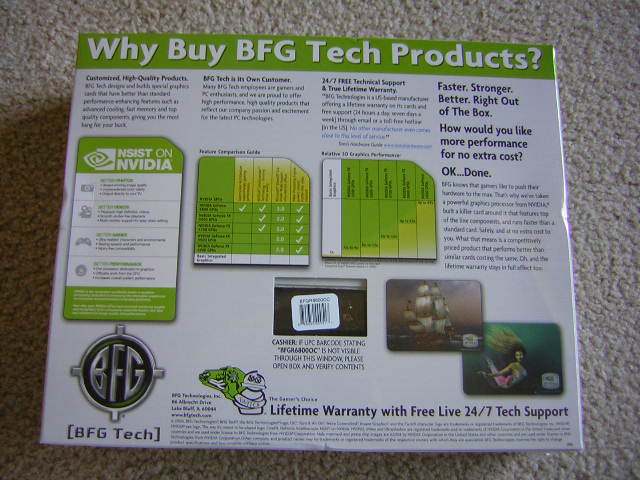
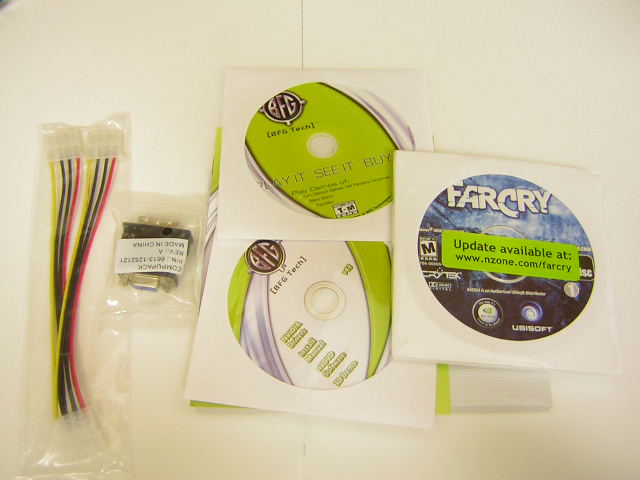
I always liked the idea of having a package that shows the actual product. BFG’s packaging provides a clear window for buyers to see just exactly what they’re buying. Video card manufacturers are supplying good software bundles now, and BFG includes a retail copy of Far Cry. Accessories such as the 4pin power cable and the DVI-to-VGA connector are also included.
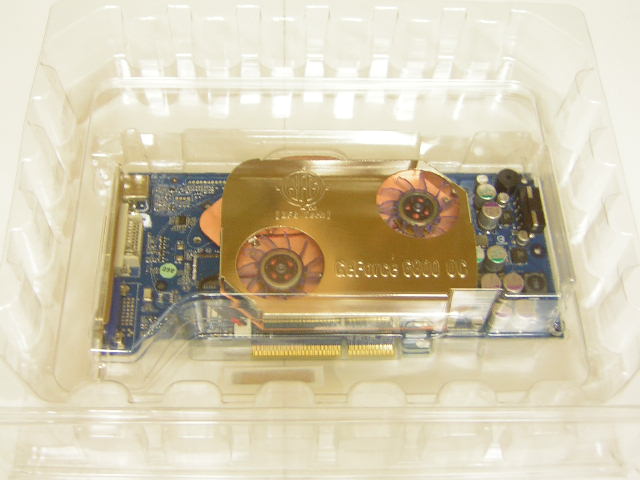
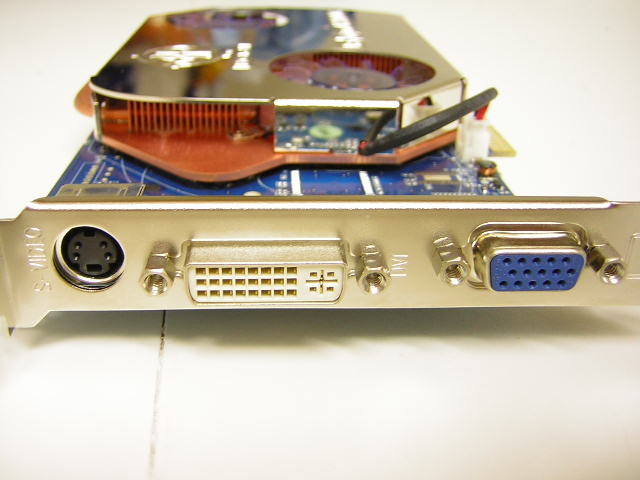
The card comes protected inside a clear plastic box. There was no anti-static bag used. Nowadays, many hardware products are packaged without anti-static bags, such as memory. While it would be much better with an anti-static bag, not one having is not a big deal anymore. The 6800 OC deviated from the usual reference heatsink design and comes equipped with a two fan copper heatsink, secured by four screws through the back of the video card like the Arctic Cooling Silencers. The heatsink has a small heatpipe to distribute the heat across the heatsink evenly. The ram chips are layered with a thick thermal pad to help transfer heat to the heatsink. BFG should’ve made steppings on the heatsink for ram chips and use some thermal paste for better heat dissipation. The memory chips used are Hynix 2.2ns memory, which is much faster and allows for higher overclocking headroom than the standard 2.8ns chips that are used for regular Geforce 6800s. The thick thermal pad was actually attached quite well. It ripped off all the markings on the memory chips.
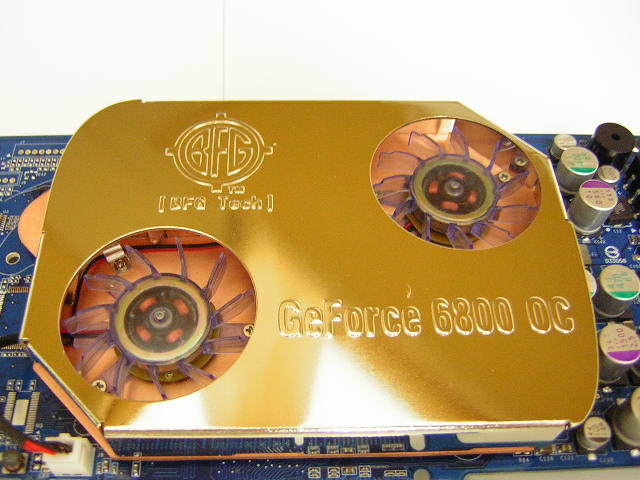
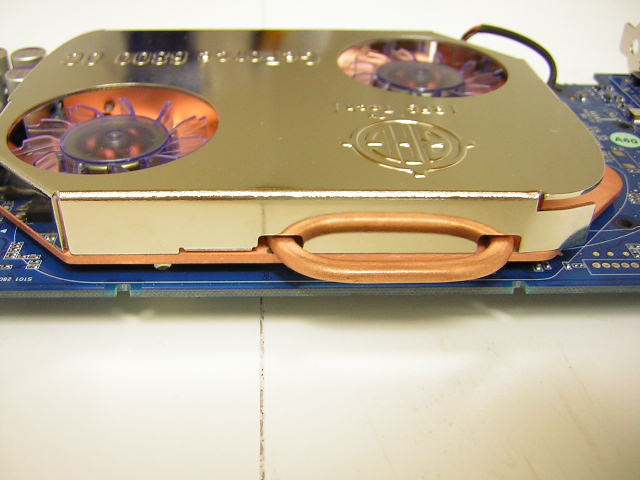
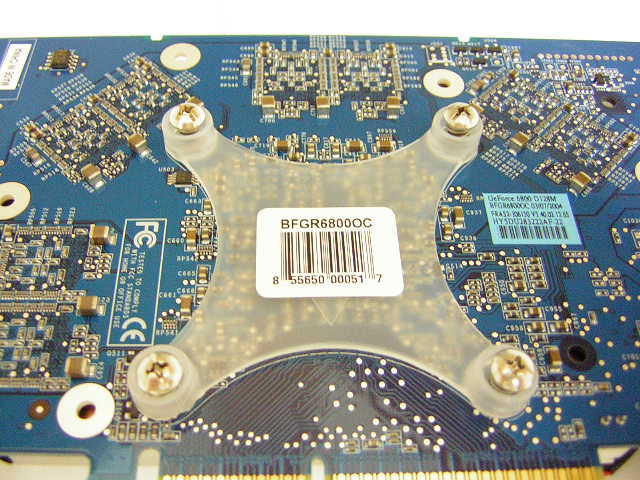
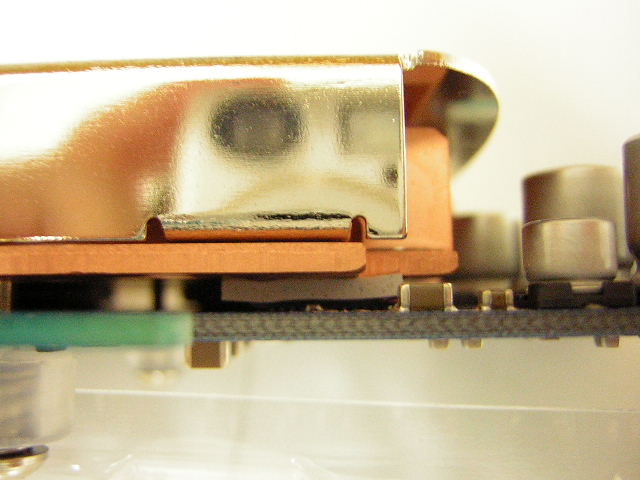
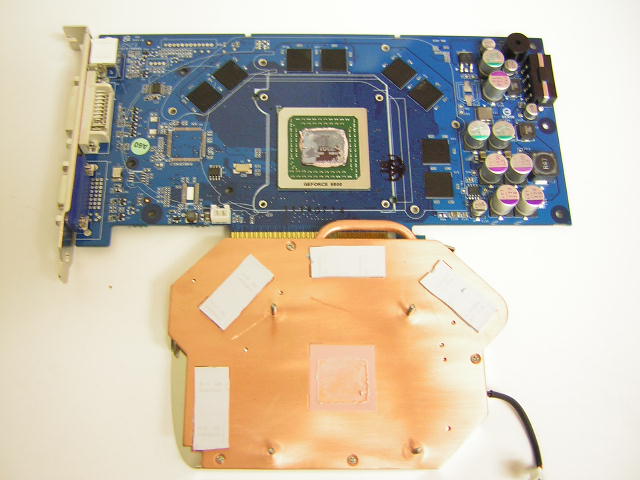
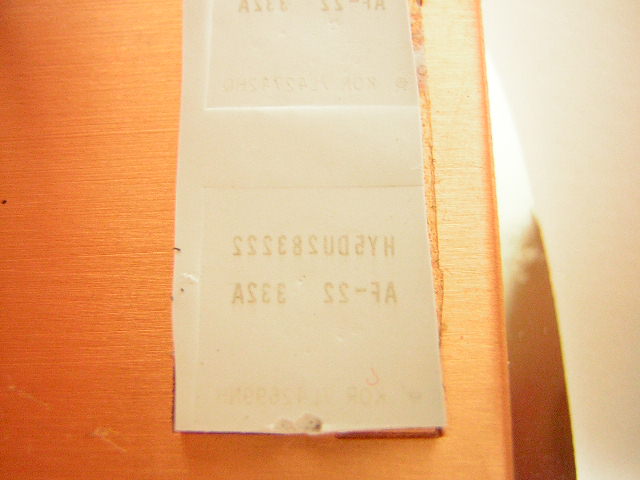
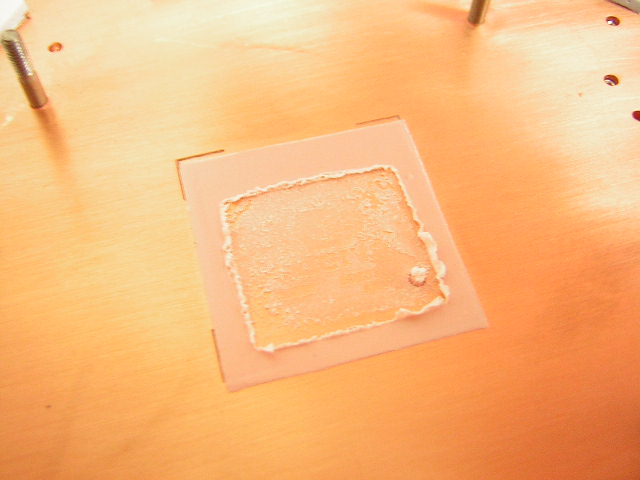
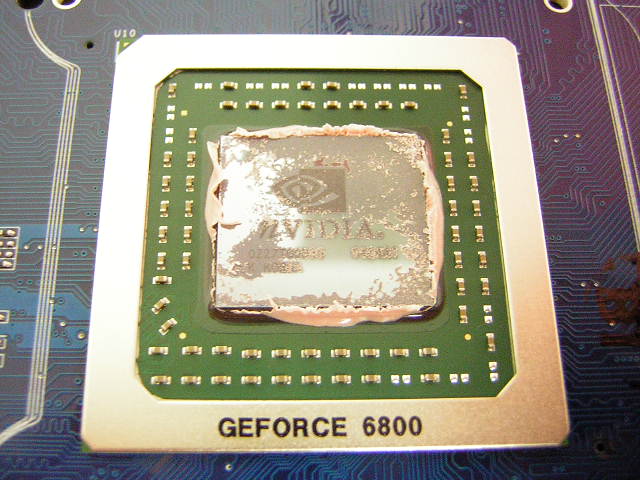
The GPU core was layered with a typical pink thermal pad. All tests were conducted with the use of this pink pad. I removed the pink pad and applied some OCZ Ultra 5 thermal paste in hopes to achieve better cooling. Boy did it help. Overclocking will be covered later on in the review.
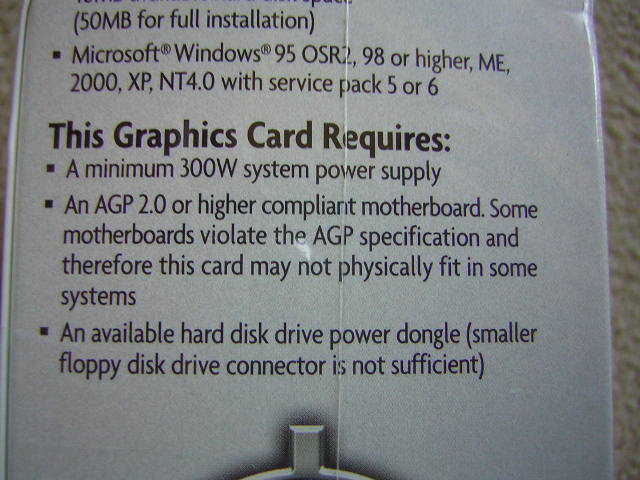
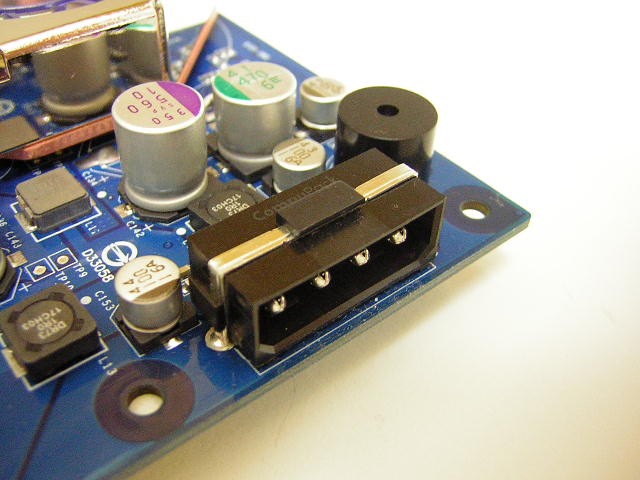
The 6800, like the 6800GT, comes with one power connector. The video card requires a minimum 300W power supply in order for the card to function well. This means that if you’re looking to upgrade, be sure to pick up a good power supply as well. Be sure to also check out some of our power supply reviews for recommendations. A generic 500W power supply isn’t going to cut it. The efficiency on those poorly built power supplies can be lower than 300W at times. Remember, quality over quantity. The 6800 comes with the standard VGA, DVI, and S-video outputs.
Specifications
The difference between a Geforce 6800 Ultra and the 6800GT lies within the core and memory speeds, as well as the lower price tag. The Ultra is rated to run at a fast 400MHZ for the core and 1100MHZ for the memory. The 6800GT runs at 350MHZ for the core and 1000MHZ for the memory. This small difference in speed can be easily made up by overclocking. Pretty much all 6800GTs out there are capable of running at Ultra speeds. Now with the vanilla 6800, there is more than just a difference in clock speeds. The regular 6800 has 12 pipelines whereas the 6800GT/Ultra has 16. The lack of these 4 pipelines can really have a performance impact when playing the latest games. Another difference is the use of DDR memory instead of the faster DDR3 memory. Video DDR has already reached a limit, and there was a move to GDDR2. It failed quite miserably when it was first introduced on the FX5800 Ultra. The memory for GT and Ultra cards is the new GDDR3. It is able to scale a lot higher, thus providing much more bandwidth. Here are the specifications and features grabbed from the BFG website.
Specifications:
- GPU Nvidia® Geforce™ 6800
- Bus Type AGP
- Memory 128MB DDR
- Core Clock 350MHZ (vs. 325MHZ standard)
- Memory Clock 700MHZ (effective)
- RAMDAC Dual 400MHZ
- API Support Microsoft® DirectX® 9.0, OpenGL for Microsoft® Windows®
- Connectors VGA, DVI, S-Video-Out
- 438 million vertices/sec setup
- 22.4GB/second memory bandwidth
Requirements:
- A minimum 300W system power supply
- An AGP compliant motherboard. Some motherboards violate the AGP specification and therefore this card may not physically fit in some systems
- An available hard disk drive power dongle (smaller floppy disk drive connector is not sufficient)
Features:
- Custom BFG cooling solution with polished nickel finish and dual blue LED lights
- Superscalar GPU architecture
- Nvidia® CineFX(TM) 3.0 engine
- On-chip video processor
- Nvidia® UltraShadow(TM) II technology
- 64-bit texture filtering and blending
- Nvidia® Intellisample(TM) 3.0 technology
- Nvidia® ForceWare(TM) Unified Driver Architecture (UDA)
- Nvidia® nView(TM) multi-display technology
- Nvidia® Digital Vibrance Control (TM) 3.0
- AGP 8x
- Microsoft® DirectX® 9.0 Shader Model 3.0 support
Included in Box:
- BFG Geforce™ 6800 OC™ graphics card
- Quick install manual
- DVI-I to VGA connector
- “Y” power cable
Driver CD, which includes:
- Nvidia® Unified Drivers
- Full installation manual .pdf
- Nvidia® NDVD™ 2.0 multimedia software
- Windowblinds™ BFG / Nvidia® skins
Differences in 6800 Models:
Nvidia Geforce 6800 Ultra: 400MHZ core speed - 1100MHZ memory speed - 16 pipelines
Nvidia Geforce 6800 GT: 350MHZ core speed - 1000MHZ memory speed - 16 pipelines
Nvidia Geforce 6800: 325MHZ core speed - 700MHZ memory speed - 12 pipelines
BFG Geforce 6800: 350MHZ core speed - 700MHZ memory speed - 12 pipelines
Image Quality
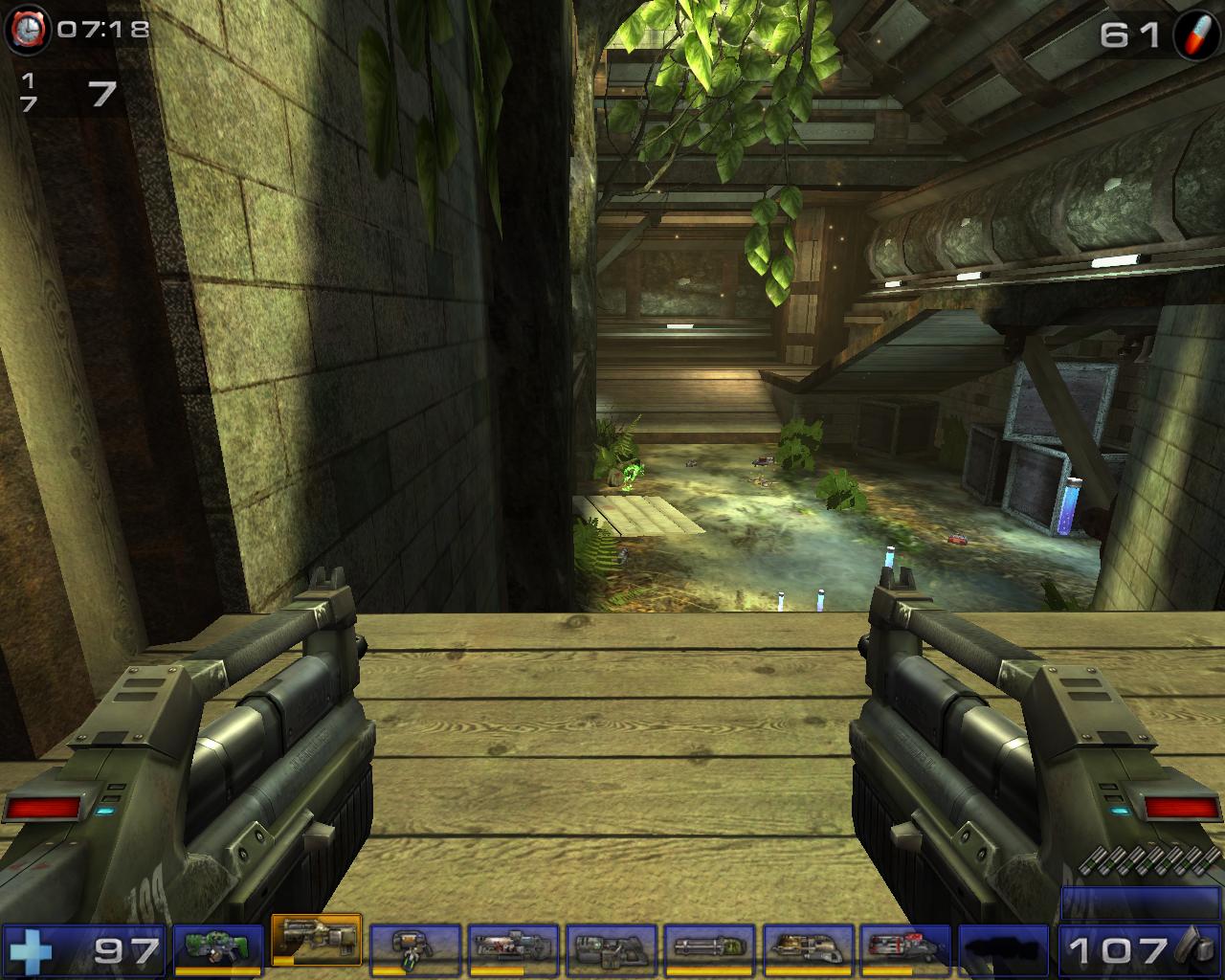
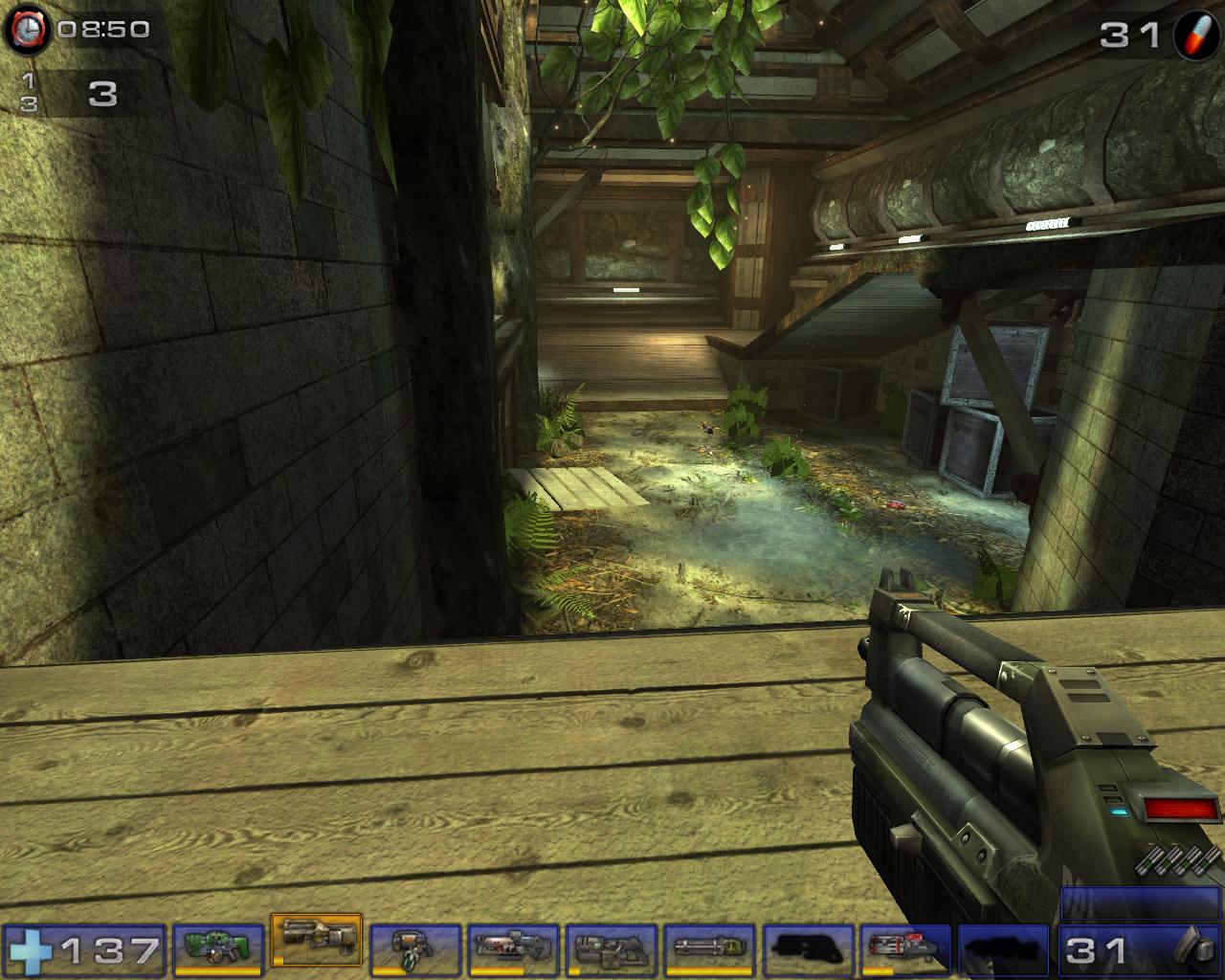
Nvidia has always had image quality issues ever since the days of Geforce 3. Although the performance was stellar, its rival, the Radeon 8500, had a much better 2D image quality. This continued on throughout the video card generations and still continues today. For my typical regular daily system, I have a 17” LCD connected to a Radeon 9800 Pro that provides me a resolution of 1280x1024. The image is so clear and remains that way throughout the day. If you haven’t noticed already, I write and read reviews all day long. Having 2D image clarity is very important to me. Gamers with large CRT monitors that run 1600x1200 should also notice the lack of image clarity. If you use the typical 1024x768, then you have nothing to worry about. But to me, the 2D image sucked. All the words were blurred in together and edges were fuzzy. There is a text sharpening toolbar in the drivers tab, it still didn’t fix the problem. With 2D out of the way, 3D image was quite spectacular. Gaming in Unreal Tournament 2004 was nice and smooth, even when all the details were turned up. Here are a couple in-game shots. The resolution was 1280x1024.
No AA/AF
2x AA/4x AF
4x AA/8x AF
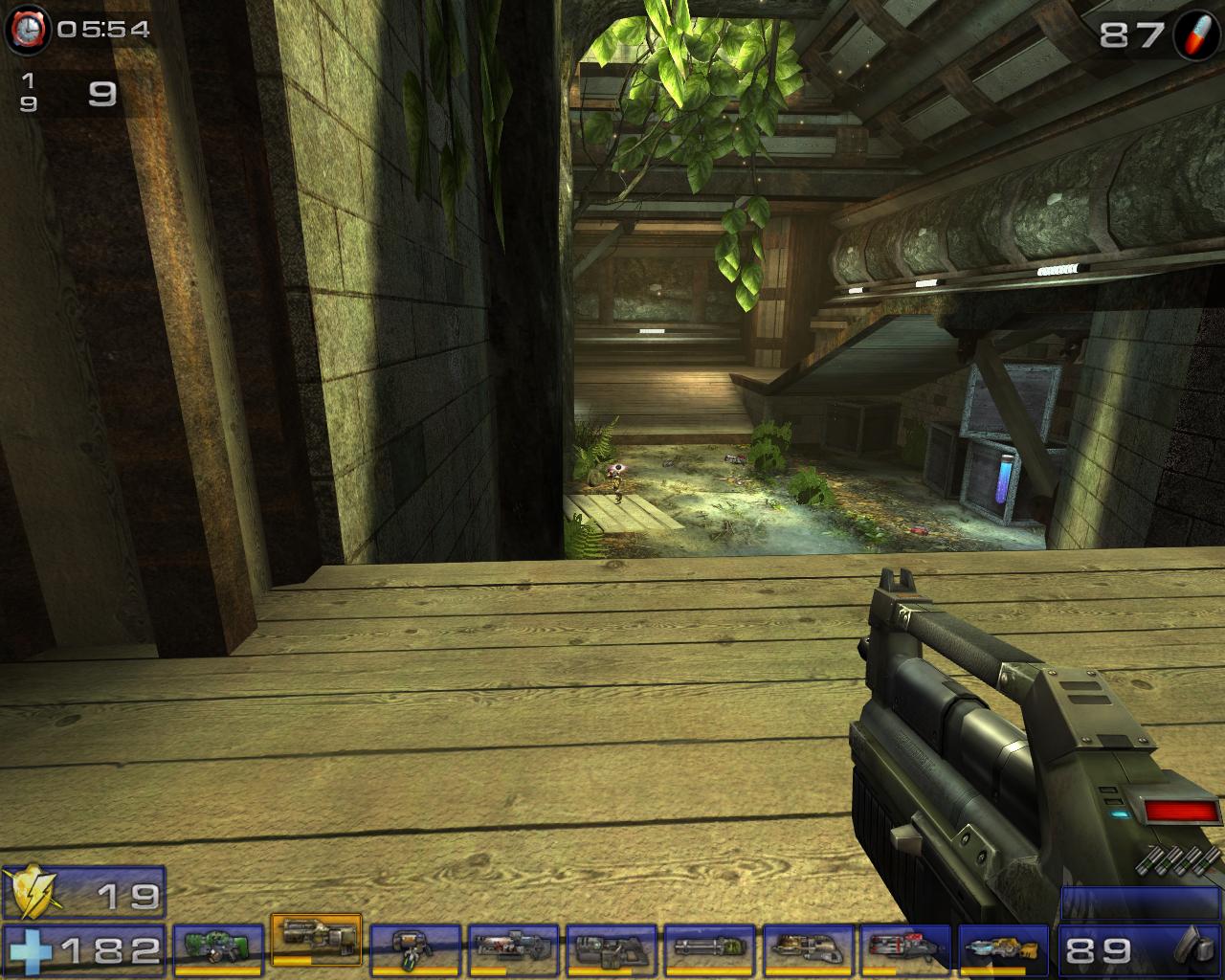
As you can see, running 2x AA/4x AF would be sufficient in producing excellent image quality when resolution is turned up. Although UT2K4 did not take a performance hit when high details are turned on, I’m sure the latest Doom 3 and Far Cry would, right? We’ll see what happens later on in the test results.
Test Setup and Overclocking
Overclocking:
My overclocking journey was a bit unpleasant. Right off the bat, I knew that the core should be able to hit GT speeds, while the memory should go well beyond 800MHZ. Theoretically, 2.2ns memory should be able to run at least 909MHZ, but we all know that’s not always possible. Reading a couple of BFG 6800 OC reviews, they usually tend to hit about 800MHZ. I used Coolbits to enable the overclocking utility within the Nvidia drivers. Auto-detect resulted with a maximum of 390MHZ for the core and 780MHZ for the memory. It wasn’t what I had hoped for, but it wasn’t too shabby either. I proceeded to test the overclocked speeds only to find them unstable. Further testing made me realize that the core was only able to reach a stable 370MHZ, while the memory was only good for 770MHZ. I figured that it must be a cooling issue. I touched the heatsink with my finger and it was burning hot. I figured that cooling would be a bit better if I removed the pink thermal pad and used some thermal paste. I replaced the pink pad with some OCZ Ultra 5 thermal paste and it made a huge difference. Although there was no accurate testing involved, the temperature reading from the Nvidia drivers indicated a good 1°C drop after switching thermal interface. The amazing part is that I was able to overclock much higher. The core went up another 10MHZ to 380MHZ, while the memory went up a whopping 110MHZ to 880MHZ. The funny part is that I didn’t do anything to the memory. I simply used the stock thermal pad. This time the card was absolutely fantastic running at 380MHZ/880MHZ without a hiccup.
Test Setup:
- Intel P4 2.4C (12 x 290FSB @ 1.7v)
- Asus P4C800-E
- Kingston HyperX PC3200UL (5:4 2.5-3-3-6)
- BFG 6800GT OC (with NV Silencer 5)
- BFG 6800 OC
- OCZ DDR Booster
- OCZ PowerStream
- Windows XP Professional Edition with SP1 and DirectX 9.0c
- Forceware 61.77
Benchmarks: Results
3DMark2001SE

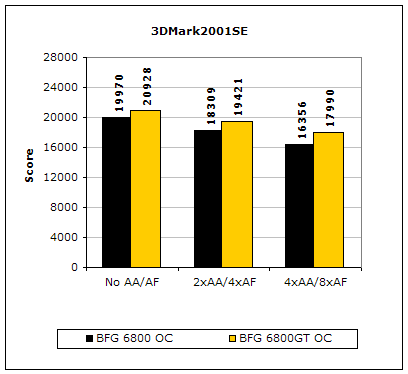
The 6800GT has a significant speed advantage over the vanilla 6800. Under the heaviest details, it was still able to achieve a 1,600 point lead. Many of you may wonder why my scores are so low. One reason is there were no performance tweaks to increase the scores. Second, my P4 is showing its age. My CPU is a bottleneck to the potential of the 6800GT.
3DMark2003

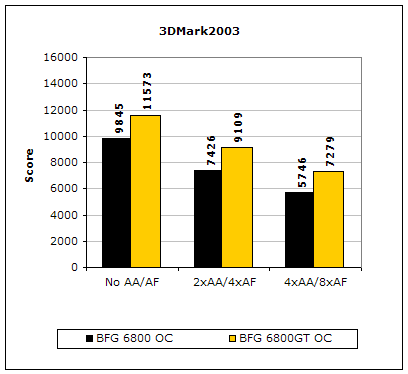
Unlike 3DMark2001SE, 3DMark2003 is extremely GPU dependent. Increases in CPU, FSB, and memory latencies do not affect the benchmark all that much. Although there are a bunch of cheating drivers going around, this is still a good benchmark to test the capabilities of the video card. From the scores above, you can see that the 4 extra pipelines and the higher clocks create a big gap between the performance of the two cards.
Code Creatures
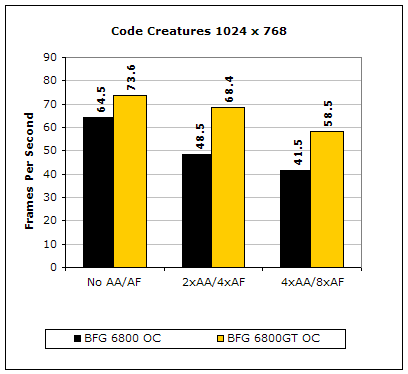
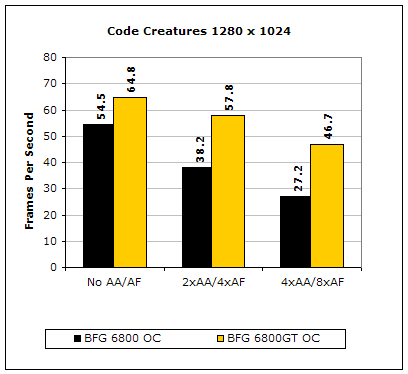
Although Code Creatures is an old benchmark, it is still capable of pushing the video card to the limits. The video test is very intensive and responds to any little increase in clocks. Once again, the 6800GT leads all the way.
Results Continued
Aquamark3
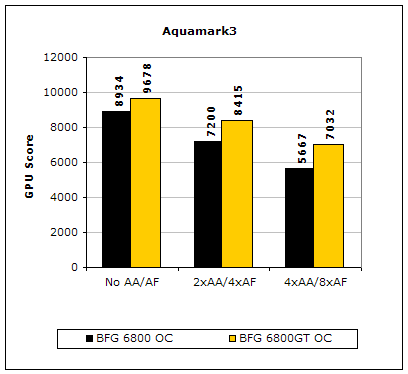
Aquamark3 is another synthetic benchmark that drives the video card to the max. Once again, the 6800GT is the clear winner. The performance gap widens as details are turned up.
With the synthetic benchmarks revealing the 6800GT as a clear winner, how does the 6800 OC fare when it comes to real world gaming performance? The three gaming benchmarks I used are the most current games that benefit greatly from having a good video card. Let’s start with the ever-popular Doom 3.
Doom 3
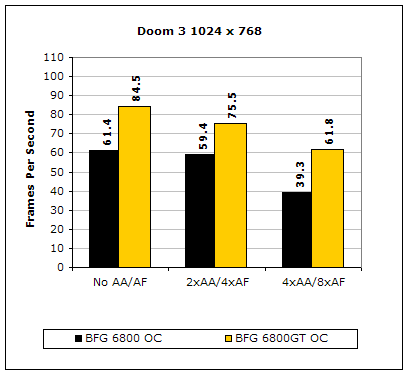
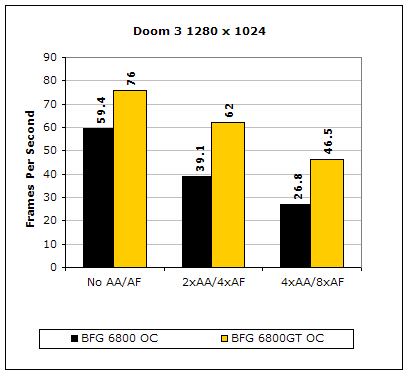
The major hype about Doom 3 was the beautiful graphics produced. With such detailed realistic graphics, a good video card is a necessity. From the results shown, the difference in the lack of 4 pixel pipelines is rather significant, especially when eye candy is turned on.
Far Cry
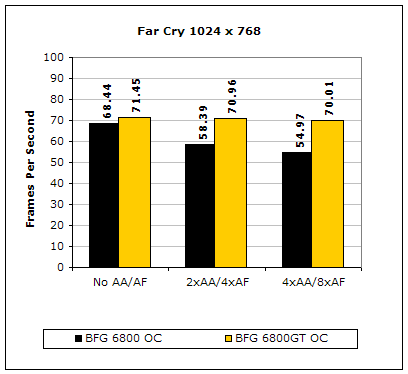
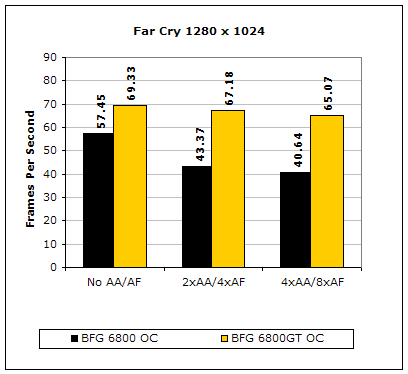
Like Doom 3, Far Cry is an extremely video intensive game. It’s interesting to see that my system is already pushing the limits when resolution is set at 1024x768 for the 6800GT. Graphical power is carrying the system through the benchmark. There is only a single frame drop when eye candy is maxed out. The 6800 OC took a big hit when details were turned on at high resolutions.
Unreal Tournament 2004
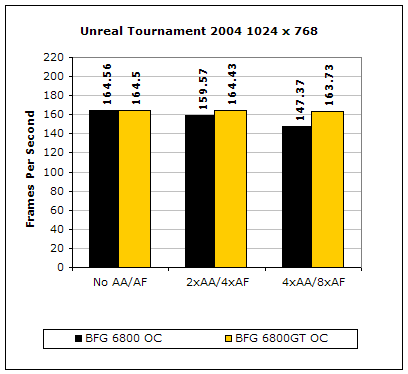
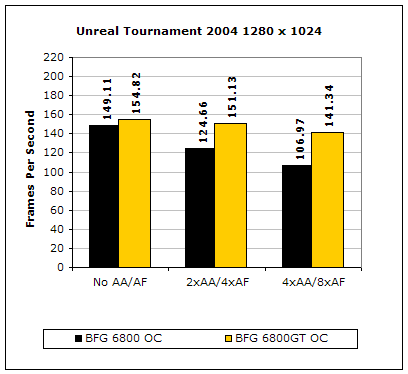
Unreal Tournament is very popular game due to its online multiplayer capabilities. Like Far Cry, the 6800GT carried the benchmarks throughout at a resolution of 1024x768. And like Far Cry, the 6800 OC was good but took a major hit when details were turned on.
With the 6800 OC trailing behind in performance due to the lesser 12 pipelines, hopefully the performance gap won’t be as large when some overclocking is done.
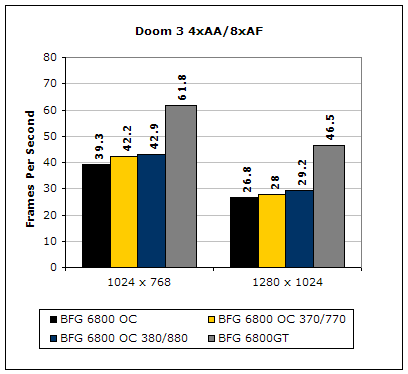
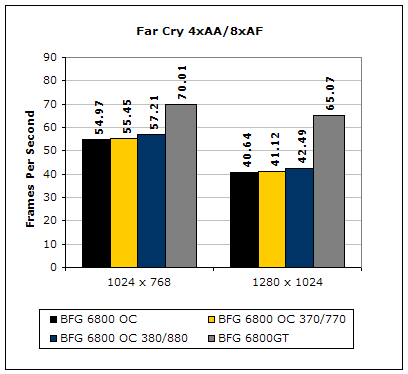
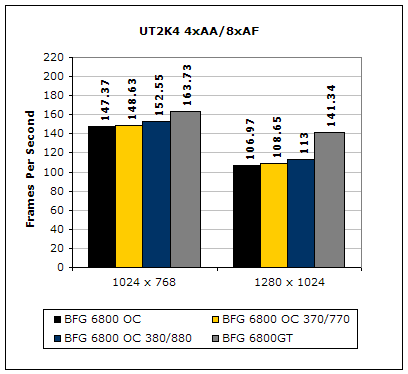
Overclocking did improve the performance of the 6800 OC, as it should, but the performance was minimal. There was only a one to two frame increase in performance in Doom 3 and Far Cry. Unreal Tournament 2004 gained a little more with seven extra frames. Overclocking did not help make up for the loss of the 4 pipelines, but it did help gain a couple of frames.
Conclusion and Thoughts
The 6800GT is known to be a “wiser” choice over the 6800 Ultra and is $100 cheaper, but the performance on the 6800 OC does not justify the savings of another $100. The 6800 OC’s 12 pipelines and slower clocks really took a performance hit when comparing it against the 6800GT. Without a doubt, the 6800GT is far superior. The point of this review is to discover whether the $100 difference matters. In the case of the GT vs Ultra, although I do not have the scores to prove it, the GT is a considered to be a better buy. In the case of the 6800 vs 6800GT, it would be better to splurge on the $100 and go with the GT. If you’re a hardcore gamer on a tight budget, I’d recommend that you save a little more and go with the GT. If you’re a casual gamer, then the 6800 can be suitable. Although not many places carry the 6800, it can be had on ebay for as little as $250. I saw an auction on the 6800 OC end at $240 shipped just the other day. If a 6800 can be had for about $250, then by all means go for it. It would be a steal if the card comes priced at $250. Considering that a Radeon 9800XT is going for about $250-$299, I would suggest picking the 6800 over the 9800XT if you’re a gamer. Very casual gamers should consider otherwise, due to the bad 2D image quality the 6800 produces. Thus, the BFG 6800 OC would be a personal recommendation if you can get it for around $250. If you’re going to pay more than that, might as well save the money for the GT.
Pros:
- Decent price
- Good performance
- Blue PCB
- Custom cooling heatsink
- Blue LEDs
- Backed by excellent tech support and customer service
- Lifetime warranty
- Use of 2.2ns memory
- Better overclocking potential over other 6800
- Comes pre-overclocked to 350MHZ
- Faster than other 6800 out of the box
- Bundled with retail copy of Far Cry
Cons:
- Custom cooling heatsink does not cool well
- Not worth it for $299, but well worth it for $250
- Bad use of pink thermal pad for thermal interface material

If you have any questions or comments, feel free to hit us up in the forums. You can also check out more of our latest reviews on the front page.