

DFI LANParty UT nF3 250Gb
Introduction
DFI was fairly small and quiet back in the early days. It was not until a year or so ago that people started recognizing the company. They broke out into the enthusiast community with their first LANParty motherboard, based on VIA’s KT400A chipset. They quickly continued the LANParty line with Nvidia’s nForce2 chipset and eventually branched into Intel motherboards. The LANParty was a huge hit, not only because it provided possibly the best overclocking results on an overall basis, but because the motherboard offered great voltage options. It was certainly a huge plus since enthusiasts no longer needed to perform voltage modifications. The LANParty motherboards were also the first to provide a stunningly high 3.3v to VDIMM. Everyone, including myself, jumped on the DFI wagon.
When AMD announced the Athlon64 processor, almost everyone waited anxiously for DFI’s LANParty solution. Almost no one cared about what other companies had to offer. When beta testing revealed what the board was capable of, everyone dropped their jaws. The board was expected to be quite the overclocker and turned out exactly as predicted.
DFI LANParty UT nF3 250Gb Package
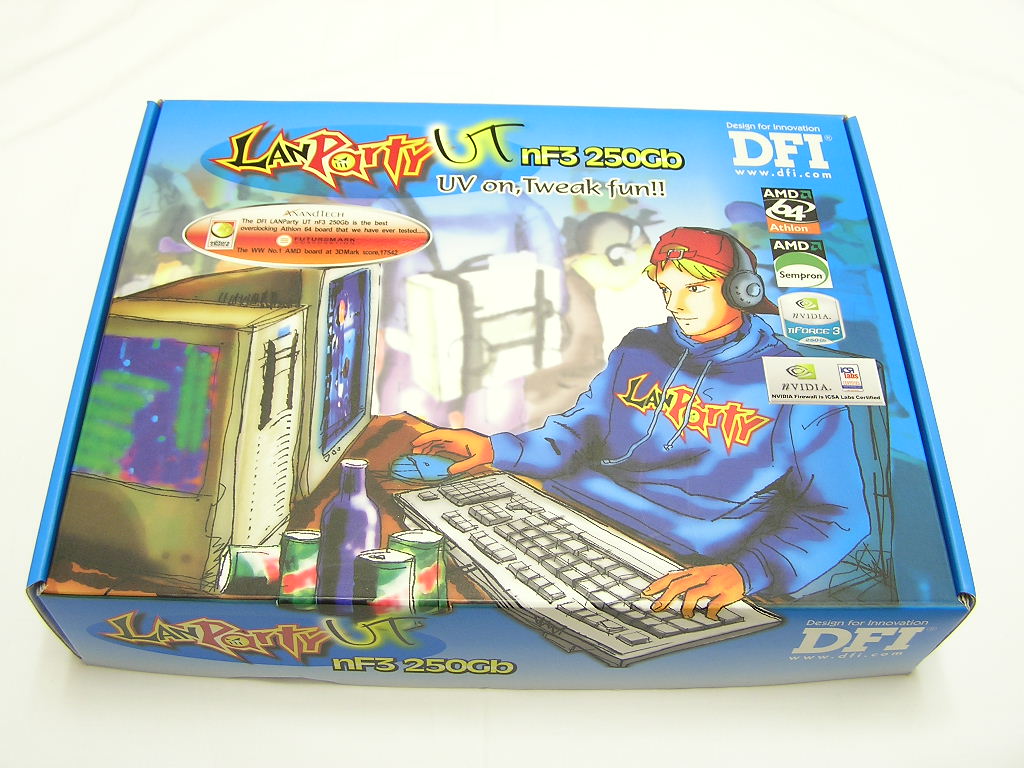
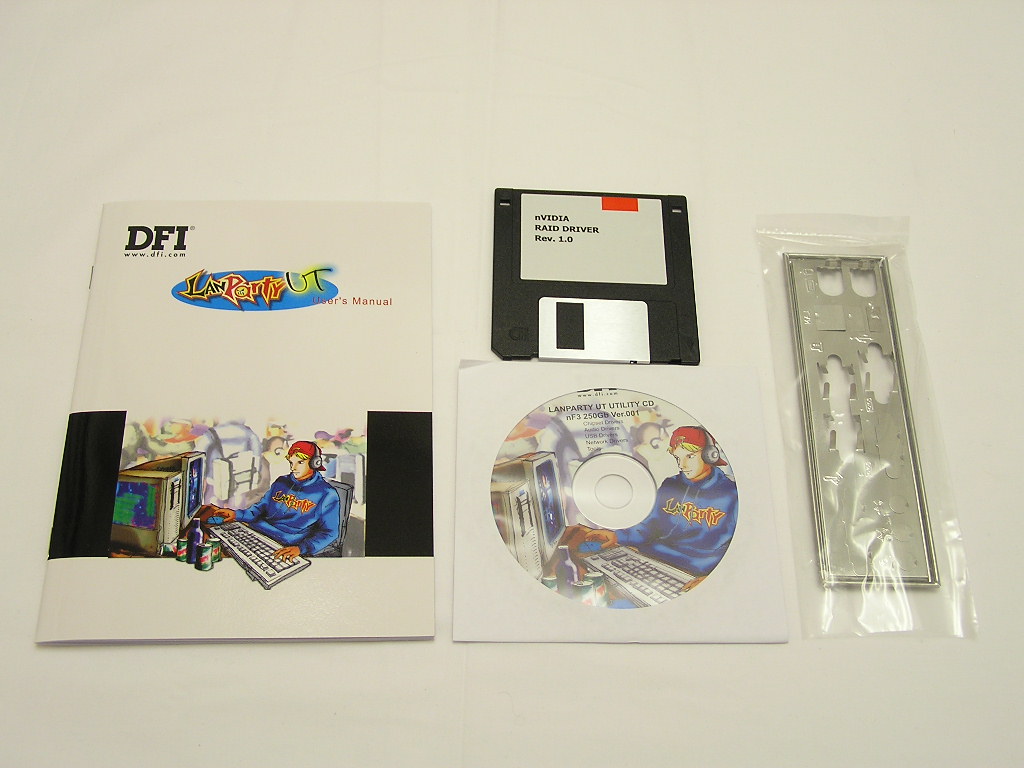
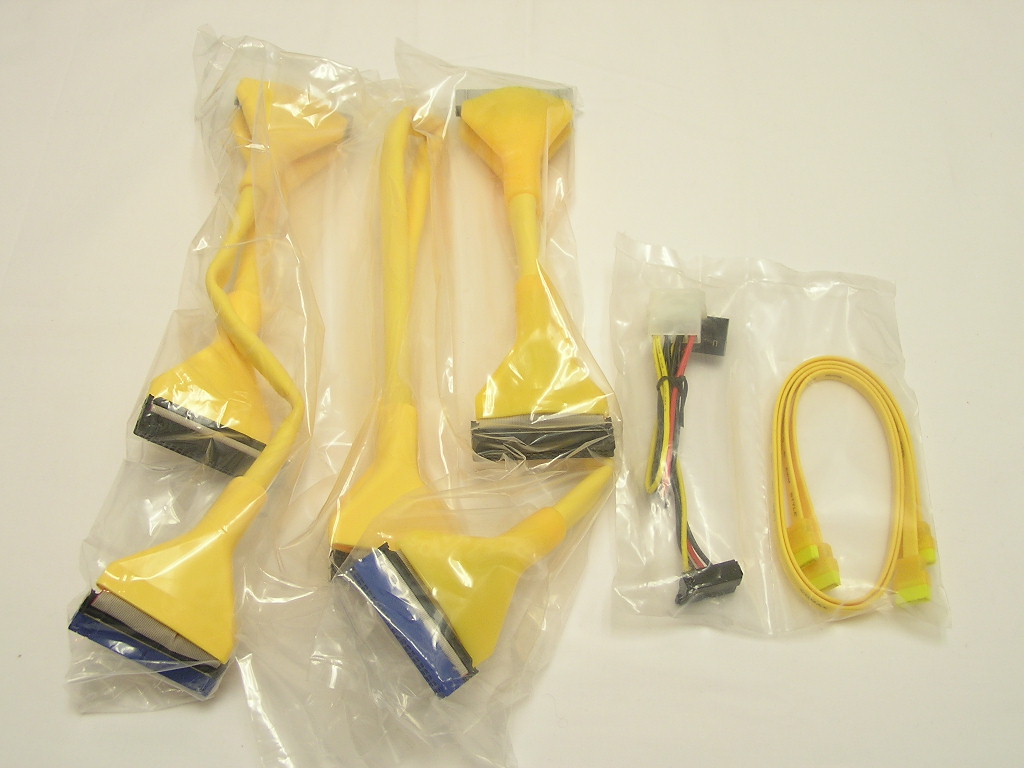
The LANParty UT nF3 comes with DFI’s signature attractive colors. The black PCB and yellow slots make a distinct combination. The included package is simple, including a rather light user’s manual, a floppy disk with RAID drivers, a drivers CD, and I/O plate. The nice part of the package is the included cables. Instead of traditional flat ribbon cables, DFI includes yellow rounded cables to match the motherboard. The SATA cables are yellow as well. The software side is practically nonexistent. Although most of the overclocking enthusiasts never use any of the included software, you’d be surprised how many people “outside” of our community do. I was also disappointed with the user’s manual. It’s really short and brief. There isn’t much details involved.
Motherboard Layout
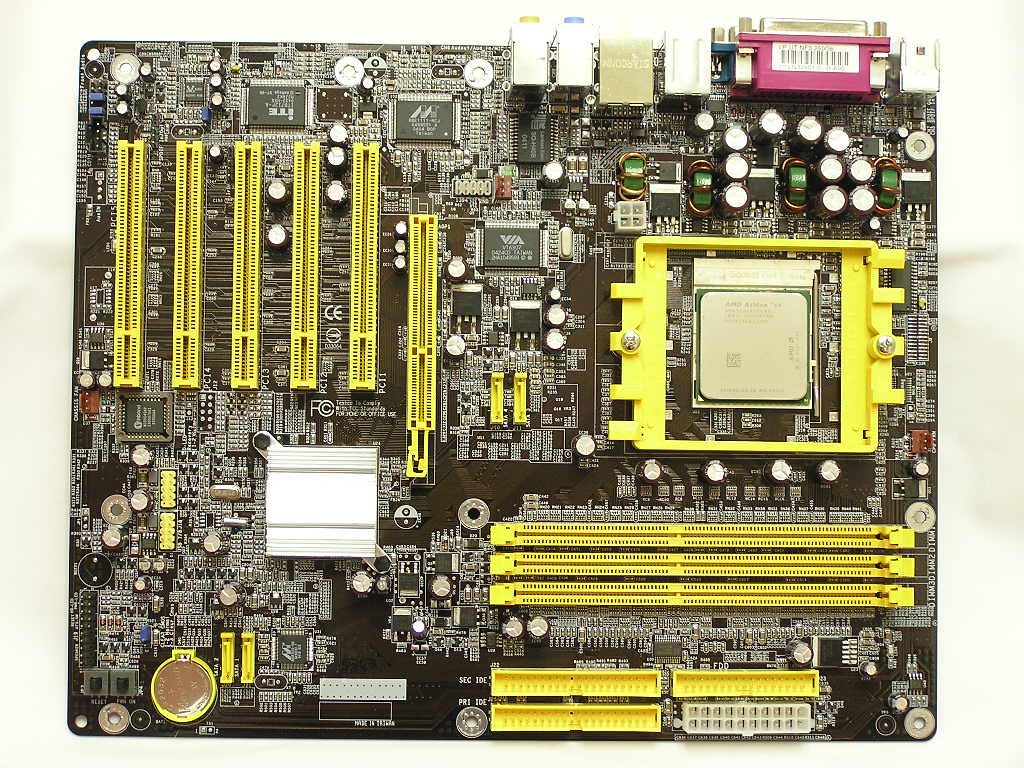
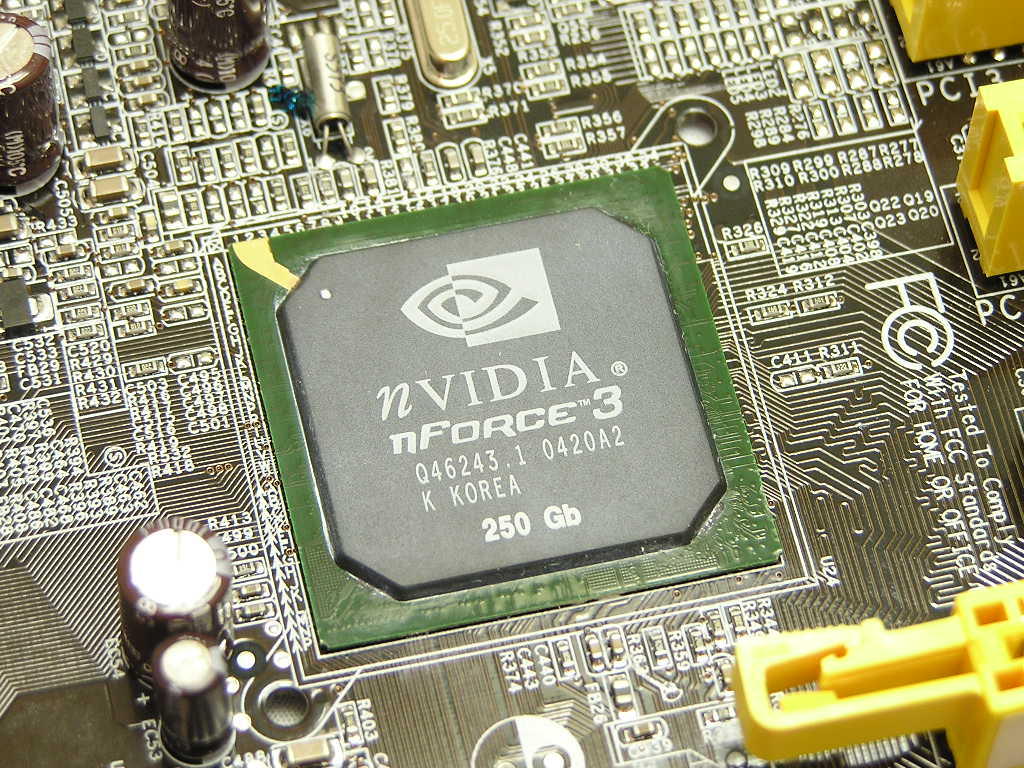
The LANParty UT nF3 250Gb makes use of Nvidia’s nForce3 250Gb chipset. While the single chipset does provide great performance, the location is just disgusting. There is no place worse than slapping it near the AGP slot. Why, you ask? The chipset gets quite hot when the system is fully overclocked and at full load. The first thing that comes to mind is to provide better cooling. The majority of the passive or active solutions available are tall. That height can become a problem when installing a graphic card. Installing graphic cards with third party coolers like the Zalman VGA heatpipes or Arctic Cooling’s Silencers will definitely be impossible. Watercooling fanatics will also run into problems with chipset waterblocks. The task of cooling the chipset is harder than one might expect. Nvidia just made your shopping much harder. While the chipset and heatsink did get very hot, the system managed to run just fine, even when overclocked. Motherboards now include plenty of onboard features, like multi-channel audio and Ethernet, so additional PCI slots rather useless. Although the motherboard has most of what you need, DFI provides 5 PCI slots for future add-ons. Speaking of slots, I wasn’t very fond of the type of AGP slot used. Currently there are three types of AGP slots used. Each of them has it’s own way of keeping the graphic card from falling out during movement. The first one is the most common locking tab. It’s found in the majority of the motherboards available. All you have to do is simply push down your graphic card and it’ll click into place. Pressing the lock tab will unlock the card. The other is a sliding tab that provides the best access. The one DFI uses requires you to squeeze the ends to allow the graphic card to come free. It can become annoyingly difficult when you’re working inside a case and, to top it off, a large VGA cooler in the way.
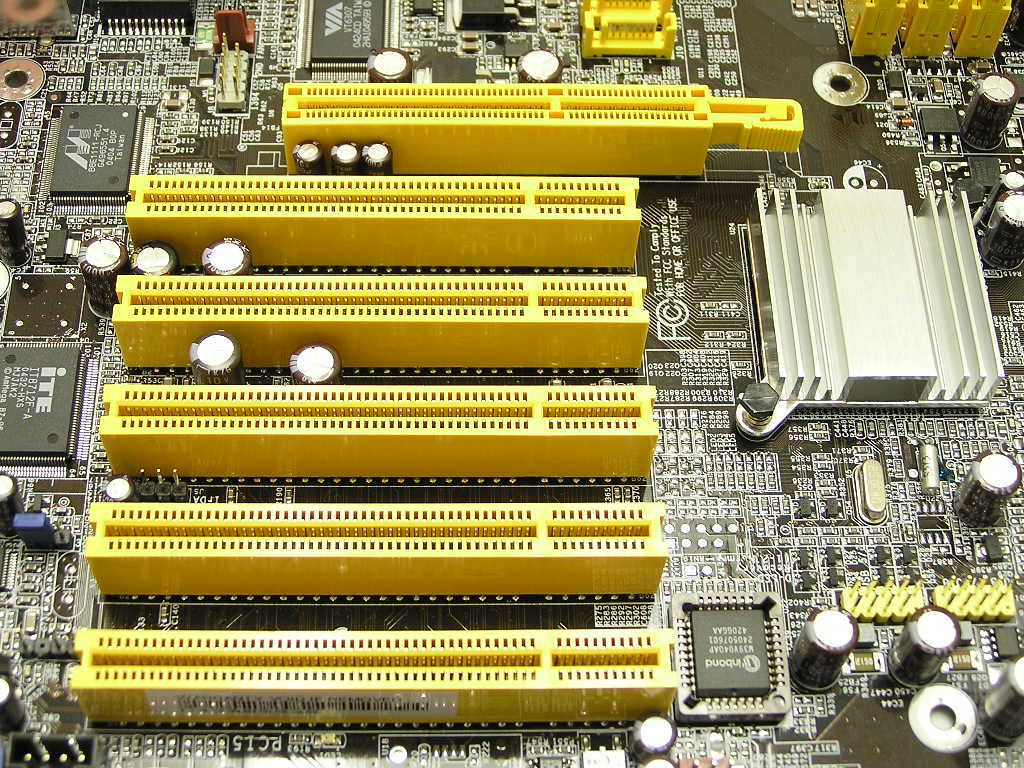
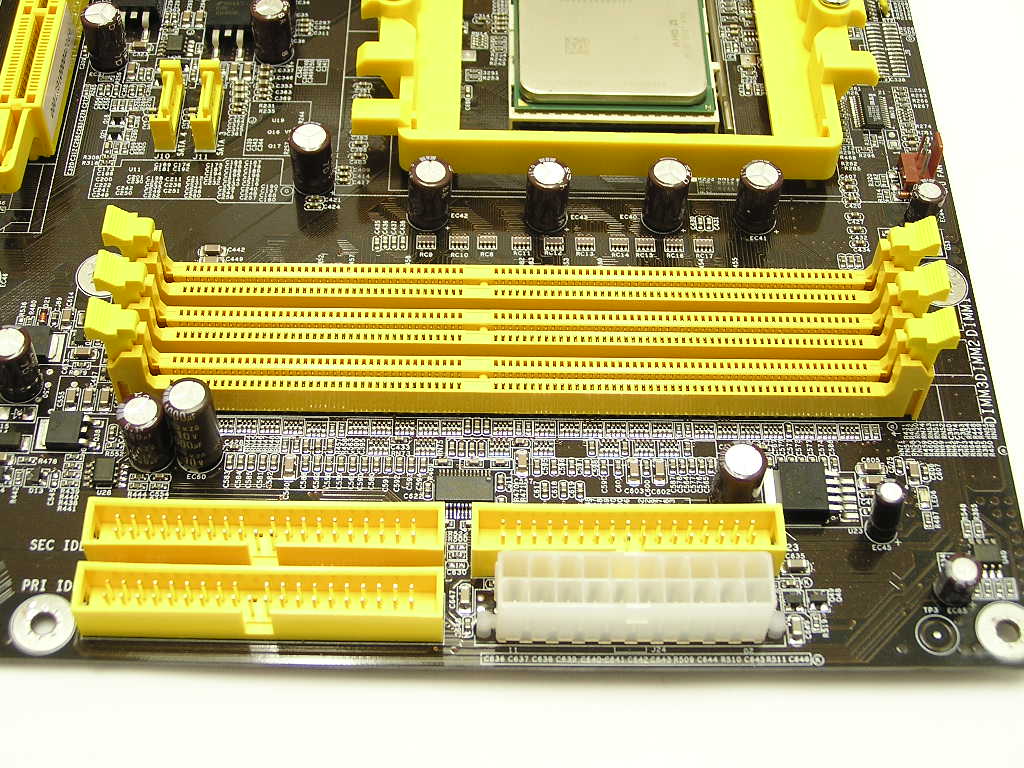
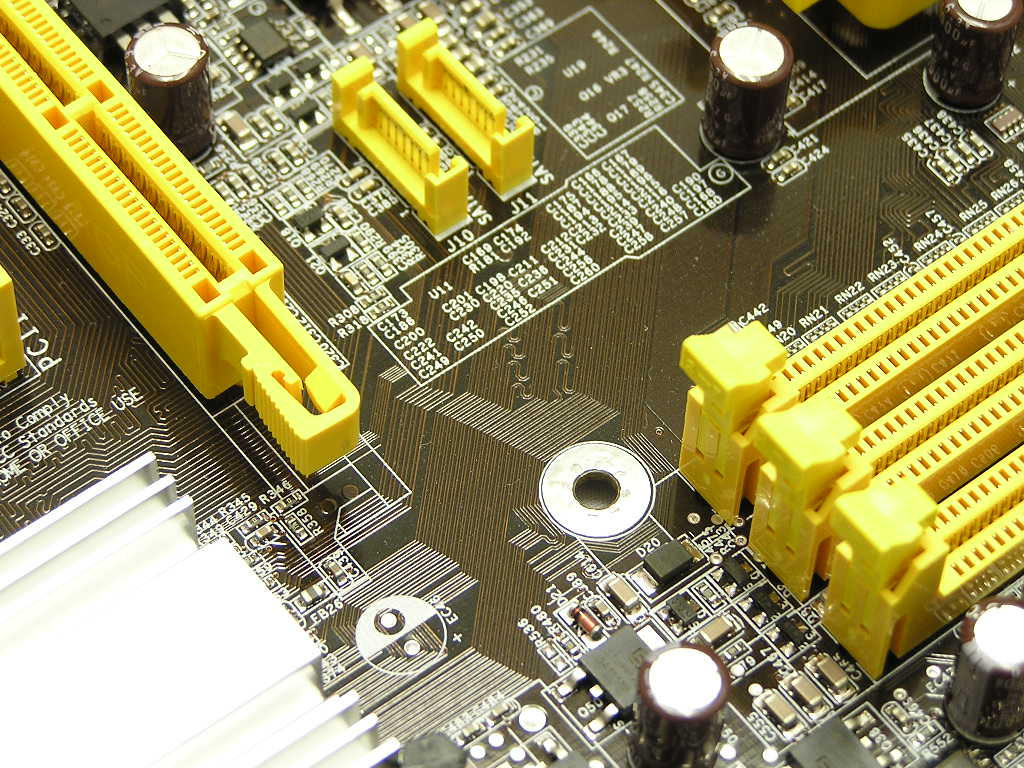
The DIMM slots, IDE ports, and ATX connector are located at the upper right section of the motherboard. The DIMM slots and AGP slot are far away enough to allow easy removal and installation of RAM. I’m not sure about the rest of you, but I find this to be the optimal location. The cables can be tucked into unused 5.25” drive bays. The LANParty UT nF3 250Gb has the floppy port right next to the ATX connector, which is great. I hate it when companies place the floppy port at the bottom of the motherboard. It doesn’t make much sense to stretch a cable half way across a case. The LANParty UT nF3 250Gb comes with 2 IDE ports and allows a total of 4 devices to be installed. The devices can be hard drives or optical drives, whichever you choose. Since SATA hard drives are becoming the norm, the LANParty UT nF3 250Gb offers 4 SATA ports for up to 4 SATA hard drives. The two located right below the CPU socket are controlled by the nForce3 250Gb chipset. The nForce3 250Gb controlled SATA ports allows RAID 0, RAID 1, RAID 0+1, and JBOD. The other two SATA ports are located right above the CMOS battery and are controlled by the Marvell chip located right above. Another gripe about the nForce3 chipset is the location of the SATA ports. Everyone knows that the majority of the cases have hard drives sitting near the lower half of the case. Why would you want the SATA cables to wrap around your graphic card? It’s like stretching the floppy cable half way across the case. Anyway, this is definitely not DFI’s fault. Nvidia just needs to come up with better designs.
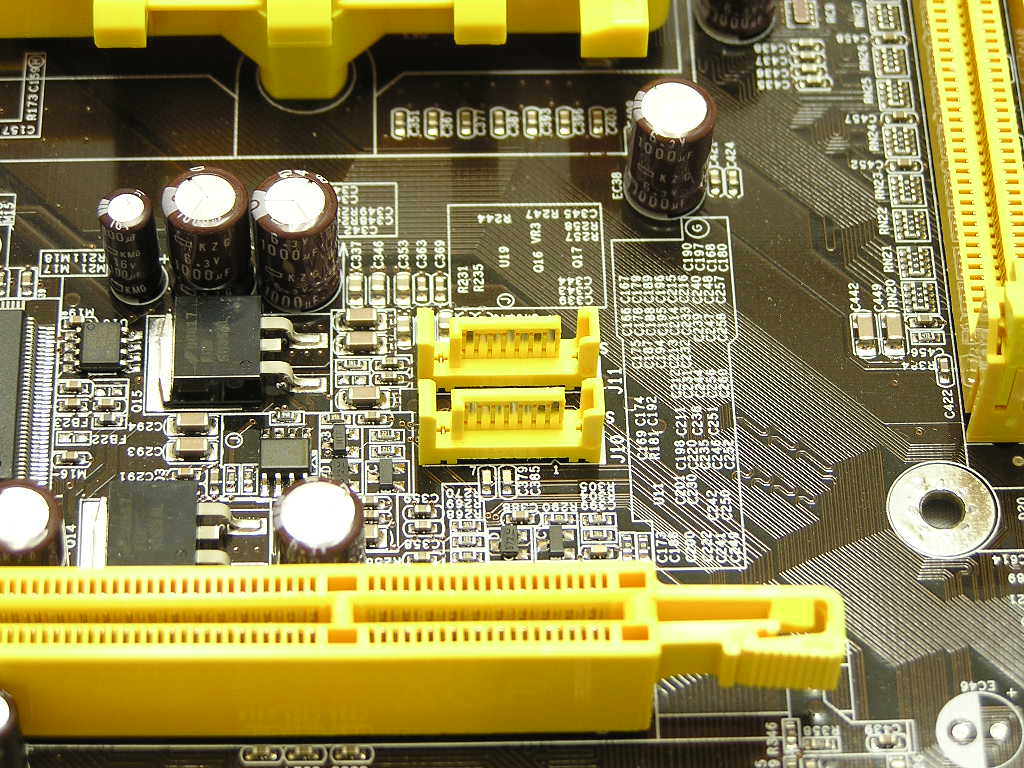
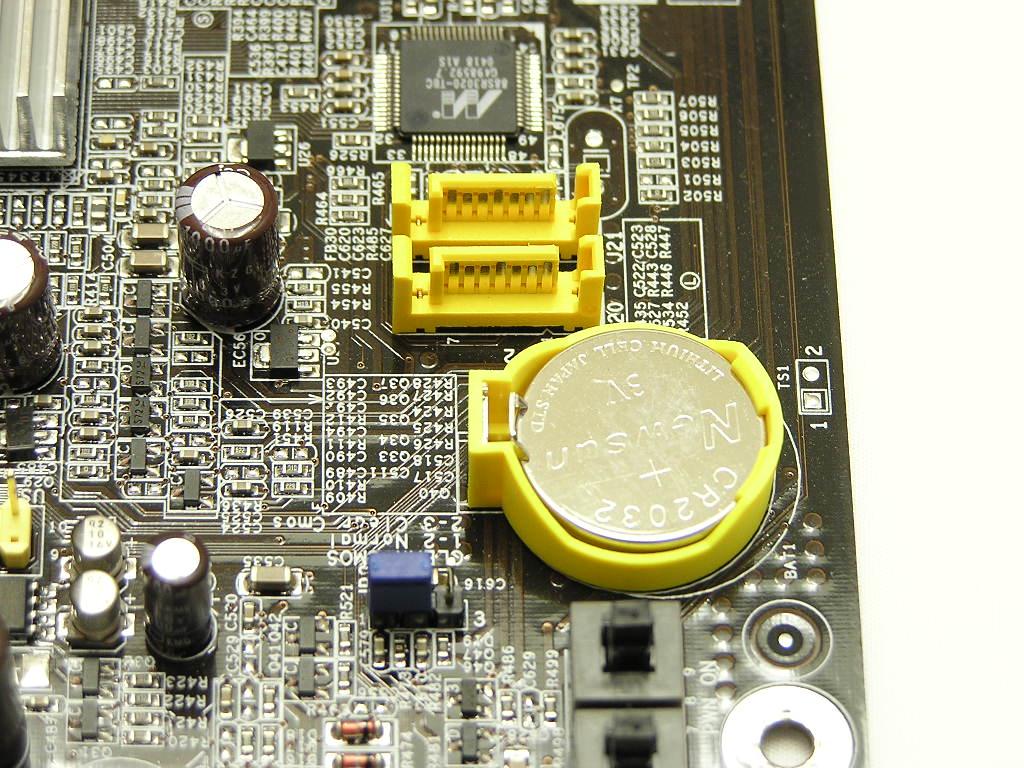
Motherboard Layout Continued
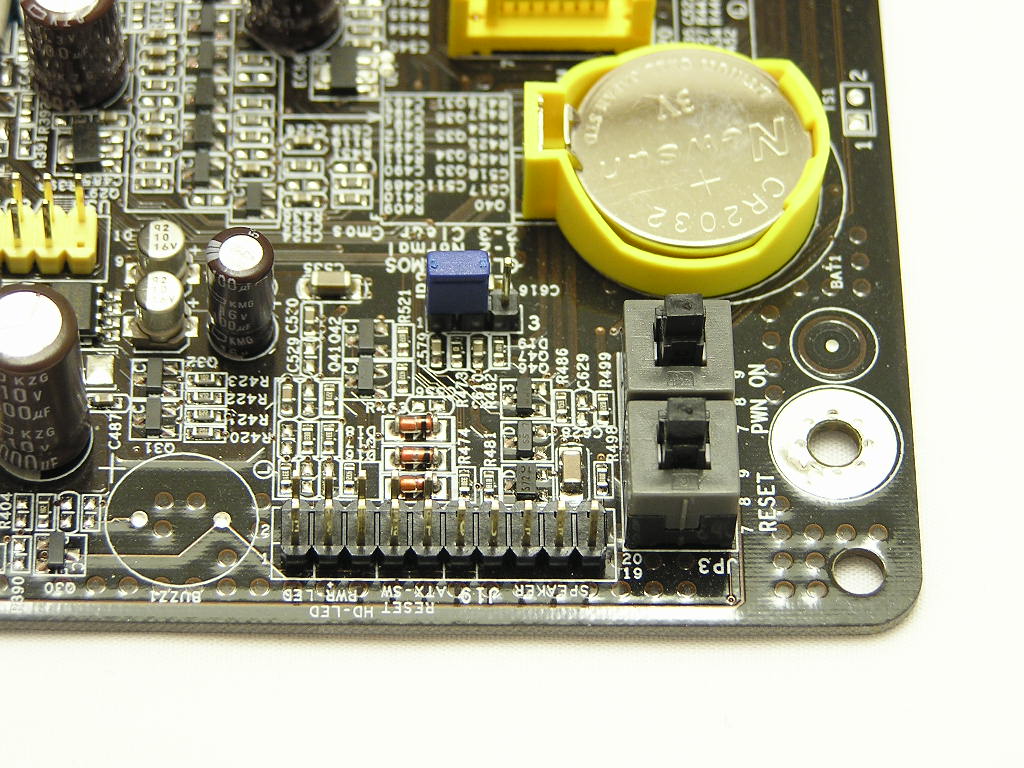
Speaking of the CMOS battery, the jumper to clear CMOS is conveniently located to the left of the battery. It is also placed clear of obstacles, like potential USB cables or PCI slots. Right below the CMOS battery are the Power and Reset buttons. The board doesn’t require the front I/O connections to be turned on, which makes review testing much easier. The buttons are not necessities, but commodities, in a motherboard. It makes the overclocking process a little easier. Next to the buttons are the front I/O ports. The ports are labeled so that you don’t really need to refer to the user’s manual to plug into the proper jumpers.
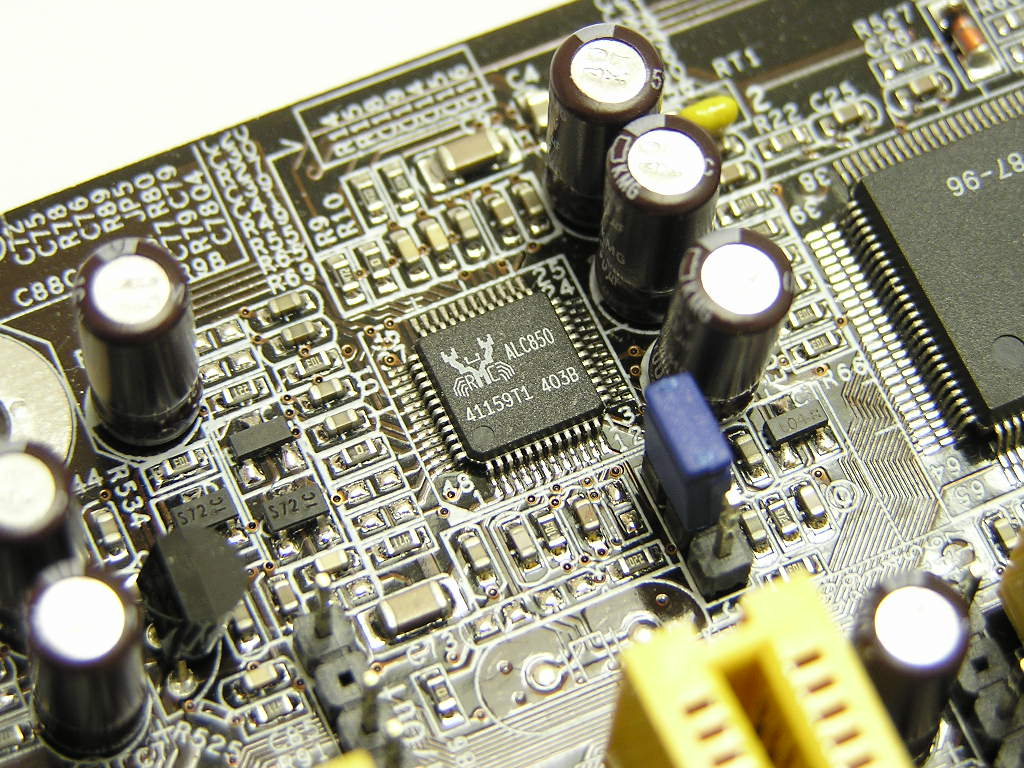
In the back I/O, the LANParty UT nF3 250Gb provides the usual keyboard and mouse PS2 ports, parallel port, 1 serial port, 4 USB ports, 1 firewire port, 1 Ethernet port, input and output for 8-channel audio, and 2 SPDIF in/out RCA jacks. The board also provides two additional USB headers next to the fourth PCI slot. An additional firewire header is controlled by VIA’s VT6307. The 8-channel sound is controlled by Realtek’s ALC850 and provides good sound for the majority of the users. Audiophiles will probably want to go with a higher quality sound card.
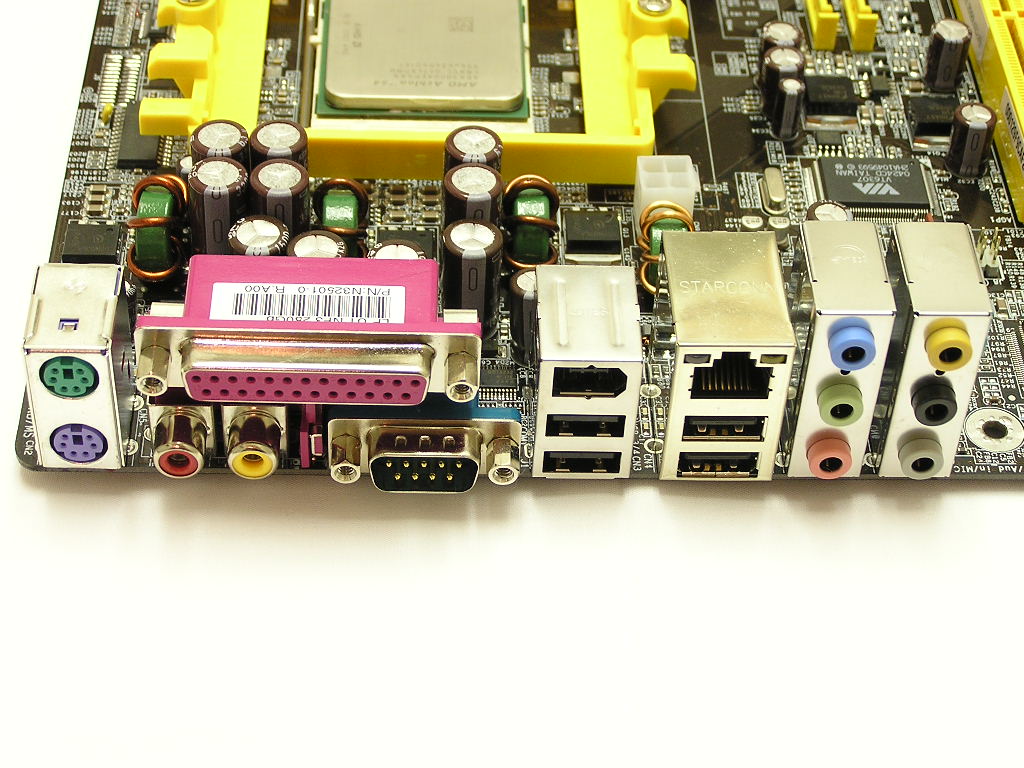
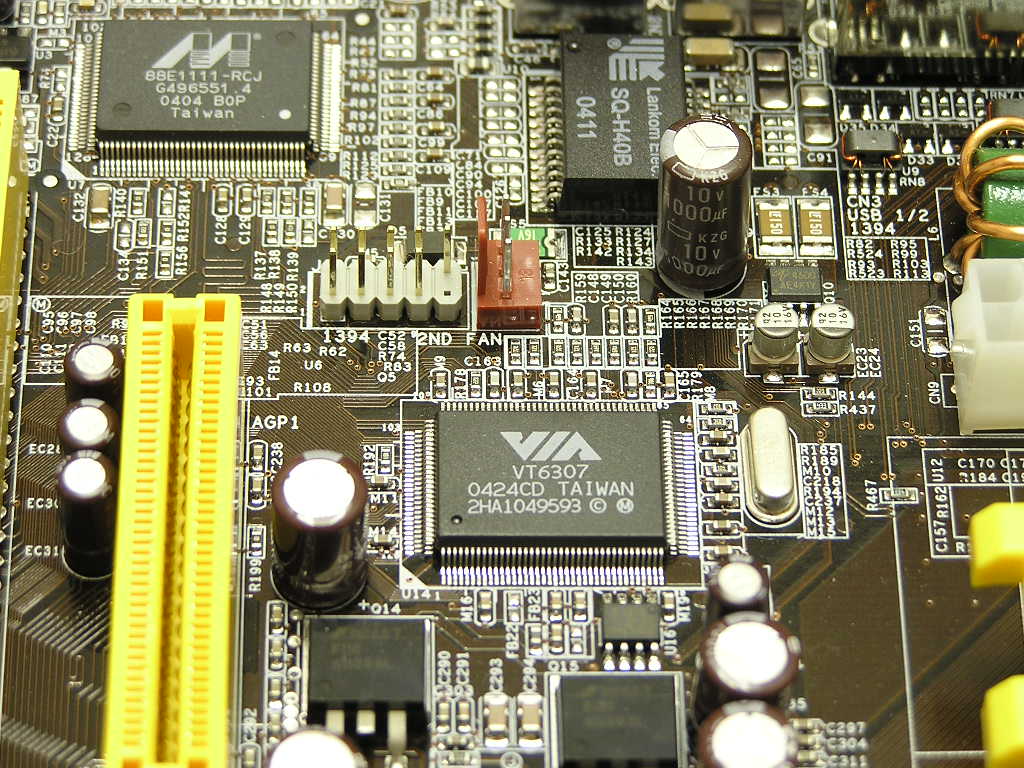
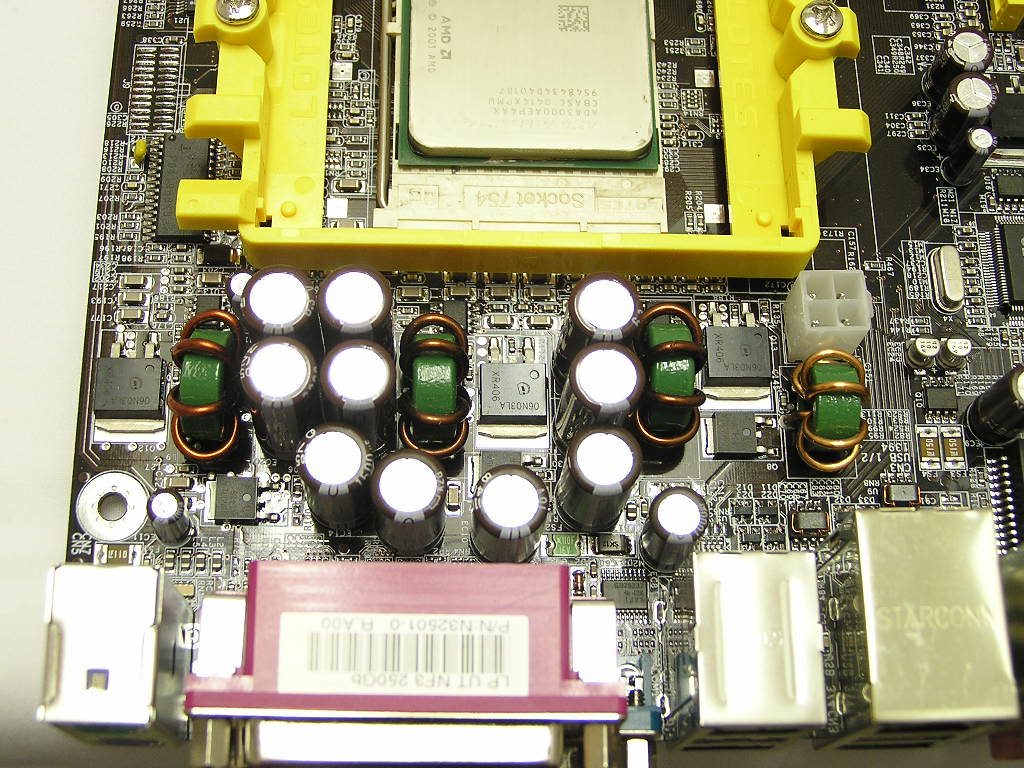
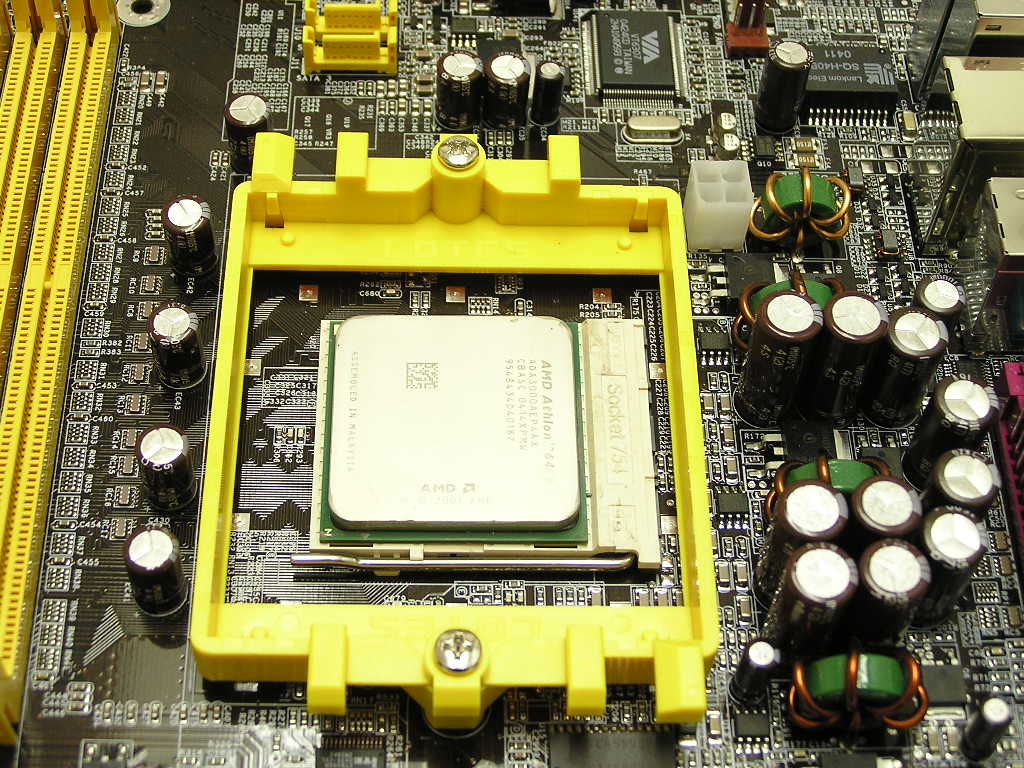
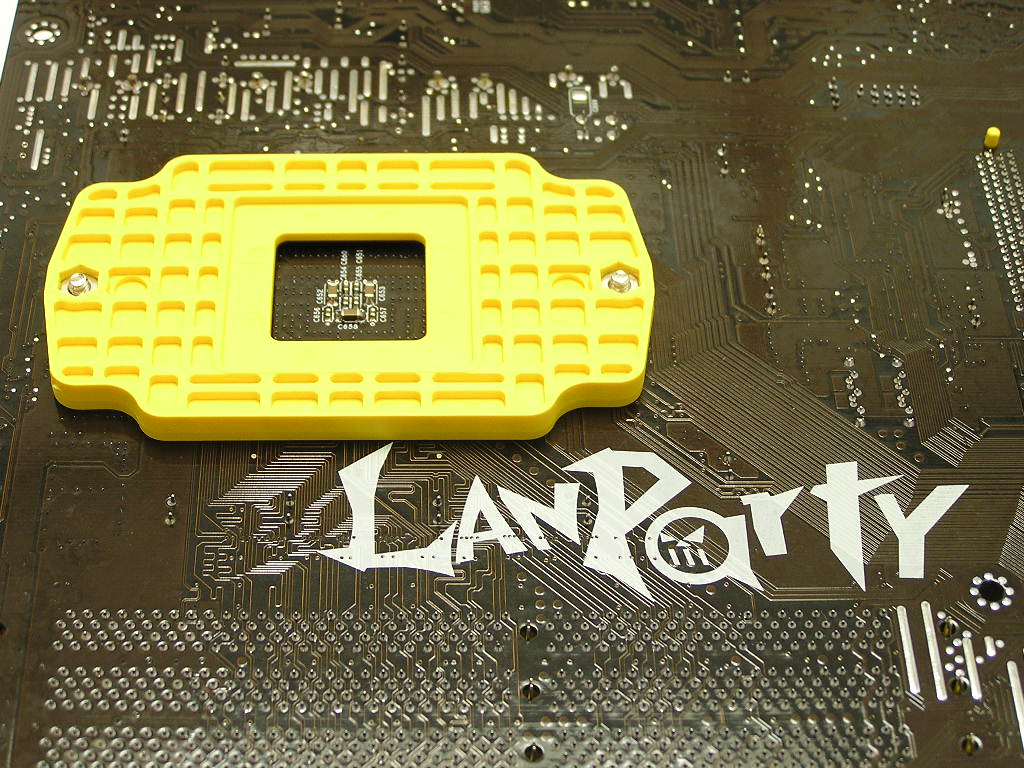
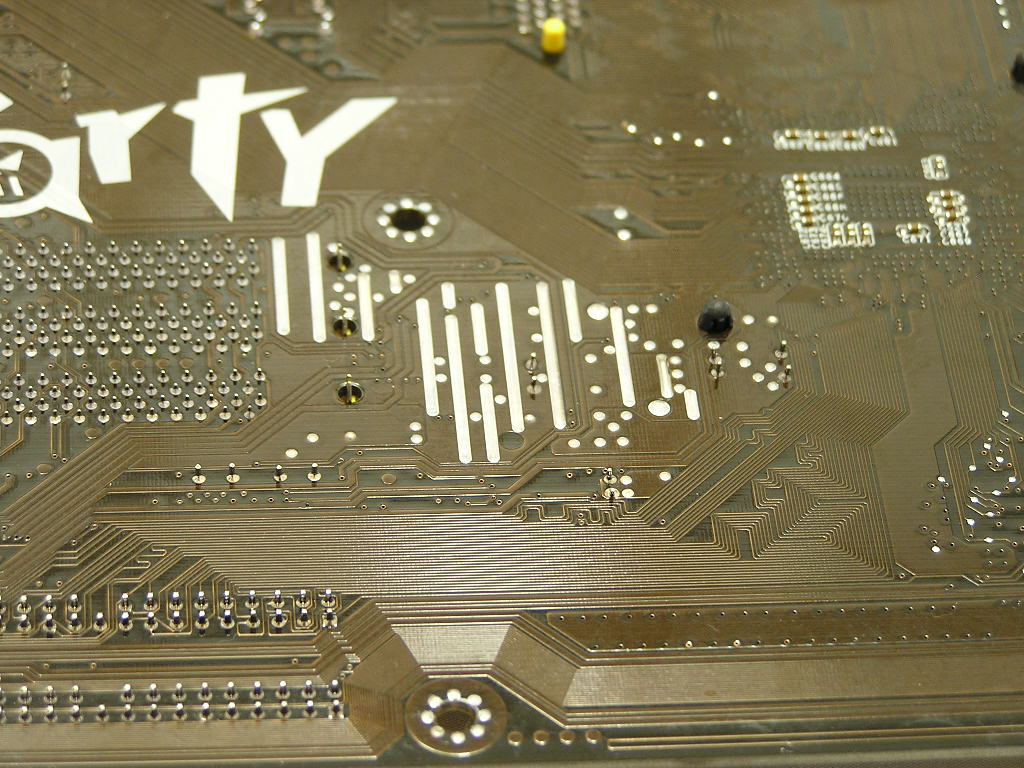
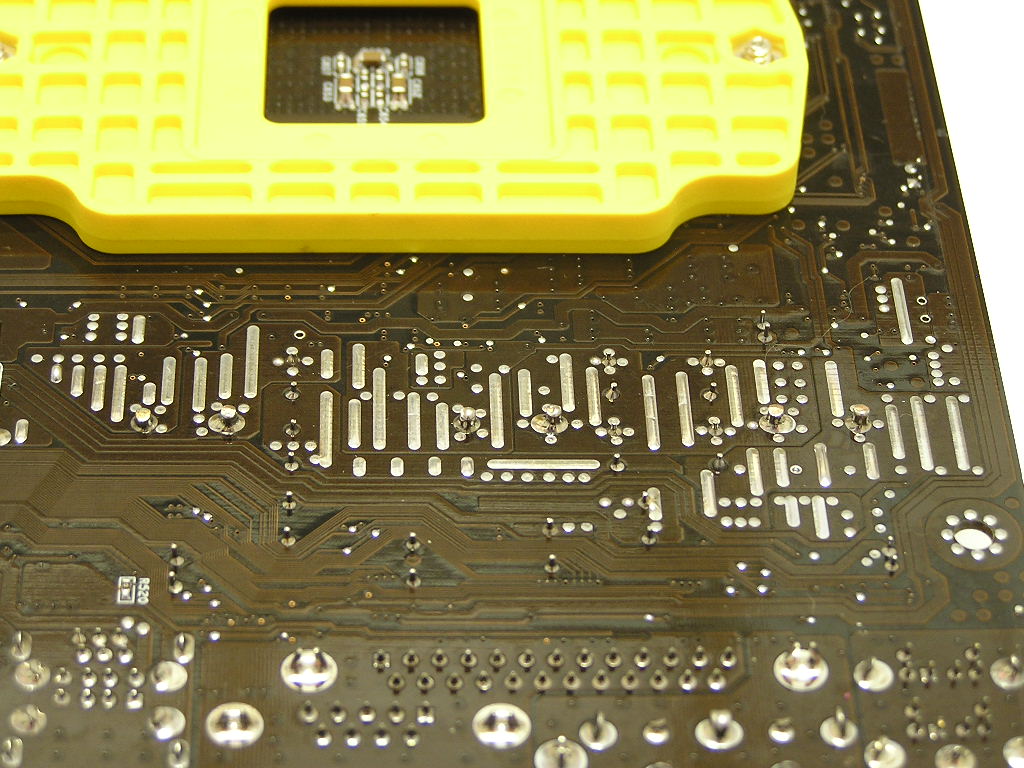
The LANParty UT nF3 250Gb comes equipped with the typical 3-phase power. Although the more power phases the better, it is not a big deal if the capacitors and inductors used are of high quality. The CPU socket has good clearance from nearby capacitors and should allow installation of large heatsinks problem free. While the clearance around the CPU socket is great, I did run into one problem. The Swiftech MCX64-V was unable to install properly on the LANParty UT nF3 250Gb. The reason behind this is that the backplate of the motherboard frame didn’t provide enough height for the screws to reach for proper attachment. This isn’t Swiftech’s fault because their heatsinks are made and based off AMD’s reference. I switched out the bracket and used another one I had lying around. Sure enough, the heatsink installed without a problem. The location of the 4pin 12v is not ideal, because it sits towards the lower left corner of the CPU socket. This requires the cable to be stretched around to wrap the heatsink. The motherboard also comes with what Abit calls “overclocking strips”. These strips are found at the back of the motherboard.
BIOS
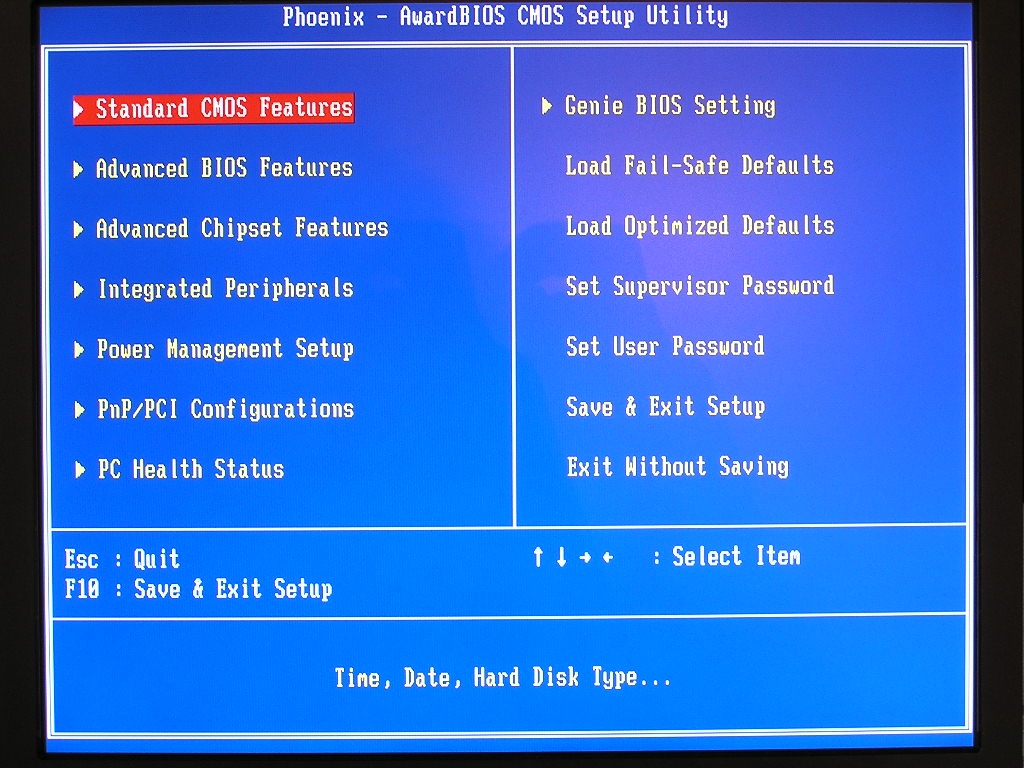
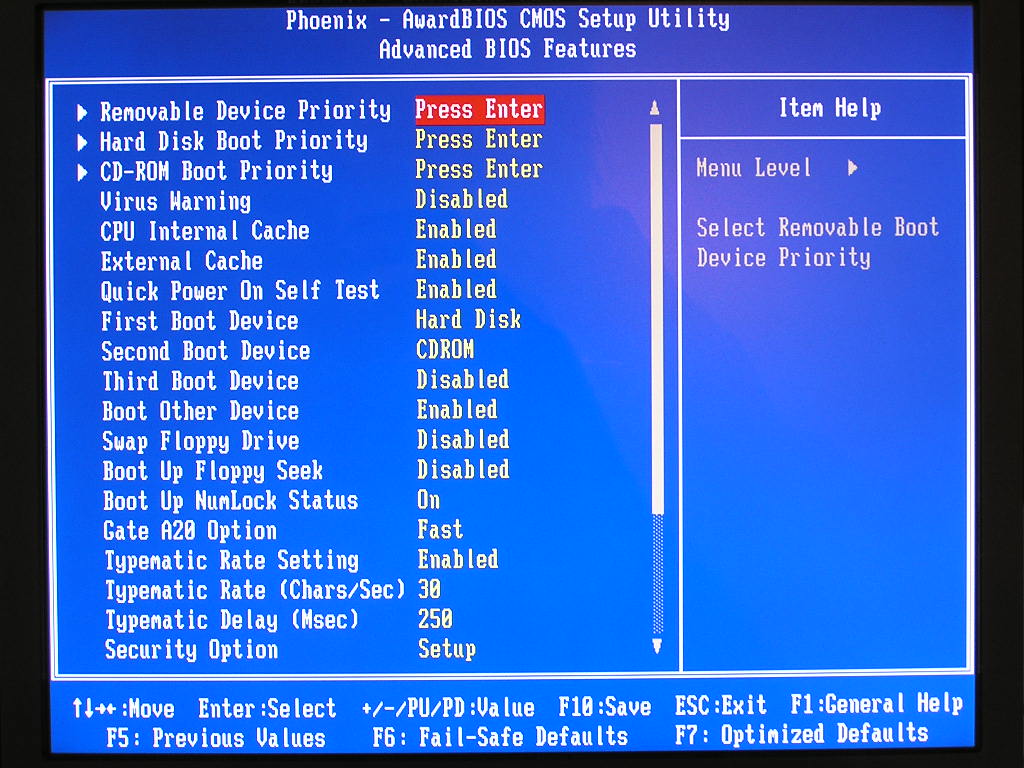
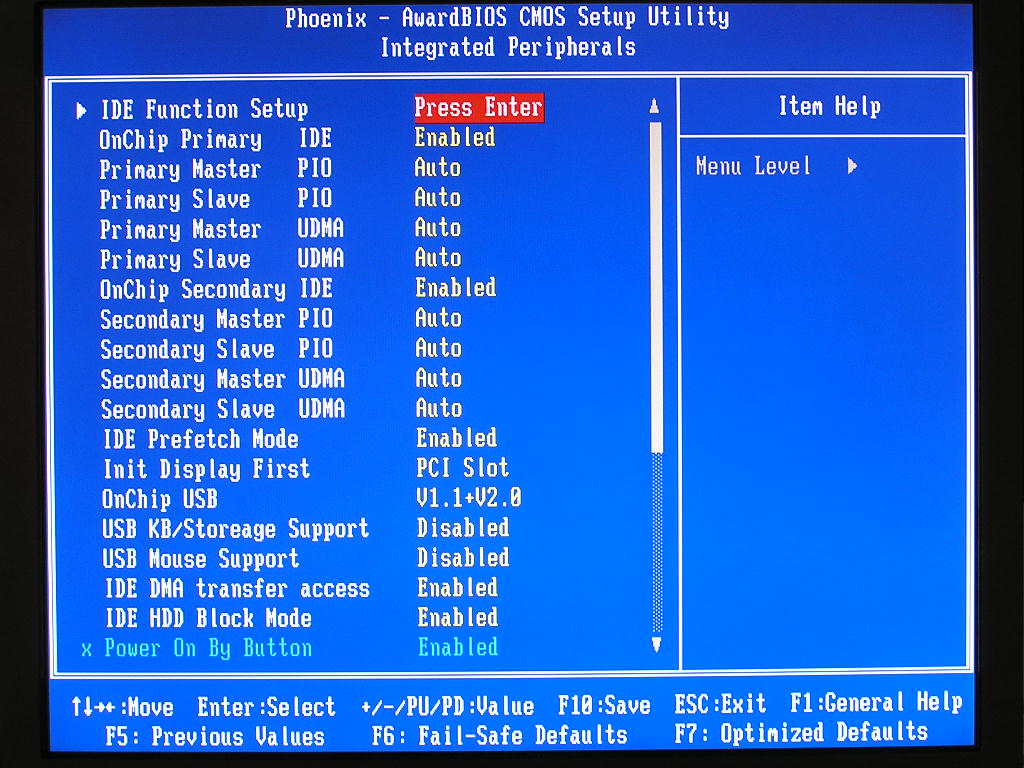
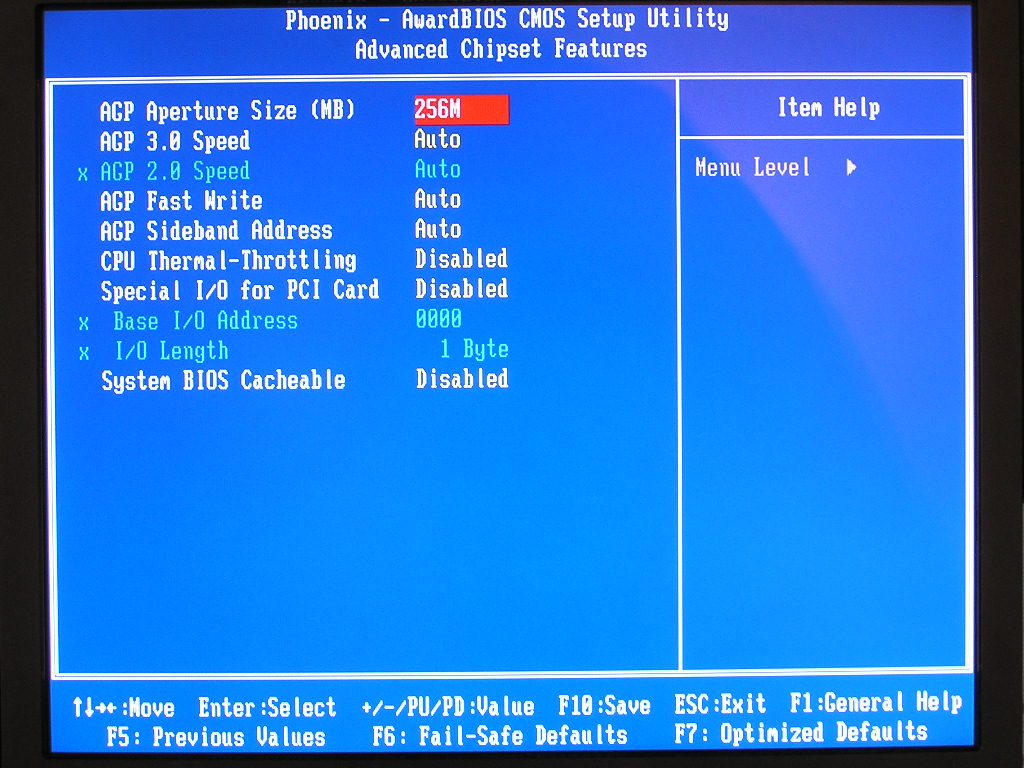
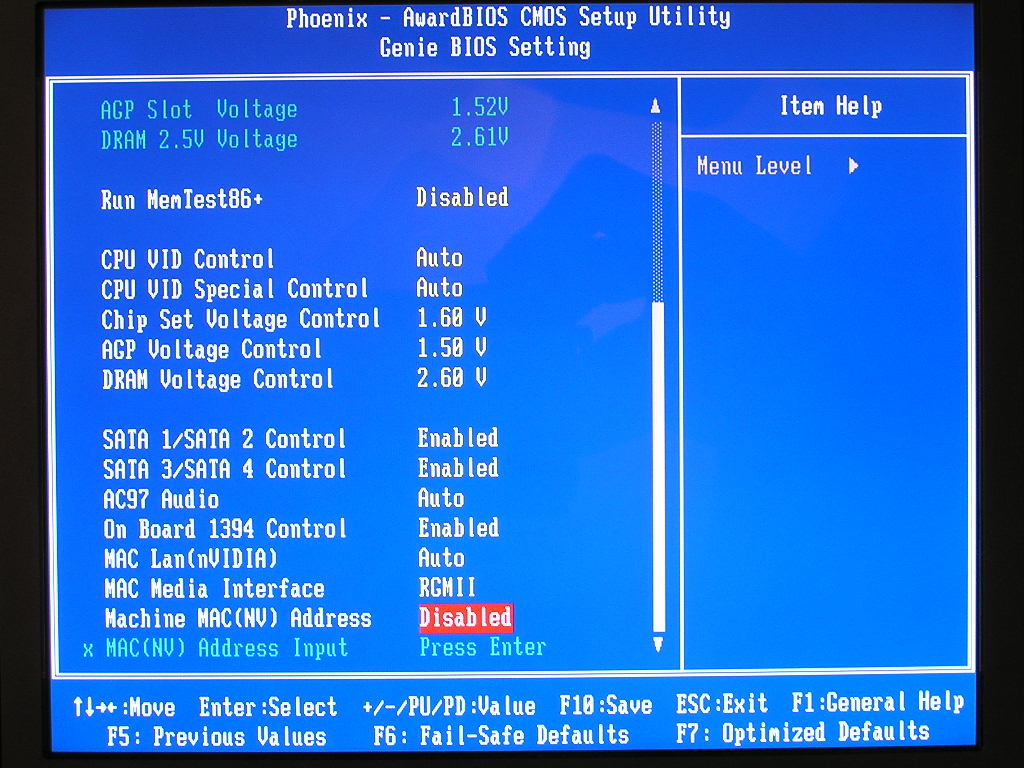
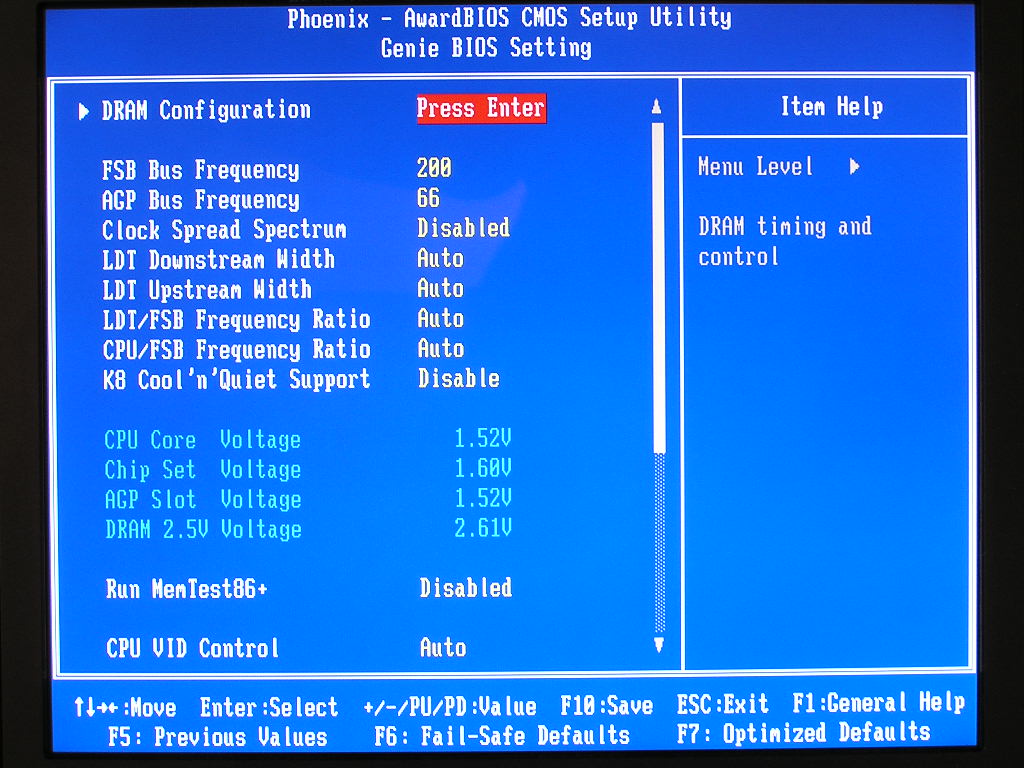
One of the reasons why DFI’s LANParty series is so successful is the great BIOS options. The LANParty UT nF3 250Gb caters towards the extreme overclockers and provides the best overclocking options I’ve yet to see.
- VCore - Auto, 0.8v-1.55v, special control of CPU VID: 104%, 110%, 113%, 123%, 126%, 133%, 136%.
- VDIMM - 2.5v-3.1v (allows up to 4.0v with beta BIOSes)
- VAGP - 1.5-1.9v
- Chipset Voltage - 1.6v-1.9v
- LDT Multipliers - Auto, 1x, 1.5x, 2x, 2.5x, 3x, 4x, 5x
- Memory Dividers - Auto, 100, 120, 133, 140, 150, 166, 180, 200
- CPU Multipliers - Auto, 4x-20x
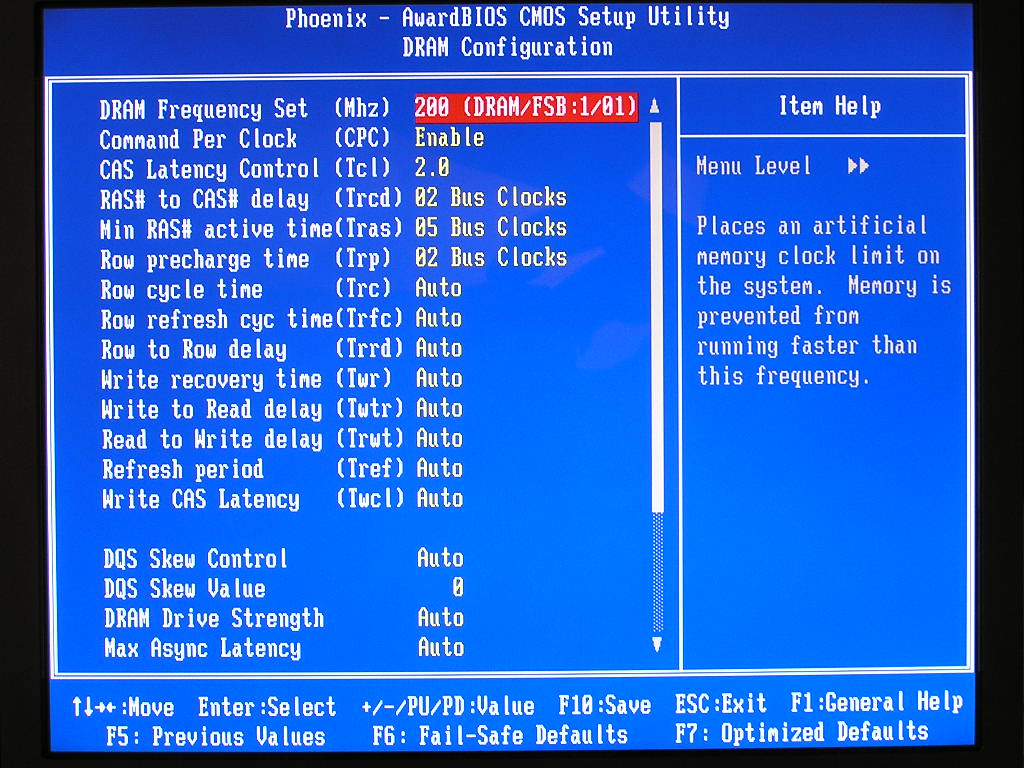
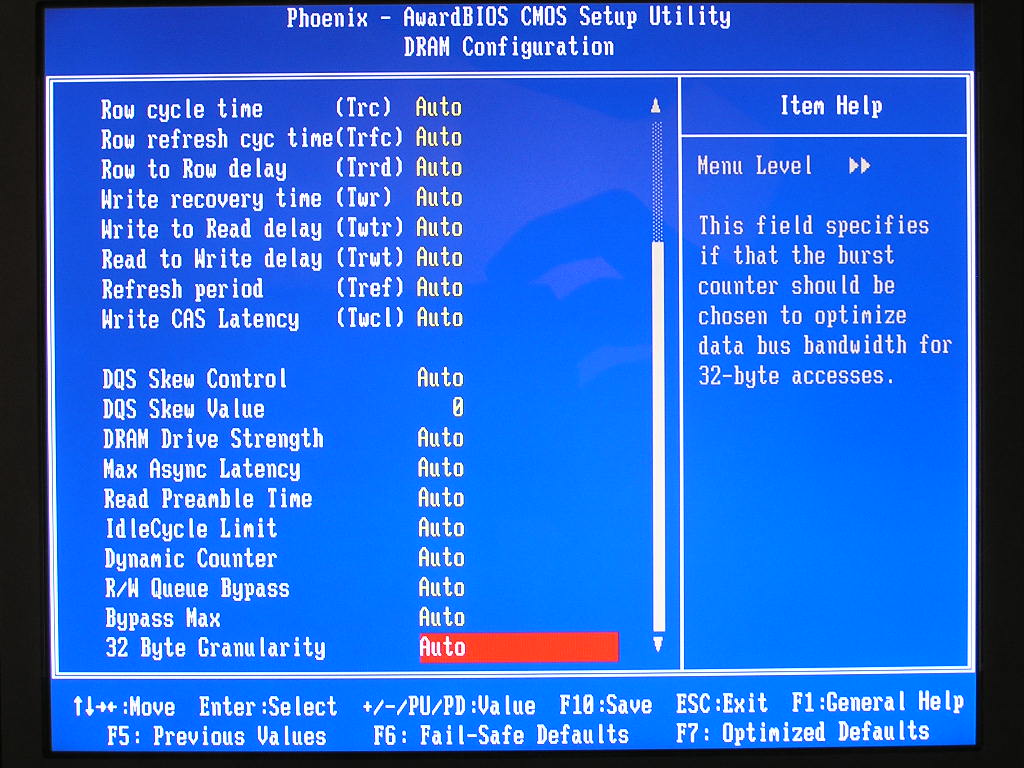
The pictures taken are of the 10/15 beta BIOS by Oskar Wu. There isn’t much difference between the original BIOS and the beta BIOS, other than the included Memtest option. The beta BIOS provides much better overclocking potential than the official. The official BIOS seems to have a bug that prevents serious overclocking. There are beta BIOSes available that allow VDIMM to go up to 4.0v, but I chose the BIOS most similar to the official. While the BIOS provides high VDIMM, there isn’t much need for the majority of memory out there. Only users with Winbond BH5, Winbond UTT, or OCZ EB memory will need high voltage. Enthusiasts with the current popular TCCD based memory will need no more than 2.8v-2.9v.
The most impressive section of the BIOS was DRAM configuration. DFI opened up all possible memory options to allow manual adjustments for maximum tweakage.
Software
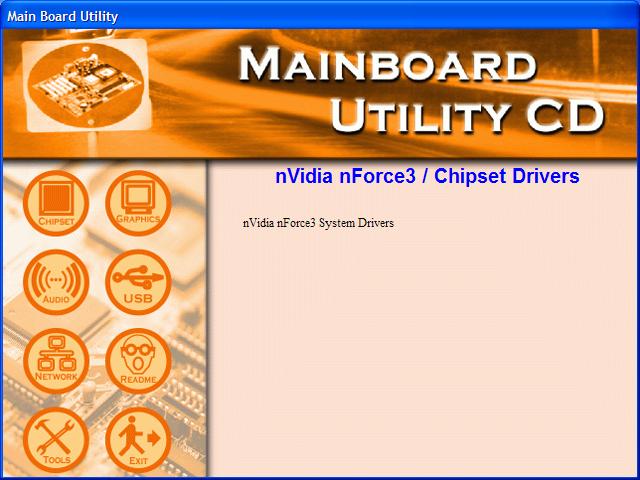
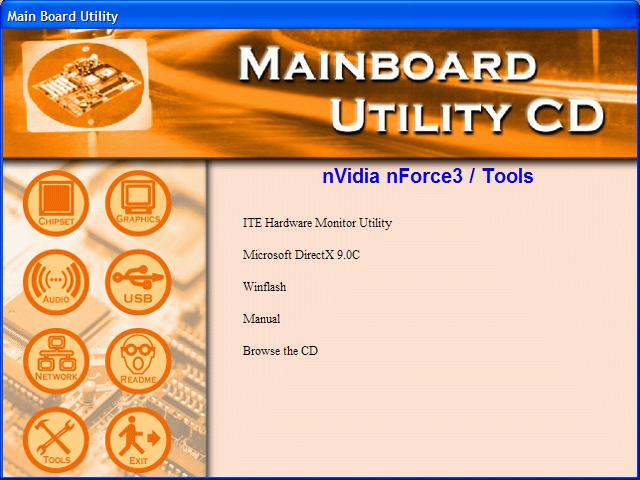
As mentioned earlier, the software bundle was very light. The only things included are the RAID driver floppy disk, which comes in very handy when doing a fresh installation of Windows, and the driver CD, which contains all the required drivers for proper operation. The only extras included are the hardware monitoring utility, DirectX 9.0c, and a windows based BIOS flash utility.
Test Setup and Overclocking
Test Setup:
- AMD Athlon64 3000+ Newcastle
- DFI LANParty UT nF3 250Gb
- Asus K8N-E
- 2 x 512MB Centon Low Latency PC3200 2-2-2-5
- ATI Radeon X800 Pro
- Nvidia unified platform drivers 5.10
- ATI Catalyst 5.1
- Hitachi 80GB SATA
Overclocking:
Now we finally get to the fun part; overclocking the motherboard. The official BIOS was not overclocker friendly. Any slight adjustments resulted with no POST. Checking with DFI’s support page provided no help. Despite having the board out in the market for quite some time, they provide no updated BIOSes. I had to resort to using a beta BIOS to find out the overclocking potential. The motherboard is already known to be a great overclocker and our results definitely show proof of that. I proceeded to find the highest HTT allowed with both single and dual sticks of memory installed. The first test will be conducted with the memory divider at 1:1. The second test will be with a divider, so that the RAM wouldn’t pose as a bottleneck. All memory timings were left at 3-4-4-8 2T and the LDT multiplier at 1x. I made sure that nothing would bottleneck the chipset potential. The reason why I tested with two sticks of memory is that most systems today makes good use of 1GB or more. Running 512MB can get a little slow at times, especially during game loads.
- Highest overclock 1:1 single stick: 300HTT
- Highest overclock 1:1 dual stick: 265HTT
- Highest overclock with divider single stick: 330HTT
- Highest overclock with divider dual stick: 290HTT
The overclocking results with a single stick of memory is spectacular. It reached 300HTT without a problem. I expected more from using two sticks of memory, though. I didn’t expect such a drastic drop in potential. No matter what I did, Memtest, Prime95, and typical benchmarks would fail. With a divider running, the headroom of the chipset increased up to 330HTT. I used the SATA ports controlled by the nForce3 250Gb chipset; and the chipset seems to have good working AGP/PCI locks.
Results
Although the beta BIOS was used for overclocking, the stock official BIOS was used to run all benchmarks and tests. The only memory timings adjusted were the typical CAS, TRCD, TRP, and TRAS. Command Rate was left at 1T. HTT was manually set to 200 on all the tested boards to make sure of a fair comparison. There are companies out there that like to “cheat” a little by shipping motherboards with slightly overclocked HTT/FSB.
Sysmark 2004
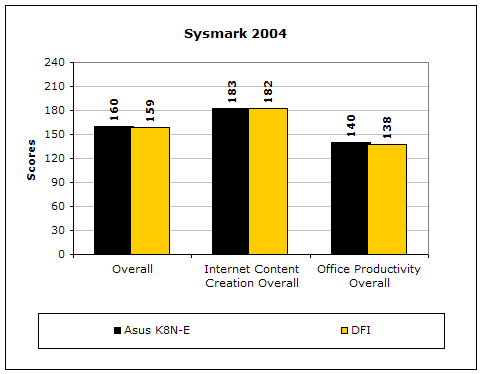
Sysmark2004 is a very common benchmark used to measure a system’s potential in performance. It goes through long and grueling tests that include compression and decompression and office intensive programs.
3DMark2001SE
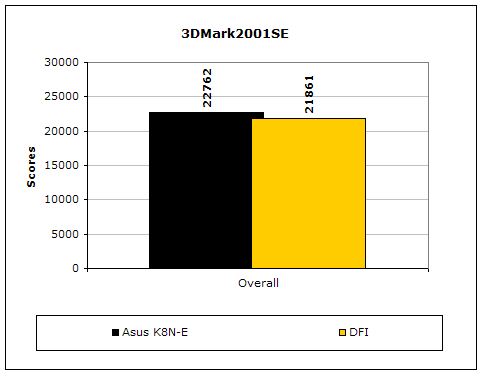
3DMark is probably the overclocker’s favorite benchmark. Unlike 3DMark2003, which stresses mainly the video card, 3DMark2001SE tests all of the system’s main components. Increasing the CPU speed, memory speed, and video card speeds will result in higher results in the final score. It was quite shocking to see that the LANParty UT nF3 250Gb scored almost 1,000 points lower. I tested repeatedly and came up with the same results.
PCMark2004
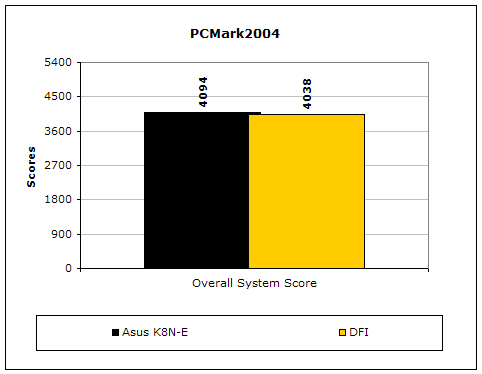
The PCMark2004 system benchmark puts the entire system to work. Once again, the LANParty UT nF3 250Gb scored lower.
PCMark2002
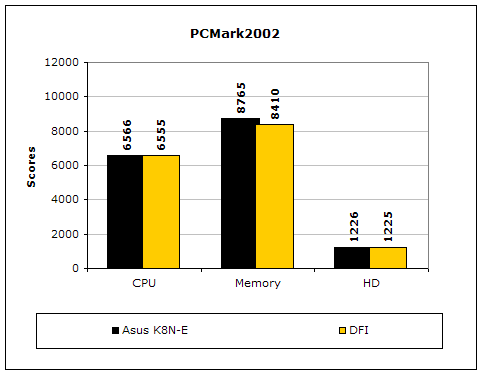
PCMark2002 is older than PCMark2004 but still very similar. Once again, the DFI scores are lower, especially the memory bandwidth. This must be attributed to the memory timings in the BIOS.
Results Continued
Everest Home Edition
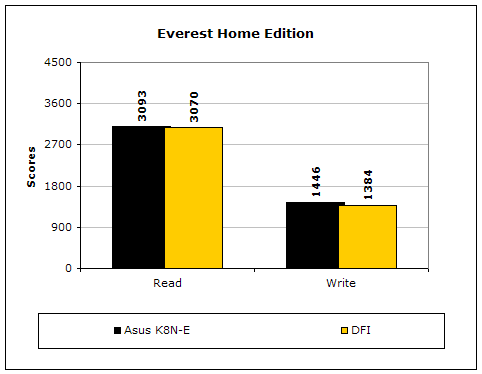
Everest Home Edition is a good benchmark for testing memory performance. Since the motherboard’s overclocking potential and memory bandwidth is closely related, I find this benchmark to be trustable.
SiSoft Sandra
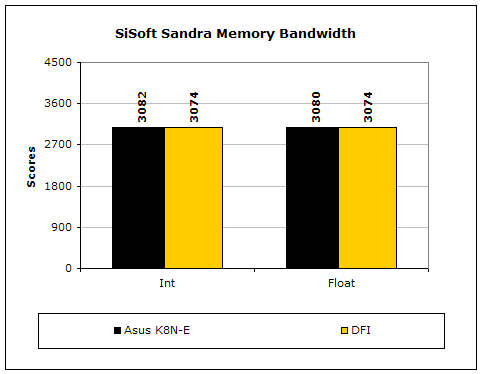
Like Everest Home Edition, SiSoft Sandra memory bandwidth tests the motherboard’s memory bandwidth performance. As again, the DFI scored just a little lower.
Super PI
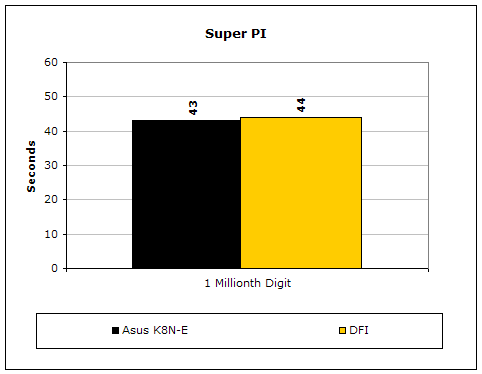
Since the value of PI is an infinite value, Super PI is a speed test to find the digit you’re looking for. In this case, we chose the millionth digit. Super PI benefits greatly from higher FSB as well as low latencies. It was very surprising to see that the DFI was ONE WHOLE second slower.
PiFast
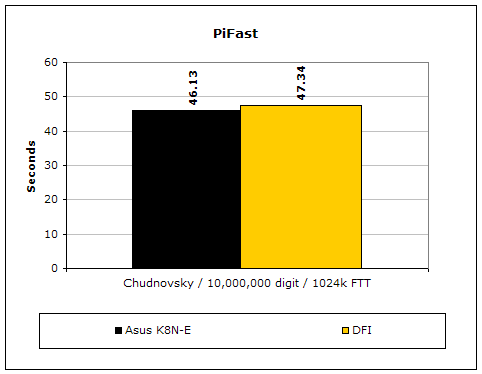
PiFast is similar to Super PI and the results can be greatly affected by a slight adjustment to the memory megahertz and latency. Once again, DFI’s performance was slower.
Unreal Tournament 2004
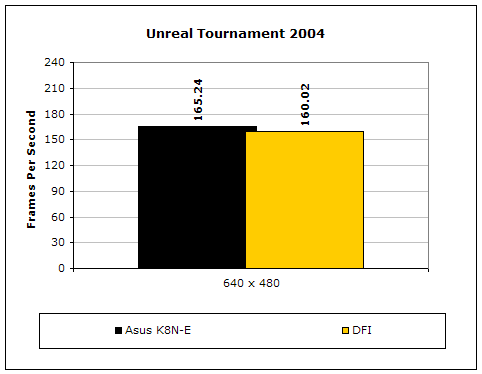
Unreal Tournament 2004 is a very popular game that is highly effected by the system’s performance. Testing was done under the resolution of 640x480 to minimize the dependency of GPU and CPU power. The difference was a whopping 5 frames lower.
The results of the DFI seem to be quite lacking. The performance was always lower than the Asus K8N-E. I made sure that both boards were running with the same settings of 200HTT 2-2-2-5 1T. I even manually changed the speeds to make sure that it was a proper and fair comparison. No matter how many times I tested, the DFI scored lower. The three most disappointing results were 3DMark2001SE, Super PI, and UT2K4. Most of you won’t really care about the unusual Super PI performance, but the realistic gaming performance was quite upsetting. 5 frames is considered to be a big difference, considering that the motherboards were running speeds.
Conclusion and Thoughts
At first, I was excited to see the performance and potential of the LANParty UT nF3 250Gb. I heard so many good things about the board that I didn’t expect to be disappointed. After spending time with the motherboard, I came to the conclusion that it’s not for everyone. The board is a great board, considering the overclocking options are top notch with great voltage options. The overclocking headroom potential is great and reaches outstanding HTT speeds. The numerous memory tweaking options allow enthusiasts to fine tune the system performance for increased results. Unfortunately, I have a disagreement. The board only seems to be a great board for reviewing purposes. It’s not very practical for a home-end consumer’s system. Why? Well the motherboard has lackluster performance when all the memory options are set to AUTO. True that the performance can be raised to step back up to that of the competition, but that would take time and plenty of trial and error. Enthusiasts will need to mess with a lot of the memory options in order to gain back the lost performance. Let’s face it, the entire community of extreme enthusiasts don’t even add up to 5% of the entire computer user community. There are people out there who hardly understand the reasoning behind the usual CAS, TRCD, TRP, and TRAS latencies. You certainly can’t expect them to go in the BIOS and start fiddling with things they don’t understand. Not only that, with all that tweaking going on, enthusiasts will need high end memory, which can be quite costly. Currently, Winbond chips seem to be the only ones capable of handling extra adjustments other than the usual latencies we’re used to. Many will argue that the tweaking is left for the enthusiasts who wish to squeeze out the very last drop of performance possible, but then just use A64 Tweaker. What I don’t understand is, why should tweaking be needed just to perform on the same level as the competitors? Tweaking to gain extra performance is understandable, but tweaking to have the same performance is not. One last thing I didn’t like was the DFI support. There are no new official BIOS’s available. This requires enthusiasts to use beta BIOS’s, which voids all kinds of warranties. This happened with their nForce2 motherboards. DFI needs to pick up that slack and provide users with decent official BIOS’s, because not everyone is willing to try beta material.
The DFI LANParty UT nF3 250Gb seems to be a great board and I can understand why so many people like it. The overclocking potential and options are great, but that shouldn’t be the deciding factor. Enthusiasts should consider the motherboard performance when making the purchase. This can be related to the analogy of Athlon64 CPUs vs. Intel CPUs. We all know that Athlon64 CPUs provide the best gaming performance, but many people still get suckered into Intel’s high gigahertz processors. We all try to tell our friends that even if Intel’s processor has higher gigahertz, that’s not what it’s all about. Well, the same is with this motherboard. The highest overclock HTT is not what it’s all about. There is still performance to consider. Let’s just hope that DFI doesn’t continue this with their new nForce4 motherboards.
I was hesitant in slapping the LANParty UT nF3 250Gb with an award mainly because of the performance issue. While I do like a great overclocking board, I tend to focus on the performance more than anything, and I’m sure most of you guys feel the same. While the board performed flawlessly, the very thought of having to make adjustments simply to run at the same level of competitors was not very pleasing. If you do happen to know what you’re doing and have the proper hardware, then it would be a fun and great board to tinker with and definitely THE board to get. For the majority of the users, and overclockers included, who have no idea what those timings are for, I’d recommend to stay away. You’ll be better off getting another board and do some typical overclocking rather than scratching your head figuring out your next step to “regain” that performance loss.
Pros:
- Sexy black and yellow color combination
- Excellent overclocking potential
- Great BIOS options
- Nice bundle of yellow rounded cables
Cons:
- Lackluster performance
- Lackluster official support
- Lacking software bundle
- Stock official BIOS not very overclocking friendly
If you have any questions or comments, feel free to hit us up in the forums. You can also check out more of our latest reviews on the front page.