

OCZ Titanium PC3200 1GB Dual Channel Kit
Introduction
‘OCZ’ and ‘overclocking’ are synonymous terms in the overclocking community. Even non-overclocking hardware enthusiasts trust OCZ products because they are simply superb. OCZ also provides great customer service and product warranty. Other memory manufacturers also provide lifetime warranties, but there is no other company that can duplicate OCZ’s level of service. If you ever have a problem with compatibility or stability, there is always an OCZ representative online ready to help through a simple instant message. What more could you ask for?
OCZ’s line of memory has always been named after metals; Copper for the value performance line, Gold for the gamers, and Platinum for the overclocking enthusiasts. OCZ now introduces a new line of memory; the Titanium. The OCZ Titanium is geared towards high-end mission critical systems and servers. The release of the Titanium memory is certainly a new step for OCZ. For once, the memory isn’t focused on overclocking! I’m sure it will allow some mild headroom, but the main focus of the Titanium is to ensure 100% reliability and stability in a system. It’s always good for a company to take a new approach and open up segments for potential future customers, but can OCZ handle the extreme demands of high quality memory? From the looks of their warranty support, they seem to have at least one area covered very well.
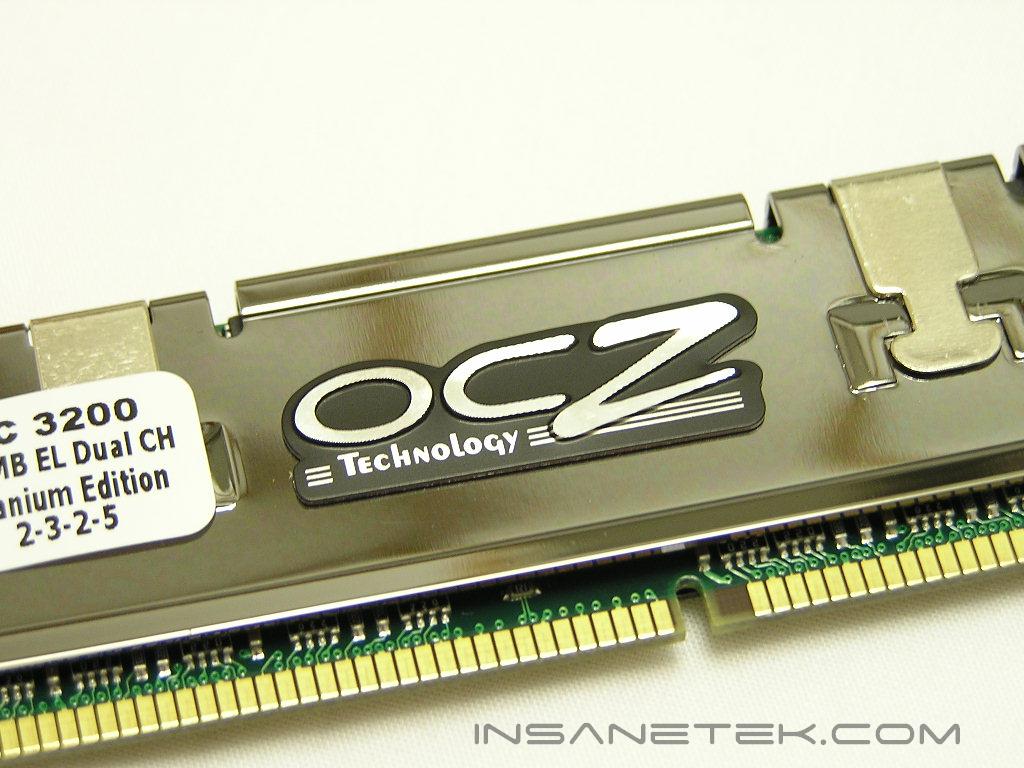
OCZ Titanium PC3200
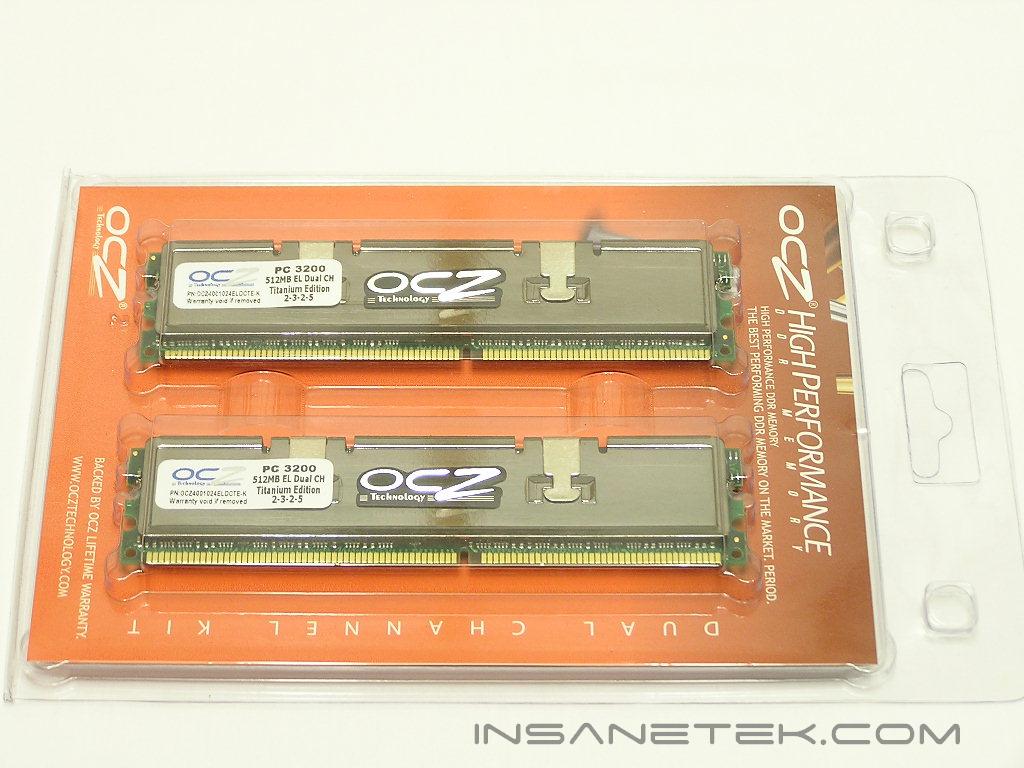
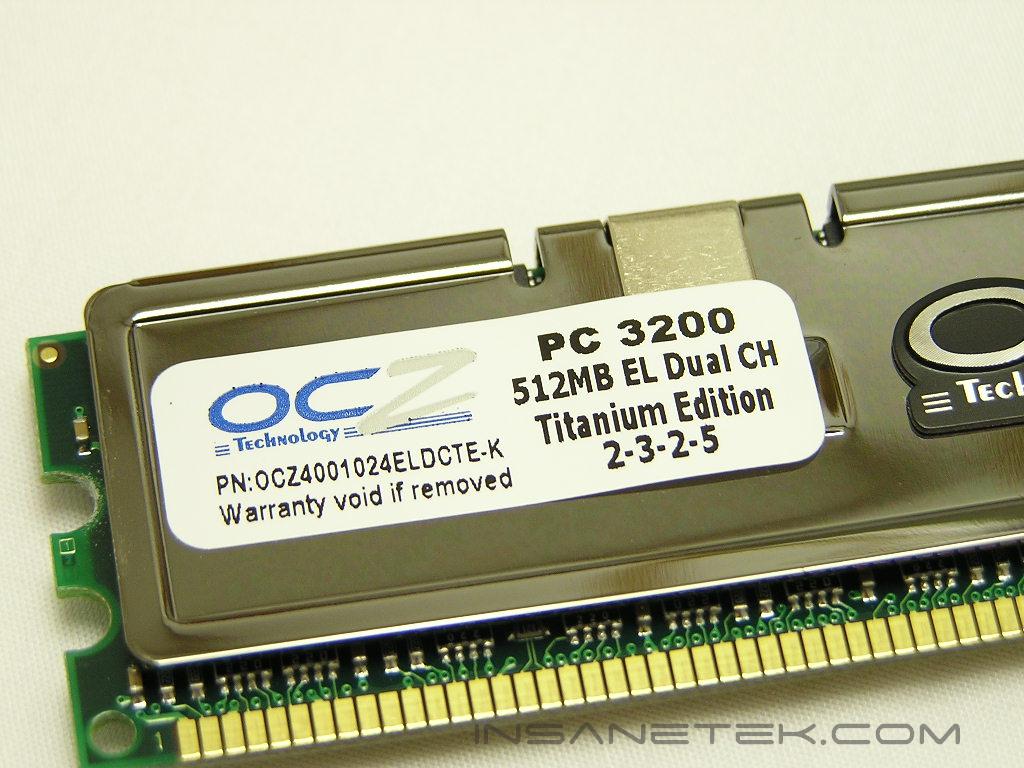
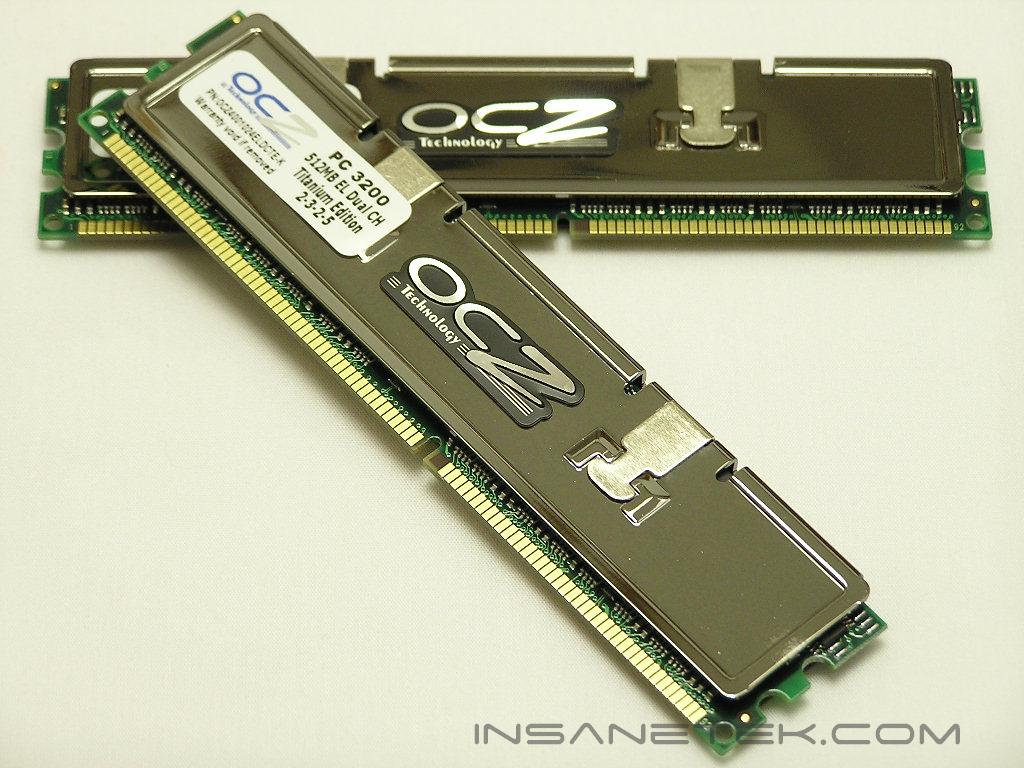
As usual, the package is a clear plastic clamshell with the same orange insert. Because the memory is named after the extremely strong metal, Titanium, it’s only appropriate to use heatspreaders that resemble Titanium. The heatspreaders are copper with a Titanium mirror finish. It’s beautiful. The heatspreader design itself is actually a bit different from the other lines of memory. It follows the same two clip design, but with enough differences to distinguish itself.
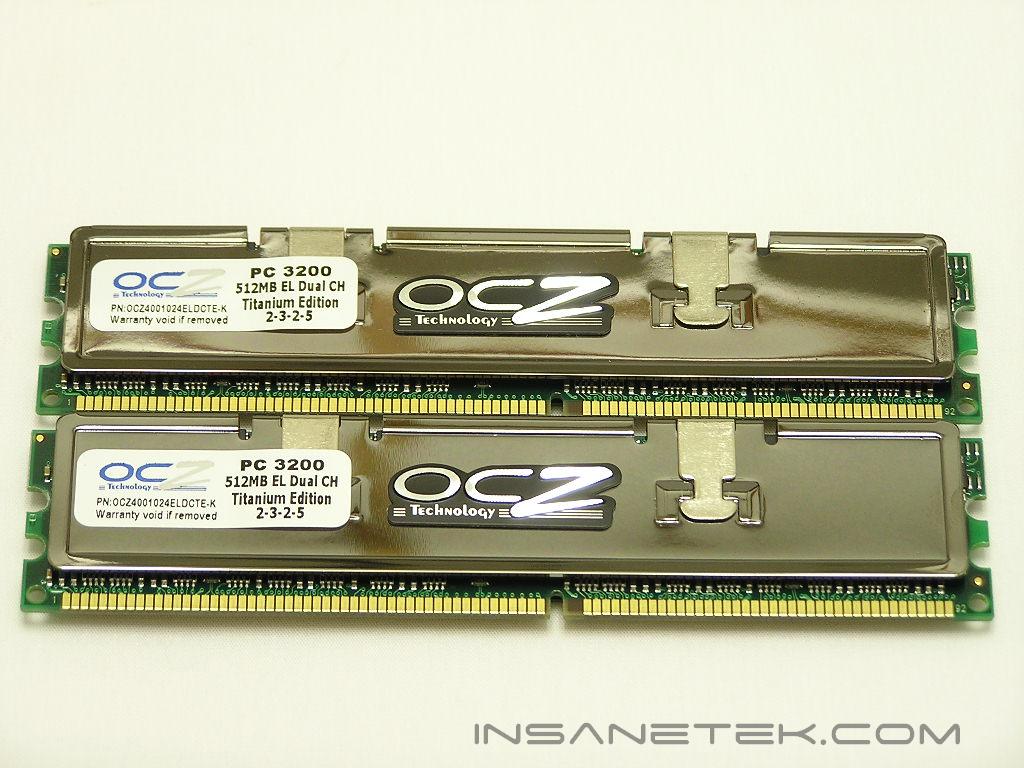
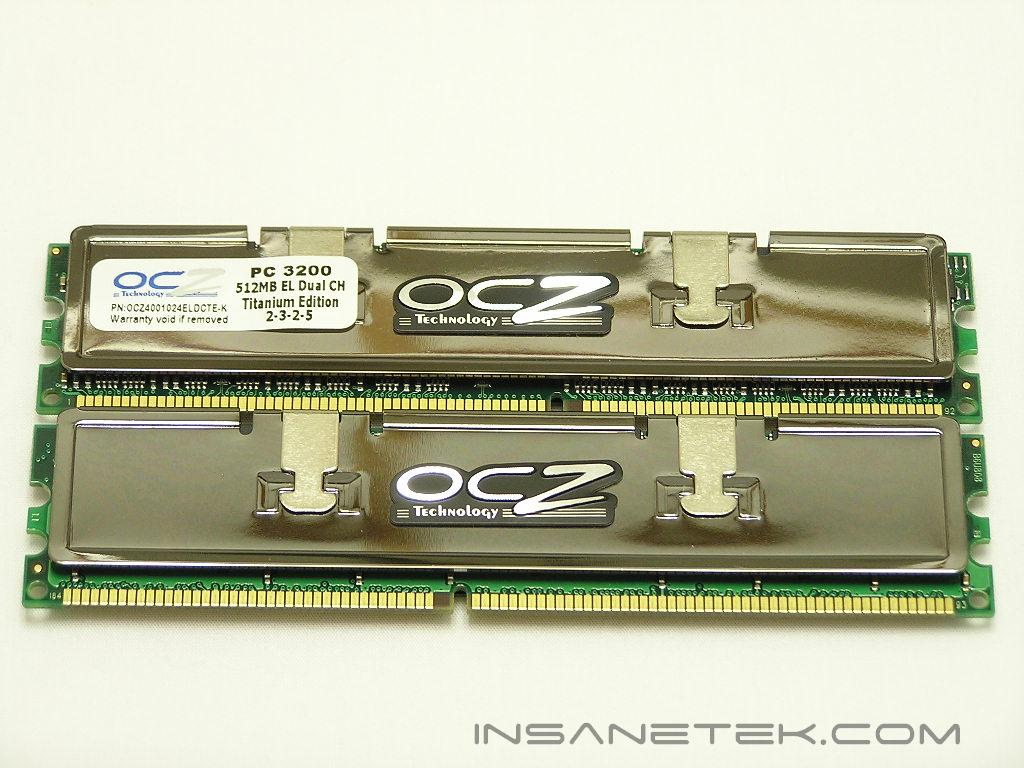
The Titanium utilizes the Brainpower 808 PCB and Infineon memory IC’s. The use of the Brainpower PCB is great, but typically only for overclocking. At stock speeds, the Brainpower PCB produces the lowest performance out of all the PCB’s I’ve ever tested. The difference is very minimal, though, and nothing to worry about. One great thing about the Titanium is that it comes rated with low latencies. Typical server memory usually comes rated at 3-3-3 and follows JEDEC standards. The Titanium comes rated at 2-3-2-5 with a voltage of 2.6v and is ready to provide great performance. One odd thing I noticed is that the Titanium doesn’t have ECC. It’s true that many servers don’t even use ECC memory, but having ECC is just another reassurance of memory reliability and stability.
If you haven’t noticed already, I continue to praise OCZ’s warranty service. There is a reason behind that. In addition to the lifetime warranty, OCZ provides the Lifetime PowerSwap. If for some reason the memory fails, OCZ will send you the replacements BEFORE you send back your faulty kit. What other memory company does that? You still have to wait a couple of days for the replacements to arrive, but that cross-shipping cuts waiting time in half. This helps ensure your system down time is minimal. Another great thing about the warranty service is the voltage. OCZ allows enthusiasts to run up to 3.0v without invalidating any of their warranties. Purely awesome!
Test System and Overclocking
Test System:
- AMD Athlon 64 3000+ Venice
- DFI LANParty UT nF4 Ultra-D
- 2 x 512MB OCZ Titanium PC3200
- MSI Geforce 6600GT
- Arctic Cooling Freezer 64
- Thermaltake PurePower 680W
Overclocking and Stability:
Keep in mind that during overclocking, the latencies are as follows: CAS-TRCD-TRP-TRAS
I began my usual tests with no expectations; Infineon IC’s are not known to be extreme overclockers. I first tested for the lowest latencies possible, which is 2-2-2-5. I was pleasantly surprised when it booted and passed about 15 tests of Test 5 in Memtest. Unfortunately, Windows failed to load. I increased the voltage to 3.0v, then 3.2v, but either voltage failed to improve the situation. This test proved two things; Memtest is not always 100% accurate and increased voltages do not always mean better overclocking headroom. All stability tests we conduct will require regular Memtest to be 100% error free, bootable and stable in Windows operations, Windows Memtest error free, and Super PI 32M passable. Super PI 1M is a joke when it comes to memory stability. Don’t tell me all those world records you see are fully stable systems. I’ve digressed enough; back to the overclocking process.
Because critical systems are built with reliability and stability in mind, the motherboards used won’t offer stunning overclocking options and extra voltages. Enthusiasts are so accustomed to seeing DDR memory come rated with 2.8v that they forget the JEDEC standard voltage is 2.5v. This means that there are tons of motherboards out there that won’t supply any increased options. Just to make sure, I ran the Titanium at 2.5v and it passed a week of Memtest testing. This is not just a single test, but a complete test, 24 hours a day, 7 days a week. Servers are meant to operate 24/7, so I tried duplicated that. I then continued stability tests in Windows for days on end. However, I forgot to take a picture of the number of loops it passed! Stupid me. I increased voltage back to 2.8v, the usual limit of most desktop motherboards, and reached a ceiling of 215MHZ. This is with the latencies still at 2-3-2-5 and a command rate of 1T. I further increased the voltage to 3.0v, again staying within my warranty, and got nowhere. I pushed it more to 3.2v and obtained a stable 220MHZ 2-3-2-5 1T. The funny thing is that the memory didn’t allow any better yields with looser timings; I achieved the same results as I did with tighter timings. Remember that if you push past 3.0v, you will invalidate OCZ’s warranty.
Overclocking Results:
- 200HTT 2.0-3-2-5 1T 2.5v
- 215HTT 2.0-3-2-5 1T 2.8v
- 220HTT 2.0-3-2-5 1T 3.2v
Results
A series of memory intensive benchmarks will be run to test the performance of our sample. The other tests will be based on common benchmark programs, such as 3DMark and PCMark. Real life performance differences will be tested through current games, such as Far Cry and UT2004. Memory bandwidth benchmarks will be based off of SiSoft Sandra and Everest Home Edition. Super PI and PiFast will also be used to test memory performance, as the benchmark benefits largely from FSB increases.
Throughout all tests, the CPU multiplier has been kept at 9x.
SiSoft Sandra Memory Bandwidth
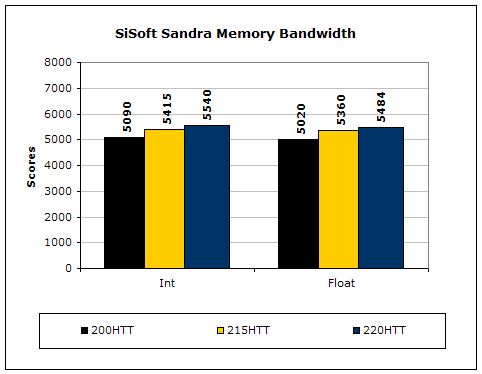
SiSoft Sandra is the most widely used memory bandwidth test. It can tell you the increase in performance from just lowering the latency timings.
Everest Home Edition
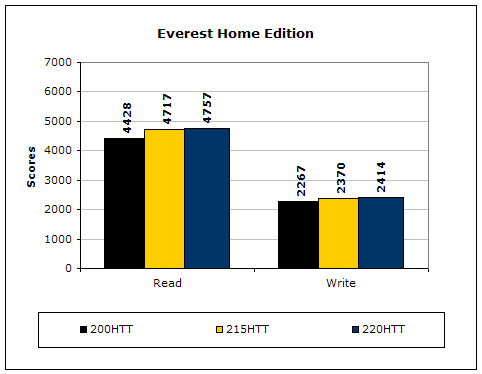
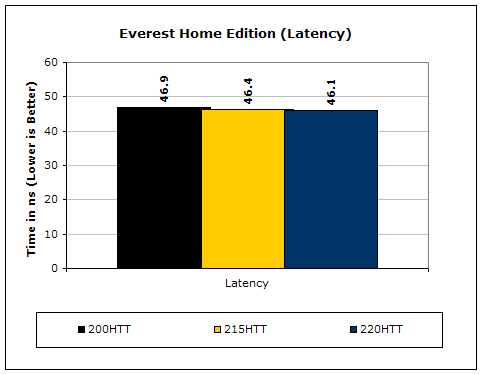
Much like Sandra, Everest Home Edition tests the memory’s ability to read and write data in large chunks. The results show that the lower latencies seem to help just a little with performance.
3DMark2001SE
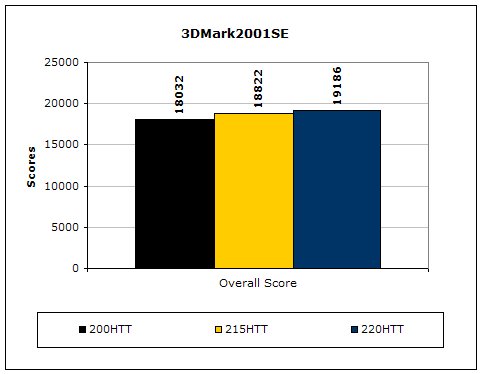
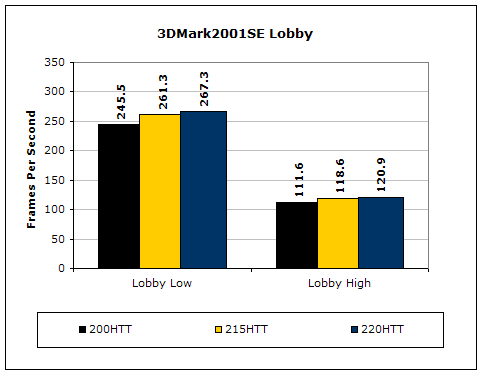
3DMark is probably the overclocker’s favorite benchmark. Unlike 3DMark2003, which stresses mainly the video card, 3DMark2001SE tests all of the system’s main components. Increasing the CPU speed, memory speed, and video card speeds will result in higher results in the final score.
Results Continued
Far Cry
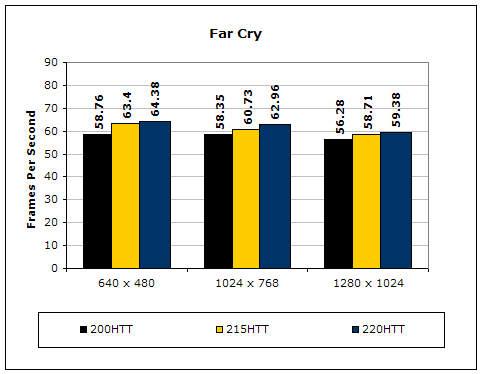
Since Far Cry is a game, the performance results will be very similar to 3dMark2001. I ran the benchmark at 640x480, so the benchmark would not be too GPU dependent. The tests under 1024x768 and 1280x1024 are an approximation of what kind of frames you’ll be getting. While the results are similar to 3dMark2001 in performance, this benchmark will give more significant results, because Far Cry is extremely demanding.
Unreal Tournament 2004
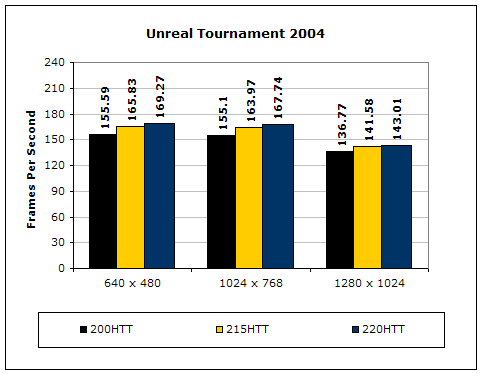
Unreal Tournament is another popular game engine to test overall system performance. Here, we can see the same results as Far Cry and 3dMark2001. Like Far Cry, UT2004 was also run at 640x480 to limit GPU dependency. The other resolutions provide an approximation of actual gameplay performance.
PCMark2002
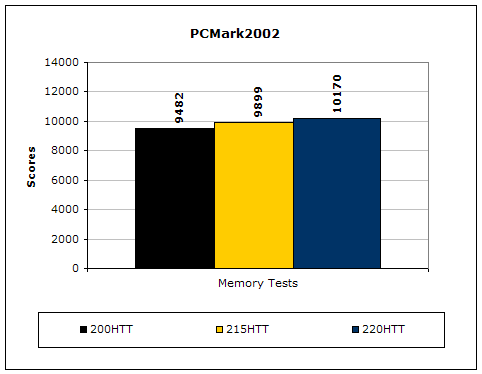
PCMark is another benchmark created by Futuremark. It tests the memory compression and decompression speeds in small to large chunks of data.
Super PI
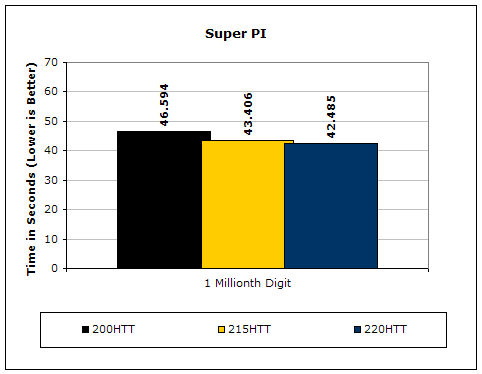
Since the value of PI is an infinite value, Super PI is a speed test to find the digit you’re looking for. In this case, we chose the millionth digit. Super PI benefits greatly from higher FSB, as well as low latencies.
PiFast
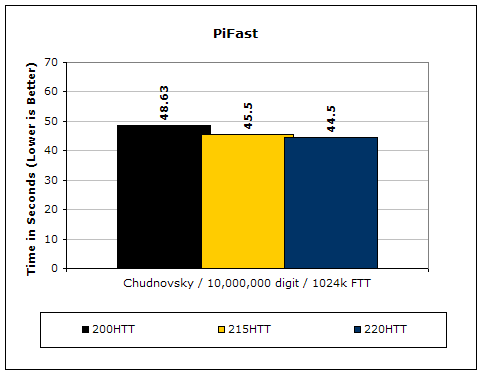
PiFast is similar to Super PI. The results can be greatly affected by a slight adjustment to the memory megahertz and latency.
Conclusion and Thoughts
For once, OCZ’s memory didn’t impress me in the overclocking department. Of course the Titanium is not going to be judged on overclocking results. Overclockers are not the target audience OCZ is after and overclocking is certainly not the marketing strategy they’re pushing. What the Titanium focuses on is entirely different from what OCZ is famous for. For the first time, OCZ has released memory that is built with reliability and stability in mind. The memory is made with quality IC’s from Infineon, rather than cheap, bottom-of-the-barrel, untested Winbond chips. The more I learn about memory, the more I understand why the majority of true memory engineers stay away from overclocking. They like to focus on high quality chips, even if they don’t provide any overclocking potential. Overclockers, on the other hand, love Winbond UTT for the excellent overclocking potential. What they don’t know is that these chips are low in quality. That’s be another story and another argument for another day.
While the Titanium is great and fulfills what many hardware enthusiasts would want in reliable memory, it does fall short in some areas. The first is the use of the PCB. The Brainpower 808 is not the best PCB for memory performance. With memory like the Titanium, overclocking won’t be necessary and a better PCB should be used. Yet, the tighter latencies seem to make up for the performance loss. The only other area where I was a tad disappointed was the lack of ECC support. Many servers run memory without ECC support, but ECC is still good to have. OCZ already has the best warranty service through their PowerSwap. Adding ECC to the Titanium will complete the basket of memory quality and reassurance. Overall, the Titanium isn’t bad. OCZ knows memory and they’re on the right track. The question now is, ‘what do I do with my kit?’ I guess my talk of starting a Counter-Strike: Source server is one step closer to being fulfilled.
Pros:
- Beautiful Titanium finish copper heatspreaders
- Best warranty service with PowerSwap
- Use of high quality memory IC’s
- Perfectly stable at 2.5v and rated speeds
Cons:
- Use of Brainpower PCB doesn’t provide best performance at stock speeds
- No ECC support
- Availability?

We would like to thank OCZ for providing us the sample. If you have any questions or comments, feel free to hit us up in the forums. You can also check out more of our latest reviews on the front page.