

Kingston HyperX PC2-6000 1GB Dual Channel Kit
Introduction
Kingston’s HyperX line has been fairly quiet in the past months. Personally, I find it quite strange how the memory giant can sleep so soundly when TCCD and DDR2 are reaching extraordinary speeds. I used to be a big fan of their Winbond BH5 based HyperX PC3200 memory, until it was discontinued. Our last few looks at Kingston’s HyperX included their low latency PC3200 TCCD, high speed PC4300 Hynix, and high speed DDR2 PC2-5400.
A couple of months ago, before the release of the Intel 955X chipset, Kingston was the first to announce intensely high speed DDR2 beyond the PC2-5400 standard. While it was extremely amazing to see DDR2 reach speeds of 400MHZ+, or DDR2-800, Kingston reached a dilemma. They weren’t sure if such a release would be beneficial, considering the best chipset to handle DDR2 at that time was the 925XE chipset. The chipset was certainly capable of reaching 300FSB+, and with the 3:4 divider, memory running at 400MHZ was definitely achievable. Unfortunately, Intel’s locked multipliers prevented the motherboard chipset from reaching its full potential; overclocking the CPU would bottleneck the motherboard due to extreme heat issues. This meant that a FSB of 270 could only be reached. With the highest memory divider of 3:4, reaching DDR2-800 wouldn’t be possible for everyone. Now you see why Kingston was a bit hesitant to release high speed DDR2; The market just isn’t there. Why would you buy such high speed memory if you can’t use it for that purpose?
Kingston finally decided to release their high speed DDR2 at a lower speed rating of PC2-6000, instead of PC2-6400. They did mention that they were able to reach DDR2-866, which means a memory frequency of 433MHZ. Their release was a few months back. While it was quite exciting news, not many people jumped the gun to give it a try. Even memory reviews were scarce. I was a little hesitant to ask a sample, mainly because I didn’t want to provide bottlenecked results. Now that I’m equipped with the proper hardware for testing, we’ll be able to see just what Kingston’s new HyperX PC2-6000 is capable of.
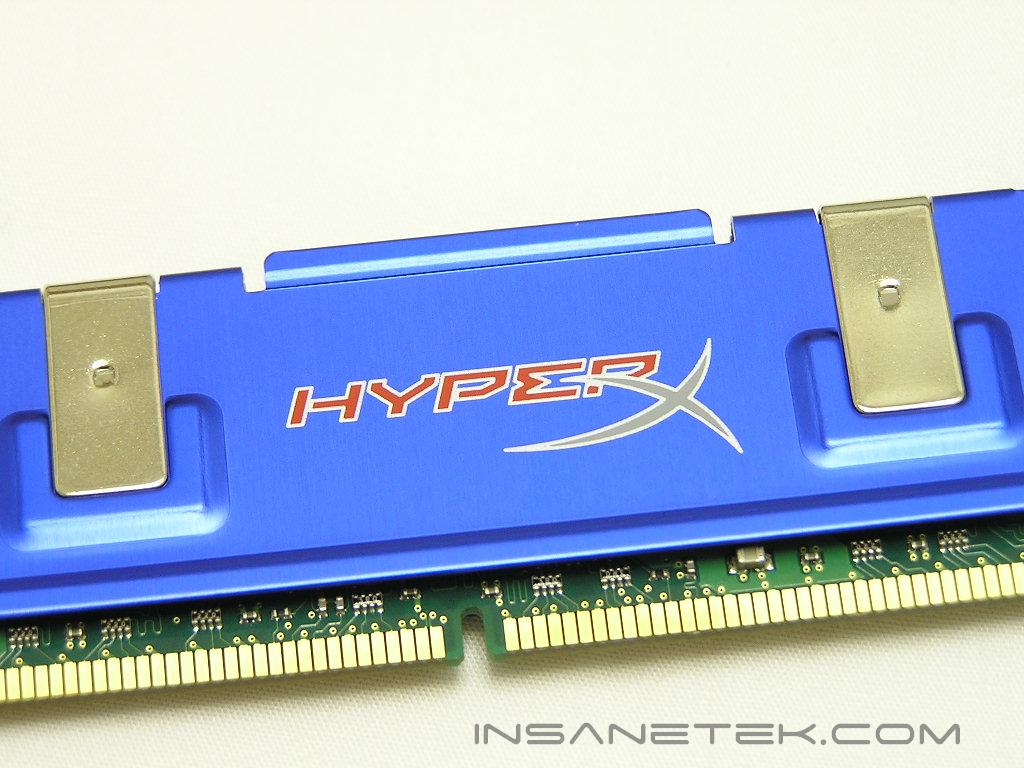
Kingston HyperX PC2-6000
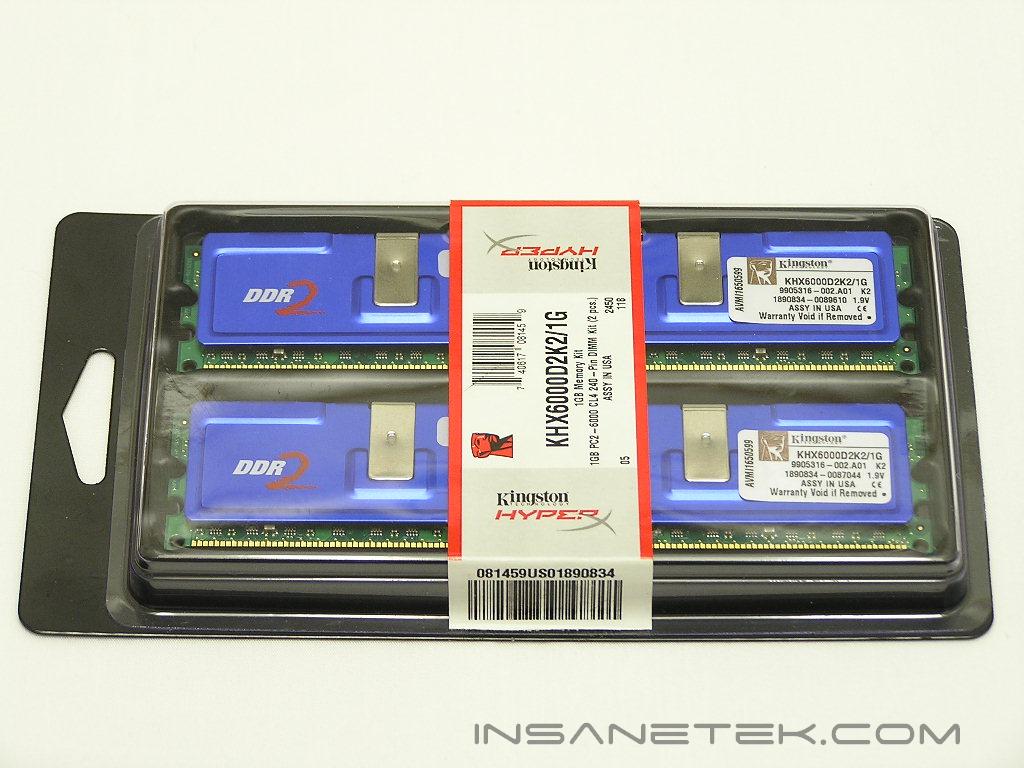
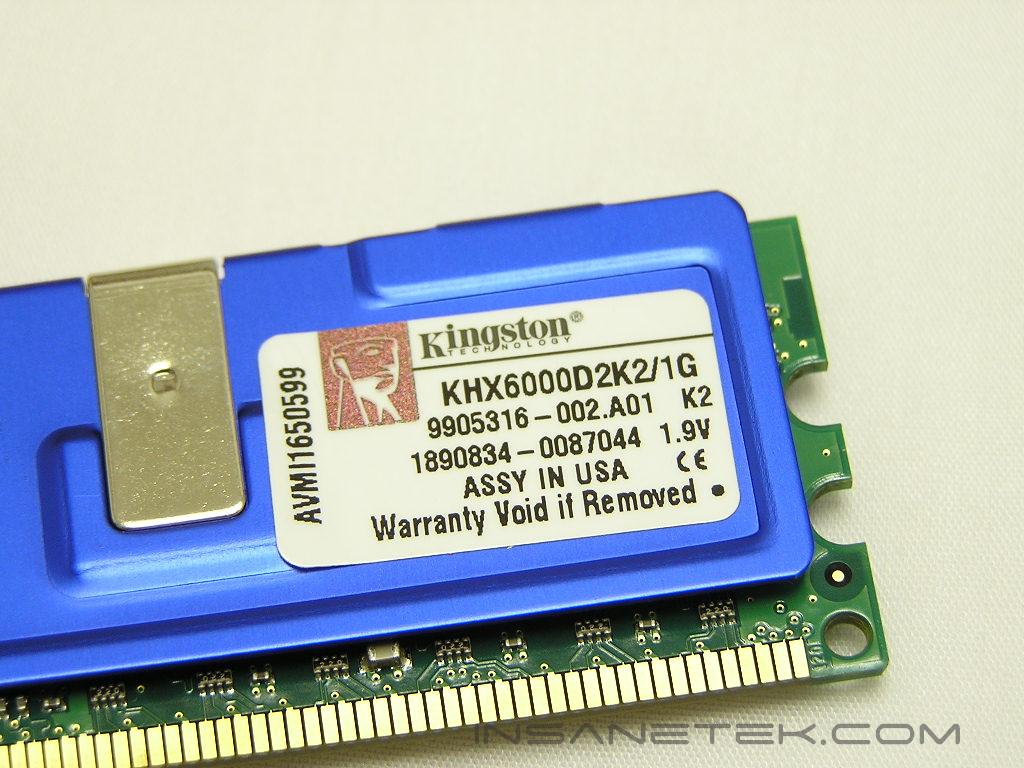
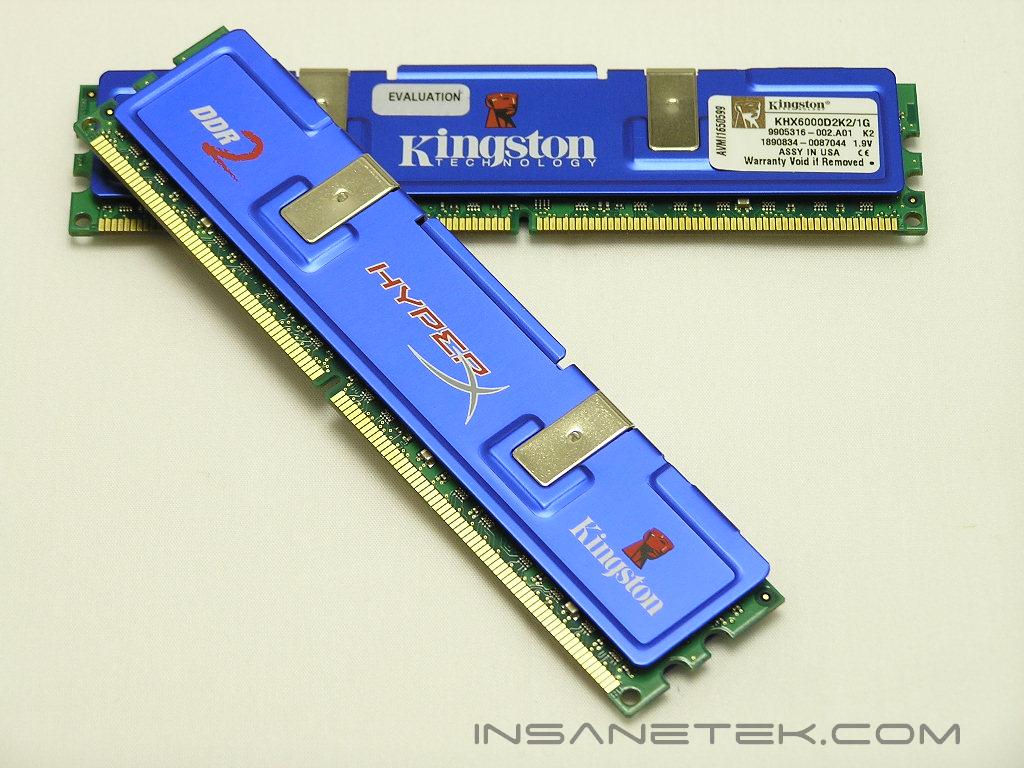
Kingston’s HyperX memory are enclosed in a black hip tray with a clear cover. It’s a very simple, yet effective, design. The HyperX memory continues the use of blue aluminum heatspreaders. There are a couple of additional designs added to the DDR2 line, like a better looking HyperX logo and a Kingston logo on both sides of the heatspreaders.
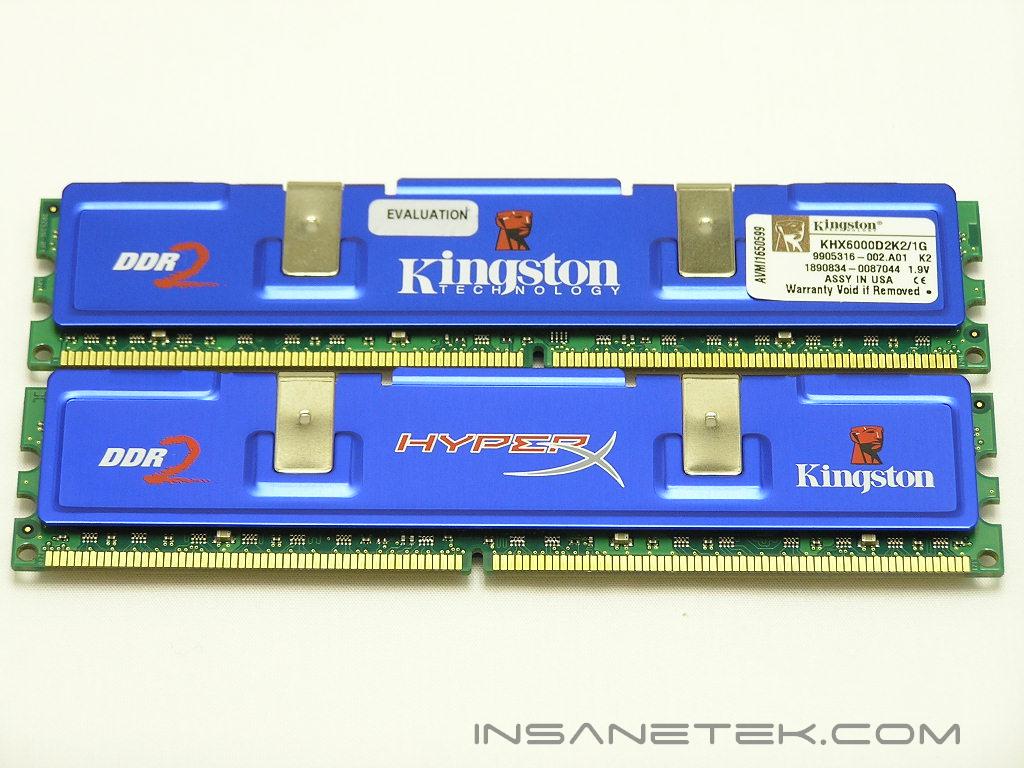
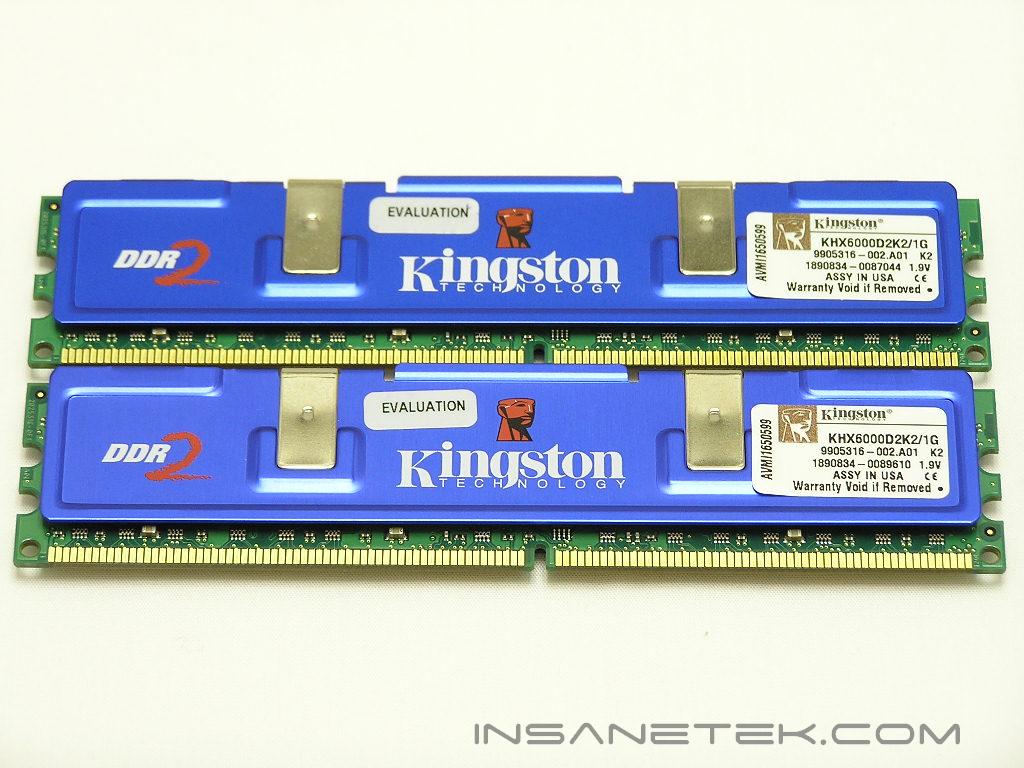
The HyperX PC2-6000 is double-sided and powered by Infineon DDR2 memory IC’s. Currently, there is only one DDR2 IC that is capable of low latency operations; Micron’s 90-ball D9 revision A series memory chips. The new revision B D9 use a new die and don’t seem to like low latencies all that much. The Infineon chips used in the PC2-6000 seem to do pretty well, in terms of overclocking and stability. Kingston rates the PC2-6000 at DDR2-750, with timings of 4-4-4-12 and a low voltage of just 1.9v.
Test System and Overclocking
Test System:
- Intel 560 3.6GHZ
- Asus P5WD2 Premium
- 2 x 512MB Kingston HyperX PC2-6000
- Sapphire Radeon X800
- Arctic Freezer 7
- Thermaltake PurePower 680W
Overclocking:
Keep in mind that during overclocking, the latencies are as follows: CAS-TRCD-TRP-TRAS
Throughout all tests, the multiplier has been kept at 14x to reduce any possible CPU bottleneck.
Because the P5WD2 motherboard provides a good amount of memory dividers, I began the initial tests with a low 200FSB. The first test was to see the lowest latencies that the memory would allow. Since Intel LGA775 systems automatically runs the memory at a 3:4 divider to reach a 266MHZ memory frequency, that’s where I began my first test. The lowest latencies the memory would allow at 266MHZ was 3-3-3-8. TRAS would actually go lower, but it’s kept a little higher for stability purposes. From my own testing for other memory reviews, I’ve found that TRAS doesn’t affect memory performance as much as the other three latencies. I personally keep it a bit higher to maintain memory overclocking stability. The typical equation for setting TRAS is CAS + TRCD + 2 = TRAS. Next, I increased the memory divider up to 3:5 and reached a memory frequency of 333MHZ, or DDR2-667. This is still with FSB at 200. Surprisingly, the memory still ran fine at 3-3-3-8 and 1.9v. Results weren’t too shabby. The next jump was to the 1:2 divider. With a 200FSB, the 1:2 divider pushes the memory to run a stunning 400MHZ, or DDR2-800. In order to run the memory at that speed, I had to loosen the timings to 4-4-4-10, but still kept a low voltage of 1.9v. This is great, considering that the majority of PC2-6400 memory available require loose timings of 5-5-5. The next stop was to push the limits. I kept the 1:2 divider and started pushing the FSB in order to further increase memory speeds. My journey ended at 215FSB. With the memory divider at 1:2, the 215FSB ran the memory at 860MHZ. Timings were still kept at 4-4-4-10 and the voltage still at 1.9v. I was already at the limits. Increasing voltages did absolutely nothing for increased headroom. Loosening the timings only lowered system performance.
Overclocking Results:
- 200FSB 3:4 266MHZ 3-3-3-8 1.9v
- 200FSB 3:5 333MHZ 3-3-3-8 1.9v
- 200FSB 1:2 400MHZ 4-4-4-10 1.9v
- 215FSB 1:2 430MHZ 4-4-4-10 1.9v
Results
A series of memory intensive benchmarks will be run to test the performance of our sample. The other tests will be based on common benchmark programs, such as 3DMark and PCMark. Real life performance differences will be tested through current games, such as Far Cry and UT2004. Memory bandwidth benchmarks will be based off of SiSoft Sandra and Everest Home Edition. Super PI and PiFast will also be used to test memory performance, as the benchmark benefits largely from FSB increases.
SiSoft Sandra Memory Bandwidth
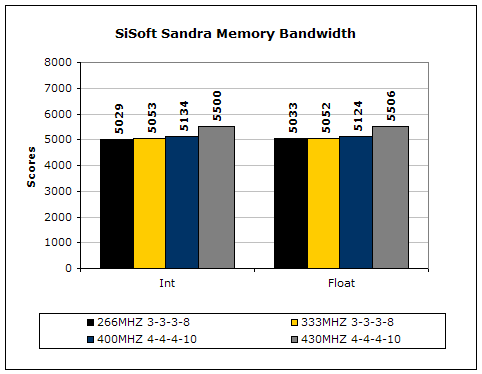
SiSoft Sandra is the most widely used memory bandwidth test. It can tell you the increase in performance from just lowering the latency timings.
Everest Home Edition
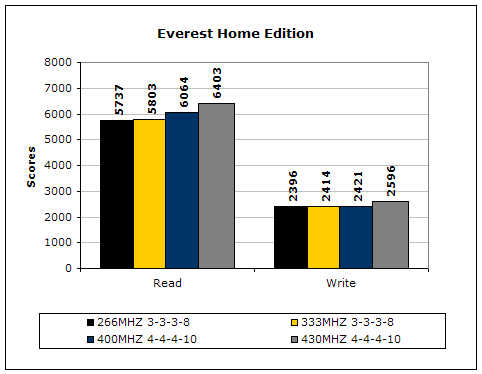
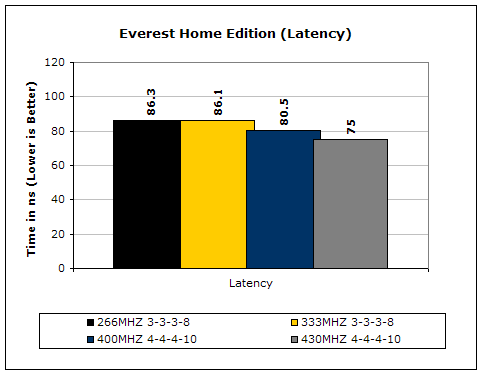
Much like Sandra, Everest Home Edition tests the memory’s ability to read and write data in large chunks. The results show that the lower latencies seem to help just a little with performance.
3DMark2001SE
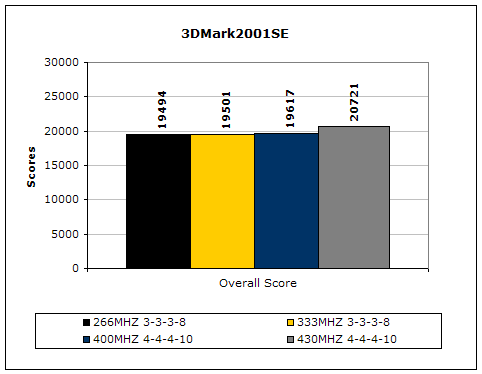
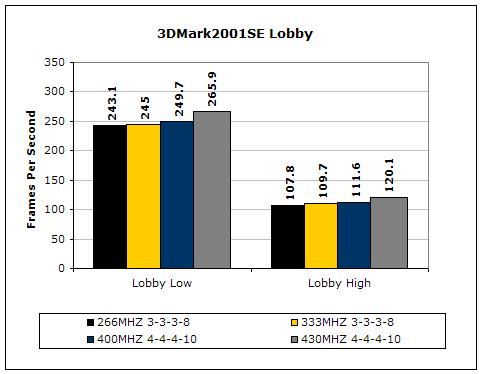
3DMark is likely the overclocker’s favorite benchmark. Unlike 3DMark2003, which stresses mainly the video card, 3DMark2001SE tests all of the system’s main components. Increasing the CPU speed, memory speed, and video card speeds will result in higher results in the final score.
Results Continued
Far Cry
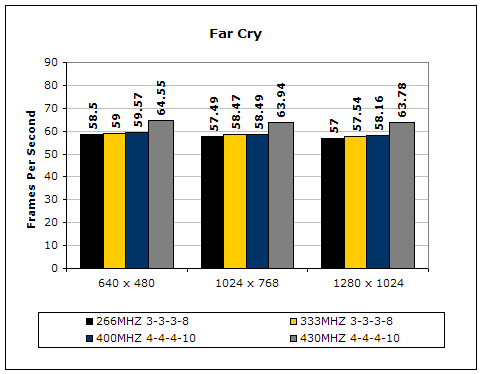
Since Far Cry is a game, the performance results will be very similar to 3dMark2001. I ran the benchmark at 640x480, so the benchmark would not be too GPU dependent. The tests under 1024x768 and 1280x1024 are an approximation of what kind of frames you’ll be getting. While the results are similar to 3dMark2001 in performance, this benchmark will give more significant results, because Far Cry is extremely demanding.
Unreal Tournament 2004
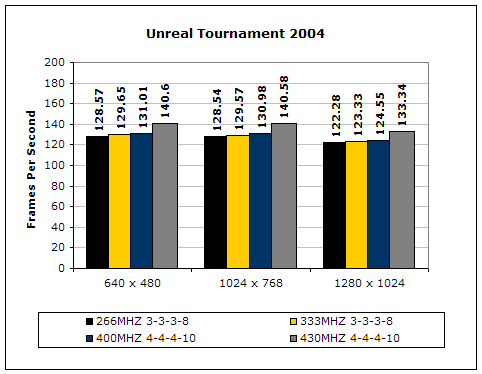
Unreal Tournament is another popular game engine to test overall system performance. Here, we can see the same results as Far Cry and 3dMark2001. Like Far Cry, UT2004 was also run at 640x480 to limit GPU dependency. The other resolutions provide an approximation of actual gameplay performance.
PCMark2002
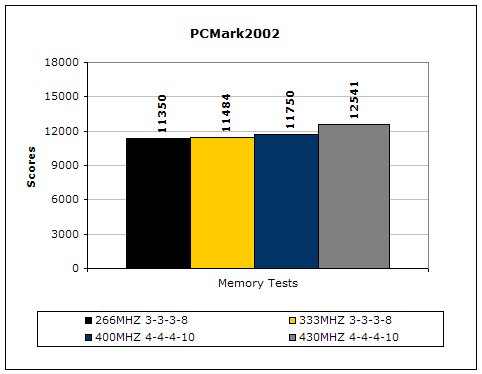
PCMark is another benchmark created by Futuremark. It tests the memory compression and decompression speeds in small to large chunks of data.
Super PI
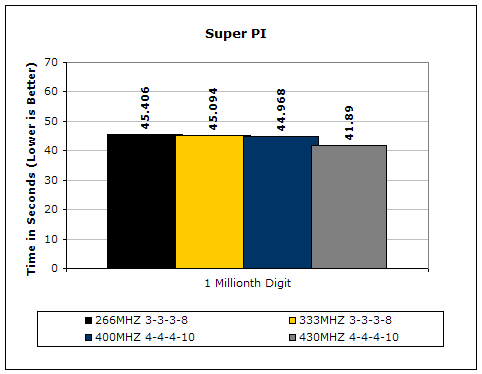
Since the value of PI is an infinite value, Super PI is a speed test to find the digit you’re looking for. In this case, we chose the millionth digit. Super PI benefits greatly from higher FSB, as well as low latencies.
PiFast
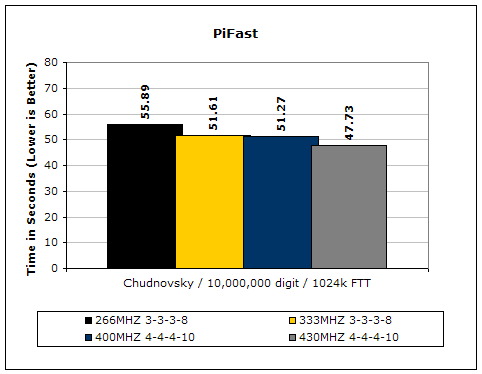
PiFast is similar to Super PI. The results can be greatly affected by a slight adjustment to the memory megahertz and latency.
As you can see from the results, maintaining the FSB at 200 and using a higher memory divider to run a higher memory frequency doesn’t provide a huge boost in performance. The performance increase is slight, so there must be something that’s bottlenecking the memory performance. The answer to that is the speed of the FSB. When FSB was upped just a tad, the performance increased quite a bit.
Conclusion and Thoughts
Kingston’s HyperX PC2-6000 is good DDR2 memory. It would have been the best memory available a couple months back if Kingston really pushed for it. The memory is still a great performer and overclocker, especially with the timings and the required voltages. Although there is PC2-6400 memory available that can probably run voltages lower than 2.0v, I’ve yet to see one that’s officially rated at 1.9v with timings of 4-4-4-10. Overclockers will probably not care about voltage ratings, since they’ll most likely pump it as much as possible, but there are consumers out there who like to push the system without voiding the warranty. Personally, I’ve enjoyed my experiences with the HyperX PC2-6000. It was very simple to overclock; once it hit the ceiling, it just stopped posting. I didn’t have to go through the usual testing of slight errors. Throughout the entire testing process, I was so satisfied with the results that I wanted to recommend it to everyone who’s building an LGA775 system. Unfortunately, I looked at the prices around and stared in awe. The price is definitely too high, considering that DRAM prices are dropping and there are cheaper alternatives available. It would make my recommendation hard to justify. If the price dropped to a reasonable $200, then all my praise would go to Kingston for having such great quality gaming memory that overclocks well at low latencies and low voltages.
Pros:
- Low voltage rating
- Overclocks very well with low voltage and at low latencies
- Pretty blue heatspreaders
Cons:
- Not available everywhere
- Very expensive!!!

We would like to thank Kingston for providing us the sample. If you have any questions or comments, feel free to hit us up in the forums. You can also check out more of our latest reviews on the front page.