

Kingston HyperX PC2-5400 1GB Dual Channel Kit
Introduction
When DDR2 was first announced, everyone was skeptical about its performance. It was capable of scaling to extremely high frequencies, but it also brought along high latencies that enthusiasts dread. So what’s good about using DDR2, other than the higher frequencies? The new TCCD memory is known to be able to scale above 270MHZ with reasonable timings. Do we really need to go beyond 300MHZ and be lagged by high latencies? Fortunately and theoretically, DDR2 is supposed to carry twice as much data per cycle than regular DDR. Hence in lamen’s terms, DDR2 that carries twice the load with latencies of 4-4-4-12 should equal to the performance of DDR that carries a single load at 2-2-2-6 latencies. Unfortunately this is not the case.
The initial release of DDR2 was marked with high latencies, usually in the CAS 5 area. Corsair was the first to announce the “ultra low” latencies of high frequency DDR2 with their release of the XMS2-5400C4PRO. The timings were rated at 4-4-4-12, which is not all that low. However for DDR2, it’s considered to be pretty good. Kingston quickly joined the games and produced the new HyperX2 line of memory. These modules had even lower latencies, running at 4-4-4-10. Although it’s not much lower, it is still lower.
Kingston HyperX PC2-5400
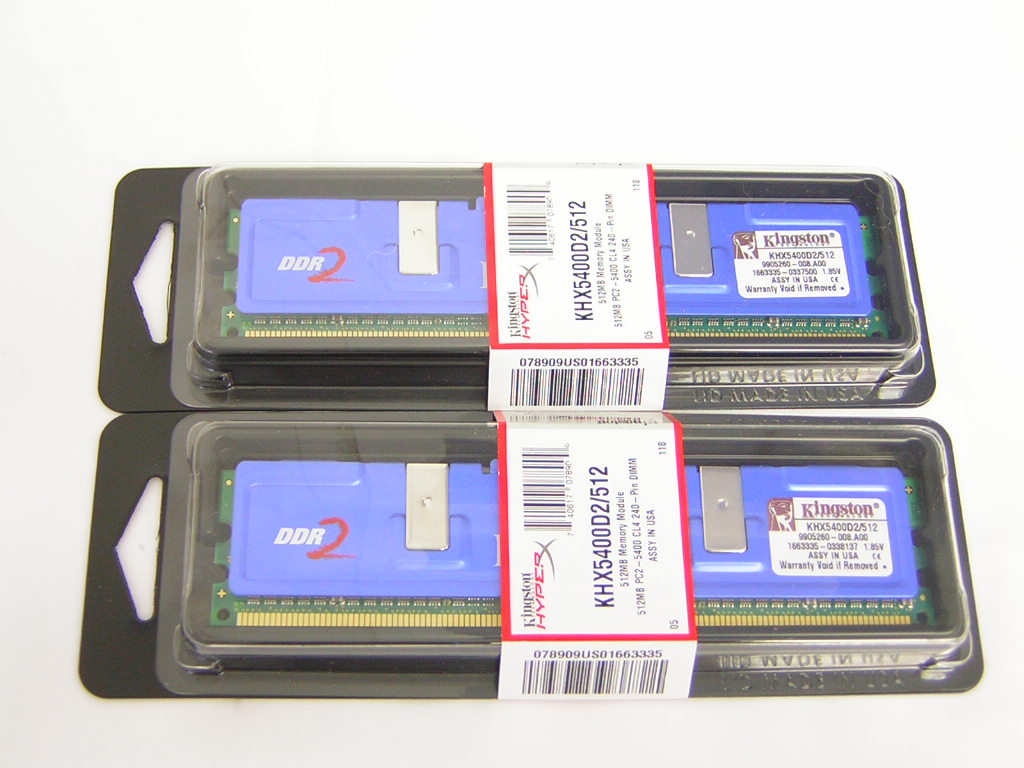
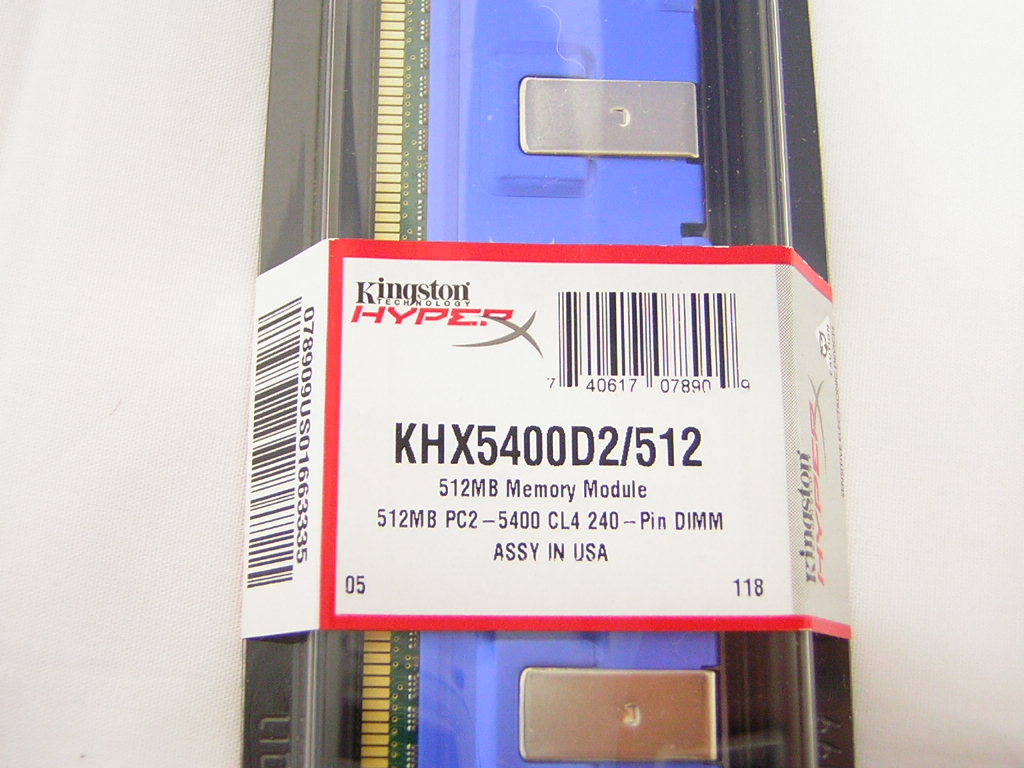
The Kingston HyperX PC2-5400 memory comes rated to run 675MHZ with 4-4-4-10 latencies. The modules are SPD programmed to detect as 4-4-4-12 but can easily run 4-4-4-10 without a problem. You’ll have to manually change the timings to run the rated speed. I guess this is a kind of precaution they take when users have no idea with what they’re doing. Altering the latencies is up to the more savvy computer enthusiasts.
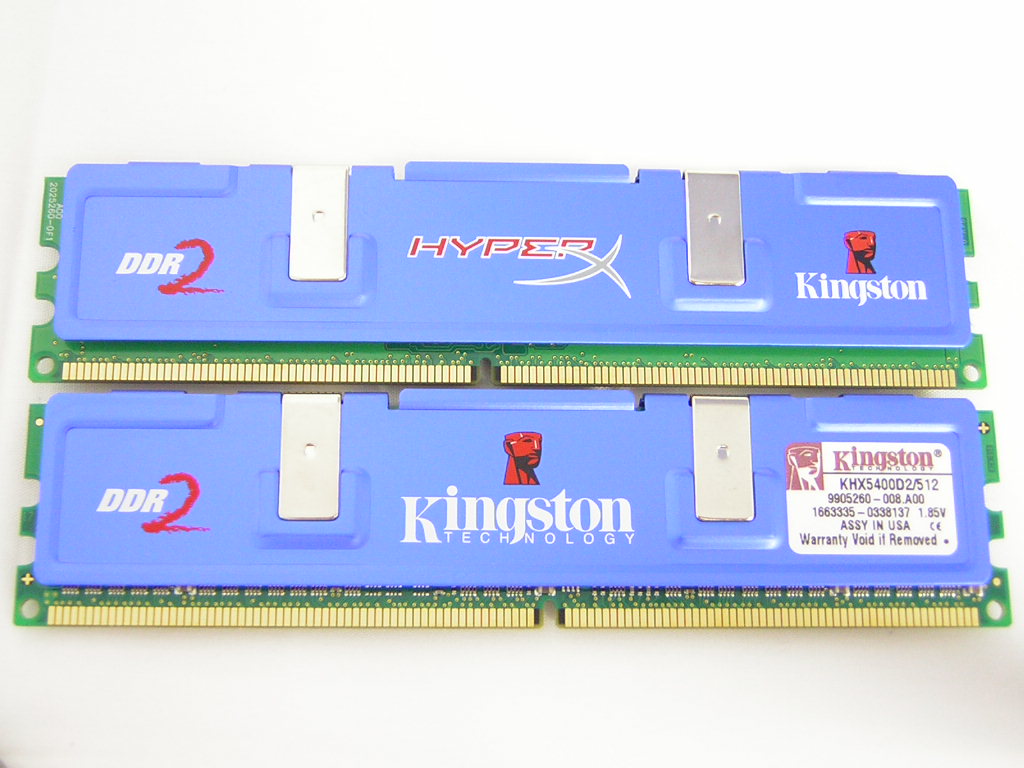
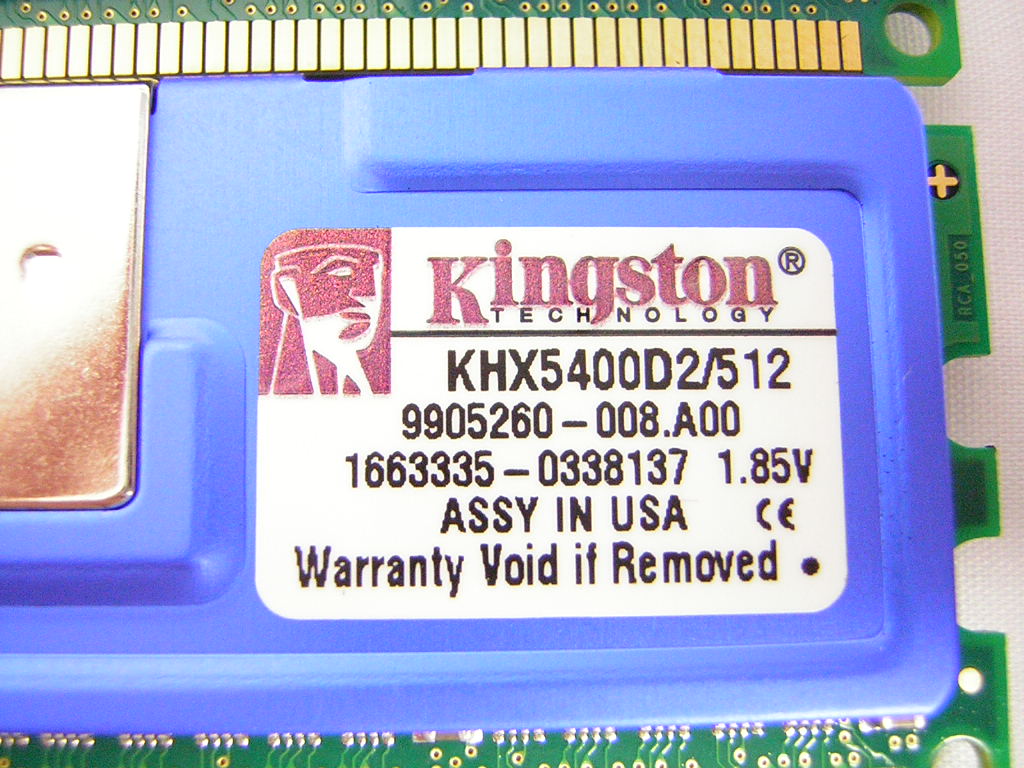
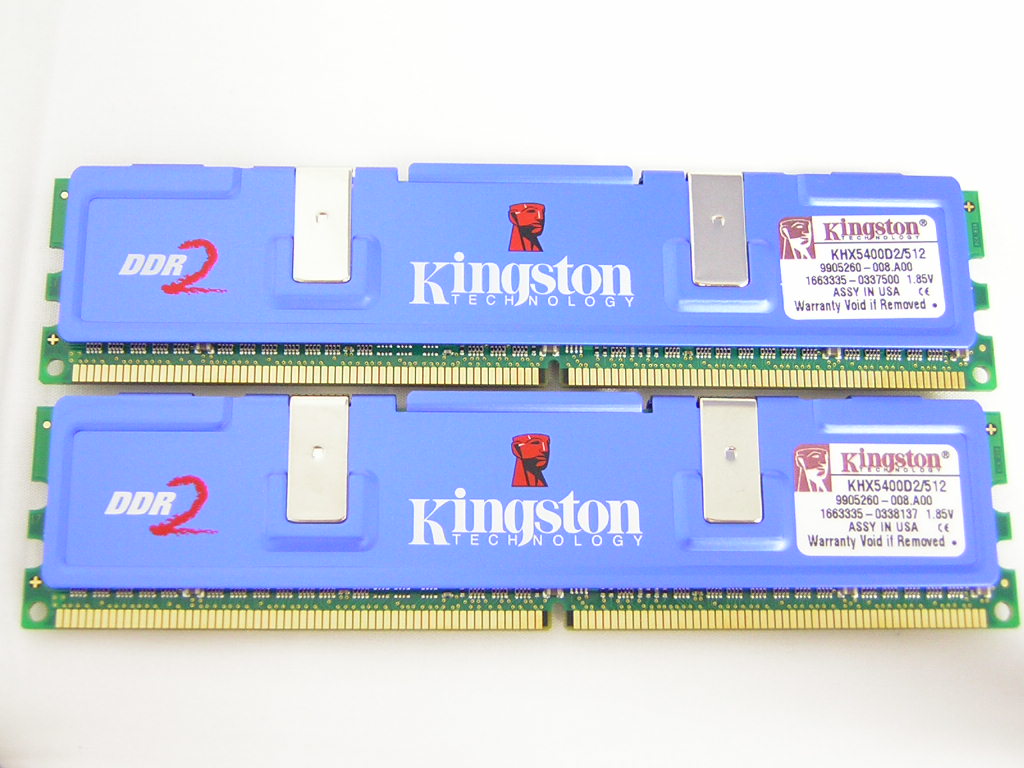
Kingston didn’t actually make up the name HyperX2, they really call it HyperX. I made it up so that it’s easier to distinguish between the HyperX DDR and HyperX DDR2. They name their DDR2 sticks as KHX5400D2, where D2 stands for DDR2, as opposed to the regular KHX3200. Regardless, I’ll be referring to these HyperX DDR2 memory as KHX2. The KHX2 use the same blue aluminum heatspreaders that the KHX use. Heatspreaders are actually not used for cooling purposes but for aesthetics and logos. It’s the eye-catcher to distinguish from other competitors. The KHX2-5400 comes as single sided memory and features the DDR2 BGA memory chips. Just exactly what these chips are, we won’t know for sure. Like Corsair, Kingston is known to use any possible chips that can run the specified speed and timings. While this may be good in that they are able to meet the demands of the consumers, enthusiasts wishing to find a specific memory chip won’t be able to. But from my testing, the chips on these sticks seem to be Elpida. These were also what the Kingston engineers were testing on over the summer. Although the sample I received were two separate sticks of KHX2-5400, these are very well capable of running in dual channel. Dual channel is motherboard dependent and running any two sticks will enable dual channel. Dual channel kits only ensure that the memory will run together, free of compatibility issues.
Test System and Overclocking
Test System:
- Intel Pentium 4 520 2.8GHZ
- Abit AA8-Duramax
- 2 x 512MB Kingston HyperX DDR2 PC2-5400
- ATI Radeon X800XT PCI-E
- Ultra Products 600W
Overclocking:
Keep in mind that during overclocking, the latencies are as follows: CAS-TRCD-TRP-TRAS
Because we have no support from Intel and we’re not made of money, I chose to go with the LGA775 520 2.8GHZ CPU for testing. The CPU offers the lowest multiplier for consumers who don’t have the $1000 to buy the Extreme Edition. Even the 3.6GHZ comes with the lowest multiplier of 14x. With the testbed setup, the overclocking process begins. First, I shot for the lowest latencies possible when running at 200FSB with the DDR533 divider, making the memory run at 266MHZ. There is no point of going even lower to 200MHZ since it’ll render using DDR2 practically useless. The latencies are already high, so high frequencies are needed to balance things out. At 266MHZ, the lowest timings attained were 3-3-2-6. With the lowest timings, I was only able to get another 7MHZ out of the sticks before they started to error. The results are certainly not bad, though. Next stop was to see how low the latencies would run at the specified speed. At 337MHZ, which is the rated DDR675, the latencies went as low as 4-4-3-8. That was pretty much the end point for lower latencies. An increase in 1MHZ resulted in errors during Memtest. I let loose the timings to the specified 4-4-4-10 and the memory just took off. It hit 354MHZ, which is DDR708, without a problem. This is with a 265FSB, resulting in a CPU clock of 3.71GHZ. Unfortunately going beyond 265FSB would cause major instability. I believe that the Abit AA8 motherboard put a ceiling on me. I know this for a fact because I swapped in my 3.6GHZ and manually lowered the multiplier to 14x, the same 265FSB was reached. This is certainly not bad considering that it overclocked easily at stock voltage. There was no need to increase the voltage from the rated 1.8v. Note the memory is rated to run DDR675 4-4-4-10 with 1.8v, the lowest rated voltage compared to competitors. With the memory running at 354MHZ or DDR708, everything ran smooth and fast. This just means that I need to find a better motherboard that’s capable of higher FSB.
Overclocking Results:
- 200FSB 3:4 266MHZ 3-3-2-6 1.8v
- 205FSB 3:4 273MHZ 3-3-2-6 1.8v
- 253FSB 3:4 337MHZ 4-4-3-8 1.8v
- 253FSB 3:4 337MHZ 4-4-4-10 1.8v (specified speed, timings, and voltage)
- 265FSB 3:4 354MHZ 4-4-4-10 1.8v
Results
A series of memory intensive benchmarks will be run to test the performance of our sample. The following tests will be based on common benchmark programs such as 3DMark and PCMark. Real life performance differences will be tested through current games such as Far Cry, UT2003, UT2004, and Halo. Memory bandwidth benchmarks will be based off of SiSoft Sandra and Aida32. Super PI and PiFast will also be used to test memory performance, as the benchmark benefits largely from FSB increases.
SiSoft Sandra
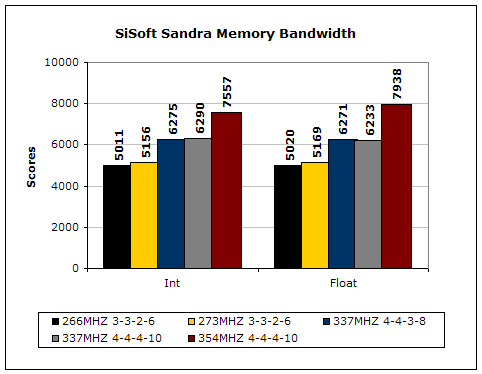
SiSoft Sandra is the most widely used memory bandwidth test. You can see that at the same rated speed, the lower latencies didn’t really help memory bandwidth all that much. SiSoft Sandra seems to favor the higher frequencies when it comes to DDR2 memory.
Aida32
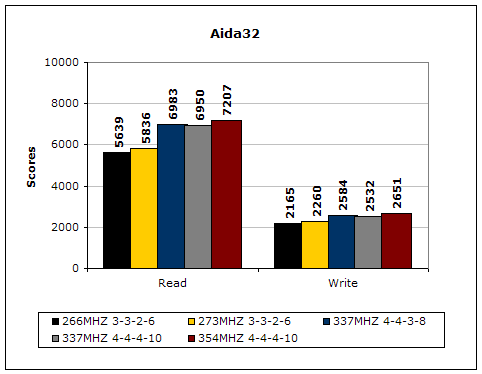
Much like Sandra, Aida32 tests the memory’s ability to read and write data in large chunks. The results show that the lower latencies seem to help just a little with performance.
3DMark2001SE
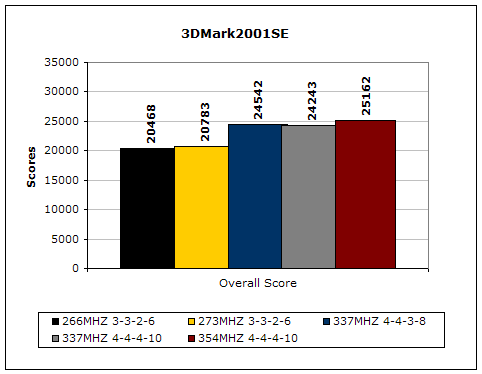
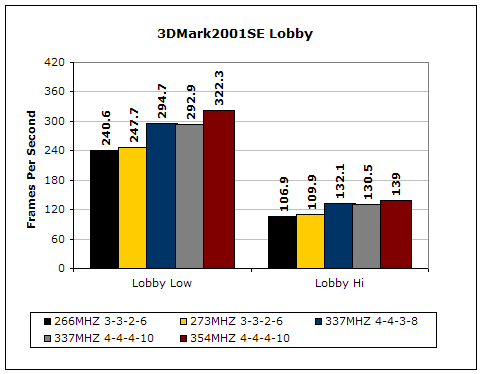
3DMark is probably the overclocker’s favorite benchmark. Unlike 3DMark2003, which stresses mainly the video card, 3DMark2001SE tests all of the system’s main components. Increasing the CPU speed, memory speed, and video card speeds will result in higher results in the final score. The lower latencies definitely helped to squeeze out more points and frames.
PCMark
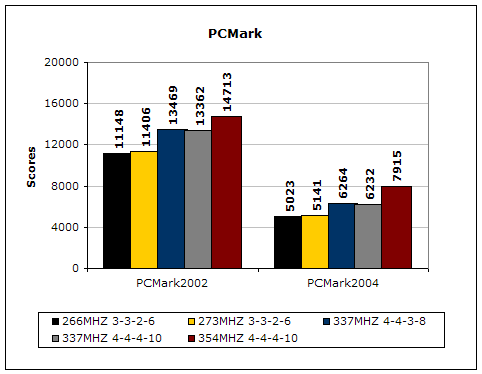
PCMark is another benchmark created by Futuremark. It tests the memory compression and decompression speeds in small to large chunks of data.
Doom 3
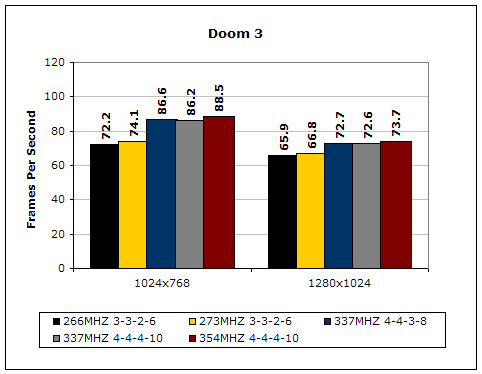
Although Doom 3 is known to be more graphic dependent than system dependent, the game responds positively when latencies are lowered and system bus is increased.
Results Continued
Far Cry
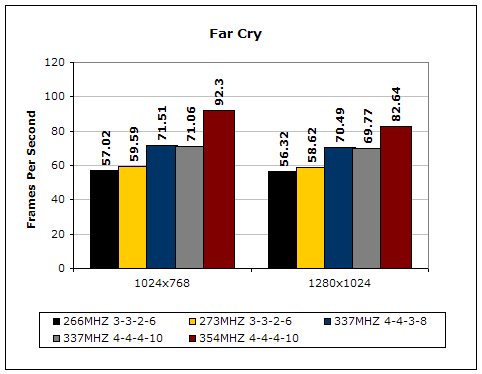
Far Cry is currently one of the most popular games and does a great job of taxing your system.
Unreal Tournament 2004
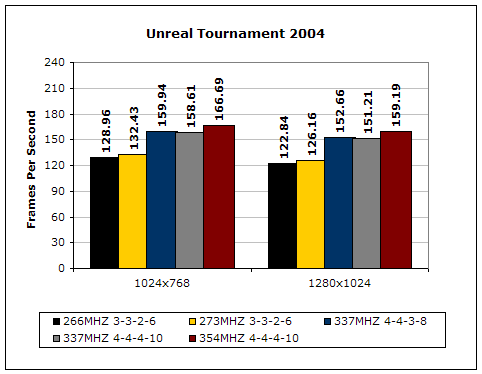
Unreal Tournament 2004 is another popular game that also doubles as a good benchmark. This game really likes memory bandwidth and it shows.
Super PI
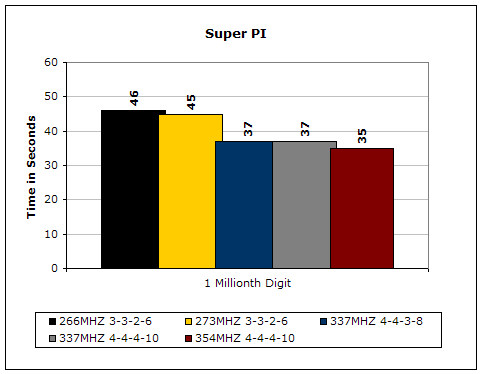
Since the value of PI is an infinite value, Super PI is a speed test to find the digit you’re looking for. In this case, we chose the millionth digit. Super PI benefits greatly from higher FSB as well as low latencies.
PiFast
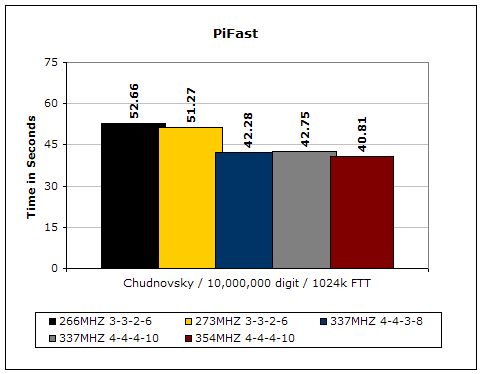
PiFast is similar to Super PI and the results can be greatly affected by a slight adjustment to the memory megahertz and latency.
Conclusion and Thoughts
Although the Kingston HyperX PC2-5400 is the first kit of DDR2 memory we’ve tested here at InsaneTek, I can honestly say that it has been some great memory. The memory offered the lowest latencies at DDR675 and is rated at the lowest voltage possible. The KHX2-5400 overclocked really well and maintained stability throughout all benchmarks and games. Not only that, I didn’t even need to increase voltage for the high overclocks. Due to motherboard limitations, the memory came to a halt at DDR708, which is still impressive nonetheless. Overclocking enthusiasts around will scoff at the performance of DDR2 and will choose not to go this route. If you’re planning on building an Intel LGA775 platform, the Kingston HyperX is a great recommendation. The cost of a dual channel kit is competitively priced against their competitors, especially Corsair, whose XMS2-5400C4PRO is at around $350. DDR2 still has a bit of ways to go before it matures but if you can’t wait and need it during the meantime, the KHX2-5400 is a great choice.
Pros:
- Reasonably priced
- Single-sided memory
- Doesn’t even get warm when overclocked
- Rated at DDR675 4-4-4-10 1.8v
- Attractive blue aluminum heatspreaders
- Great overclocking potential
Cons:
- Nothing really, but what can I say, it’s DDR2.

We would like to thank Kingston for providing us the sample. If you have any questions or comments, feel free to hit us up in the forums. You can also check out more of our latest reviews on the front page.