

Kingmax SuperRAM PC3200 1GB Dual Channel Kit
Introduction
If you’ve never heard of Kingmax, you should be ashamed of yourself. Either you’ve just recently joined the overclocking scene, or you’ve been hiding in a cave. While they haven’t been as popular in the DDR world, back in the SDR days, Kingmax was the king of them all. You see all the small BGA chips on graphic cards and DDR2 memory? Kingmax started using that in their SDRAM. Just how big was Kingmax during the SDRAM era? They were like Corsair is now. Yup, the majority of overclockers preferred Kingmax as the choice for overclocking memory.
Since they had such a great reputation, what happened? No one really knows. I found it strange to see them disappear from the enthusiast crowd after the impact they had. Well, they’re slowly starting to pick up the pace again with new releases. While not getting much press, many enthusiasts have taken a chance and were greeted with pretty good results. Their enthusiast line of memory is called the Hard-core series. Before we’re able to get our hands on their Hard-core stuff, we’ll take a look at their value memory, named SuperRAM.
While we’ve done quite a few memory reviews here at InsaneTek, we’ve never really gone through anything that’s not enthusiast memory. The only exception would be the Gigaram PC3500 we reviewed almost a year ago. Well now that we’re so used to using high end expensive stuff, we certainly can’t forget about the budget users out there who simply look for something that works. Can Kingmax join Corsair, Kingston, OCZ, and Mushkin as a legitimate choice?
Kingmax SuperRAM PC3200
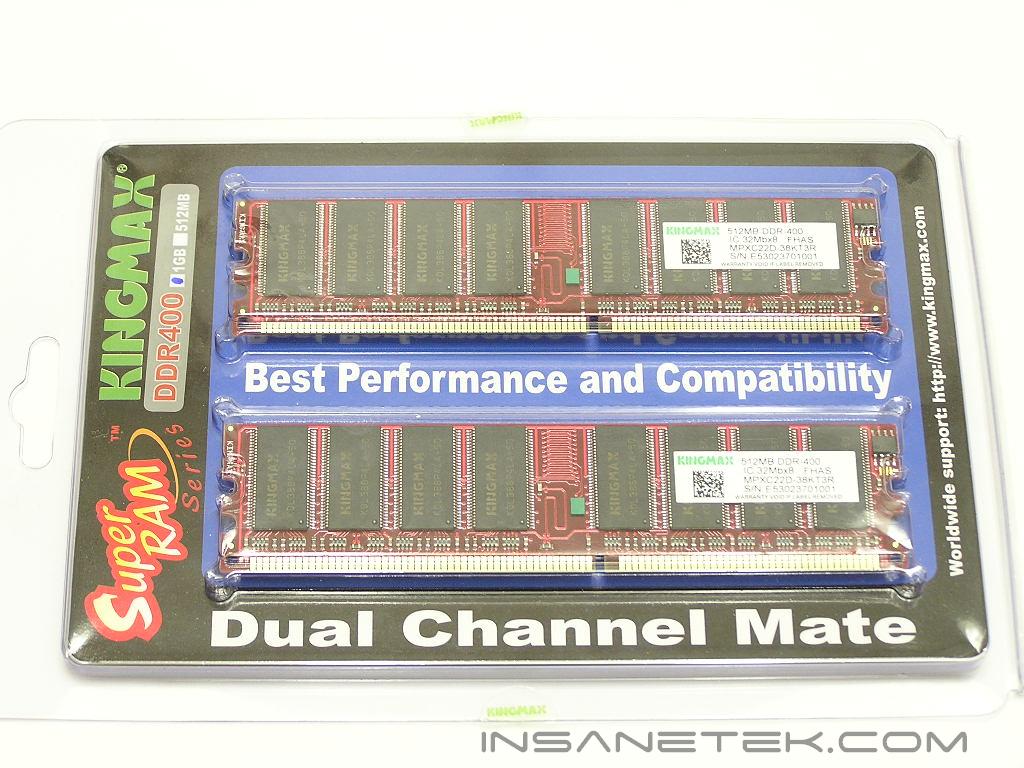
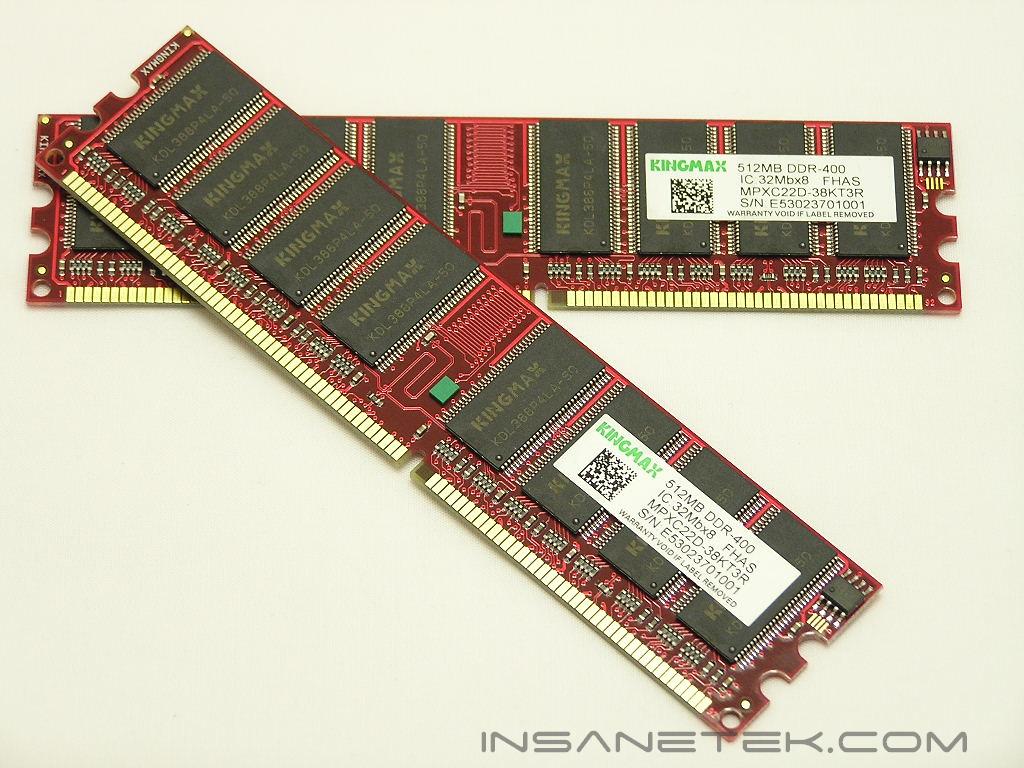
The SuperRAM comes in a plain package like most of the memory available out there. There are no heatspreaders on the memory. Why? The memory doesn’t need it. The heatspreaders just add looks, and because this is considered low end value stuff, why hike up the overall price by including needless heatspreaders? Just because it doesn’t have heatspreaders doesn’t mean it looks bad. The memory strays away from the typical green PCB to a sexy red PCB. It’s eye-catching, isn’t it?
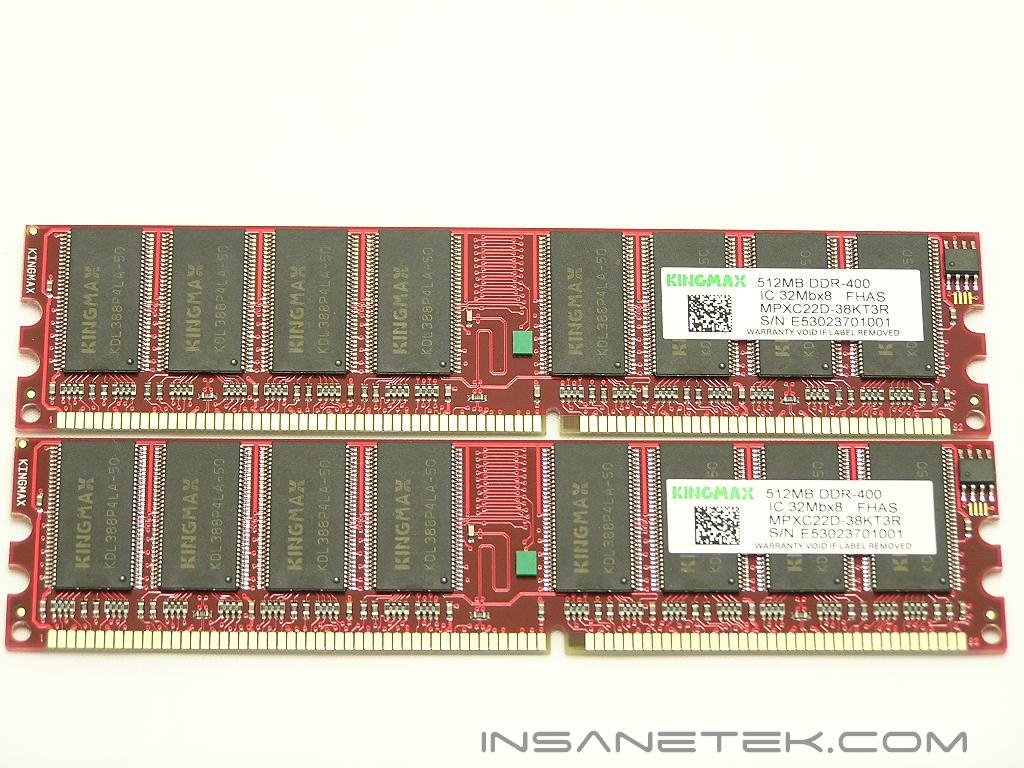
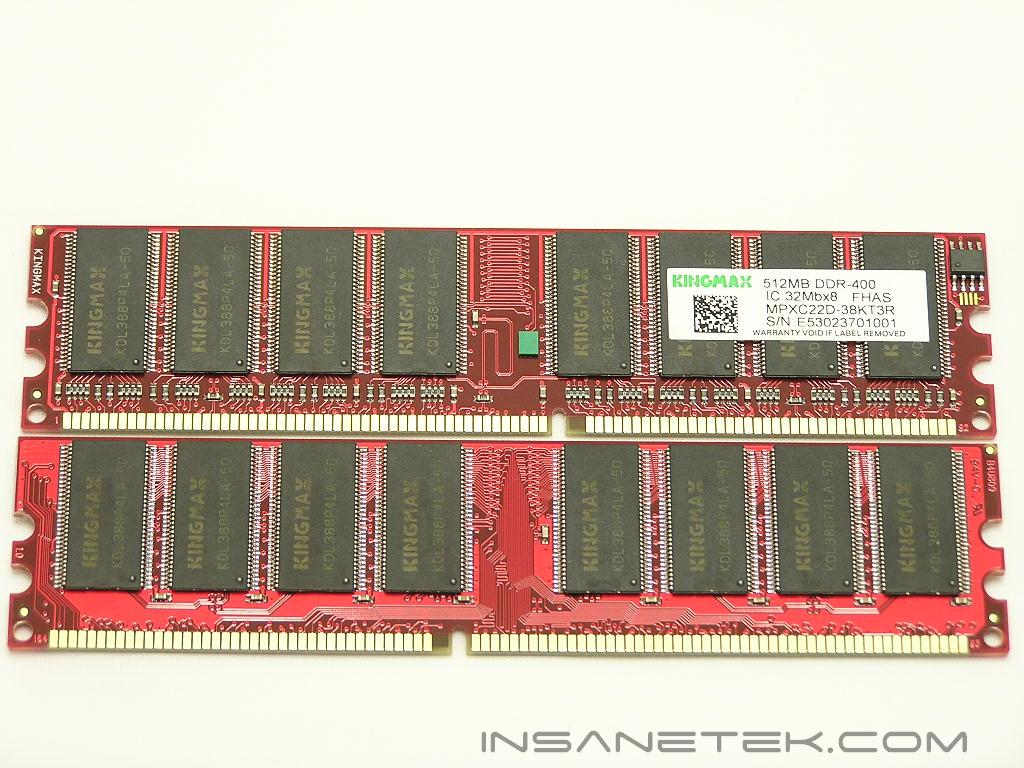
If you look closely, the chips on these sticks are relabeled with the Kingmax name and their model numbers. The chips used are 5ns though, as that 50 at the end of the string indicates memory nanoseconds. Judging from the overclock results that you’ll see later on, the chips used seem to be PSC. There is a sticker label on the memory chips, but that doesn’t provide any useful information to the user, as those markings are just more model numbers. If you do remove the labels, your warranty will be voided. What is interesting here is that the PCB is actually made by Brainpower. It’s not the infamous 808 or the 815, but the 809 version. I would’ve liked to find out which was better, the 809 or the 808, but because the different sticks of memory used different chips, I couldn’t find out.
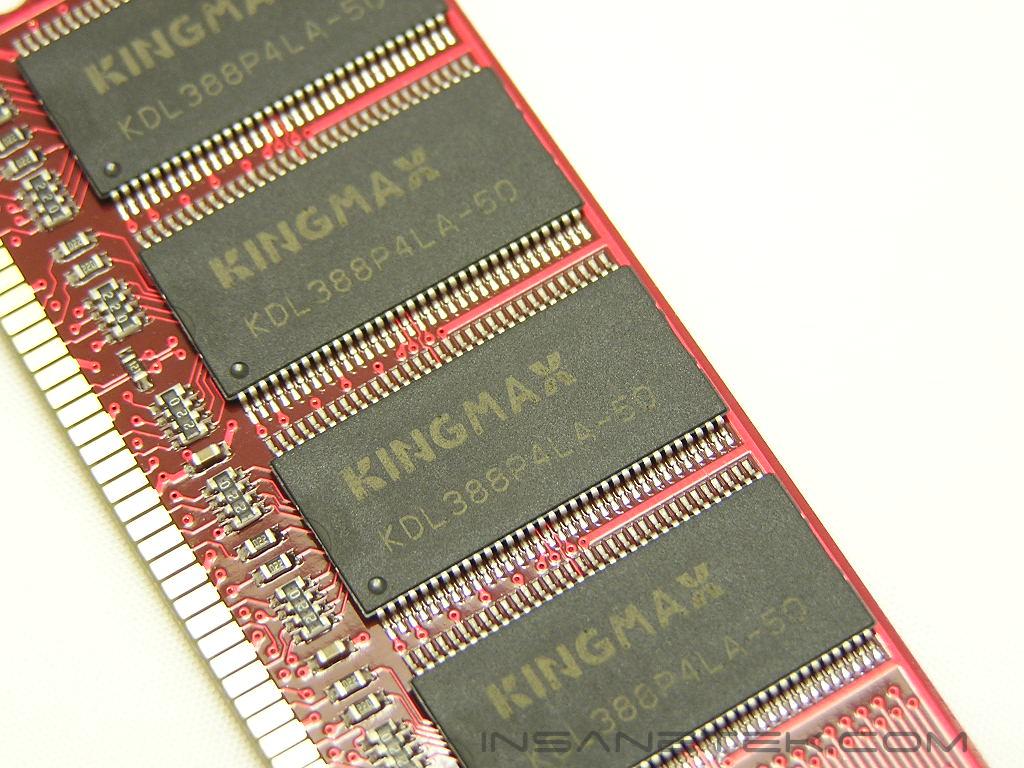
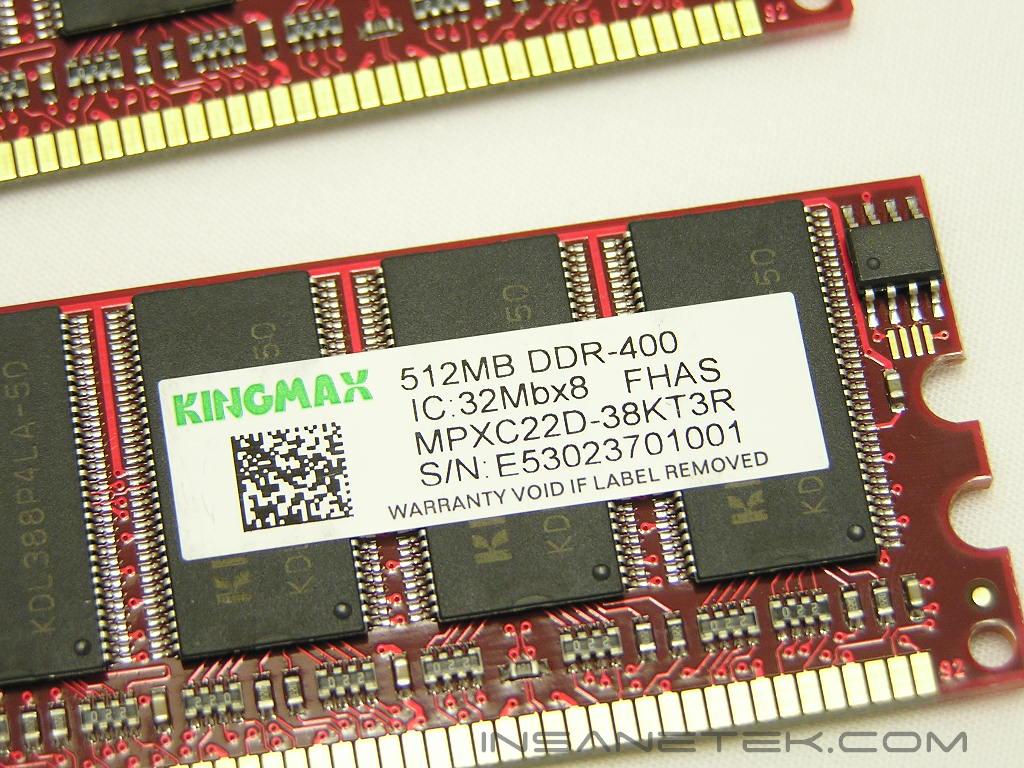
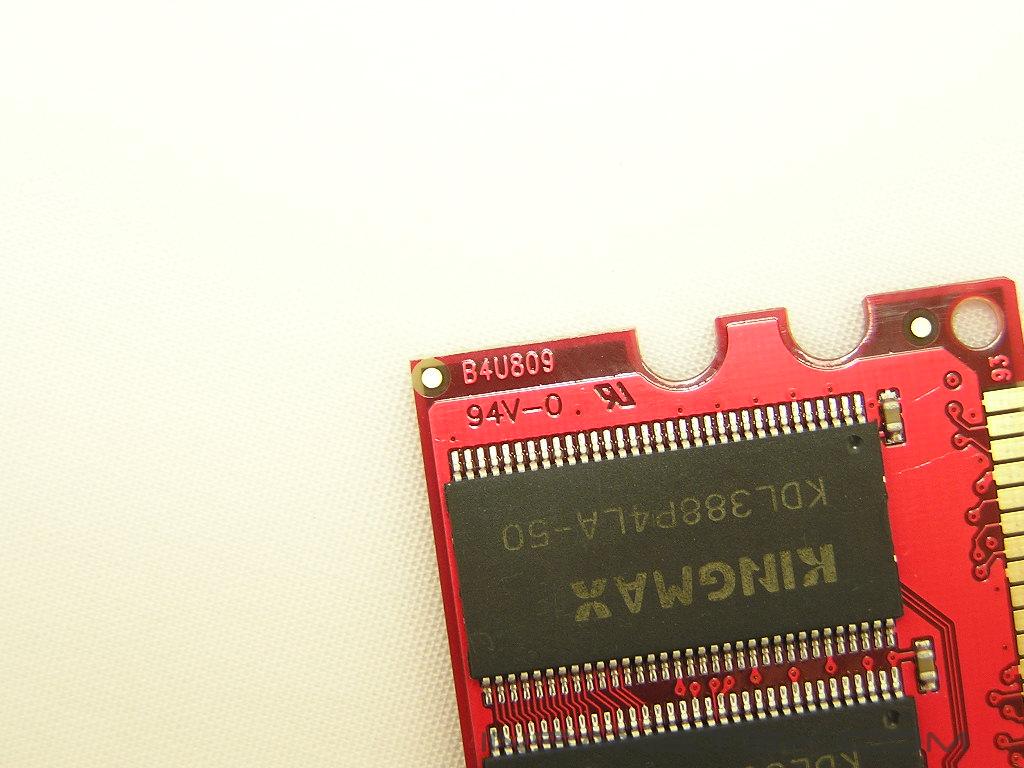
The SuperRAM PC3200 package did not provide any specifics on the memory latencies or voltage requirements. A quick check at Kingmax’s products page shows that the memory is rated at CAS 2.5 with a voltage range of 2.5v-2.7v. It also shows that it is capable of CAS 2, but I was unable to run at that timing during all overclocking tests.
Test System and Overclocking
Test System:
- AMD Athlon64 3000+ Winchester
- DFI LANParty UT nF4 Ultra-D
- 2 x 512MB Kingmax SuperRAM PC3200
- 2 x 512MB GeIL Ultra-X Winbond BH5 PC3200
- ATI X800 (400/490)
- Enermax Noisetaker 470W
- Arctic Freezer 64
I normally don’t include or compare memory results in my memory reviews mainly because all everyone cares about is the highest overclock they’ll be able to get. All memory running the same frequencies and same latencies should provide the same performance, give or take some really minor increases due to different chips or PCB used. I did include something to compare the Kingmax SuperRAM to show the difference between value memory and high performance memory, and also to show the difference between average latencies and extreme low latencies.
Overclocking:
Keep in mind that during overclocking, the latencies are as follows: CAS-TRCD-TRP-TRAS
The overclocking process of the Kingmax SuperRAM was straightforward and fast. I tried the lowest latencies of 2-2-2-5 and the system wouldn’t POST. I tried 2-3-3-6 and the system continued to hang. The lowest latencies the memory would allow at 200HTT was 2.5-3-3-6. I proceeded to overclock to find the highest frequencies it’ll reach and ended up with 225HTT. I loosened the timings even more to 3-4-4-8 and received increase. I increased the voltages and was surprised to see that the memory hates extra voltage. The highest it would accept is 2.8v. The overclocking process certainly was short. But then again, what did you expect out of something that’s only $80? I found this to be rather decent.
I mentioned earlier that the chips seem to be PSC IC’s. Why did I guesstimate this? Well Hynix is just expensive. The memory would not sell for less than $80. It’s certainly not Winbond or TCCD. It couldn’t do 2-2-2 at 200HTT. It’s not Micron or Infineon because they overclock better than 225MHZ. It can’t be Mosel because Mosel can do CAS 2. So basically, I came to the conclusion that PSC are the IC’s used. The majority of value ram or “cheap stuff” out there is based on PSC IC’s anyway. Don’t take my word for it, though. I’m just basing it on my personal experience.
Results
A series of memory intensive benchmarks will be run to test the performance of our sample. The other tests will be based on common benchmark programs such as 3DMark and PCMark. Real life performance differences will be tested through current games such as Far Cry and UT2004. Memory bandwidth benchmarks will be based off of SiSoft Sandra and Everest Home Edition. Super PI and PiFast will also be used to test memory performance, as the benchmark benefits largely from FSB increases.
SiSoft Sandra Memory Bandwidth
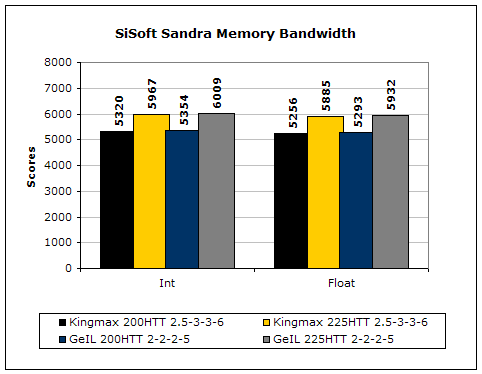
SiSoft Sandra is the most widely used memory bandwidth test and can distinguish increases in performance from lower latency timings.
Everest Home Edition
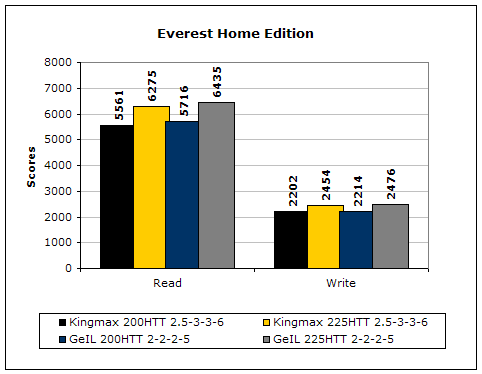
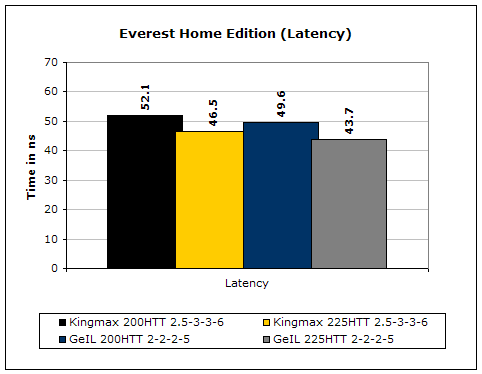
Much like Sandra, Everest Home Edition tests the memory’s ability to read and write data in large chunks. The results reveal the lower latencies helping just a little with performance.
3DMark2001SE
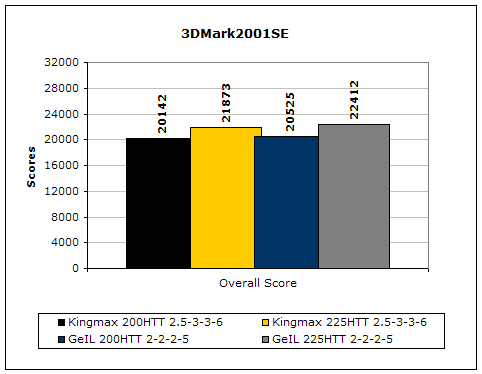
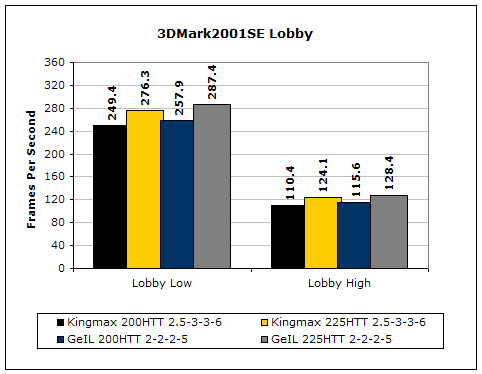
3DMark is probably the overclocker’s favorite benchmark. Unlike 3DMark2003, which stresses mainly the video card, 3DMark2001SE tests all of the system’s main components. Increasing the CPU speed, memory speed, and video card speeds will result in higher results in the final score.
Results Continued
Far Cry
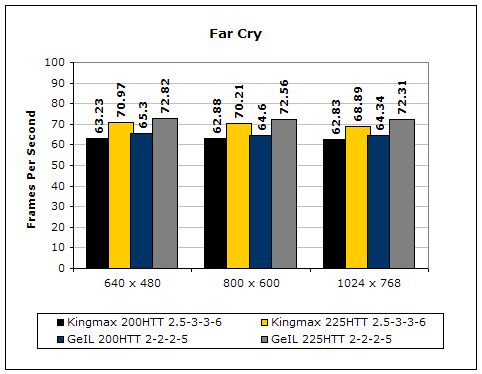
Since Far Cry is a game, the performance results will be very similar to 3dMark2001. I ran the benchmark at 640x480 so the benchmark would not be too GPU dependent. The tests under 800x600 and 1024x768 are an approximation of what kind of frames you’ll be getting. While the results are similar to 3dMark2001 in performance, this benchmark will give more significant results because Far Cry is extremely demanding.
Unreal Tournament 2004
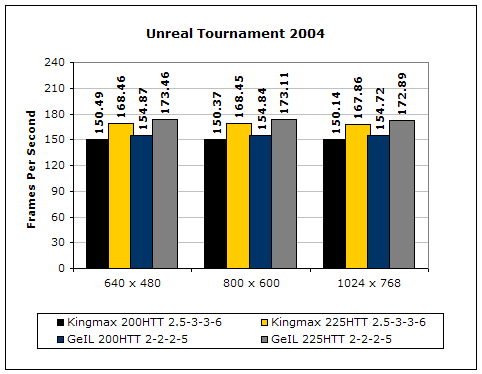
Unreal Tournament is another popular game engine to test overall system performance. Here, we can see the same results as Far Cry and 3dMark2001. Like Far Cry, UT2004 was also run at 640x480 to limit GPU dependency. The other resolutions are to give an approximation of actual gameplay performance.
PCMark2002
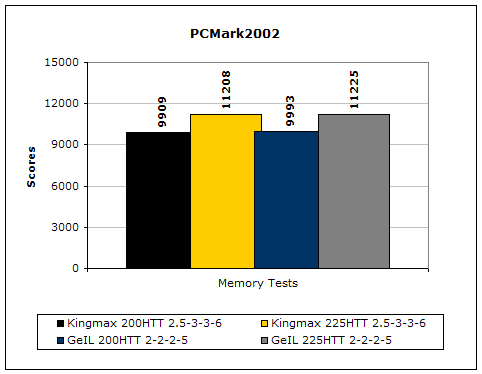
PCMark is another benchmark created by Futuremark. It tests the memory compression and decompression speeds in small to large chunks of data.
Super PI
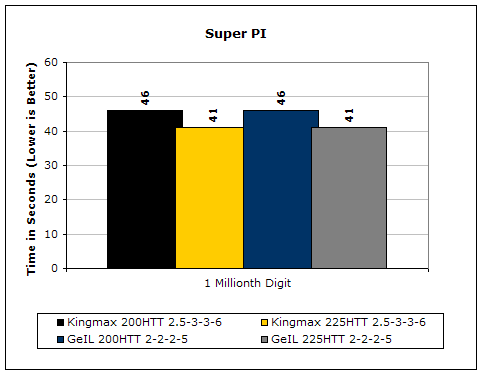
Since the value of PI is an infinite value, Super PI is a speed test to find the digit you’re looking for. In this case, we chose the millionth digit. Super PI benefits greatly from higher FSB as well as low latencies.
PiFast
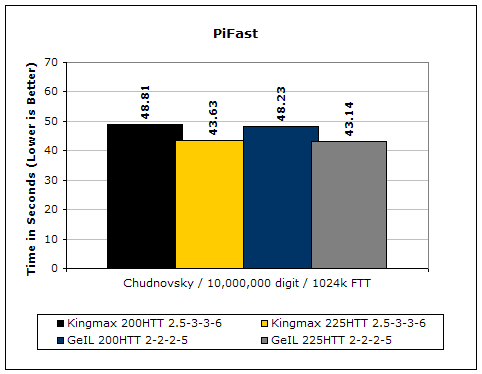
PiFast is similar to Super PI and the results can be greatly affected by a slight adjustment to the memory megahertz and latency.
Well from the performance results shown, you can see that lower latencies really make a difference. In real life, memory intensive games like Unreal Tournament 2004 gained as much as 5FPS just by having lower latencies. The only odd thing was that Super PI didn’t get any increase. I found that to be really strange.
Conclusion and Thoughts
After going through so much high performance memory, playing with value offerings definitely brings out a different kind of experience. While it doesn’t have the high impact performance that we’re all used to seeing, it does perform rather decently. You have to keep in mind that the price on a 1GB kit is less than half of high performance 1GB kits out there. Enthusiasts who look to load their computers with system memory can buy two sets of these 1GB kits and still come out with some beer change. Of course, they won’t get very far when it comes to overclocking, but not everyone in the world overclocks. Honestly, you won’t find me buying value ram for my own system. I’d get it if I was building someone else a computer, though. The cost of the Kingmax SuperRAM kit and the performance it provides isn’t too shabby. The memory was stable throughout all testing and hours of World of Warcraft. If you’re on an extremely tight budget and want 1GB of system memory without breaking your wallet, these will be great. If you want to overclock, look elsewhere. These aren’t made for that. We’ll have to wait and see just how well Kingmax’s Hard-core series performs.
Pros:
- Extremely low price
- Sexy red PCB
- Overclocks OK for value stuff
- Performance is decent
Cons:
- Nothing extraordinary
We would like to thank Kingmax for providing us the sample. If you have any questions or comments, feel free to hit us up in the forums. You can also check out more of our latest reviews on the front page.