

Corsair XMS2 TWIN2X2048-6400PRO 2GB Dual Channel Kit
Introduction
We all know that the transition to 2GB imminent. It is just a matter of time when people decide to hop over the border. 2GB DDR kits are not hard to find. The hard part is finding a kit that allows good overclocking headroom. Fortunately for us, memory companies are keeping on their toes and quickly providing us with good overclocking 2GB kits. In the DDR2 world, there is not much problem in finding good 2GB enthusiast memory. This lies within the fact that the majority of DDR2 ICs are already high in density. If you notice, 512MB DDR2 modules are usually single sided. This means that a 1GB dual channel kit will come with two single sided memory. There is little to no problem for memory companies to use a new PCB and slap another row of ICs on the other side to make 1GB modules, resulting with 2GB dual channel kits. DDR2 is great isn’t it?
For those who have been keeping up with 2GB enthusiast memory should know that overclocking results won’t reach as high as 1GB kits. Crucial came extremely close and currently still leads the pack with their Ballistix, but megahertz for megahertz, it cannot beat TCCD. The reason is that when ICs are too dense in size, overclocking results will drop. You can consider it as a trade-off. What about for DDR2? DDR2 already comes with dense ICs, so will it hinder the overclocking potential? We’ll find out through Corsair’s current flagship DDR2.
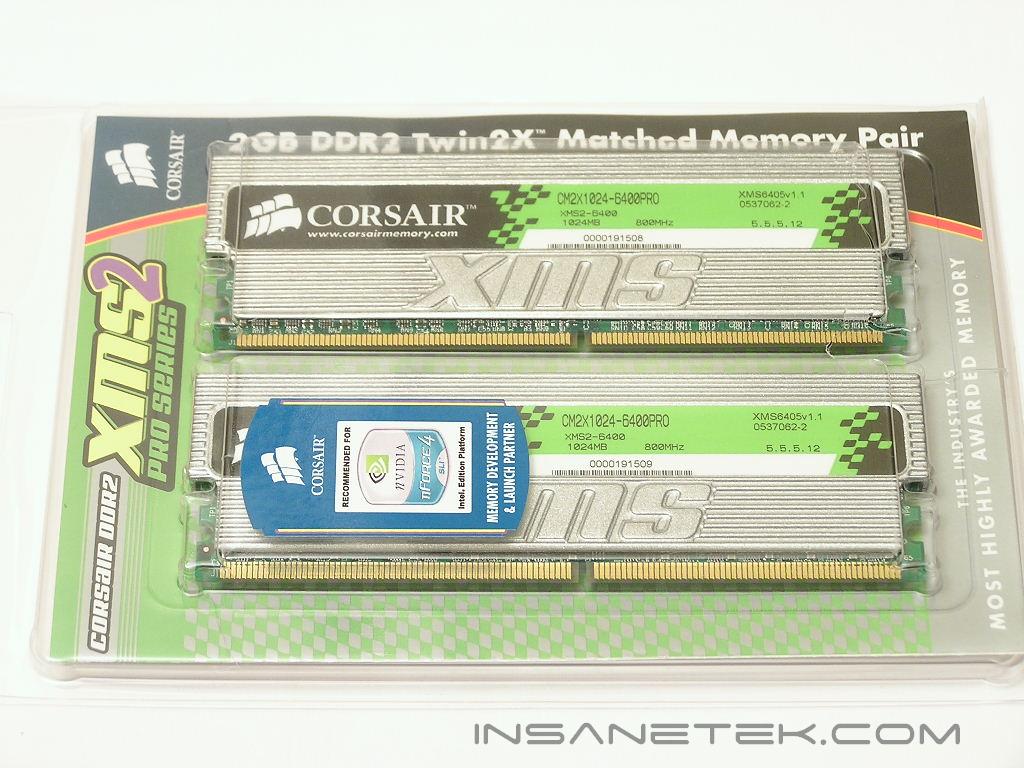
Corsair XMS2 PC2-6400PRO
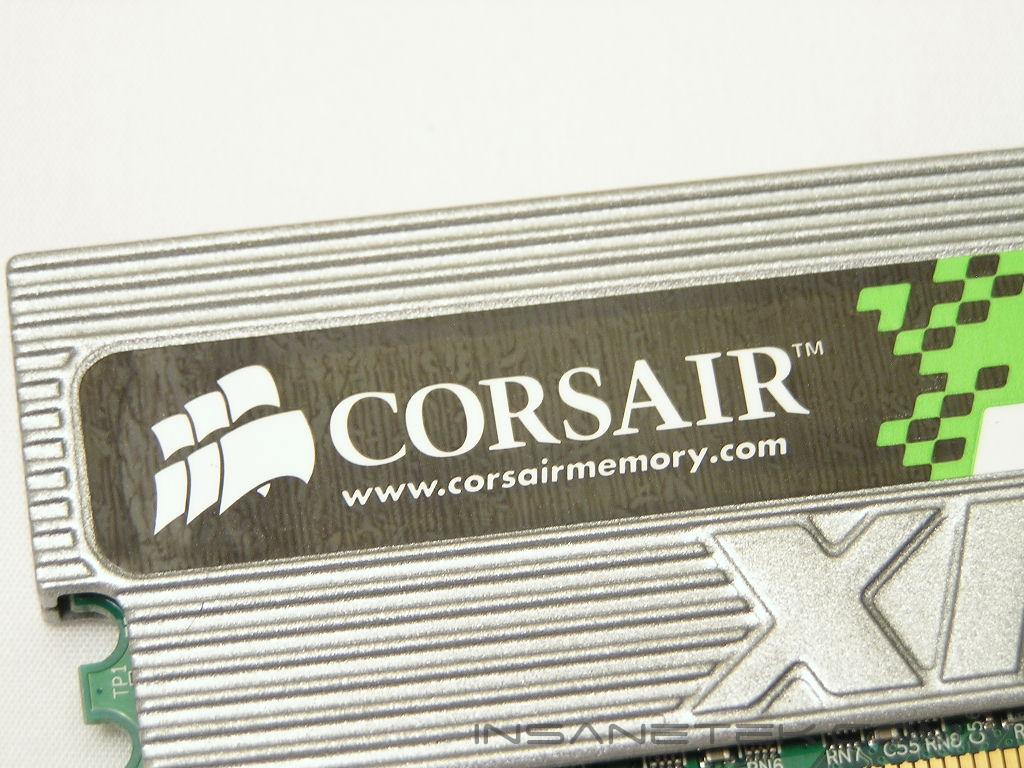
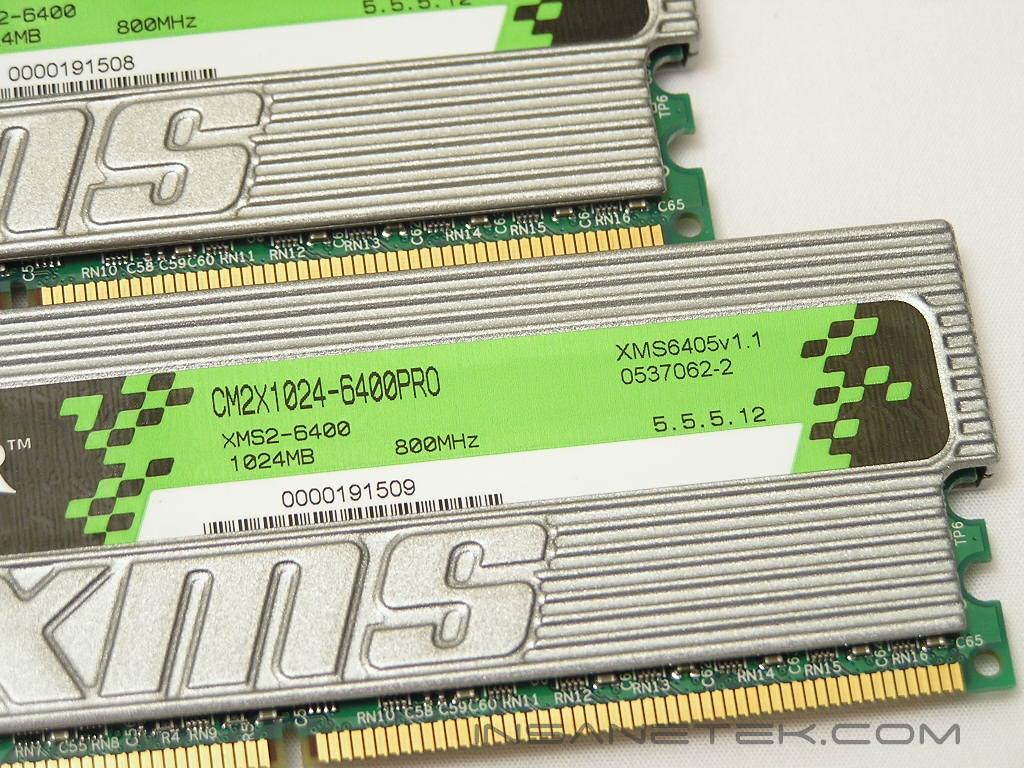
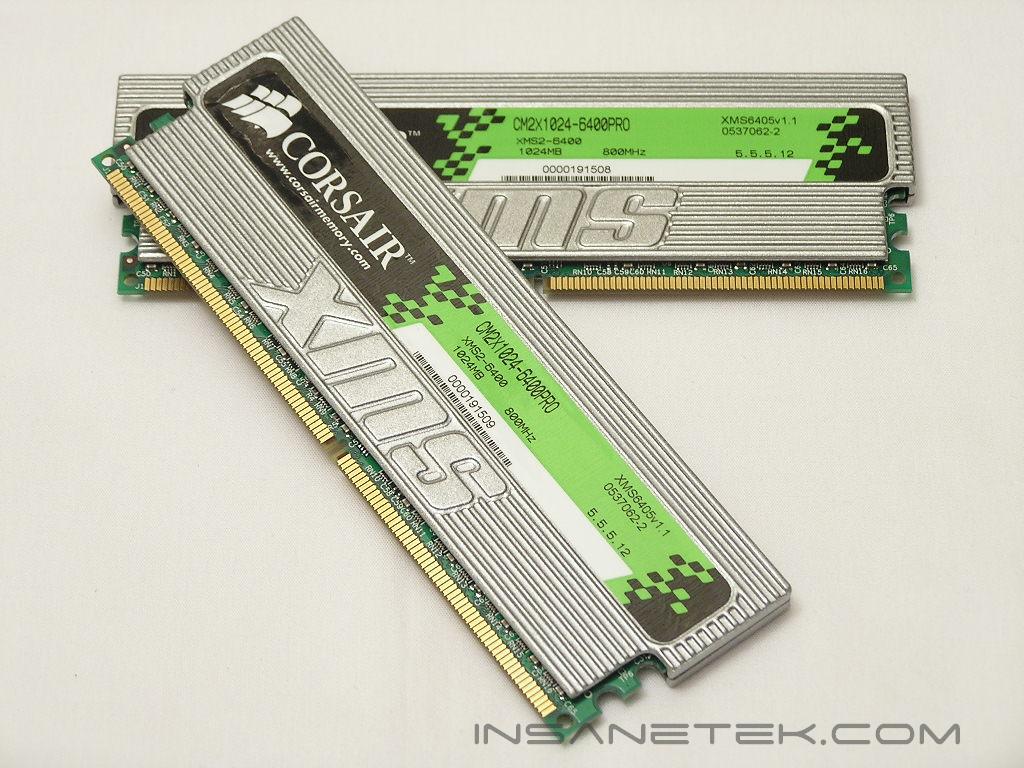
Corsair’s popular PRO series continues to come with large memory heatspreaders to help improve memory cooling. The large heatspreaders on DDR2 PRO memory comes in a silver finish, whereas the DDR PRO memory comes in black. The PRO series comes with memory activity LEDs that flash and blink depending on your memory usage.
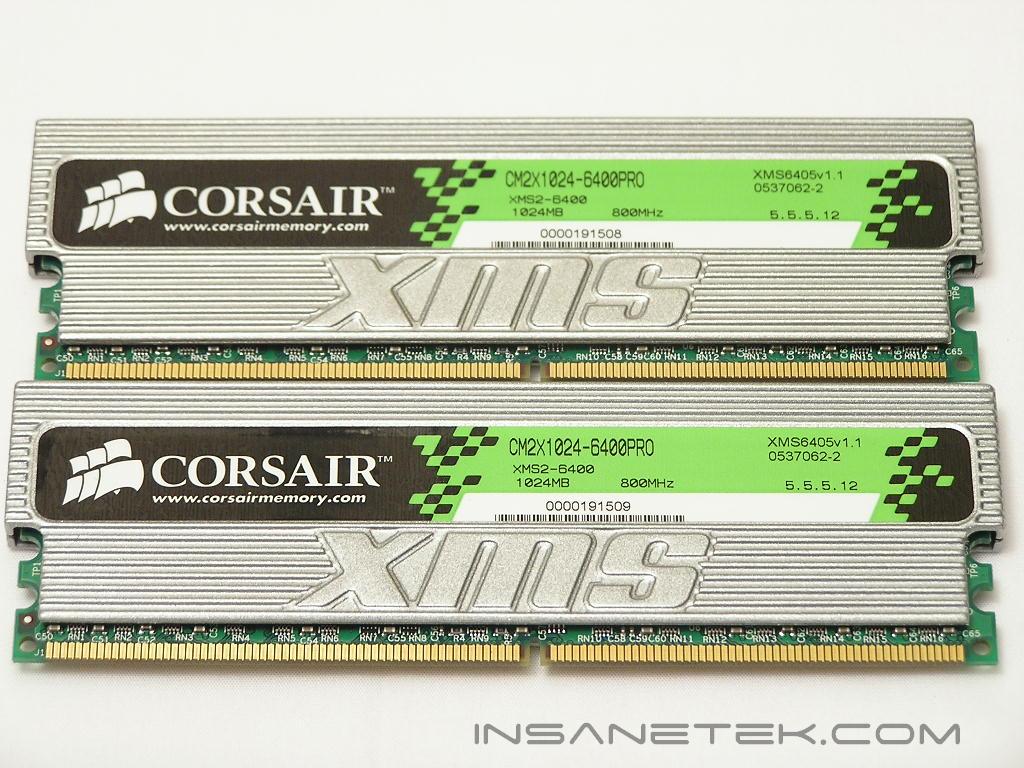
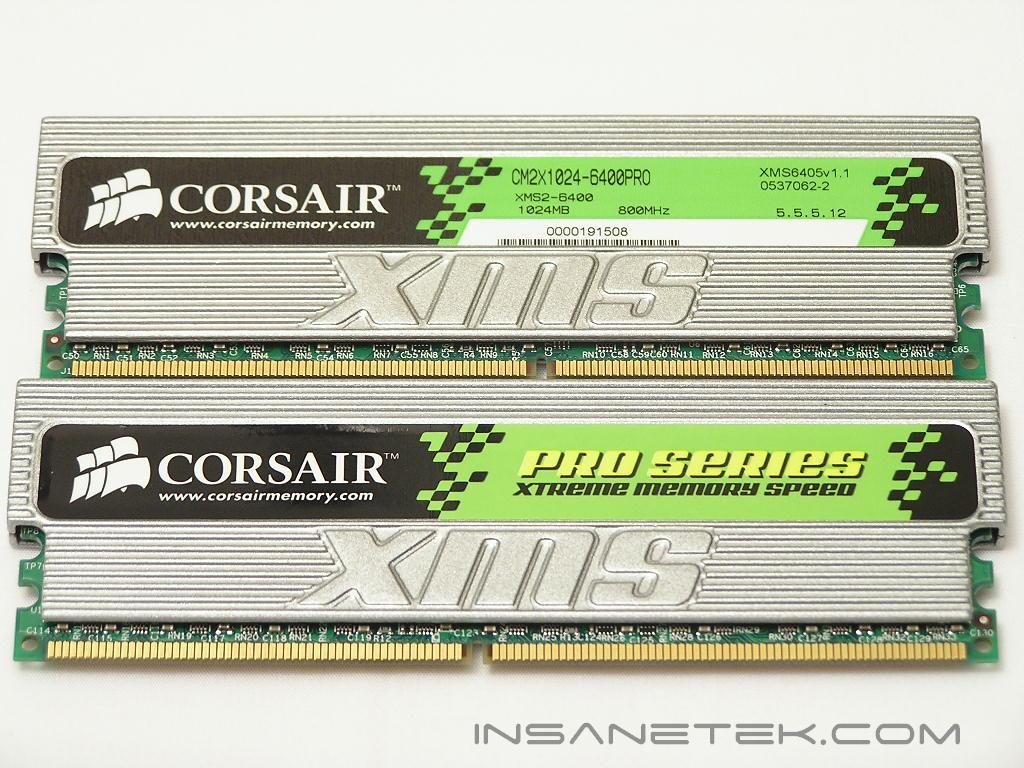
The memory comes loosely rated with timings of 5-5-5-12 and a required voltage of 1.9v. The rated speed of the memory is a nice 400MHz, or DDR2-800. The revision I received is v1.1 and it is important to mention this because Corsair is known to change their memory revisions quite often. The results and ICs reported in this review might hold true for all their v1.1 PC2-6400PRO, but it might change when a new revision is released. I looked underneath the heatspreaders to find Micron fatbody D9s! I was extremely surprised. To further ensure that the ICs are fatbody D9s, I tested the memory to see if it would run low latencies of 3-2-2-5. Holy blazing speed Batman, it does!
Test System and Overclocking
Test System:
- Intel Pentium D 840 3.2GHz
- Asus P5WD2 Premium
- 2 x 1GB Corsair XMS2 PC2-6400PRO
- ATI Radeon X800XT
- Arctic Cooling Freezer 7
- Thermaltake PurePower 680W
Overclocking:
Keep in mind that during overclocking, the latencies are as follows: CAS-TRCD-TRP-TRAS
Throughout all tests, the multiplier has been kept at 14x to reduce any possible CPU bottleneck.
As mentioned earlier, I tested the memory to see if it would run extreme low latencies of 3-2-2-5. The memory ran like a champ. Now that I know the memory uses Micron fatbody D9s, I pumped up the voltage to 2.3v. The fatbody D9s responds very well to increased voltage so all tests will be run with 2.3v. Keeping a memory ratio of 3:4, I ramped up the FSB to 237MHz to obtain a memory speed of 316MHz, or DDR2-632. Unlike the other fatbody D9s I have encountered, the PC2-6400PRO could not reach DDR2-667 with the low latencies. It could be due to the high density modules or it could be lower rated fatbody D9 ICs. I loosened CAS to 4 and TRAS to 8 and proceeded to hit 240FSB, resulting with 320MHz memory speed, or DDR2-640. I tried running 4-3-2-8 to see if it would allow any bit of increase, but the memory would not budge. I had to loosen the timings to 4-3-3-8 before it would allow me to go any further. Now using a 1:2 memory ratio, I managed to get 221FSB and resulted with 442MHz memory speed, or DDR2-884. In order to push further, I loosened CAS to 5. The memory halted at 235FSB, yielding 470MHz or DDR2-940. The memory is pretty darn close to reaching the 1GHz barrier so I loosened the timings even more to 5-4-4-9. It only gained 8FSB, resulting with 486MHz or DDR2-972. I was determined to break the 1GHz barrier with these D9s so I let loose all the timings to 5-5-5-10 and pushed as much as I could. The memory maxed out at 490MHz, or DDR2-980. The finish line was so close, yet so far behind. Nonetheless, these are still some awesome overclocks. I did not expect the memory to reach such wonderful places.
Overclocking Results:
- 200FSB 3:4 266MHz 3-2-2-5 2.3v
- 237FSB 3:4 316MHz 3-2-2-5 2.3v
- 240FSB 3:4 320MHz 4-2-2-8 2.3v
- 221FSB 1:2 442MHz 4-3-3-8 2.3v
- 235FSB 1:2 470MHz 5-3-3-9 2.3v
- 243FSB 1:2 486MHz 5-4-4-9 2.3v
- 245FSB 1:2 490MHz 5-5-5-10 2.3v
Results
A series of memory intensive benchmarks will be run to test the performance of our sample. The other tests will be based on common benchmark programs, such as 3DMark and PCMark. Real life performance differences will be tested through current games, such as Far Cry and UT2004. Memory bandwidth benchmarks will be based off of SiSoft Sandra and Everest Home Edition. Super PI and PiFast will also be used to test memory performance, as the benchmark benefits largely from FSB increases.
SiSoft Sandra Memory Bandwidth
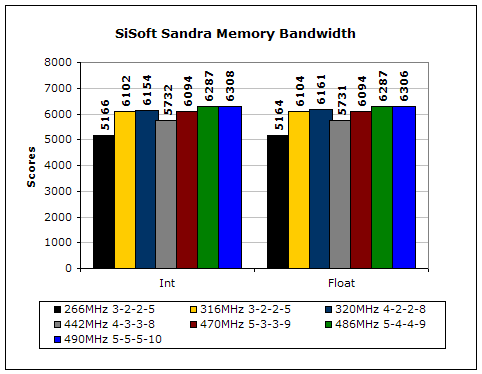
SiSoft Sandra is the most widely used memory bandwidth test. It can tell you the increase in performance from just lowering the latency timings.
Everest Home Edition
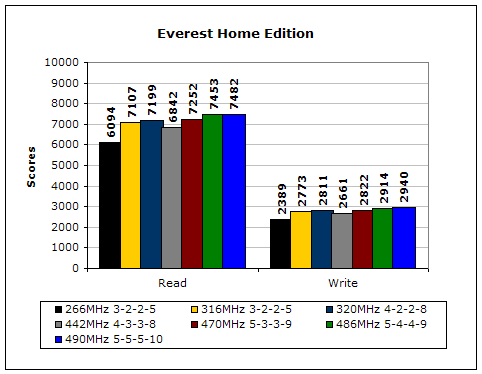
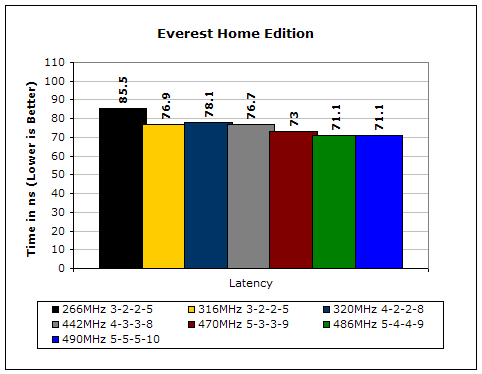
Much like Sandra, Everest Home Edition tests the memory’s ability to read and write data in large chunks. The results show that the lower latencies seem to help just a little with performance.
3DMark2001SE
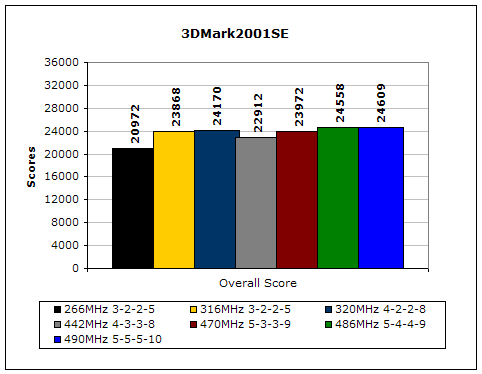
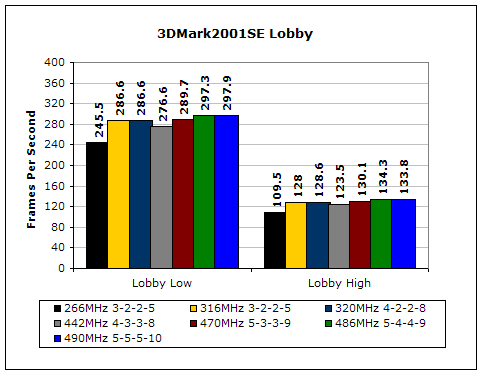
3DMark is likely the overclocker’s favorite benchmark. Unlike 3DMark2003, which stresses mainly the video card, 3DMark2001SE tests all of the system’s main components. Increasing the CPU speed, memory speed, and video card speeds will result in higher results in the final score.
Results Continued
Far Cry
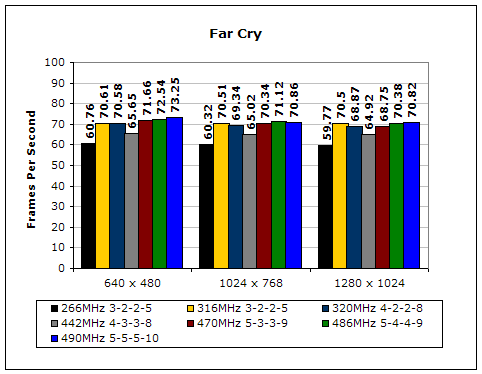
Since Far Cry is a game, the performance results will be very similar to 3dMark2001. I ran the benchmark at 640x480, so the benchmark would not be too GPU dependent. The tests under 1024x768 and 1280x1024 are an approximation of what kind of frames you’ll be getting. While the results are similar to 3dMark2001 in performance, this benchmark will give more significant results, because Far Cry is extremely demanding.
Unreal Tournament 2004
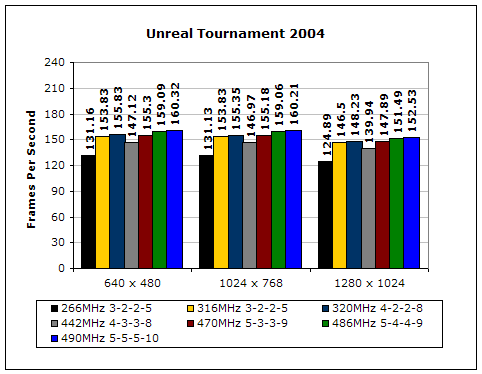
Unreal Tournament is another popular game engine to test overall system performance. Here, we can see the same results as Far Cry and 3dMark2001. Like Far Cry, UT2004 was also run at 640x480 to limit GPU dependency. The other resolutions provide an approximation of actual gameplay performance.
PCMark2002
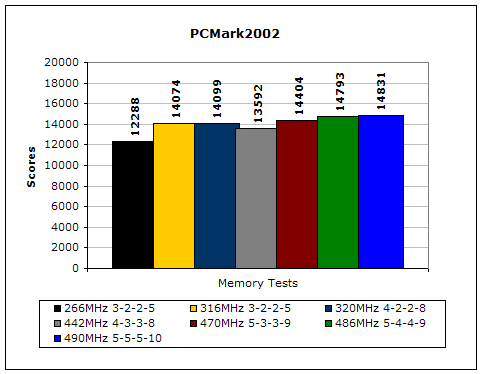
PCMark is another benchmark created by Futuremark. It tests the memory compression and decompression speeds in small to large chunks of data.
Super PI
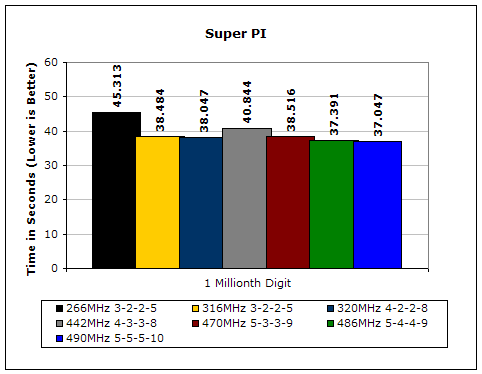
Since the value of PI is an infinite value, Super PI is a speed test to find the digit you’re looking for. In this case, we chose the millionth digit. Super PI benefits greatly from higher FSB, as well as low latencies.
PiFast
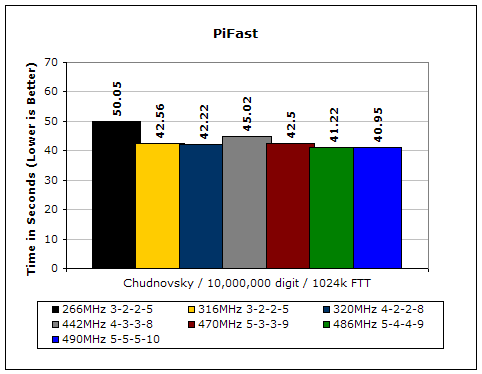
PiFast is similar to Super PI. The results can be greatly affected by a slight adjustment to the memory megahertz and latency.
Conclusion and Thoughts
In our recent review of Corsair’s PC2-8000UL, I mentioned that they made some of the fastest DDR2 memory tested here at InsaneTek. The same goes with their PC2-6400PRO. Although it did not break the 1GHz barrier, it was ridiculously close. The impressive part is that the memory was able to reach such high places with a whopping 2GB memory size. Corsair continues to excel in the DDR2 department, providing great solutions for everyone’s needs. The only downside to this memory that I can see would be future revisions. For those Intel users who are thinking about hopping over to the 2GB, make sure you do it now before Corsair makes a change in the revision. The PC2-6400PRO comes rated with loose timings so who knows what they will use in the future. Your best bet is to grab them now while they are still Micron fatbody D9s. The worst feeling is regretting that you missed out because you were hesitant on the purchase. The price is a little steep coming in close at $400, but it is worth your pennies.
Pros:
- Memory activity LEDs
- Large heatspreader to help dissipate heat
- Micron fatbody D9s! (at least with v1.1)
- Great overclocking results
Cons:
- Price?

We would like to thank Corsair for providing us the sample. If you have any questions or comments, feel free to hit us up in the forums. You can also check out more of our latest reviews on the front page.