

Corsair XMS TWINX2048-4400PRO 2GB Dual Channel Kit
Introduction
Who remembers when all we needed was 256MB of system memory to play our favorite games? I certainly do. In fact, I can remember when 256MB was more than what we needed. Kicking ass on Counter-Strike 1.6 had never looked smoother. At the time, I had even told some of my friends that 512MB was unnecessary and excessive. Now, with those “excessive” specs, I can barely surf the web, much less play any games, on their systems. It is ridiculously slow. Times are definitely changing. Even the times when I told my friends about my 1GB of system memory seems like a long time ago. The surprised looks on their faces were quite hilarious. The need for more system memory is inevitable. The popularity of 2GB memory is on the rise and is slowly becoming the norm. How and when did this all happen? Are you seething now because you just purchased a 1GB dual channel kit? Blame it on Battlefield 2.
It is quite amazing how games can make upgrading your computer hardware an absolute necessity. Nonetheless, memory companies have realized this and have been desperately searching for memory ICs capable of high overclocks. There are a lot of memory parts being released with a PC4000 rating, but those also come with loose latencies. That certainly cannot be helped since high density ICs are less likely to run at tight timings. Corsair’s latest 2GB dual channel kit comes with the highest speed rating of all–PC4400 with latencies of 3-4-4-8. Exciting, isn’t it?
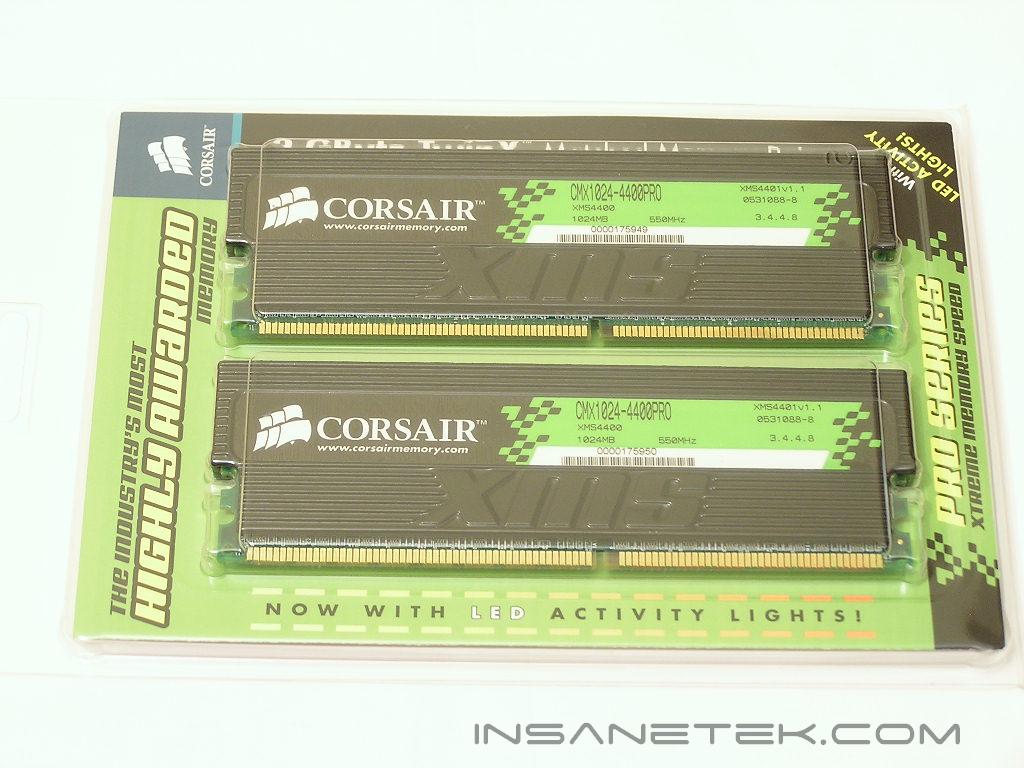
Corsair XMS TWINX2048-4400PRO
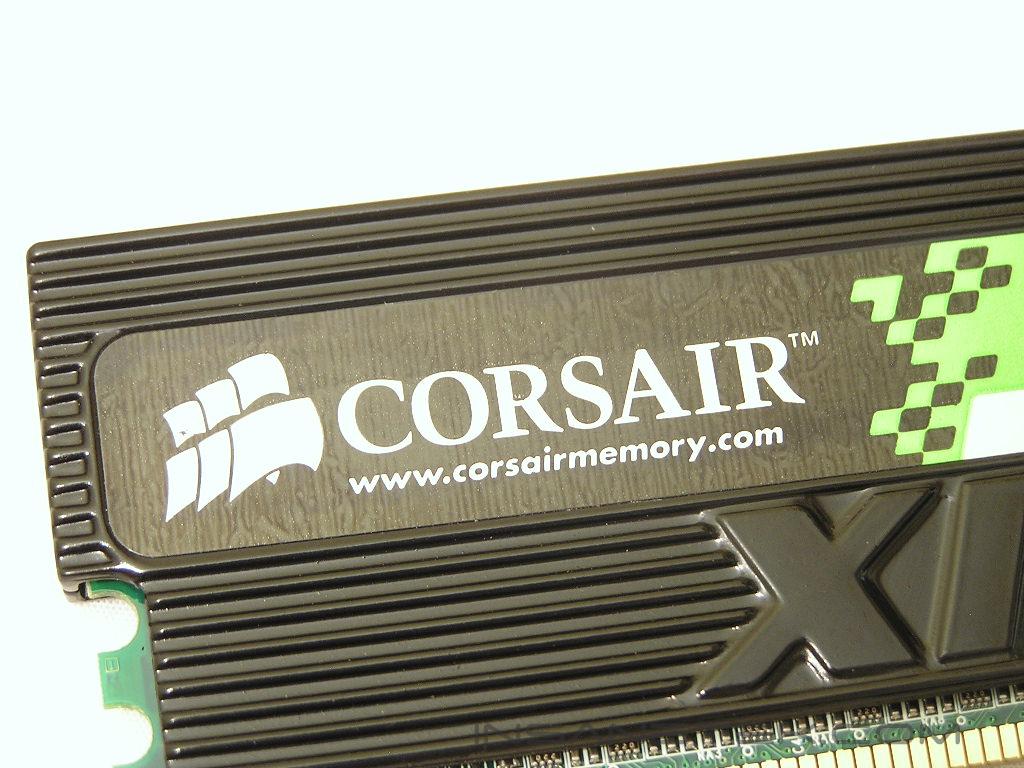
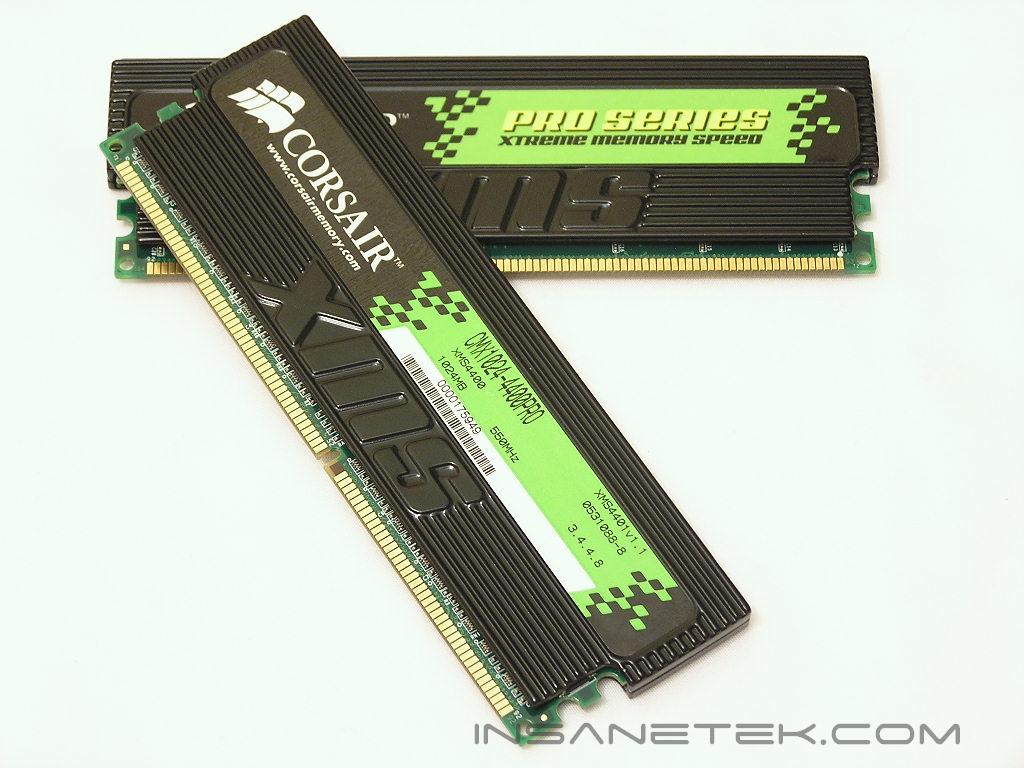
The Pro series in Corsair’s line comes with extra large memory heatspreaders and flashy LED activity lights. They look astonishing when installed in a system with an available side panel window. The large memory heatspreaders increase the surface area to help dissipate more heat.
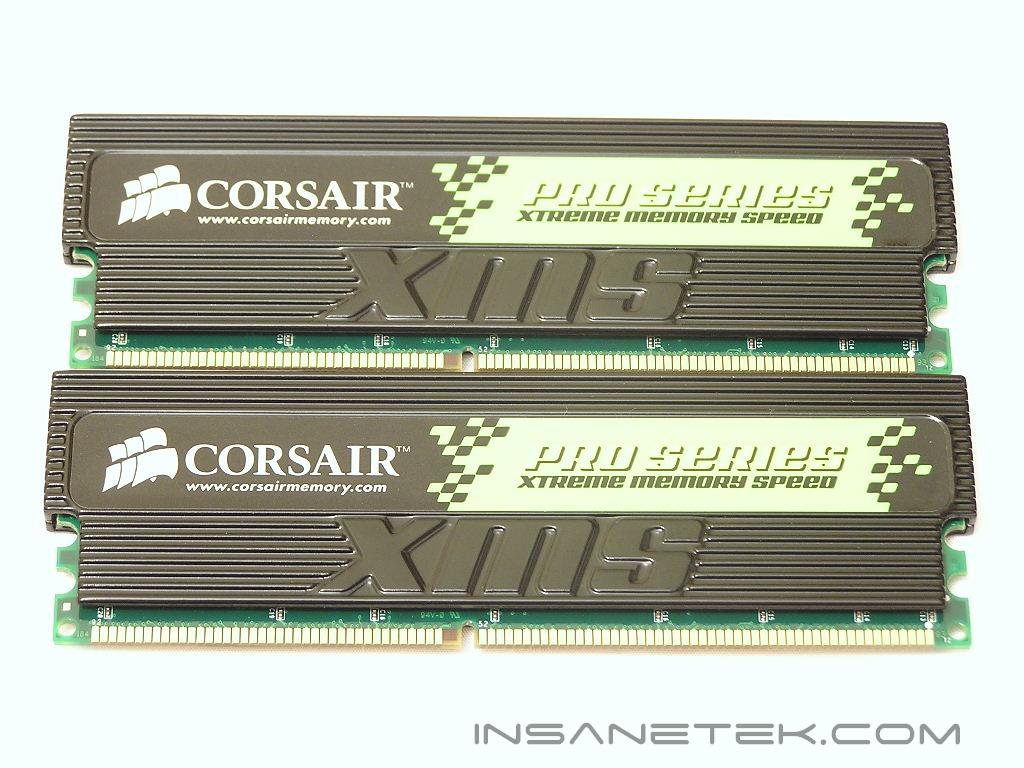
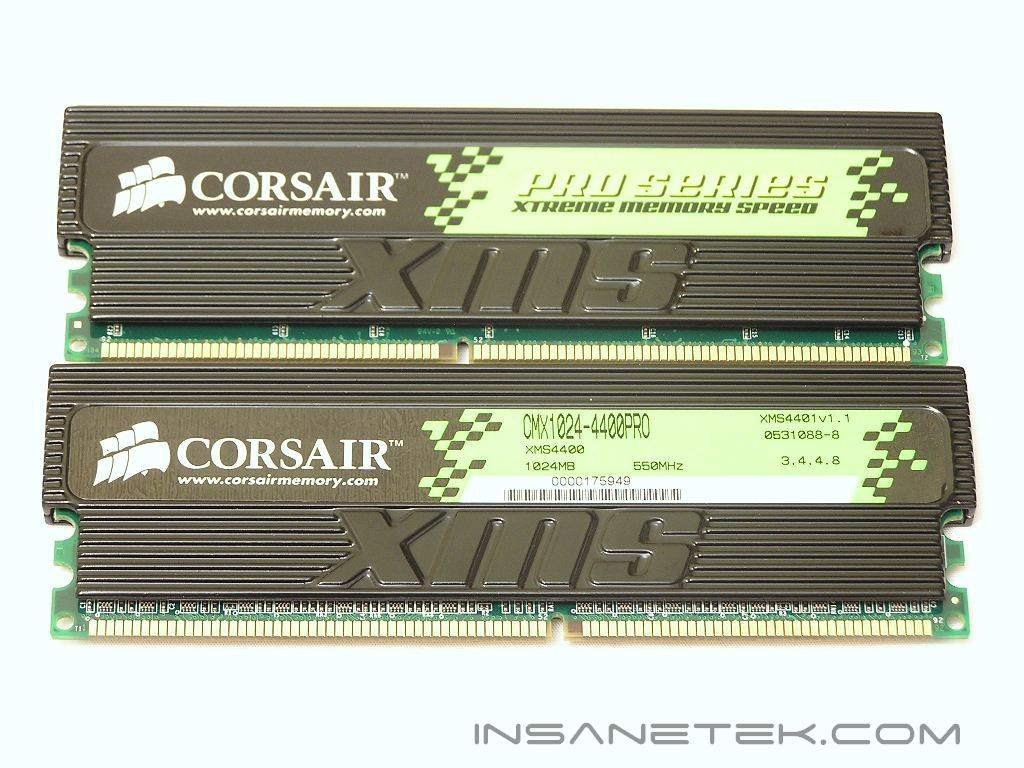
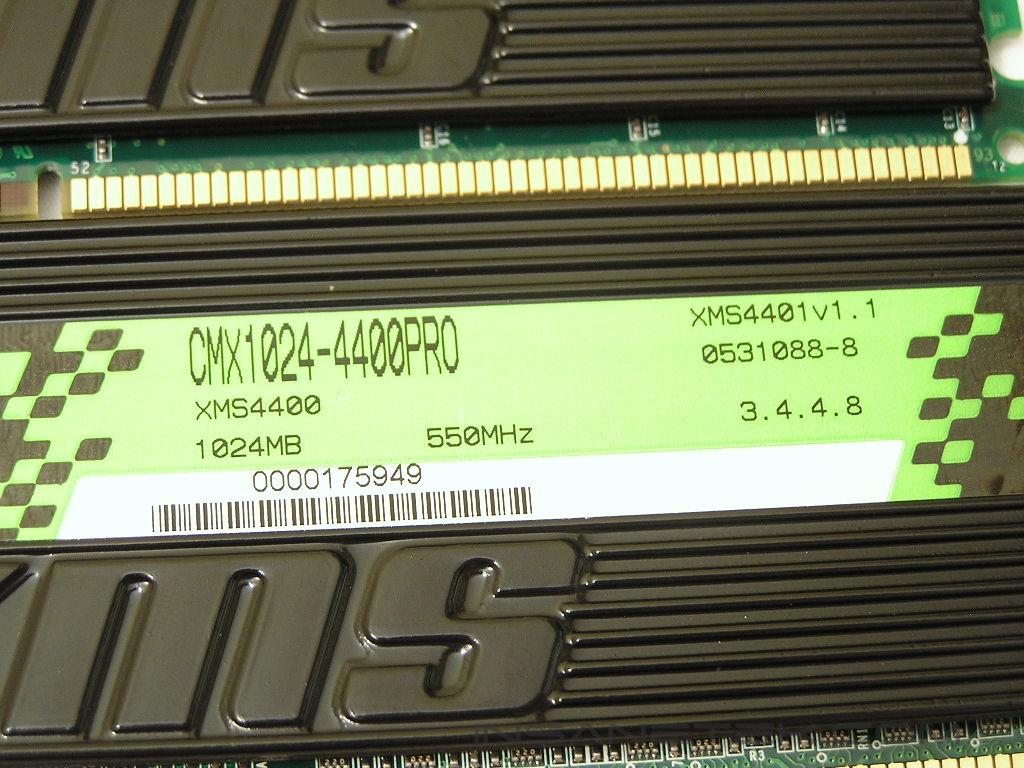
This particular PC4400PRO 2GB kit uses Infineon CE-5 memory ICs. High performance, high density chips are rather rare and there are only a few that are capable of meeting the goals and demands of enthusiasts. The current top contenders possessing such potential are Micron, Infineon, and Samsung. The PC4400PRO 2GB kit is rated at a speed of 275MHz with timings of 3-4-4-8. The voltage rating is not specified but I reckon that it should run somewhere between 2.7v-2.8v.
UPDATE:
We have just been informed by Corsair that the PC4400PRO 2GB kit is rated with a command rate of 2T, making the timings 3-4-4-8 2T. I was unable to find the specifications sheet on the memory so I was unsure. I did all tests with a 1T command rate simply because, in my honest opinion, running 2T is a waste of time. Running 2T loses a lot of performance over 1T. I continued to test to see the highest overclock the memory will go with a command rate of 2T. Unfortunately, the looser command rate only brought me to the rated speed of 275MHz.
Test System and Overclocking
Test System:
- AMD Athlon 64 3000+ Venice
- DFI LANParty UT nF4 Ultra-D
- 2 x 1GB Corsair XMS PC4400PRO 2GB
- ATI Radeon X800XT
- Arctic Cooling Freezer 64
- Thermaltake PurePower 680W
- BIOS 623-3 and orange slots
Overclocking:
Keep in mind that during overclocking, the latencies are as follows: CAS-TRCD-TRP-TRAS
As always, the first test is to see just how low the latencies would run at speeds of 200MHz. For those who do not overclock as much and like to leave things running at stock speeds, you’ll be happy to know that the memory can do low latencies of 2-3-2-5. The memory continued with these low latencies up to a max of 225MHz. All of this was running at only 2.7v! I loosened the timings to 2-3-3-6 and tried to push for another 5MHz but the memory would not budge. I had to loosen to 2.5-3-3-7 before any further overclocking was enabled. With average timings of 2.5-3-3-7, the memory went as high as 255MHz. For those with CPUs that have a multiplier of 10x or higher, pairing memory running at 250MHz+ will yield a pretty good setup. The Corsair also overclocked the highest with these average timings. Many of the other kits I have encountered stopped below the PC4000 mark. I tried timings of 3-3-3-8 and the memory did not gain any increase. I loosened the timings to 3-4-3-8 and managed to squeeze 270MHz out of the memory. Here’s the part where I became frustrated. No matter what I did, I could not get the memory to run at the rated speeds of 275MHz, 3-4-4-8. I tried different voltages varying from 2.6v-3.0v. I tried 3 different motherboards–Abit Fatal1ty AN8 SLI, ECS KN1 SLI Extreme, and the DFI Ultra-D. The memory stopped at 270MHz for all three of them. It was able to run Memtest stably up to 285MHz 3-4-4-8 with 2.8v, but as soon as Windows tried to load, blue screens started to appear or the performance became choppy. The kit I received is just a preview, so it may just be that I got a bad kit. I am hoping that the retail line won’t have the same fate. While 270MHz is not bad, not being able to reach the speeds specified above is definitely a bummer.
Overclocking Results:
- 200HTT 2.0-3-2-5 1T 2.7v
- 225HTT 2.0-3-2-5 1T 2.7v
- 255HTT 2.5-3-3-7 1T 2.7v
- 270HTT 3.0-4-3-8 1T 2.7v
UPDATE:
The overclocking results are not bad as I made it out to be. Since the memory comes rated with a speed of 275MHz with timings of 3-4-4-8 2T, being able to run 270MHz with timings of 3-4-3-8 1T is quite impressive. The overclocking difference between the two command rates is usually a decent sized gap, but the PC4400PRO 2GB kept it within a mere 5MHz.
Results
A series of memory intensive benchmarks will be run to test the performance of our sample. The other tests will be based on common benchmark programs, such as 3DMark and PCMark. Real life performance differences will be tested through current games, such as Far Cry and UT2004. Memory bandwidth benchmarks will be based off of SiSoft Sandra and Everest Home Edition. Super PI and PiFast will also be used to test memory performance, as the benchmark benefits largely from FSB increases.
SiSoft Sandra Memory Bandwidth
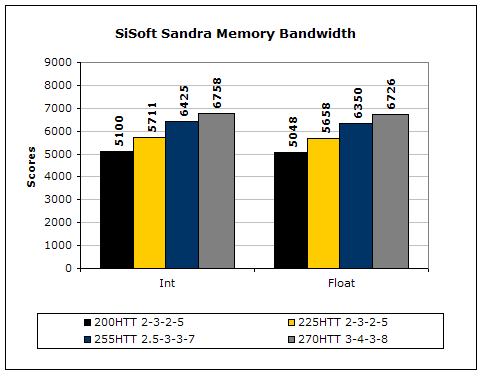
SiSoft Sandra is the most widely used memory bandwidth test. It can tell you the increase in performance from just lowering the latency timings.
Everest Home Edition
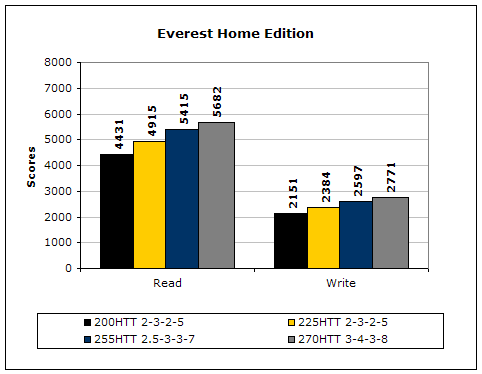
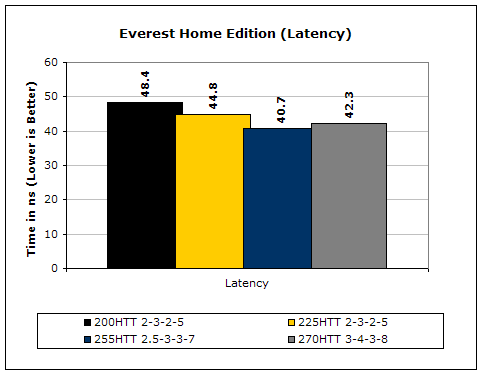
Much like Sandra, Everest Home Edition tests the memory’s ability to read and write data in large chunks. The results show that the lower latencies seem to help just a little with performance.
3DMark2001SE
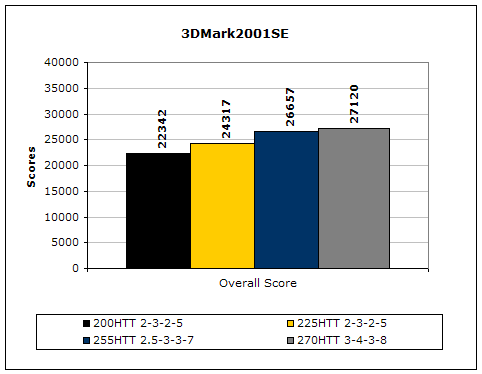
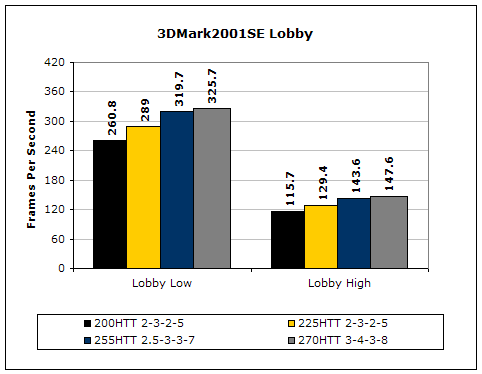
3DMark is likely the overclocker’s favorite benchmark. Unlike 3DMark2003, which stresses mainly the video card, 3DMark2001SE tests all of the system’s main components. Increasing the CPU speed, memory speed, and video card speeds will result in higher results in the final score.
Results Continued
Far Cry
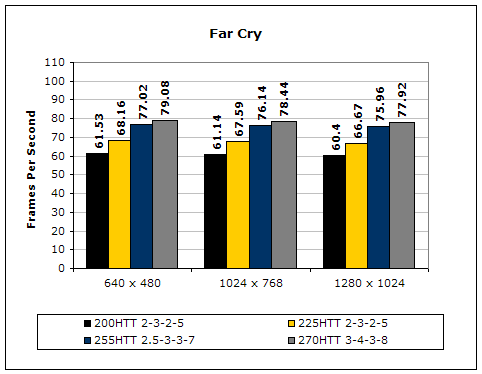
Since Far Cry is a game, the performance results will be very similar to 3dMark2001. I ran the benchmark at 640x480, so the benchmark would not be too GPU-dependent. The tests under 1024x768 and 1280x1024 are an approximation of what kind of frames you’ll be getting. While the results are similar to 3dMark2001 in performance, this benchmark will give more significant results, because Far Cry is a lot more demanding.
Unreal Tournament 2004
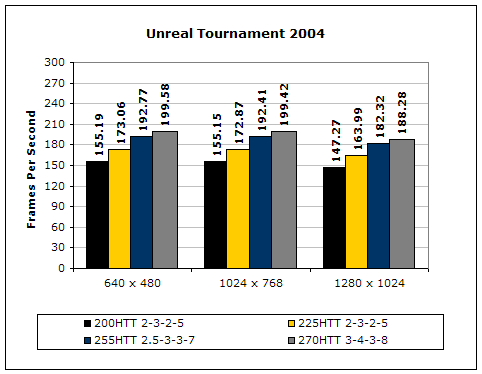
Unreal Tournament is another popular game engine to test overall system performance. Here, we can see the same results as Far Cry and 3dMark2001. Like Far Cry, UT2004 was also run at 640x480 to limit GPU dependency. The other resolutions provide an approximation of actual game play performance.
PCMark2002
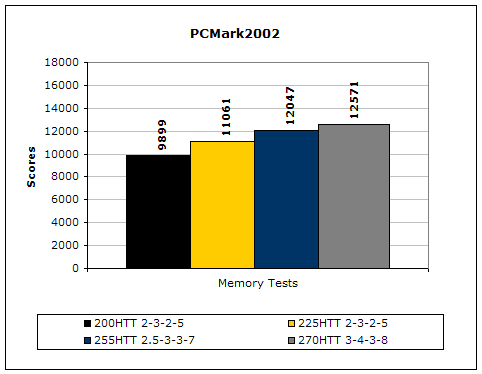
PCMark is another benchmark created by Futuremark. It tests the memory compression and decompression speeds in small to large chunks of data.
Super PI
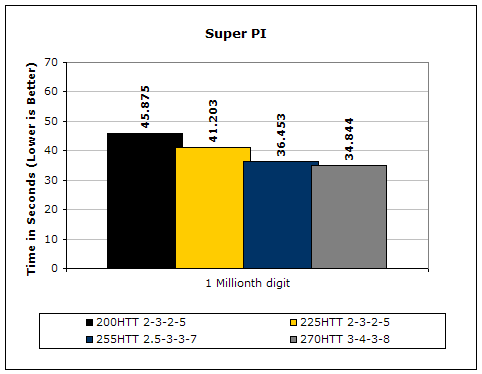
Since the value of PI is an infinite value, Super PI is a speed test to find the digit you’re looking for. In this case, we chose the millionth digit. Super PI benefits greatly from higher FSB, as well as low latencies.
PiFast
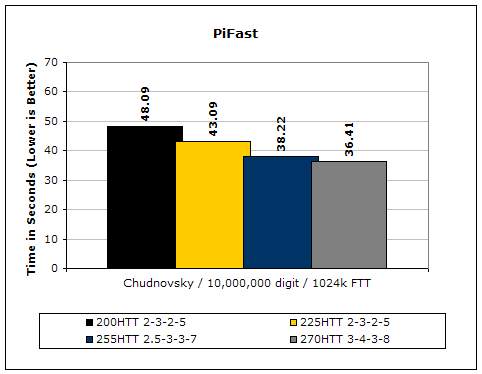
PiFast is similar to Super PI. The results can be greatly affected by a slight adjustment to the memory megahertz and latency.
Conclusion and Thoughts
Corsair’s flagship 2GB dual channel kit comes with some amazing speeds, but unfortunately, it did not run the rated speeds and ratings when I tested it. Since what I had was still a preview kit, the memory still has some time before it is released to the mass public and Corsair should have enough time to make sure that all their released kits are capable of greatness. Memory that does not run at the rated speeds and timings are huge turn-offs for me. However, the Corsair PC4400PRO was not all that bad. The highest overclock that I was able to reach was only 5MHz away from the rated speeds, but I had to use tighter timings. I guess that is somewhat of a fair trade. The voltage requirements for the PC4400PRO are not high and all motherboards should easily handle the mere 2.7v. Pretty good job here, Corsair. My only advice is to double check that the memory is actually capable of its rated speeds and timings before it is mass released. For those who are thinking about moving to 2GB, Corsair will keep you happy.
Pros:
- Pretty memory activity LEDs
- Large heatspreaders for increased surface area
- Highest speed rating
- Overclocks rather well
- Runs low latencies at 200MHz
Cons:
- Might be expensive
- Was a bit short of reaching rated speeds

We would like to thank Corsair for providing us the sample. If you have any questions or comments, feel free to hit us up in the forums. You can also check out more of our latest reviews on the front page.
UPDATE:
Again, this is an update regarding the overclocking results of the PC4400PRO 2GB. In the above mentioned conclusion of not being able to reach the rated speeds and timings, I wrote that not knowing the PC4400PRO 2GB was rated with a command rate of 2T. I assumed the PC4400PRO 2GB came rated with 1T just like the majority of the memory available. I had reached the maximum of the memory with a command rate of 1T. There is a difference here. I went back and retested the PC4400PRO 2GB with the rated command rate of 2T and sure enough it reached the rated speeds of 275MHz. Now we see that the memory is certainly capable of running the rated speeds and timings. For a 2GB kit to reach 270MHz with timings of 3-4-3-8 1T is not shabby at all. The memory is also going to be competitively priced, making the PC4400PRO 2GB a good overall choice for those who like to mix in flashy LED looks with high performance.