

Waffer PC AirCon PAC 400
Introduction
Southern California, right where the deserts are supposed to be. I must say that it is still extremely hot. On a typical good day, temperatures reach about 75°F inside my house; and on a bad day, they can hit as high as a blazing 85°F. It’s certainly not healthy, not to mention comforting, to be in such a heated place. What would most people do when they’re hot? They turn on their air conditioner. While we complain about heat, our PCs must be screaming for help. With each degree that rises in ambient temperature, it causes increased component temperature inside your case. Luckily for computers, Waffer Technology has invented their PAC 400, which acts like an air conditioner just for the computer system.
PAC 400
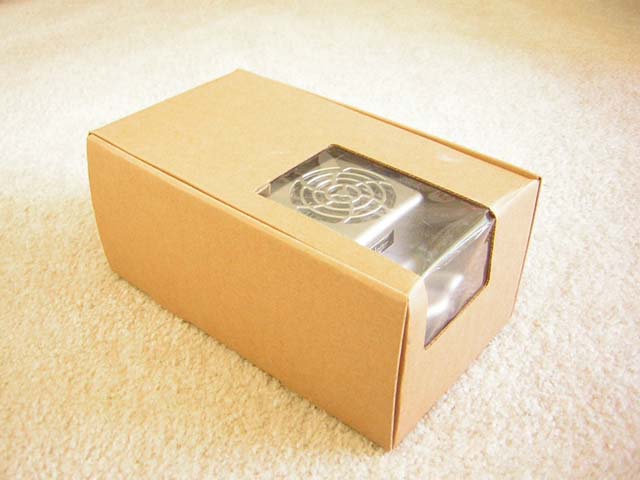
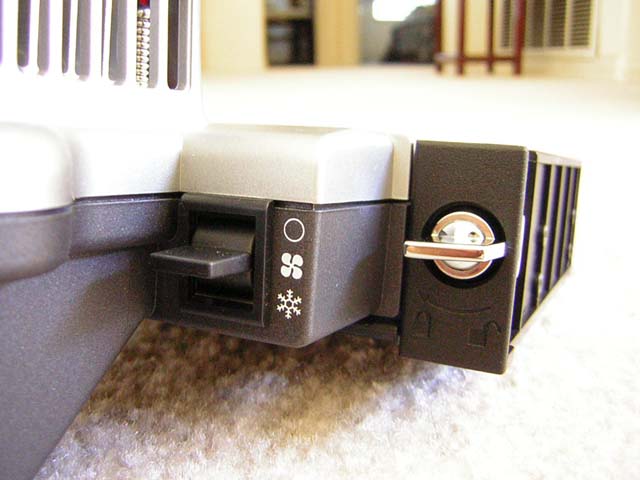
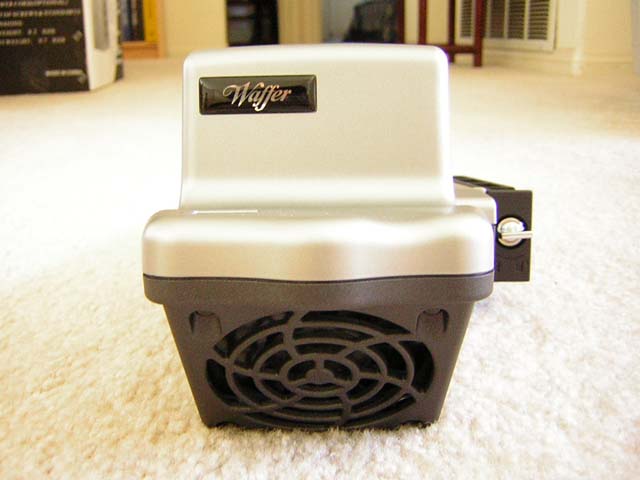
The PAC 400 came in a brown box with no fancy labels or designs. The unit right now is OEM, straight from Waffer Technology themselves. Included inside are the PAC 400, a simple instructions manual, and some screws. While the idea of air conditioning sounds complicated, the unit itself is rather simple, but large. It’s designed to fit into the 5.25” drive bay for easy installation and access. The PAC 400 has one 4 pin power connector and a switch for adjusting the fan mode. Users have the option of using it as a regular case fan or turning it up to “snow” mode for enabling the air conditioning function.

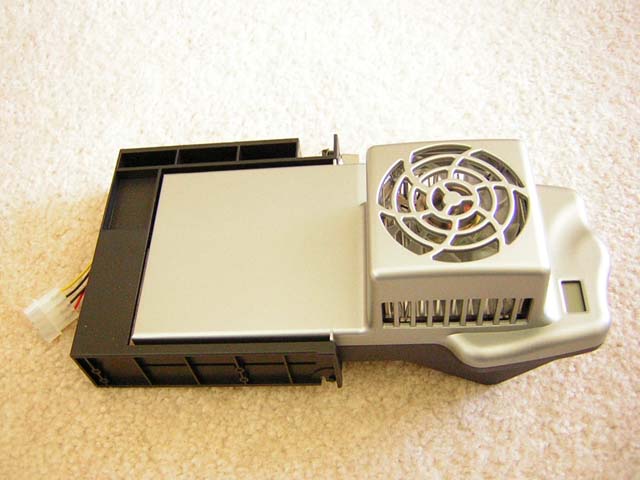
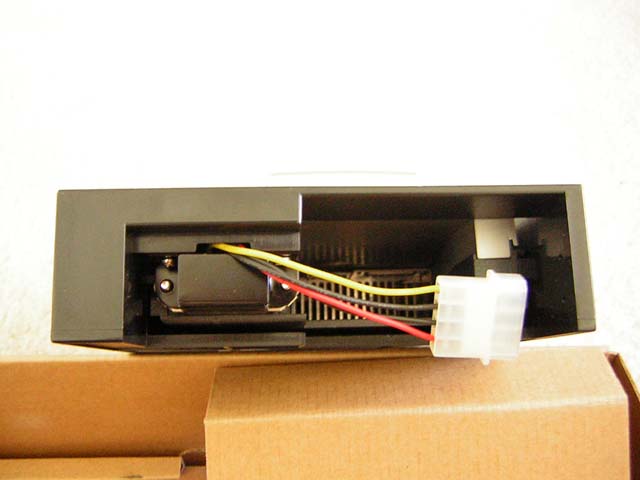
The PAC 400 houses two 80mm fans. The one underneath is used for intake. The one on top is used to cool the heatsink that is underneath. Like regular air conditioners, one side provides cooler air while the other side exhausts the heat. The heatsink is used to cool off the components inside the PAC 400 when the “snow” mode is turned on. That fan has blue LEDs to add to a nice look. Just how does the PAC 400 work? Check out Waffer’s Technical Aspects of the unit to get further details.
Specifications and Installation
Specifications:
|
|
Installation:
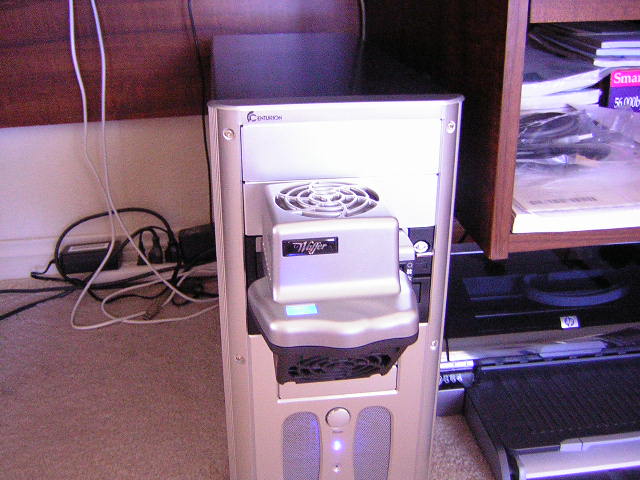
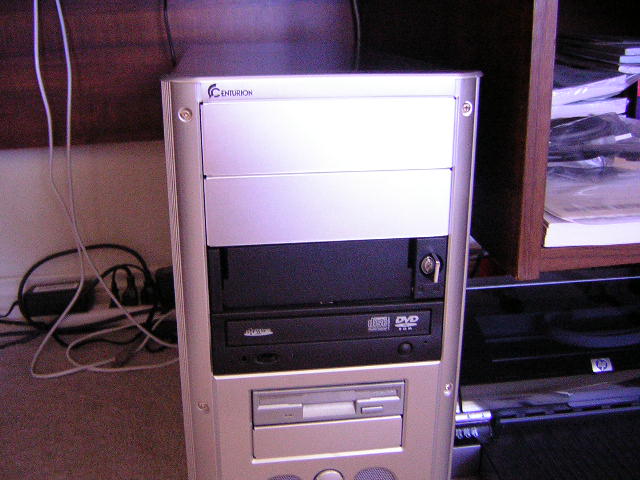
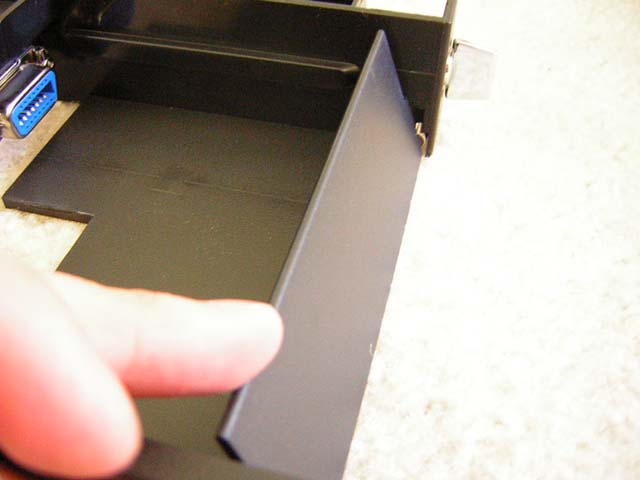
The cooler is extremely easy to install. Simply locate your available 5.25” drive bay and screw it on with the provided screws, just like installing a typical optical drive. When installed, the head of the unit sticks out, blocking the paths of your optical drives. This can be quite annoying for users who use their drives a lot, so Waffer has designed it to be fully removable without future access to internals of the case. The lock mechanism next to the fan switch can be switched to “lock” or “unlock” modes. When locked, the PAC 400 cannot be removed. It is secured and prevents it from falling out. When unlocked, simply pull out the PAC 400 and you’ll find yourself with clearance. Reattaching the unit only requires you to plug it back in and lock it. It’s as easy as using a key. When the unit is removed, the black bay has a flap that closes the entrance. This eliminates having an empty hole at your drive bay.
Test Setup and Results
Test Setup and Method:
- AMD XP1800+ (10 x 200FSB @ 1.6v)
- Abit NF7 v2.0
- 2 x 256MB OCZ PC3200 EB
- ATI Radeon 9500NP
- Swiftech MCX462+ w/ Cooler Master Dual Storm
- Antec 400W
- Cooler Master Centurion
- 2 x 80mm Panaflo L1A
Testing will consist of running Prime95, Folding@Home, and looping 3DMark2001SE for load. Load tests will run for 30 minutes. Idle test will be idling at desktop and will run for 30 minutes. A temperature probe will be placed next to the core of the AMD CPU, and another probe will be set dangling inside the system next to the side panel. A constant room temperature was kept at 28°C. I kept my room hot so that we can see how well the PAC 400 performs.
Results:
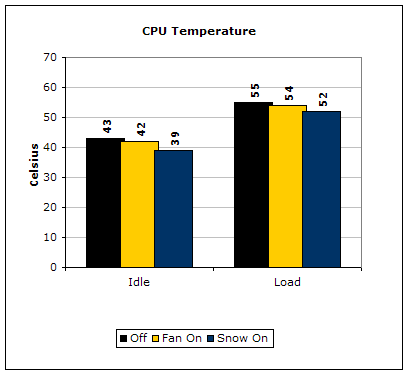
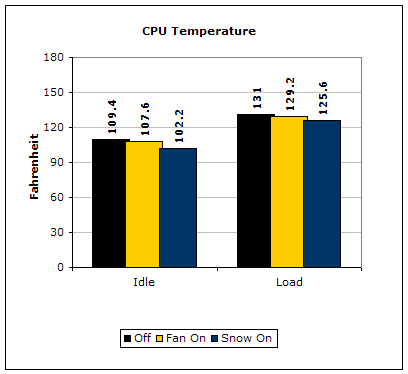
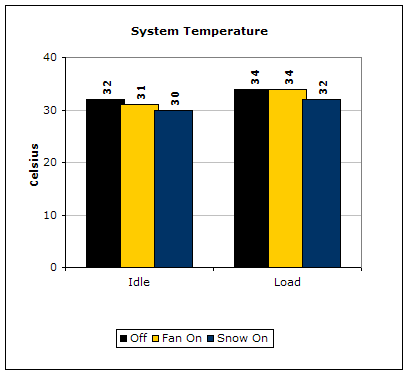
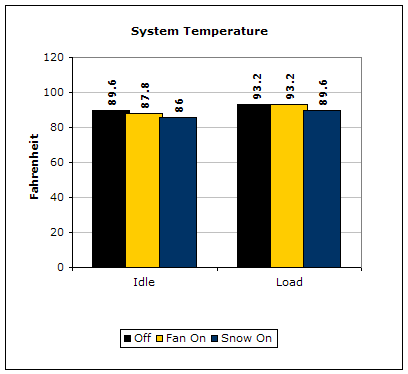
The results I obtained were pretty good. While my results were not all that scientific and complicated, it gives users an idea of what kind of performance gains they would achieve. The unit does not only focus and cool the CPU, it cools the entire system as well. It was nice knowing that the PAC 400 was bringing in cooler air into my system. Keep in mind that each degree drop is a drop in each component’s temperatures–motherboard, memory, video card, Northbridge, Southbridge, and CPU. It is definitely nice to know that with just a single piece of hardware, each piece of system hardware is cooled. Something does boggle my mind though. Typically, the 5.25” drive bays are located from the middle to the top of the case. Since the PAC 400 installs through the 5.25” bay, it would only bring in cool air for the middle to the top of the case. Although cold air falls, the airflow of a typical PC setup will prevent the cold air to fall all the way to the bottom of the case. Perhaps if you had no front intake, then cooling just might actually be better. This is highly doubted though; it’s just one of my stupid questions. Hopefully Waffer can come up with a smaller unit to fit into extra 3.5” bays for extra coverage.
Conclusion and Thoughts
Waffer’s approach to cooling systems is definitely interesting. The uniqueness in concept and idea is definitely something worth dwelling into. Unlike traditional fans, the PAC 400 allows the use of Thermoelectric technology to help bring in cold air and not warm room temperature air. The idea is definitely there, but implementing it is a problem. The PAC 400 is the first designed cooling unit with the air conditioning idea, but is relatively large. The extra “head” sticks out of the case and becomes relatively ugly. Another problem is the high fan noise. Although Waffer doesn’t specify the noise level of the two fans, I must tell you that it is considered to be loud. It drowns out the noise of the Cooler Master Dual Storm inside my case; one being that the fans are actually next to me, and two, the fans are just plain loud. The last problem I see would be the power consumption. While this can’t really be fixed, the high wattage amount required from power supplies can affect system stability, if the power supply is not adequate. Enthusiasts with a typical 350W power supply will need to upgrade in order to accommodate the device.
With the PAC 400 being the first production, I must say that it isn’t all that bad. Waffer has a lot to learn from the consumers out there and has the ability to improve with each new addition. As a consumer, I know for a fact that I wouldn’t buy one. The cooler is just too big for my liking. We must hope that Waffer can use the same technology and implement it more effectively to attract attention.
Pros:
- Innovative cooling idea
- Provides cool air intake
- Easy installation
- Removes easily
- Option for Fan or Snow modes
- Blue LCD display
- Blue LED fan
- Lowers system temps
Cons:
- Relatively large
- Ugly
- High power consumption
- Fans are loud
- Availability and price
We would like to thank Waffer Technology for providing us the sample. If you have any questions or comments, feel free to hit us up in the forums. You can also check out more of our latest reviews on the front page.