

Thermalright XP-120
Introduction
Heatpipes have been the recent trend among heatsinks and Thermalright is no exception. The popular SP-94 and SP-97 both use heatpipe technology and have been top performers in their respective classes for a while now. Thermalright seems to have hit a size/weight limit with their copper heatsinks and have introduced a few aluminum products. They started with the ALX-800, which is like an aluminum version of the SLK-800. Then they released their first Northbridge heatsink fan, the NB-1, which was also aluminum. Their latest releases, the XP-120 and XP-90, use heatpipe technology and the advantages of aluminum to differentiate themselves from the rest of the crowd.
Thermalright XP-120
The XP-120 is Thermalright’s first heatsink to utilize a 120mm fan. The advantages of a 120mm fan over a smaller fan include lower noise and higher CFM (cubic feet per minute). Aluminum is probably the only practical metal for a heatsink this massive. A drawback of copper is its weight and a copper XP-120 would just be too heavy for modern motherboard mounting systems. The heatsink is compatible with socket 478/754/939/940. The K8 requires a special retention bracket which the P4 version doesn’t include…more on that later.
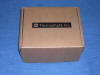
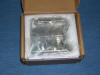
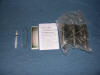
Thermalright includes the XP-120, an installation guide, a Thermalright sticker, small tube of thermal grease, and fan vibration prevention strips.
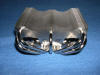
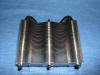
The XP-120 has 5 heatpipes to help the fins dissipate heat. Heatpipe technology uses pipes filled with a fluid. When one side of the heatpipe gets hot, the fluid is turned into a vapor and the hot vapor travels towards the cooler opposite end. There it condenses and releases the heat.


Specifications
Dimension: L110 x W125 x H63 (mm) Fin only, without fan
Weight: 370g (heat sink only)
Compare that weight to the SP-94’s 590g. You don’t have to worry about transporting your computer with this heatsink installed.
The base is nickel-plated copper and so are the heatpipes. The base is very flat. Don’t confuse reflectivity with flatness. A curved, bumpy surface can be reflective and not flat. Flatness matters much more than reflectivity.
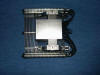
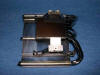

Thermalright doesn’t include a fan with their heatsinks, so I used a 120mm Panaflo M1A. The fan pushes 88.5 CFM @ 2100 RPM, 35.5 dBA. The heatsink uses Thermalright’s standard fan mounting clips.
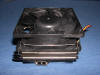
The heatsink’s base is much smaller than its top, which prevents it from having a huge number of compatibility problems. This doesn’t mean there are absolutely no issues, as some motherboards have components that obstruct the heatpipes. Thermalright has a list of compatible motherboards on their site here for P4 and here for K8. I strongly suggest you take a look before purchasing this heatsink.
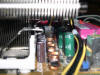


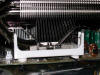
Install the fan after you install the heatsink. When the fan is installed, it prevents you from using a screw driver to clip the tabs on. The large span of the fan also helps cool the MOSFET and chipset.


Test Setup and Results
Test Setup and Method:
The TIM (thermal interface material) I used was Arctic Silver’s Ceramique. Ambient temperature was 24°C (+/- 1C). I used a Compunurse flat thermal probe attached to the side of the P4’s IHS and another thermal probe to measure ambient temperature. For load temperatures, I ran Prime95 torture test with the Large FFT option (maximum heat option) for 30 minutes.
- Pentium 2.4C overclocked to 3.0 - 1.6 vcore
- Asus P4P800 Deluxe
- 1GB Hynix BT-D5 PC4000 2.85v
- Radeon 9800 Pro
- TTGI 450w

Results:
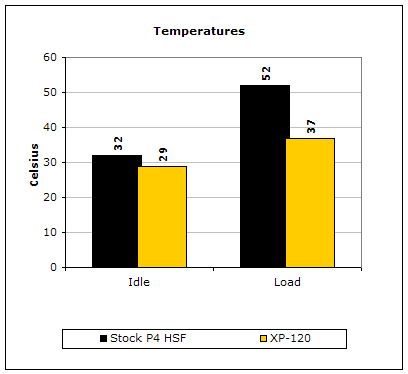
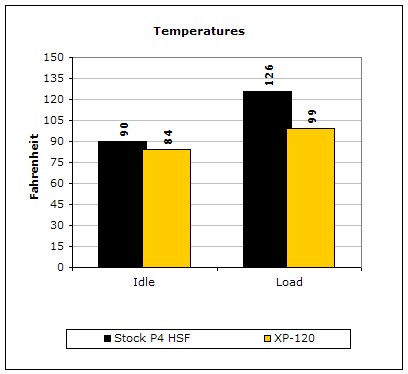
An amazing drop in temperature. This can be attributed to the higher powered fan, multiple heatpipes, and large surface area of the XP-120.
Conclusion and Thoughts
An important thing that I would like to mention is Thermalright ships a P4 version and a P4/K8 version to retailers. The P4 version costs a couple dollars less because it doesn’t include the K8 bracket. Make sure to read the store’s description carefully to know exactly what you are purchasing. Thermalright does allow consumers to purchase the K8 bracket directly for $3.85. Contact Thermalright for details.
After using a 120mm HSF it would be hard to go back to an 80mm fan. Noise is considerably less at the same performance level. Installation of the heatsink is easy and doesn’t require the removal of the motherboard. You don’t have to worry about the heatsink putting a lot of stress on your motherboard because of the light-weight aluminum construction.
If you’re looking for top-notch performance, the XP-120 is an awesome product and should definitely be on an enthusiast’s short list .
Pros:
- Performance
- Easy Installation
- Compatible with 120mm fans
- Light-weight
Cons:
- Doesn’t include a fan

We would like to thank Sidewinder for providing us the sample. If you have any questions or comments, feel free to hit us up in the forums. You can also check out more of our latest reviews on the front page.